
8 Best Wireless Meeting Room Schedulers in 2026
We compared wireless meeting room scheduler models by verified specs and real-world tradeoffs, not marketing claims alone.

New to Amazon Prime?
Get fast, free shipping on every pick in this guide, plus Prime Video and exclusive deals.
Try Prime Free




At a Glance
Joan 6 RE Gray: Wireless E Ink Touch 6-Inch Display Meeting Scheduler
↓ See why we picked itPoE Texas 8" Conference Room Scheduler with Color Changing LED Status
↓ See why we picked itJoan 6 Pro Black: Wireless Meeting Room Scheduler: 6 Inch Tablet E Ink Carta
↓ See why we picked itJoan 6 RE Black: Wireless E Ink Touch 6-Inch Display Meeting Scheduler
↓ See why we picked itBest Wireless Meeting Room Schedulers range widely on paper, so wireless meeting room scheduler, marketing skips the rest.
wireless meeting room scheduler is judged here on honest privacy controls, because screen size shapes legibility.
5 Criteria to Look For Before Buying a Wireless Meeting Room Scheduler
Key buying criteria so you get the right fit the first time.
WiFi vs Wired Network Reliability
WiFi-only panels are simpler to install since there's no ethernet cable to run, but they're only as reliable as your office WiFi coverage at that specific wall or door, a real problem if that spot has a known dead zone. A wired connection, frequently bundled with PoE power over the same cable, sidesteps WiFi reliability entirely at the cost of needing a physical ethernet run. Weigh installation simplicity against long-term reliability for that specific location.
PoE vs Battery vs AC Power
PoE support on a room panel is a two-sided requirement: the panel needs it, and so does your network switch or an inline injector, one without the other doesn't give you single-cable installation. Battery and e-ink displays skip needing any wired power at all, at the cost of periodic recharging, while plain AC power is easiest to source but means a visible cable and an outlet near every panel. Decide based on how permanent the install is and what infrastructure is already in the wall.
Advertised Battery Life Assumes Ideal Conditions
Manufacturer battery-life claims for e-ink or battery-powered panels (often quoted as a year or more) are measured under best-case conditions, expect real-world battery life to run shorter in a heavily-booked room, a colder installation spot, or with brightness turned up. Check buyer reviews for actual reported battery life in daily use rather than trusting the specification alone.
E-Ink vs LCD Touchscreen Tradeoffs
The e-ink versus LCD decision comes down to how the panel is actually used: e-ink displays last far longer on a charge (often a year or more) and read clearly under bright light, but their slow refresh rate makes them a poor fit for interactive booking. LCD touchscreens update instantly and support full tap-to-book interactions, at the cost of higher power draw and more washout in direct sunlight. Pick based on whether the panel needs to be simple status signage or a real interactive booking point.
Mounting Surface Changes What You Can Actually Buy
Where a panel needs to mount, glass walls, drywall, or a door frame, genuinely limits which models work, since not every bracket kit supports every surface and glass-wall installs often need a specific adhesive or clamp-style mount rather than a standard screw bracket. Panels also vary in whether the mount is included or sold separately, a real cost and compatibility detail easy to miss on a listing. Confirm the actual mounting hardware included (or required separately) against your specific wall type before ordering.
8 Best Wireless Meeting Room Schedulers in 2026
Jabra Scheduler, 10.1” Touchscreen Tablet
About this pick
Jabra Scheduler, 10.1” Touchscreen Tablet is the top pick in this comparison. Find a free meeting room fast and book in seconds. The integrated red/green lightbar is visible down the corridor, so you know if a room’s free without knocking.
Against Joan 6 RE Gray: Wireless E Ink Touch 6-Inch Display Meeting Scheduler, neither pick has an obvious edge on paper, so the deciding factor comes down to whichever spec matters most for your specific use case.
Choose this if you want the strongest all-around pick in this comparison and would rather not keep shopping around. A panel that lists 'PoE support' still needs a PoE-capable switch or injector to actually deliver power over the same cable, so confirm your network hardware supports it before assuming a single cable install.
Best for: buyers who want the strongest all-around pick in this comparison and would rather not keep shopping around
Check price on AmazonPros
- +Instant room booking
- +At-a-glance availability
- +Flexible installation
- +Works with your ecosystem
Cons
- −Zigbee-free doesn't mean setup-free, a hub or PoE switch may still be needed
- −Not every panel supports every calendar platform out of the box
Joan 6 RE Gray: Wireless E Ink Touch 6-Inch Display Meeting Scheduler
About this pick
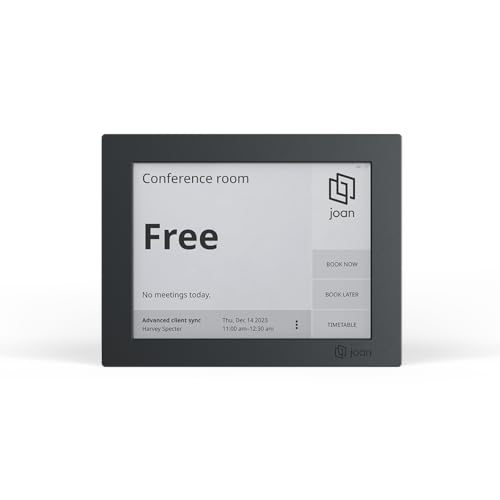
Joan 6 RE Gray: Wireless E Ink Touch 6-Inch Display Meeting Scheduler is a strong alternative worth comparing directly against the top pick. Joan 6 re simplifies the booking of meeting rooms through its e-paper touchscreen display, offering real-time calendar sync (workspace, exchange, office 365, and icalendar), for seamless room availability updates. No need for complicated installations!
Side by side with Jabra Scheduler, 10.1” Touchscreen Tablet, the real difference worth noting is getting started is a breeze.
Reach for this pick if you want a genuine alternative to the top pick with a different tradeoff worth comparing directly. Calendar integration claims vary in depth between platforms, some panels sync read-only availability while others support full one-tap booking and release, so check which level of integration your specific calendar platform actually gets.
Best for: buyers who want a genuine alternative to the top pick with a different tradeoff worth comparing directly
Check price on AmazonPros
- +Effortless meeting management
- +Wireless convenience
- +Quick and easy to setup
- +Sustainable materials
Cons
- −Not every panel supports every calendar platform out of the box
- −Zigbee-free doesn't mean setup-free, a hub or PoE switch may still be needed
Joan 6 Pro Gray: Seamless Calendar Integration
About this pick
Joan 6 Pro Gray: Seamless Calendar Integration is a strong alternative worth comparing directly against the top pick. Pro, an e-paper conference room booking display, seamlessly syncs with your company calendar (workspace, exchange, office 365, and icalendar). Experience an impressive battery life of up to 6 months on a single charge with joan 6 pro.
Jabra Scheduler, 10.1” Touchscreen Tablet is a reasonable point of comparison here, close enough that the actual listing details are worth checking before deciding between them.
It's worth picking this one if you want a genuine alternative to the top pick with a different tradeoff worth comparing directly. A panel that lists 'PoE support' still needs a PoE-capable switch or injector to actually deliver power over the same cable, so confirm your network hardware supports it before assuming a single cable install.
Best for: buyers who want a genuine alternative to the top pick with a different tradeoff worth comparing directly
Check price on AmazonPros
- +Seamless meeting room management
- +Extended battery life
- +Commitment to sustainability
Cons
- −Zigbee-free doesn't mean setup-free, a hub or PoE switch may still be needed
- −Not every panel supports every calendar platform out of the box
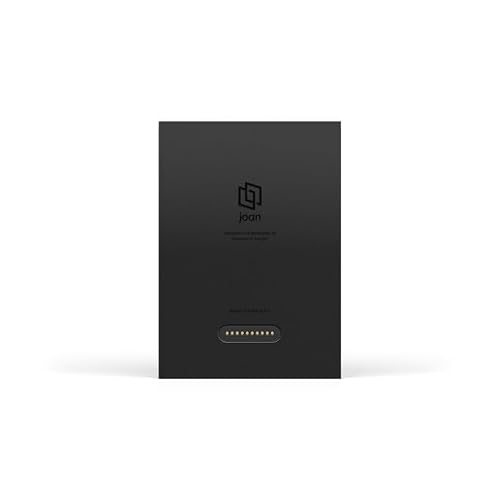
Poe Wallmount for Joan 6 Pro
About this pick
Poe Wallmount for Joan 6 Pro is the most affordable pick here that still clears the capability floor for this category.
Set next to Jabra Scheduler, 10.1” Touchscreen Tablet, the two land close enough on paper that it's worth comparing both listings directly on the spec that matters most for your setup.
This makes sense for anyone who want a genuinely capable pick without paying for headroom you won't use. Calendar integration claims vary in depth between platforms, some panels sync read-only availability while others support full one-tap booking and release, so check which level of integration your specific calendar platform actually gets.
Best for: buyers who want a genuinely capable pick without paying for headroom you won't use
Check price on AmazonPros
- +Well-reviewed option in this category
- +Straightforward setup based on the listed specs
- +Covers the core feature set for this category
Cons
- −Not every panel supports every calendar platform out of the box
- −Zigbee-free doesn't mean setup-free, a hub or PoE switch may still be needed
RAYPODO Meeting Room Scheduler Tablet
About this pick
RAYPODO Meeting Room Scheduler Tablet is a strong alternative worth comparing directly against the top pick. The 10-inch touchscreen and LED ring light ensure meeting room availability is clearly displayed for effortless scheduling from down the hall or across the office. As a plug and play poe device, the touchscreen meeting room scheduler syncs with your existing business calendar and email with no complex configuration.
Jabra Scheduler, 10.1” Touchscreen Tablet is a reasonable point of comparison here, close enough that the actual listing details are worth checking before deciding between them.
Go with this pick if you want a genuine alternative to the top pick with a different tradeoff worth comparing directly. A panel that lists 'PoE support' still needs a PoE-capable switch or injector to actually deliver power over the same cable, so confirm your network hardware supports it before assuming a single cable install.
Best for: buyers who want a genuine alternative to the top pick with a different tradeoff worth comparing directly
Check price on AmazonPros
- +Bright and visible
- +Simple setup
- +Streamlined scheduling
- +Integrates seamlessly
Cons
- −Zigbee-free doesn't mean setup-free, a hub or PoE switch may still be needed
- −Not every panel supports every calendar platform out of the box
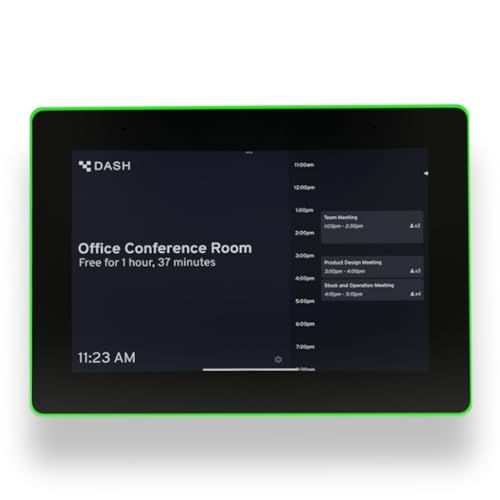
PoE Texas 8" Conference Room Scheduler with Color Changing LED Status
About this pick
PoE Texas 8" Conference Room Scheduler with Color Changing LED Status is a strong alternative worth comparing directly against the top pick. This 8-inch touchscreen tablet displays real-time conference room schedules and availability at your meeting room entrance. The pre-installed dash app syncs with all major business calendar platforms including zoom rooms, microsoft teams, outlook 365, google workspace, robin, skedda, and yarooms.
Set next to Jabra Scheduler, 10.1” Touchscreen Tablet, the two land close enough on paper that it's worth comparing both listings directly on the spec that matters most for your setup.
Reach for this pick if you want a genuine alternative to the top pick with a different tradeoff worth comparing directly. Calendar integration claims vary in depth between platforms, some panels sync read-only availability while others support full one-tap booking and release, so check which level of integration your specific calendar platform actually gets.
Best for: buyers who want a genuine alternative to the top pick with a different tradeoff worth comparing directly
Check price on AmazonPros
- +8-inch touchscreen tablet displays real-time conference room schedules and availability at your meeting room entrance
- +Pre-installed dash app syncs with all major business calendar platforms including zoom rooms
- +How do I install
- +Are there monthly fees
Cons
- −Not every panel supports every calendar platform out of the box
- −Zigbee-free doesn't mean setup-free, a hub or PoE switch may still be needed
Joan 6 Pro Black: Wireless Meeting Room Scheduler: 6 Inch Tablet E Ink Carta
About this pick
Joan 6 Pro Black: Wireless Meeting Room Scheduler: 6 Inch Tablet E Ink Carta is a strong alternative worth comparing directly against the top pick. Pro, an e-paper conference room booking display, seamlessly syncs with your company calendar (workspace, exchange, office 365, and icalendar). No need for complicated installations!
Against Jabra Scheduler, 10.1” Touchscreen Tablet, neither pick has an obvious edge on paper, so the deciding factor comes down to whichever spec matters most for your specific use case.
Choose this if you want a genuine alternative to the top pick with a different tradeoff worth comparing directly. A panel that lists 'PoE support' still needs a PoE-capable switch or injector to actually deliver power over the same cable, so confirm your network hardware supports it before assuming a single cable install.
Best for: buyers who want a genuine alternative to the top pick with a different tradeoff worth comparing directly
Check price on AmazonPros
- +Seamless meeting room management
- +Wireless convenience
- +Extended battery life
- +Quick and easy to setup
Cons
- −Zigbee-free doesn't mean setup-free, a hub or PoE switch may still be needed
- −Not every panel supports every calendar platform out of the box
Joan 6 RE Black: Wireless E Ink Touch 6-Inch Display Meeting Scheduler
About this pick
Joan 6 RE Black: Wireless E Ink Touch 6-Inch Display Meeting Scheduler is a strong alternative worth comparing directly against the top pick. Joan 6 re simplifies the booking of meeting rooms through its e-paper touchscreen display, offering real-time calendar sync (workspace, exchange, office 365, and icalendar), for seamless room availability updates. No need for complicated installations!
Side by side with Jabra Scheduler, 10.1” Touchscreen Tablet, the real difference worth noting is getting started is a breeze.
Go with this pick if you want a genuine alternative to the top pick with a different tradeoff worth comparing directly. Calendar integration claims vary in depth between platforms, some panels sync read-only availability while others support full one-tap booking and release, so check which level of integration your specific calendar platform actually gets.
Best for: buyers who want a genuine alternative to the top pick with a different tradeoff worth comparing directly
Check price on AmazonPros
- +Effortless meeting management
- +Wireless convenience
- +Quick and easy to setup
- +Sustainable materials
Cons
- −Not every panel supports every calendar platform out of the box
- −Zigbee-free doesn't mean setup-free, a hub or PoE switch may still be needed
How We Evaluated These Wireless Meeting Room Schedulers
Each pick was assessed across 5 criteria weighted for real-world use.
WiFi vs Wired Network Reliability
WiFi-only panels are simpler to install since there's no ethernet cable to run, but they're only as reliable as your office WiFi coverage at that specific wall or door, a real problem if that spot has a known dead zone.
PoE vs Battery vs AC Power
PoE support on a room panel is a two-sided requirement: the panel needs it, and so does your network switch or an inline injector, one without the other doesn't give you single-cable installation.
Advertised Battery Life Assumes Ideal Conditions
Manufacturer battery-life claims for e-ink or battery-powered panels (often quoted as a year or more) are measured under best-case conditions, expect real-world battery life to run shorter in a heavily-booked room, a colder installation spot, or with brightness turned up.
E-Ink vs LCD Touchscreen Tradeoffs
The e-ink versus LCD decision comes down to how the panel is actually used: e-ink displays last far longer on a charge (often a year or more) and read clearly under bright light, but their slow refresh rate makes them a poor fit for interactive booking.
Mounting Surface Changes What You Can Actually Buy
Where a panel needs to mount, glass walls, drywall, or a door frame, genuinely limits which models work, since not every bracket kit supports every surface and glass-wall installs often need a specific adhesive or clamp-style mount rather than a standard screw bracket.
How to Choose the Right Wireless Meeting Room Schedulers
By Room Type
| Your setup | Recommended pick |
|---|---|
| Small huddle room or single door | Poe Wallmount for Joan 6 Pro |
| Standard conference room | Jabra Scheduler, 10.1” Touchscreen Tablet |
| Large room or lobby signage | Joan 6 RE Black: Wireless E Ink Touch 6-Inch Display Meeting Scheduler |
By Budget
| Budget | Recommended pick |
|---|---|
| Lowest price in this lineup | Poe Wallmount for Joan 6 Pro |
| Mid-range pick | Joan 6 RE Gray: Wireless E Ink Touch 6-Inch Display Meeting Scheduler |
| Higher budget | Joan 6 RE Black: Wireless E Ink Touch 6-Inch Display Meeting Scheduler |
E-Ink vs LCD Touchscreen
E-ink or low-power (e.g. Poe Wallmount for Joan 6 Pro)
Long battery life and bright-light legibility, but slower refresh and simpler interaction.
LCD touchscreen (e.g. Joan 6 RE Black: Wireless E Ink Touch 6-Inch Display Meeting Scheduler)
Instant refresh and full tap-to-book interaction, at the cost of higher power draw.
Match this to whether the panel needs simple status signage or real interactive booking.
By Calendar Platform
| Your platform | Recommended pick |
|---|---|
| Microsoft 365 / Outlook / Teams | Jabra Scheduler, 10.1” Touchscreen Tablet |
| Google Workspace / Calendar | Joan 6 RE Gray: Wireless E Ink Touch 6-Inch Display Meeting Scheduler |
For Multi-Room Deployments Specifically
Look for
Genuine fleet management: bulk configuration, remote updates, and a central online/offline dashboard.
In this comparison
Jabra Scheduler, 10.1” Touchscreen Tablet is worth checking against its specific spec sheet before standardizing across every room in your office.
When to Spend More
Spend more if
You need deeper calendar integration, check-in/auto-release, and multi-room fleet management, where Joan 6 RE Black: Wireless E Ink Touch 6-Inch Display Meeting Scheduler justifies the extra cost.
Save if
You want a straightforward single-room display without advanced features, where Poe Wallmount for Joan 6 Pro already covers the job at the lowest price here.
Frequently Asked Questions
Should a room panel connect over WiFi or a wired connection?
Wired (often via PoE) is more reliable and immune to WiFi congestion or dead zones, while WiFi is simpler to install since it needs no ethernet run; pick based on how reliable your WiFi actually is at that specific wall.
Does a PoE room panel need special network hardware?
Yes, PoE support on the panel only works if your network switch supports PoE or you add an inline injector; without one, a 'PoE-capable' panel still needs a separate power source.
What size room panel should I get?
Match it to viewing distance: a compact 7-8 inch panel works fine right next to a door, but a larger 10-inch-plus display reads better across a big room or open floor plan.
Can a room scheduler panel mount on a glass wall?
Only if it ships with (or supports) an adhesive or clamp-style mount; a standard screw-in bracket made for drywall typically won't work on glass, so check the specific mounting hardware included.
How long does battery life actually last on a wireless panel?
Manufacturer claims (sometimes over a year) are measured under ideal conditions; real-world battery life is typically shorter in a heavily-booked room or colder installation spot, so check buyer reviews for realistic figures.
How do room schedulers prevent ghost bookings?
Through check-in features like tap-to-confirm, NFC/RFID badge tap, or an occupancy sensor that auto-releases an unclaimed booking after a set time; a basic calendar-display-only panel has no way to catch this.
Bottom Line
best overall: Jabra Scheduler, 10.1” Touchscreen Tablet - best overall pick in this roundup.
See the full rankings above for all picks with pros, cons, and best-for summaries.
Browse on Amazon
All Prime-eligible options with current pricing.
Shop on Amazon →