
4 Best Walking Pads Under $150 in 2026
We compared walking pads under $150 by incline levels, weight capacity, and motor strength, since multi-level incline and higher capacities appear at this tier.

New to Amazon Prime?
Get fast, free shipping on every pick in this guide, plus Prime Video and exclusive deals.
Try Prime Free


At a Glance
Between $100 and $150, walking pads add multi-level incline systems and jump from 2.5HP to 3.0HP motors, meaningfully increasing both weight capacity and workout intensity options over the flat, single-speed picks in the lower tier.
We compared this lineup on incline flexibility, motor power, and weight capacity, since a multi-level incline that requires manually repositioning legs works differently than a true adjustable system, and buyers should know which type they're getting.
5 Criteria to Look For Before Buying a Walking Pads Under $150
Key buying criteria so you get the right fit the first time.
Manual Multi-Level Incline Requires Physical Repositioning, Not a Simple Switch Toggle
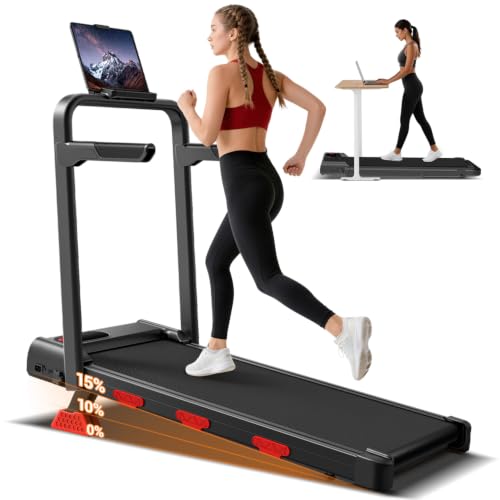
The LONTEK pick's 3 incline levels are achieved by physically flipping out black legs for 10% or placing included red pads under the front legs for 15%, a manual process distinct from a built-in incline motor or switch that some higher-tier treadmills offer. This matters because switching incline levels mid-session isn't quick or convenient, so you'd typically set your incline before starting rather than adjusting on the fly during a workout. Check whether a listing describes incline as requiring manual leg or pad repositioning versus an integrated motorized or switch-based system before assuming you can casually change incline levels during active use.
Side Rail Support Differs Meaningfully From a Fixed Front Handle Bar in How You Can Position Yourself
The Superun pick's side rails specifically support you from any position, front, middle, or back along the rail, while a fixed front handle bar like on the LONTEK or Acezoe picks only provides support when you're positioned at the front of the walking surface. This matters if you tend to walk at varying positions on the belt or want support available regardless of where you're standing, less so if you consistently walk in the same front-facing position anyway. Consider your actual walking habits and whether you move around on the belt during use before assuming a front-only handle bar provides equivalent support to side rails.
App Connectivity Quality Varies From Basic Tracking to Genuine Social and Competitive Features
The Acezoe pick's app support specifically enables real-time data synchronization and friend competitions, a more interactive feature set than simply logging steps or calories for personal review, which is what many basic 'app compatible' walking pads offer. This matters if social accountability or competition genuinely motivates your exercise habits, less so if you prefer tracking your own progress privately without a social component. Check the specific app features described in a listing, real-time sync, social competitions, guided programs, rather than assuming all 'app connected' walking pads offer the same depth of functionality.
Belt Layer Count and Shock Absorber Type Together Determine Actual Cushioning Quality, Not Layer Count Alone
The Acezoe pick specifically combines 7 layers of anti-slip belt material with 6 silicone shock absorbers and 2 soft rubber pads, a more detailed cushioning system than a listing that only states a layer count without describing the shock absorber material or count. This matters because two picks with similar stated layer counts could still feel meaningfully different if one includes dedicated silicone shock absorbers underneath the belt structure and the other doesn't. Look for both the belt layer count and any separately described shock absorber components, silicone, rubber, or foam, rather than judging cushioning quality by layer count alone.
Speed Range Differences at This Tier Matter More for Jogging Intent Than Casual Desk Walking
The Acezoe pick's 0.6-6.2 MPH range extends well into jogging territory, while the Superun and QuietClimb picks top out around 3.8-4.0 MPH, a range suited primarily for walking rather than running. This matters if you intend to occasionally jog or run on the pad rather than exclusively walk during desk work, where a lower top speed simply won't accommodate that faster pace. Consider whether your actual intended use includes jogging or running sessions, not just desk-adjacent walking, before treating a higher top speed as a meaningful advantage if you'll never actually use those faster settings.
4 Best Walking Pads Under $150 in 2026
Walking Pad with QuietClimb 8% Incline, 2.5HP
About this pick
This pad's QuietClimb 8% incline system is specifically upgraded to turn daily walking into a more effective workout while keeping noise under 45 dB, supporting up to 265 lbs on its 2.5HP motor. Its 15 x 35.4 inch belt uses 6-layer shock absorption to reduce joint impact during extended sessions.
Compared to the LONTEK pick below, this one focuses on a simpler, single fixed incline rather than multiple selectable levels, trading incline flexibility for a more compact, streamlined design. The 1.0-4.0 MPH speed range keeps pace options focused on walking rather than jogging.
Best for buyers who want a quiet, upgraded incline system in the most compact frame in this tier.
Best for: buyers who want a quiet, effective incline system in a compact frame
Check price on AmazonPros
- +QuietClimb incline system specifically upgraded for effectiveness
- +Compact, streamlined design among the smallest in this tier
- +6-layer shock absorption reduces joint impact
Cons
- −Single fixed incline rather than multiple selectable levels
- −Lower weight capacity than the LONTEK or Acezoe picks
LONTEK 15% Incline Walking Pad Treadmill with Handles
About this pick
This pad's 3 walking levels, flat, 10% incline via flip-out legs, or 15% incline via included red pads under the front legs, give you genuine manual incline flexibility not found on the fixed-incline QuietClimb pick above. Its 3.0HP brushless motor supports up to 350 lbs, the highest capacity in this comparison.
Compared to the QuietClimb pick, this one requires manually adjusting the incline setup rather than a built-in switch, a real tradeoff between flexibility and convenience. A removable phone or pad holder and a recessed slot for the remote round out its practical design touches.
Best for buyers who want manual multi-level incline flexibility with the highest weight capacity.
Best for: buyers who want manual multi-level incline with the highest weight capacity
Check price on AmazonPros
- +Highest weight capacity in this comparison at 350 lbs
- +3 genuine incline levels including 15% steep setting
- +Removable phone holder and recessed remote slot
Cons
- −Incline requires manually repositioning legs and pads, not a switch
- −Speed tops out lower than the Acezoe pick's 6.2 MPH
Acezoe Walking Pad Treadmill with Incline and Handle Bar
About this pick
This pad's app connectivity synchronizes motion data in real time, letting you run competitions with friends and access more scientific exercise tracking than the non-app picks in this comparison. Its 10% manual incline simulates real hill climbing to boost fat-burning, and a 2.5HP motor delivers a 0.6-6.2 MPH speed range, the widest range in this tier.
Compared to the LONTEK pick, this one supports slightly less weight at 300 lbs but adds 7 layers of anti-slip belt cushioning plus 6 silicone shock absorbers and 2 rubber pads, more cushioning components than any other pick here. It includes 24/7 customer service with a 2-year protection plan.
Best for buyers who want app-based workout tracking with the widest speed range.
Best for: buyers who want app-based tracking with the widest speed range
Check price on AmazonPros
- +App connectivity enables real-time tracking and friend competitions
- +Widest speed range in this tier at up to 6.2 MPH
- +7-layer belt with 6 silicone shock absorbers, most cushioning in this tier
Cons
- −Slightly over this tier's stated ceiling at under $170
- −Lower weight capacity than the LONTEK pick's 350 lbs
Superun 6% Incline Walking Pad
About this pick
This pad's side rails support you from any position, front, middle, or back, rather than the restrictive front-only handle bars on the LONTEK or Acezoe picks, a genuinely different stability approach. Its 6% incline is stated to boost calorie burn by 30% in the same 30-minute session compared to flat walking.
Compared to the other three picks in this tier, this one is the cheapest by a meaningful margin while still supporting up to 300 lbs on a reinforced alloy steel frame. It sets up in seconds with no tools or assembly, and pairs with the PitPat App for tracking metrics.
Best for buyers who want the lowest price in this tier with flexible side-rail support.
Best for: buyers who want the lowest price with flexible side-rail support
Check price on AmazonPros
- +Cheapest pick in this tier by a meaningful margin
- +Side rails support any walking position, not just front-facing
- +No-tools setup, ready to use in seconds
Cons
- −Lowest incline percentage in this comparison at 6%
- −Slower top speed than the Acezoe or QuietClimb picks
How We Evaluated These Walking Pads Under $150
Each pick was assessed across 5 criteria weighted for real-world use.
Incline Flexibility
Compared fixed incline systems against multi-level manual incline options across the lineup.
Motor Power and Weight Capacity
Compared stated HP and weight capacity ranging from 265 to 350 lbs.
Belt Cushioning
Compared belt layer count and shock absorber components across all four picks.
App and Smart Features
Checked which picks offer app connectivity for tracking and social features.
Support Hardware Design
Compared handle bar and side rail stability approaches across the tier.
How to Choose the Right Walking Pads Under $150
By Primary Need
| If you mainly need | Recommended pick |
|---|---|
| A quiet, effective incline system in a compact frame | Walking Pad with QuietClimb 8% Incline, 2.5HP |
| Manual multi-level incline with the highest weight capacity | LONTEK 15% Incline Walking Pad Treadmill with Handles |
| App-based tracking with the widest speed range | Acezoe Walking Pad Treadmill with Incline and Handle Bar |
| The lowest price with flexible side-rail support | Superun 6% Incline Walking Pad |
By Budget
| Price range | Recommended pick |
|---|---|
| Under $112 | Superun (under $120) |
| Under $130 | LONTEK (under $130) |
| Under $150 | QuietClimb (under $150) |
| Under $170 | Acezoe (under $170) |
Fixed Incline vs Manual Multi-Level Incline
Fixed incline (QuietClimb)
Provides a simple, always-on incline boost without needing to physically adjust anything, but offers less flexibility.
Manual multi-level incline (LONTEK)
Requires physically flipping out legs or placing pads to change incline, but gives you genuine choice between flat, moderate, and steep settings.
If you want a consistent, no-fuss incline workout every time, the QuietClimb's fixed system is simpler. If you want to vary intensity across sessions or over time as fitness improves, the LONTEK's multi-level system is worth the extra manual step.
By Weight Capacity Needs
| Your weight capacity needs | Recommended pick |
|---|---|
| Standard capacity, up to 265 lbs | QuietClimb |
| Higher capacity, up to 300 lbs | Acezoe or Superun |
| Highest capacity in this tier, up to 350 lbs | LONTEK |
For a Buyer Who Wants Social Fitness Motivation Specifically
Look for
App connectivity that supports real-time data sync and social features like friend competitions, not just basic step tracking on an LED display.
In this comparison
The Acezoe pick's app connectivity specifically enables synchronized real-time data and friend competitions that the non-app picks in this tier don't offer.
When to Spend More
Spend more if
You want app-based tracking with the widest speed range and most belt cushioning, where the Acezoe pick delivers all three at the top of this tier.
Save if
You want flexible side-rail support without incline levels, where the Superun pick covers that for about $39 less.
Frequently Asked Questions
Can I change the LONTEK's incline level while actively walking on it?
No, changing between the flat, 10%, and 15% incline settings requires stopping and physically repositioning the legs or placing the included pads, so you'll want to set your desired incline before starting your session rather than mid-walk.
What's the most common mistake buyers make when comparing incline percentages across these picks?
Assuming a higher stated incline percentage always means a more effective or harder workout, when the actual difference between 6% and 15% incline in practice depends heavily on your walking speed and how consistently you use the incline, not just the maximum number available.
Is the Acezoe pick worth it over the cheaper LONTEK option?
If you specifically want app connectivity and the widest speed range for occasional jogging, yes, but if the highest weight capacity and multi-level manual incline matter more, the LONTEK pick covers that for about $40 less.
How do I know if the Superun's side rails provide enough support for someone with balance concerns?
The side rails support multiple walking positions, which can help with balance, but for anyone with significant stability concerns or recovering from injury, consulting a doctor before starting any walking pad routine is worth doing regardless of which pick you choose.
Do these walking pads work without connecting to an app, or is the app required?
Only the Acezoe pick specifically emphasizes app connectivity as a core feature, and even then it should function for basic walking without the app, while the other three picks operate independently via their built-in LED display and remote control.
Can the higher weight capacity picks in this tier, like the LONTEK, still fit under a standard desk?
Yes, weight capacity relates to how much weight the frame supports rather than the pad's physical footprint, so checking the specific dimensions against your desk's clearance is the relevant measurement, not the weight rating.
Bottom Line
best overall: Walking Pad with QuietClimb 8% Incline, 2.5HP - best overall pick in this roundup.
See the full rankings above for all picks with pros, cons, and best-for summaries.
Browse on Amazon
All Prime-eligible options with current pricing.
Shop on Amazon →