
4 Best USB4 Mini Docks with Dual HDMI in 2026
We compared mini dual HDMI docks by MST support versus mirror-only macOS behavior, since Multi-Stream Transport for independent screens is Windows-only.

New to Amazon Prime?
Get fast, free shipping on every pick in this guide, plus Prime Video and exclusive deals.
Try Prime Free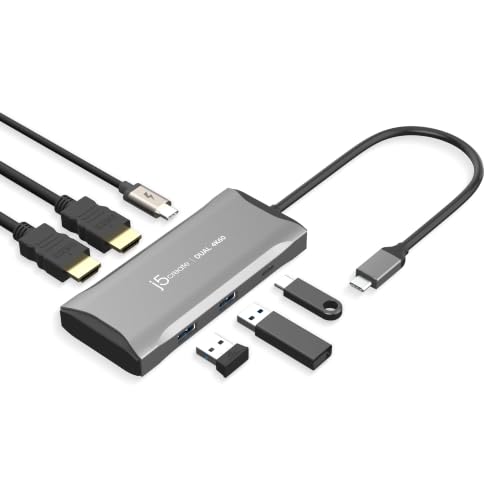



At a Glance
A genuinely compact mini dock with dual HDMI trades some port count and desk-anchored power for a design that fits easily in a bag, but the underlying Multi-Stream Transport technology that enables independent (not mirrored) dual displays is explicitly not supported on macOS or Chrome OS.
We compared this lineup on MST support and its platform limitations, total data transfer speed, and included charging capability, since one listing specifically warns that without MST support, connected monitors will show identical mirrored content rather than extending your workspace.
5 Criteria to Look For Before Buying a USB4 Mini Docks with Dual HDMI
Key buying criteria so you get the right fit the first time.
Multi-Stream Transport Only Delivers Independent Dual Displays on Windows, Not macOS or Chrome OS
The j5create pick's MST technology specifically enables two independent 4K displays at 60Hz, but its own listing discloses that MST is not currently supported by macOS or Chrome OS, meaning Mac and Chromebook users connecting through this dock will see identical mirrored content on both monitors rather than an extended workspace. This matters significantly if you're a Mac or Chrome OS user expecting independent extended displays from any dual-HDMI mini dock, and matters less if you're exclusively on Windows where MST works as intended. Check whether a mini dock's dual-display technology specifically relies on MST before assuming it will deliver independently extended (not just mirrored) displays on your specific operating system.
Native GPU Video Output Avoids the Platform-Specific Limitations That MST-Based Solutions Carry
The StarTech pick specifically uses direct GPU performance with no software or compression dependency, a fundamentally different technical approach from MST-based splitting that results in more consistent dual-display behavior across both Windows and Mac platforms, as evidenced by its detailed per-chip Mac compatibility documentation. This matters if cross-platform consistency matters to you, particularly if you switch between Mac and Windows devices with the same dock, and matters less if you exclusively use one platform where either approach would work equally well. Check whether a dock's dual-display technology is described as native GPU output versus MST-based splitting if you need consistent behavior across different operating systems.
A Mini Dock's Actual Wall Charger May Not Be Included Despite a Stated High Charging Wattage
The Anker pick specifically states 100W input and 85W output charging capability but explicitly notes the wall charger itself is not included in the package, meaning you need to already own or separately purchase a compatible high-wattage USB-C charger to actually achieve that stated charging performance. This matters when comparing total cost across mini docks, where a cheaper dock lacking an included charger might require an additional purchase to match a pricier dock's complete out-of-box charging capability, and matters less if you already own a suitable high-wattage charger. Check whether a listing's stated charging wattage requires a separately purchased charger before assuming the dock alone delivers that full charging capability out of the box.
A Genuinely Extra-Long Cable Reduces Physical Port Strain on Specific Laptop Form Factors
The StarTech pick specifically includes an 11-inch attached cable designed to provide long reach and prevent the dock from dangling directly off the host laptop's port, a detail specifically called out as beneficial for 2-in-1 convertible laptops or laptops mounted on riser stands where a short, rigid dock connection could stress the port over time. This matters if you use a convertible laptop or a laptop riser stand where cable slack genuinely matters for physical stability, and matters less if your laptop sits flat on a desk where a shorter, more compact dock connection poses no practical issue. Consider your specific laptop setup (convertible, riser-mounted, or flat desk use) before assuming any mini dock's cable length is equally suitable for your physical arrangement.
1080p Resolution Caps Are a Real Limitation Worth Comparing Against 4K-Capable Picks at Similar Prices
The Anker pick specifically caps its dual-screen extension at 1080p@60Hz resolution, meaningfully lower than the 4K support offered by the UGREEN, StarTech, and j5create picks, a genuine tradeoff for its lowest price in this comparison. This matters if you specifically need 4K resolution for detailed work or a sharper visual experience, where the Anker's 1080p cap would be a real limitation, and matters less if standard 1080p resolution is sufficient for your typical use case like basic productivity or web browsing. Check a mini dock's specifically stated maximum resolution rather than assuming all dual-HDMI docks in a similar price range support the same display quality.
4 Best USB4 Mini Docks with Dual HDMI in 2026
j5create USB-C Hub 4K@60Hz Dual HDMI with 100W PD
About this pick
This mini dock's Multi-Stream Transport technology specifically enables two independent 4K displays at 60Hz on compatible systems, while the listing transparently discloses that MST is not currently supported by macOS or Chrome OS, meaning connected monitors will mirror identical content on those platforms rather than extend. Its flexible refresh rate options also include Full HD at 144Hz or QHD at 120Hz for gaming-oriented setups.
Compared to the Anker and UGREEN picks below, this one includes 3 high-speed USB 5Gbps ports for external SSDs, webcams, and keyboards alongside 100W PD pass-through charging. Its genuinely compact design fits easily in a bag for on-the-go productivity in the office, at home, or while traveling.
Best for buyers who want independent dual 4K@60Hz displays via MST on Windows, with clear macOS limitation disclosure.
Best for: buyers who want independent dual 4K displays via MST on Windows
Check price on AmazonPros
- +Transparently discloses macOS/Chrome OS MST limitation upfront
- +Flexible refresh rate options up to QHD 120Hz for gaming
- +3 high-speed USB 5Gbps ports for peripherals
Cons
- −macOS and Chrome OS users get mirrored, not extended, displays
- −Highest price in this comparison at under $90
StarTech Driverless Thunderbolt 3 Dual 4K HDMI Mini Dock
About this pick
This dock's dual 4K 60Hz video output specifically uses direct GPU performance with no software or compression, a genuinely different and higher-fidelity video path than the MST-based j5create pick above. Its listing specifically documents per-chip Mac compatibility: dual display support on M1, M2, M3 Max/Pro, and M4 Pro/Max MacBooks, with single display on base M-series MacBooks and iPad Pro M1 and later.
Compared to the j5create pick above, this one's attached 11-inch cable is specifically designed to provide long reach for easy setup and prevent the adapter from dangling on the host connector, reducing port strain on 2-in-1 convertibles or laptops on riser stands. Its Gigabit Ethernet with PXE boot and Wake-on-LAN support targets IT-managed enterprise deployments.
Best for buyers who want native uncompressed dual 4K video with enterprise-grade IT deployment features.
Best for: buyers who want native uncompressed dual 4K video with enterprise IT features
Check price on AmazonPros
- +Native uncompressed video, not MST-based like the j5create pick
- +Detailed per-chip Mac compatibility documentation
- +Extra-long cable reduces port strain on convertibles and riser-mounted laptops
Cons
- −Requires Thunderbolt 3/USB4 for full dual-display functionality
- −No stated maximum refresh rate beyond 60Hz like the j5create's gaming modes
UGREEN USB C Docking Station, 10-in-1 with 2 HDMI
About this pick
This dock's 10-in-1 design packs dual HDMI display output alongside additional peripheral ports at a fraction of the j5create and StarTech picks' prices, making dual-monitor expansion accessible without a premium cost. Its compact form factor still qualifies as a genuine mini dock despite the higher port count than the simpler Anker pick below.
Compared to the StarTech pick above, this one trades native uncompressed video and enterprise IT features for genuine budget accessibility while still covering the core dual-HDMI use case for compatible Windows laptops. UGREEN is an established brand with a wide product catalog specifically in the USB-C dock and hub category.
Best for buyers who want dual HDMI output with 10 total ports at a genuinely low price.
Best for: buyers who want dual HDMI output with more total ports at a low price
Check price on AmazonPros
- +Genuinely low price for dual-HDMI functionality
- +10 total ports cover more peripheral needs than simpler budget hubs
- +Established UGREEN brand with broad product support
Cons
- −No native uncompressed video path like the StarTech pick
- −Less detailed per-platform display documentation than the pricier picks
Anker 7-in-1 USB-C Hub, Dual Monitor Docking Station
About this pick
This hub is the lowest-priced pick in this comparison, still delivering dual-screen extension at 1080p@60Hz resolution alongside a blazing-fast 10Gbps data transfer port for large file transfers. Its 100W input with 85W output charging keeps high-demand laptops powered, though the listing specifically notes the wall charger itself is not included.
Compared to the UGREEN pick above, this one caps display resolution at 1080p rather than 4K, a genuine tradeoff for its lower price and simpler 7-in-1 design with no Ethernet port included. Its 18-month warranty and Anker's established customer service back the compact build.
Best for buyers who want the lowest possible price for basic dual-screen extension without needing 4K resolution.
Best for: buyers who want the lowest price for basic dual-screen extension without needing 4K
Check price on AmazonPros
- +Lowest price in this comparison at under $35
- +10Gbps data transfer speed despite the budget price
- +18-month warranty backs the compact build
Cons
- −1080p resolution cap versus the 4K support of pricier picks
- −Wall charger not included despite 100W charging capability stated
How We Evaluated These USB4 Mini Docks with Dual HDMI
Each pick was assessed across 5 criteria weighted for real-world use.
MST Support and Platform Limitations
Compared Multi-Stream Transport availability and its explicit macOS/Chrome OS limitations.
Native vs Compressed Video
Compared direct GPU video output against MST-based display splitting.
Maximum Resolution
Compared 4K display support against 1080p resolution caps.
Portability
Compared genuinely compact mini dock designs across all four picks.
Total Port Count and Price
Compared additional peripheral ports against price across the tier.
How to Choose the Right USB4 Mini Docks with Dual HDMI
By Primary Need
| If you mainly need | Recommended pick |
|---|---|
| Independent dual 4K@60Hz via MST on Windows | j5create USB-C Hub 4K@60Hz Dual HDMI |
| Native uncompressed dual 4K with enterprise IT features | StarTech Driverless Thunderbolt 3 Mini Dock |
| Dual HDMI with more total ports at a low price | UGREEN 10-in-1 Docking Station |
| The lowest possible price for basic dual-screen extension | Anker 7-in-1 USB-C Hub |
By Budget
| Price range | Recommended pick |
|---|---|
| Under $32 | Anker 7-in-1 (under $35) |
| Under $38 | UGREEN 10-in-1 (under $40) |
| Under $77 | StarTech Driverless Mini Dock (under $80) |
| Under $90 | j5create Dual HDMI Hub (under $90) |
MST-Based vs Native GPU Video Output
MST-based (j5create)
Uses Multi-Stream Transport to split one video output into two independent displays on Windows, but mirrors content on macOS and Chrome OS.
Native GPU output (StarTech)
Uses direct GPU performance with no compression or MST dependency, delivering more consistent cross-platform dual-display behavior.
If you're exclusively on Windows, the j5create's MST-based approach works well and costs slightly more. If you need reliable dual-display behavior across Mac and Windows, the StarTech's native GPU output is the safer choice.
By Resolution Needed
| Your display resolution need | Recommended pick |
|---|---|
| Standard 1080p dual-screen extension | Anker 7-in-1 USB-C Hub |
| Full 4K dual-display support | j5create, StarTech, or UGREEN picks |
For Mac Users Specifically
Look for
A dock using native GPU video output rather than MST, since MST-based dual-display splitting explicitly does not work independently on macOS.
In this comparison
The StarTech pick specifically documents genuine dual-display support by exact Mac chip generation using native GPU output, not MST.
When to Spend More
Spend more if
You want native uncompressed dual 4K video with enterprise IT deployment features, where the StarTech pick justifies its under $80 price.
Save if
You just need basic 1080p dual-screen extension at the lowest cost, where the Anker pick delivers that for under $35.
Frequently Asked Questions
Will the j5create dock give me independent dual displays on my MacBook?
No, the listing specifically states MST is not currently supported by macOS, so on a MacBook both connected monitors would mirror identical content rather than extend your workspace independently.
What's the most common mistake buyers make when choosing a mini dual HDMI dock?
Assuming any dock with two HDMI ports delivers independent extended displays regardless of platform, when MST-based docks specifically don't support independent extension on macOS or Chrome OS, only mirroring.
Is the StarTech pick worth the extra cost over the UGREEN 10-in-1 for a Mac user?
If you're on a Mac and want genuine dual-display support with detailed per-chip compatibility documentation, the StarTech's native GPU video output is the more reliable choice, while the UGREEN pick's lower price is better suited to Windows-only use.
Does the Anker 7-in-1 hub include a power adapter for its 100W charging?
No, the listing specifically states the wall charger is not included, so you'll need a separately purchased or already-owned 100W-capable USB-C charger to achieve the stated charging performance.
Can I use these mini docks with a gaming laptop for higher refresh rate gaming?
The j5create pick specifically supports Full HD at 144Hz and QHD at 120Hz for gaming-oriented refresh rates, while checking each other specific listing's stated refresh rate options is worth doing if high-refresh gaming is your priority.
How compact are these mini docks compared to a full-size desk dock?
All four picks in this comparison are specifically marketed as compact mini docks designed to fit easily in a bag, though checking each listing's exact dimensions is worth doing if you have specific space constraints for your travel bag or desk setup.
Bottom Line
best overall: j5create USB-C Hub 4K@60Hz Dual HDMI with 100W PD - best overall pick in this roundup.
See the full rankings above for all picks with pros, cons, and best-for summaries.
Browse on Amazon
All Prime-eligible options with current pricing.
Shop on Amazon →