
4 Best USB4 Docks with 10GbE in 2026
We compared USB4 docks with built-in 10GbE by real port count, thermal design, and host requirements, since these docks cluster at the premium price tier.

New to Amazon Prime?
Get fast, free shipping on every pick in this guide, plus Prime Video and exclusive deals.
Try Prime Free


At a Glance
A dock with genuine built-in 10 Gigabit Ethernet, not just a standalone USB-C to 10GbE adapter, is aimed squarely at professionals who need fast, reliable NAS or server access alongside display and storage expansion, and these docks consistently cluster in the premium price tier.
We compared this lineup on real 10GbE port count, thermal management under sustained network load, and Thunderbolt generation requirements, since delivering consistent 10Gbps network throughput alongside high-bandwidth displays and storage requires genuinely robust internal engineering.
5 Criteria to Look For Before Buying a USB4 Docks with 10GbE
Key buying criteria so you get the right fit the first time.
Docks With Built-in 10GbE Consistently Cost More Because the Underlying Network Chip and Cooling Requirements Are Genuinely More Complex
All four picks in this comparison cluster at under $450 or higher, reflecting the real engineering cost of integrating genuine 10 Gigabit Ethernet alongside Thunderbolt 5 data and display bandwidth in a single dock, since 10GbE controllers generate meaningfully more heat and require more sophisticated power delivery than standard Gigabit Ethernet. This matters if you're comparing this tier against cheaper docks with only 2.5GbE or standard Gigabit Ethernet, where the price jump reflects genuine hardware complexity rather than pure brand markup. Expect to pay a premium for genuine 10GbE integration compared to more common 1GbE or 2.5GbE dock options, since this reflects real component and engineering cost differences, not just marketing positioning.
Dual 10GbE Ports Serve a Genuinely Different Use Case Than a Single 10GbE Port Plus Storage Expansion
The OWC pick's two independent 10GbE ports let you maintain simultaneous connections to two separate high-speed networks (for example, a production network and a backup network), a capability the single-10GbE-port Sonnet picks can't replicate regardless of their other strengths like built-in NVMe storage. This matters if your specific workflow genuinely requires dual independent high-speed network connections, and matters less if a single 10GbE connection to one network, paired with local NVMe storage instead, better serves your actual needs. Determine whether your workflow needs two independent 10GbE network connections or would benefit more from a single 10GbE port paired with built-in local storage before choosing between the OWC and Sonnet approaches.
Advanced Thermal Design Becomes Genuinely Necessary to Sustain Peak Bandwidth During Extended High-Load Use
The iVANKY pick's triple-layer thermal system, combining an NTC-controlled fan, internal copper heat sinks, and a floating chassis chimney-effect design, is specifically engineered to sustain its 120Gbps peak performance during 24/7 operation, a meaningfully more elaborate cooling approach than a simpler dock might use. This matters if you run the dock under sustained heavy load for extended periods, such as continuous RAID array access or all-day video editing sessions, where inadequate cooling could cause thermal throttling that reduces real-world performance, and matters less for lighter, intermittent use. Check a dock's specific stated thermal design approach if your typical workload involves sustained, maximum-bandwidth operation for extended periods rather than brief, occasional use.
Mac-Exclusive Dual-Silicon Architecture Delivers Maximum Throughput But Locks You Into a Single Platform
The iVANKY pick's dual 80/120Gbps silicon architecture is specifically engineered exclusively for the Mac ecosystem, unlocking display and bandwidth capabilities the listing describes as previously impossible on standard Mac docks, but this Mac-exclusive design means it offers no meaningful functionality if you ever need to use it with a Windows or Linux system. This matters if you're committed entirely to the Mac ecosystem and want the absolute maximum performance that platform-specific engineering can deliver, and matters significantly if there's any chance you'll need cross-platform compatibility in the future, where the OWC and Sonnet picks' broader compatibility would serve you better long-term. Consider your long-term platform commitment before choosing a Mac-exclusive dock over a cross-platform alternative with slightly different performance characteristics.
Standard Cat6 or Cat6A Cable Compatibility Determines Whether You Need Specialized Networking Infrastructure
The Sonnet Echo 20 SecureDock specifically confirms its 10GbE port works with standard Cat6 or Cat6A cabling rather than requiring specialized fiber or Cat6A-only infrastructure, meaning most existing home or office network cabling can support the connection without upgrades. This matters if you're integrating the dock into an existing network setup with standard cabling already in place, where confirmed Cat6/Cat6A compatibility avoids an unexpected infrastructure upgrade cost, and matters less if you're building a new network from scratch anyway. Check a dock's specific stated cable compatibility for its 10GbE port before assuming your existing network cabling will support the full 10Gbps speed.
4 Best USB4 Docks with 10GbE in 2026
OWC Thunderbolt 5 Dual 10GbE Network Dock
About this pick
This dock's dual 10 Gigabit Ethernet RJ-45 ports on the back, plus an additional 2.5GbE port on the front, give it genuinely more network connectivity than any single-10GbE-port dock in this comparison, ideal for setups needing simultaneous connections to two separate high-speed networks. Its 3 Thunderbolt 5 ports each support up to 80Gb/s bi-directional data and 120Gb/s display bandwidth.
Compared to the Sonnet picks below, this one's display support scales up to three 8K@60Hz displays with DSC, or two 8K@120Hz, genuinely flexible high-resolution combinations. Its 2-year OWC limited warranty and detailed OS compatibility requirements (specific macOS and Windows version minimums by host chip) reflect a thoroughly documented enterprise-grade product.
Best for buyers who want dual 10GbE ports for connecting to two separate high-speed networks simultaneously.
Best for: buyers who want dual 10GbE ports for two separate high-speed network connections
Check price on AmazonPros
- +Dual 10GbE ports, more network connectivity than single-port competitors
- +Flexible high-resolution display support up to three 8K@60Hz
- +Detailed documented OS version requirements by exact host chip
Cons
- −Requires specific minimum macOS/Windows versions by host generation
- −Same price as the Sonnet Echo 21 despite no built-in SSD slot
Sonnet Echo 21 Thunderbolt 5 SuperDock
About this pick
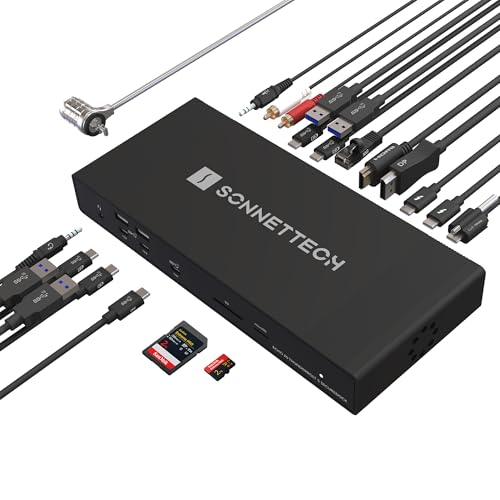
This dock's built-in M.2 NVMe SSD slot supporting up to 8TB is a genuinely distinct feature versus the OWC pick above, letting you add fast internal-feeling storage directly to the dock alongside its 10Gb Ethernet networking. Its 21 total interfaces include 3 Thunderbolt 5 ports, 9 USB ports at 10Gbps, HDMI, DisplayPort, SD and microSD readers, and audio I/O.
Compared to the OWC pick above, this one trades a second 10GbE port for integrated SSD expansion, a different feature tradeoff depending on whether networking or storage matters more to your workflow. Its 140W Power Delivery covers demanding laptops while the single Thunderbolt cable handles data, video, storage, and charging simultaneously.
Best for buyers who want built-in NVMe storage expansion combined with genuine 10GbE networking.
Best for: buyers who want built-in NVMe storage combined with genuine 10GbE networking
Check price on AmazonPros
- +Built-in NVMe storage expansion alongside 10GbE networking
- +21 total interfaces cover nearly every peripheral need
- +140W charging handles demanding laptops in a single cable
Cons
- −Single 10GbE port versus the OWC pick's dual ports
- −SSD sold separately, adding to the total cost
Sonnet Echo 20 Thunderbolt 5 SecureDock
About this pick
This dock specifically states its 10GbE networking is designed for ultra-fast connections to NAS systems using standard Cat6 or Cat6A cabling, a practical detail for buyers planning a network-attached storage workflow. Its 20 total interfaces closely mirror the pricier Echo 21's connectivity without the built-in NVMe slot, delivering the lowest price among the genuinely premium 10GbE docks in this comparison.
Compared to the Echo 21 pick above, this one is $50 less while retaining the same 3 Thunderbolt 5 ports, 9 USB ports at 10Gbps, HDMI, DisplayPort, and 10Gb Ethernet, making it the better value if you don't need integrated SSD storage. Its 140W Power Delivery matches the Echo 21's laptop charging capability.
Best for buyers who want the same core 10GbE and display capability as the Echo 21 without paying for a storage slot they may not use.
Best for: buyers who want the same core 10GbE capability as the Echo 21 without the storage slot premium
Check price on AmazonPros
- +Lower price than the Echo 21 with nearly identical core connectivity
- +Specifically documented for standard Cat6/Cat6A NAS networking
- +Same 140W charging and Thunderbolt 5 performance as the pricier Echo 21
Cons
- −No built-in NVMe storage slot like the Echo 21
- −Still a premium price relative to non-10GbE docks
iVANKY 26-in-1 FusionDock Ultra
About this pick
This dock is specifically engineered exclusively for the Mac ecosystem, described as the world's first docking station utilizing dual 80/120Gbps silicon architecture, delivering display support up to two 8K@60Hz or four 6K@60Hz monitors simultaneously on MacBook Pro M-Series Max systems. Its triple-layer thermal system combines an NTC-controlled fan, internal copper heat sinks, and a floating chassis design creating a chimney effect for sustained cooling during 24/7 operation.
Compared to the OWC and Sonnet picks above, this one's 4 dedicated 80/120Gbps downstream ports are specifically designed for connecting multiple high-speed RAID arrays simultaneously while maintaining 140W PD passthrough. Its 26-in-1 interface count includes an Optical Audio Toslink port for lossless sound and an independent 45W PD USB-C port specifically for fast-charging an iPad or iPhone without extra adapters.
Best for buyers who specifically own a MacBook Pro M-Series Max and want maximum display and RAID array connectivity.
Best for: buyers who specifically own a MacBook Pro M-Series Max and need maximum RAID and display connectivity
Check price on AmazonPros
- +Genuinely novel dual-silicon architecture for maximum Mac throughput
- +Triple-layer cooling specifically engineered for sustained 24/7 use
- +Independent 45W USB-C port for fast-charging phones and tablets
Cons
- −Highest price in this comparison at under $650
- −Exclusively designed for Mac, not compatible with Windows workflows
How We Evaluated These USB4 Docks with 10GbE
Each pick was assessed across 5 criteria weighted for real-world use.
10GbE Port Count
Compared single versus dual 10 Gigabit Ethernet port configurations.
Thermal Management
Compared cooling designs for sustaining high-bandwidth network and data throughput.
Built-in Storage
Compared docks offering integrated NVMe SSD slots against pure connectivity-focused designs.
Host Platform Requirements
Compared cross-platform compatibility against Mac-exclusive engineering.
Total Interface Count
Compared overall port and connector count beyond just networking.
How to Choose the Right USB4 Docks with 10GbE
By Primary Need
| If you mainly need | Recommended pick |
|---|---|
| Dual 10GbE ports for two separate networks | OWC Thunderbolt 5 Dual 10GbE Network Dock |
| Built-in NVMe storage combined with 10GbE | Sonnet Echo 21 Thunderbolt 5 SuperDock |
| The same core capability at a lower price | Sonnet Echo 20 Thunderbolt 5 SecureDock |
| Maximum display and RAID connectivity for Mac Pro Max | iVANKY 26-in-1 FusionDock Ultra |
By Budget
| Price range | Recommended pick |
|---|---|
| Under $450 | Sonnet Echo 20 SecureDock (under $450) |
| Under $500 | OWC Dual 10GbE Dock or Sonnet Echo 21 (both under $500) |
| Under $650 | iVANKY 26-in-1 FusionDock Ultra (under $650) |
Cross-Platform Dock vs Mac-Exclusive Dock
Cross-platform (OWC, Sonnet picks)
Works across Mac, Windows, Chromebook, and iPad Pro, giving genuine flexibility if your workflow spans multiple platforms.
Mac-exclusive (iVANKY FusionDock Ultra)
Engineered specifically for Mac's dual-silicon architecture, delivering maximum throughput but only for MacBook Pro M-Series Max systems.
If you work across Mac and Windows or use non-Mac devices, the OWC or Sonnet picks are the safer, more flexible choice. If you specifically own a MacBook Pro M-Series Max and want the absolute maximum Mac-optimized performance, the iVANKY pick delivers that.
By Storage Need
| Your storage need | Recommended pick |
|---|---|
| Built-in NVMe storage expansion | Sonnet Echo 21 SuperDock |
| No built-in storage needed | OWC Dual 10GbE Dock or Sonnet Echo 20 |
For NAS-Connected Home or Studio Networks Specifically
Look for
A dock specifically documented to work with standard Cat6 or Cat6A cabling, so you can connect to your existing NAS setup without needing specialized network hardware.
In this comparison
The Sonnet Echo 20 SecureDock specifically states its 10GbE is designed for ultra-fast NAS connections using standard Cat6 or Cat6A cabling.
When to Spend More
Spend more if
You specifically own a MacBook Pro M-Series Max and want maximum RAID array and display connectivity, where the iVANKY FusionDock Ultra justifies its under $650 price.
Save if
You want the same core 10GbE and display capability without a storage slot, where the Sonnet Echo 20 delivers that for under $450, the lowest price in this comparison.
Frequently Asked Questions
Do I need special networking equipment to use these docks' 10GbE ports?
The Sonnet Echo 20 specifically confirms compatibility with standard Cat6 or Cat6A cabling, so most existing network setups with reasonably modern cabling should support the full 10Gbps speed without needing specialized fiber infrastructure.
What's the most common mistake buyers make when choosing a USB4 dock with 10GbE?
Assuming any dock with an Ethernet port delivers 10Gbps speeds, when many docks in this general category actually include only standard Gigabit or 2.5Gbps Ethernet, with genuine 10GbE consistently appearing only at this comparison's premium price tier.
Is the iVANKY FusionDock Ultra worth its significant price premium if I use both Mac and Windows devices?
No, since the iVANKY pick is specifically engineered exclusively for the Mac ecosystem, buyers who need cross-platform compatibility should choose the OWC or either Sonnet pick instead, which all support Mac, Windows, Chromebook, and iPad Pro.
How do I decide between the OWC's dual 10GbE ports and the Sonnet Echo 21's built-in NVMe storage?
If your workflow genuinely requires two independent high-speed network connections simultaneously, the OWC's dual ports serve that specific need, but if local fast storage matters more than a second network connection, the Sonnet Echo 21's built-in NVMe slot is the better fit.
Will these docks work with older Thunderbolt 3 laptops, or do they require Thunderbolt 5?
The OWC pick specifically states Thunderbolt 3 support is available but Mac-only and requires a specific macOS version, so checking each pick's exact minimum host generation and OS version requirements for your specific device is worth doing before purchase.
Can I use the Sonnet Echo 21's built-in NVMe slot without buying a separate SSD?
No, the M.2 NVMe SSD slot requires you to purchase and install a compatible SSD separately, as the dock itself only provides the enclosure and connection infrastructure, not the storage drive itself.
Bottom Line
best overall: OWC Thunderbolt 5 Dual 10GbE Network Dock - best overall pick in this roundup.
See the full rankings above for all picks with pros, cons, and best-for summaries.
Browse on Amazon
All Prime-eligible options with current pricing.
Shop on Amazon →