
4 Best USB4 Docks for Microsoft Surface in 2026
We compared USB4 docks for Surface by official Microsoft compatibility, charging speed, and display count, since third-party support varies widely.

New to Amazon Prime?
Get fast, free shipping on every pick in this guide, plus Prime Video and exclusive deals.
Try Prime Free


At a Glance
Surface Thunderbolt 4 Dock 13-in-1, Dual HDMI + DisplayPort
↓ See why we picked itMicrosoft's own Surface Thunderbolt 4 Docking Station sits at the top of this category, but several third-party USB4 and Thunderbolt 4 docks specifically engineered for Surface Pro, Laptop, and Go models offer more ports and displays at a lower price.
We compared this lineup on official versus third-party Surface compatibility, charging speed, and simultaneous display count, since Surface devices historically have specific quirks around external monitor support that a generic USB-C dock not designed for Surface hardware can struggle with.
5 Criteria to Look For Before Buying a USB4 Docks for Microsoft Surface
Key buying criteria so you get the right fit the first time.
Official Microsoft Docks and Third-Party Docks Use Genuinely Different Underlying Connection Standards
The Microsoft Surface Thunderbolt 4 Docking Station uses genuine Thunderbolt 4 technology, while the Microsoft Surface USB4 Dock for Business specifically uses a USB4 host interface with a stated 5 GB/s maximum transfer rate, a meaningfully lower ceiling than Thunderbolt 4's typical 40Gbps capability despite both being official Microsoft products. This matters if you need maximum data transfer speed for large file transfers or external SSDs, where the Thunderbolt 4 dock's higher bandwidth ceiling matters more, and matters less if you primarily use the dock for basic charging, networking, and a single display. Check whether a Surface dock specifically states Thunderbolt 4 or USB4 as its underlying standard, since these two official Microsoft products differ meaningfully in raw bandwidth despite similar branding.
Third-Party Docks Precision-Engineered for Surface Hardware Solve Compatibility Quirks Generic USB-C Docks Can Miss
Surface devices have historically had specific quirks around external display detection and power negotiation that a generic USB-C dock not designed with Surface hardware in mind can struggle with, while both third-party picks in this comparison specifically state they're engineered for a named list of Surface Pro, Laptop, Go, and Book models. This matters if you're choosing between a Surface-specific dock and a generic universal USB-C dock at a similar price, where the Surface-specific engineering reduces the risk of display or charging issues. Look for a dock that specifically lists your exact Surface model in its stated compatibility list rather than assuming any USB-C dock will work identically with Surface hardware.
A VGA Port Is a Genuinely Useful Legacy Compatibility Feature If You Still Use Older Display Hardware
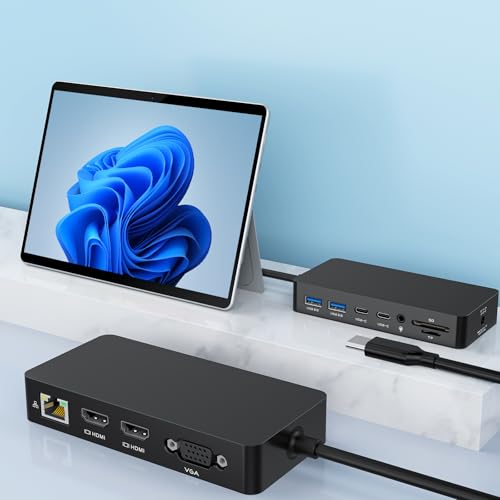
The 12-in-1 pick specifically includes a VGA port alongside its dual 4K HDMI outputs, letting you connect an older monitor, projector, or conference room display that only accepts VGA input without needing a separate adapter, a feature the other three picks in this comparison don't offer. This matters if you regularly present in older conference rooms or classrooms still equipped with VGA-only projectors, and matters less if all your displays are modern HDMI or DisplayPort equipped. Check whether legacy VGA support is specifically needed for your regular presentation or display environments before assuming every modern dock covers this connection type.
SD/TF Card Slot Read Speed Is a Specific, Checkable Number Worth Comparing for Media Workflows
The Surface Thunderbolt 4 Dock 13-in-1 specifically states its SD/TF card slots support speeds up to 104MB/s, a concrete figure that directly affects how long it takes to offload photos and video from a camera's memory card, unlike a dock that simply states 'card reader included' without disclosing an actual speed rating. This matters significantly if you're a photographer or videographer who regularly offloads large media files, and matters less if you rarely or never use the dock's card slot. Check for a specifically stated card reader speed in MB/s before assuming any dock's integrated card slot will offload your media files quickly.
Warranty Length Differences Among Similarly Priced Third-Party Surface Docks Are Worth Comparing Directly
The Surface Thunderbolt 4 Dock 13-in-1 specifically states a 24-month warranty, twice the 12-month coverage stated for the similarly priced 12-in-1 pick, a meaningful difference in manufacturer confidence and buyer protection between two products at nearly the same price point. This matters if you're deciding between two similarly featured and priced third-party docks, where longer warranty coverage provides more assurance against defects, and matters less if you plan to replace the dock within a year or two regardless. Compare the specifically stated warranty length between similarly priced third-party options rather than assuming all third-party Surface docks carry equivalent coverage.
4 Best USB4 Docks for Microsoft Surface in 2026
Microsoft Surface Thunderbolt 4 Docking Station
About this pick
This is Microsoft's own official Surface dock, built with genuine Thunderbolt 4 ports and specifically engineered to charge a compatible Surface laptop in as little as 2.5 hours, a charging speed claim backed by first-party engineering rather than a generic third-party estimate. Its raised tactile port indicators are a small but genuinely useful detail for finding the correct port without looking, and the dock supports up to two 4K monitors simultaneously.
Compared to the third-party docks in this comparison, this one carries the reliability and support backing of an official Microsoft accessory, plus a stated commitment to sustainability using 20% recycled ocean-bound plastic in its construction. Its (3) USB-C and (3) USB-A ports plus 2.5G Ethernet cover most peripheral needs without additional adapters.
Best for buyers who want the reliability of an official Microsoft-made Surface dock with genuine Thunderbolt 4 ports.
Best for: buyers who want the reliability of an official Microsoft-made Surface dock
Check price on AmazonPros
- +Official Microsoft-made dock with first-party support
- +Rapid charging in as little as 2.5 hours
- +Raised tactile port indicators for easy identification
Cons
- −Highest price in this comparison at under $250
- −Only dual monitor support versus the triple-display third-party picks
Microsoft Surface USB4 Dock for Business
About this pick
This dock specifically uses a USB4 host interface rather than Thunderbolt 4, with a stated 5 GB/s maximum data transfer rate, giving it a genuinely different underlying connection standard than the Thunderbolt 4-based Microsoft dock above despite both being Microsoft-branded Surface accessories. Its Power Delivery Pass-through feature routes charging power efficiently alongside data, and its desktop form factor is specifically designed for a stable, permanent desk setup.
Compared to the official Thunderbolt 4 dock above, this one is positioned specifically for business deployment scenarios, with Gigabit Ethernet for reliable wired networking and an HDMI port for straightforward single-display connections. Its lower price than the flagship Thunderbolt 4 dock makes it a more budget-conscious official Microsoft option.
Best for buyers who want an official Microsoft USB4 dock at a lower price than the flagship Thunderbolt 4 model.
Best for: buyers who want an official Microsoft USB4 dock at a lower price point
Check price on AmazonPros
- +Official Microsoft branding at a lower price than the Thunderbolt 4 flagship
- +Power Delivery Pass-through for efficient charging alongside data
- +Desktop form factor suits a permanent workstation
Cons
- −Single HDMI port limits it to one external display
- −5 GB/s transfer rate is lower than genuine 40Gbps USB4 bandwidth
Surface Thunderbolt 4 Dock 13-in-1, Dual HDMI + DisplayPort
About this pick
This third-party dock's triple display support through dual 4K HDMI ports plus a 4K DisplayPort output specifically targets buyers who need more screen real estate than the official Microsoft docks in this comparison provide. Its 10Gbps USB-A ports plus integrated SD/TF card slots rated up to 104MB/s make it genuinely useful for offloading photo and video files directly from memory cards.
Compared to the official Microsoft picks above, this one is precision-engineered specifically for a wide range of Surface Pro, Laptop, Go, and Book models and explicitly states plug-and-play compatibility with no drivers needed. Its 24-month warranty is longer than the 12-month coverage on the similarly priced 12-in-1 pick below.
Best for buyers who want triple-display support with fast card-reader speeds at a lower price than official Microsoft docks.
Best for: buyers who want triple-display support and fast card reading at a lower price
Check price on AmazonPros
- +Triple display support exceeds both official Microsoft docks
- +Fast SD/TF card slots rated up to 104MB/s
- +24-month warranty, longer than the similarly priced alternative
Cons
- −Third-party support isn't backed by Microsoft directly
- −No official Surface Connect port like Microsoft's own docks
12-in-1 Thunderbolt 4 Dock, Dual HDMI + VGA
About this pick
This dock's inclusion of a VGA port alongside dual 4K HDMI is a genuinely distinct feature from the other picks in this comparison, letting you connect an older monitor or projector that only accepts VGA input without a separate adapter. Its 100W DC charging port comes with an included power adapter, and the dock is specifically optimized for USB4 devices while remaining backward compatible with standard USB-C.
Compared to the 13-in-1 pick above, this one trades a slightly lower USB-A transfer speed (5Gbps versus 10Gbps) for the lowest price in this comparison and the practical addition of a VGA port for legacy display compatibility. Its Gigabit Ethernet and 3.5mm audio jack round out a complete peripheral connectivity set for daily work.
Best for buyers who need VGA compatibility for legacy displays at the lowest price in this comparison.
Best for: buyers who need VGA compatibility for legacy displays at the lowest price
Check price on AmazonPros
- +VGA port supports legacy monitors and projectors
- +Lowest price in this comparison at under $140
- +Complete connectivity set including Ethernet and audio jack
Cons
- −5Gbps data transfer is slower than the 13-in-1 pick's 10Gbps
- −12-month warranty is shorter than the 13-in-1 pick's 24 months
How We Evaluated These USB4 Docks for Microsoft Surface
Each pick was assessed across 5 criteria weighted for real-world use.
Official vs Third-Party Compatibility
Compared Microsoft's own docks against third-party docks engineered specifically for Surface hardware.
Charging Speed
Compared stated charging time and wattage for Surface laptop models.
Display Count
Compared maximum simultaneous external display support across dual and triple configurations.
Port Variety
Compared legacy VGA support, card readers, and data transfer speeds.
Warranty Coverage
Compared stated warranty length between third-party Surface dock options.
How to Choose the Right USB4 Docks for Microsoft Surface
By Primary Need
| If you mainly need | Recommended pick |
|---|---|
| Official Microsoft reliability with rapid charging | Microsoft Surface Thunderbolt 4 Docking Station |
| An official but lower-priced USB4 option | Microsoft Surface USB4 Dock for Business |
| Triple-display support with fast card reading | Surface Thunderbolt 4 Dock 13-in-1 |
| Legacy VGA compatibility at the lowest price | 12-in-1 Thunderbolt 4 Dock, Dual HDMI + VGA |
By Budget
| Price range | Recommended pick |
|---|---|
| Under $135 | 12-in-1 Dual HDMI + VGA (under $140) |
| Under $140 | Surface Thunderbolt 4 Dock 13-in-1 (under $140) |
| Under $170 | Microsoft Surface USB4 Dock for Business (under $170) |
| Under $220 | Microsoft Surface Thunderbolt 4 Docking Station (under $250) |
Official Microsoft Dock vs Third-Party Surface-Optimized Dock
Official Microsoft (both Microsoft-branded picks)
Backed by first-party support and engineering specifically validated against Surface hardware, at a price premium over third-party alternatives.
Third-party Surface-optimized (13-in-1 and 12-in-1 picks)
Offers more ports and displays for less money, precision-engineered for Surface compatibility but without Microsoft's direct support backing.
If official support and proven reliability matter most, either Microsoft-branded pick is the safer choice. If maximizing ports and displays per dollar matters more, the third-party picks deliver more for less.
By Display Configuration Needed
| Your display setup | Recommended pick |
|---|---|
| Dual 4K monitors | Microsoft Surface Thunderbolt 4 Docking Station |
| Triple displays including a legacy VGA screen | 12-in-1 Thunderbolt 4 Dock, Dual HDMI + VGA |
For Photographers and Videographers Specifically
Look for
Fast integrated SD/TF card slots rated for high-speed offloading, so transferring photos and video from a camera's memory card doesn't bottleneck your workflow.
In this comparison
The Surface Thunderbolt 4 Dock 13-in-1 specifically states SD/TF card slots rated up to 104MB/s, directly supporting fast media offloading.
When to Spend More
Spend more if
You want official Microsoft reliability with the fastest stated charging time, where the Microsoft Surface Thunderbolt 4 Docking Station justifies its under $250 price.
Save if
You want triple-display support and fast card reading without official Microsoft branding, where the 13-in-1 pick delivers that for under $140.
Frequently Asked Questions
Will the official Microsoft Surface USB4 Dock for Business work with older Surface Pro models?
Checking Microsoft's specifically stated compatibility list for your exact Surface Pro generation before purchase is worth doing, since USB4 and Surface Connect compatibility can vary between older and newer Surface Pro models.
What's the most common mistake buyers make when choosing between official and third-party Surface docks?
Assuming a third-party dock's higher port count and lower price make it the clear better choice without confirming it specifically lists your exact Surface model in its stated compatibility, since not every third-party dock supports every Surface generation equally well.
Is the official Microsoft Thunderbolt 4 dock worth the price premium over the third-party 13-in-1 pick?
If official Microsoft support and the fastest stated charging speed matter most to you, yes, but if you specifically want triple-display support and fast card reading at a lower price, the third-party 13-in-1 pick delivers more features for less money.
How do I know if my Surface device supports triple external displays through one of these docks?
Checking your specific Surface model's official display output specifications against the dock's stated display support is worth doing, since some Surface models are limited to fewer simultaneous external displays regardless of how many the dock itself supports.
Do these Surface docks require installing special drivers before use?
The third-party picks in this comparison specifically state plug-and-play compatibility with no drivers needed, while the official Microsoft docks are also designed for driverless operation, though checking for the latest Surface firmware updates is worth doing for the smoothest initial setup.
Can I use the VGA port on the 12-in-1 dock and the dual HDMI ports at the same time for three displays?
Yes, the 12-in-1 pick specifically supports triple display output using its dual HDMI and single VGA ports simultaneously in extend or mirror mode, though your specific Surface model's own display output limits still apply.
Bottom Line
best overall: Microsoft Surface Thunderbolt 4 Docking Station - best overall pick in this roundup.
See the full rankings above for all picks with pros, cons, and best-for summaries.
Browse on Amazon
All Prime-eligible options with current pricing.
Shop on Amazon →