
6 Best USB-C to 2.5GbE Ethernet Adapters Under $30 in 2026
We compared USB-C to 2.5GbE ethernet adapters under $30 by chipset, connector type, and real device compatibility, not just the advertised speed number.

New to Amazon Prime?
Get fast, free shipping on every pick in this guide, plus Prime Video and exclusive deals.
Try Prime Free


At a Glance
Plugable USB C to Ethernet Adapter 2.5Gb with 100W PD
↓ See why we picked itA 2.5GbE label on the box only tells half the story. Two adapters can both claim "up to 2.5Gbps" and still land in very different desk setups once you check the connector type, the chipset driving it, and whether your own router can actually push past 1Gbps in the first place.
Below $30, most of these use the same Realtek RTL8156BG chipset under the hood, so the real differences show up in connector flexibility (USB-A vs USB-C only), power delivery passthrough, and which operating systems get native driver support without a manual install.
5 Criteria to Look For Before Buying a USB-C to 2.5GbE Ethernet Adapters Under $30
Key buying criteria so you get the right fit the first time.
Check the actual chipset, not just the speed claim
The chipset inside a USB-C ethernet adapter is what your operating system actually talks to, and it determines whether the adapter works instantly with no extra software or needs a manual driver install. Nearly every adapter in this price tier uses Realtek's RTL8156BG chip, which has mature native driver support in Windows, macOS, and most Linux kernels, but a listing that never names its chipset at all is a signal the manufacturer is hiding a cheaper, less-supported chip behind a generic "2.5G" label. Look for the chipset name and model number spelled out in the bullet points or product description, not just a headline speed number, and be skeptical of listings that only say "advanced chipset" without naming it.
Confirm your router or switch actually supports 2.5GbE
An adapter rated for 2.5Gbps only delivers that speed if the device on the other end of the cable, your router, switch, or NAS, also supports 2.5GbE. Most home routers shipped before 2023 top out at 1Gbps per port, which means a 2.5GbE adapter plugged into a standard router will still run at 1Gbps, making the extra speed capability pointless for your actual network. Before buying, check your router's or switch's spec sheet for a "2.5GbE" or "2500Mbps" port rating rather than assuming any recent router supports it, since even many current mid-range routers still ship with only Gigabit ports.
Match the connector type to every device you'll actually use it on
USB-C ethernet adapters come in two connector styles: USB-C only, or a dual USB-A and USB-C design that works with both port types from one adapter. If your household or office mixes an older USB-A desktop with a newer USB-C laptop, a USB-C-only adapter locks you out of the older machine entirely, forcing you to buy a second adapter or a separate USB-A-to-USB-C cable. Check the product photos and title for "USB-A" or "dual connector" language specifically, since some listings bury this detail in a small print spec table rather than the main bullet points.
Verify power delivery wattage against your laptop's actual charger
Some 2.5GbE adapters add a USB-C Power Delivery passthrough port so the same cable can charge your laptop and carry the ethernet connection at once, but the PD wattage rating matters more than the fact that PD exists at all. A 100W-rated passthrough port charges most 13 to 14 inch laptops and MacBooks at full speed, but a 16 inch MacBook Pro or a gaming laptop that ships with a 140W or higher charger will charge more slowly through a 100W adapter than through its included charger. Check your laptop's included charger's wattage rating (printed on the charger brick itself) before assuming a PD passthrough adapter will fully replace it.
Read the documented OS list, not just "universal compatibility"
A listing that says an adapter is "universally compatible" is telling you less than one that names specific operating systems and driver requirements, because Linux kernel support in particular varies a lot even among adapters using the identical Realtek chipset. Some listings explicitly warn that older Linux kernels or certain distributions need the latest Realtek USB 2.5G Ethernet Controller driver installed manually rather than working out of the box, which is a real setup step, not a guarantee. If you run Linux or ChromeOS as your primary system, prioritize a listing that names your specific OS and driver behavior over one that only claims broad, unspecified compatibility.
6 Best USB-C to 2.5GbE Ethernet Adapters Under $30 in 2026
Plugable 2.5Gbps USB C to Ethernet Adapter
About this pick
Plugable's entry runs the Realtek RTL8156BG chipset, the same chip that shows up across nearly every adapter in this comparison, but it's the cheapest listing that carries it at under $20. It's also the only pick here with both a USB-A and a USB-C connector built into one adapter, so it works whether your laptop still has a USB-A port or has moved to USB-C only.
Against the UGREEN and Cable Matters picks below, the chipset and top speed are identical on paper. The real difference is that dual connector: if you're mixing an older USB-A desktop with a newer USB-C laptop, this is the only adapter here that covers both without buying two separate cables.
Best for anyone who isn't fully committed to USB-C yet, or who wants a single adapter that moves between an older USB-A dock and a newer USB-C laptop. The tradeoff is no power delivery passthrough, so it won't double as a charger.
Best for: buyers who need one adapter to work across both an older USB-A device and a newer USB-C laptop
Check price on AmazonPros
- +Works with both USB-A and USB-C ports
- +Cheapest 2.5GbE pick with a name-brand chipset
- +Aluminum shell stays cool under sustained transfers
Cons
- −No power delivery passthrough
- −Requires a 2.5GbE-capable router to hit full speed
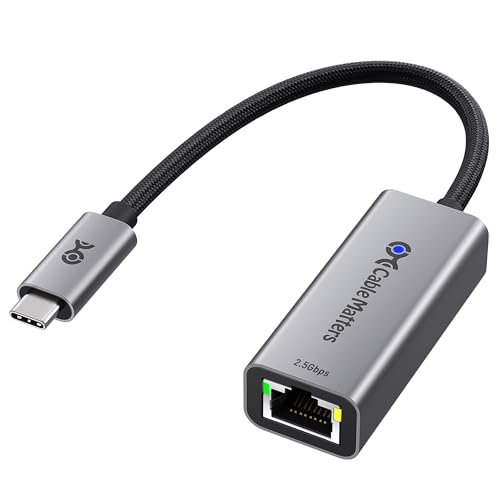
Cable Matters USB C to 2.5Gb Ethernet Adapter
About this pick
Cable Matters explicitly lists Windows, macOS, Linux, and ChromeOS support on the packaging, and calls out that older systems or certain Linux kernels may need the latest Realtek USB 2.5G Ethernet Controller driver installed manually rather than relying on plug-and-play. That's a level of platform detail most competitors in this price range don't bother spelling out.
Compared to the Plugable pick above, this one drops the dual USB-A/USB-C connector for a USB-C-only design, but adds the braided pigtail cable and aluminum housing that Plugable also uses. The real decision point is platform: if you're running Linux or ChromeOS specifically, Cable Matters is the only listing here that documents driver behavior on those systems rather than just claiming universal compatibility.
Best for Linux workstation users or ChromeOS device owners who've been burned before by an adapter that only truly plug-and-plays on Windows and macOS.
Best for: buyers on Linux or ChromeOS who want documented driver support instead of a vague compatibility claim
Check price on AmazonPros
- +Explicit Linux and ChromeOS compatibility notes
- +Same proven chipset as the pricier picks here
- +Braided cable resists fraying with daily use
Cons
- −USB-C only, no USB-A fallback
- −Older Linux kernels may need a manual driver install
Dell Adapter USB-C to 2.5G Ethernet
About this pick
This is Dell's own first-party adapter, sold and shipped as a Dell-branded accessory rather than a third-party listing. For anyone already running a Dell laptop through Dell's support and warranty ecosystem, that first-party sourcing carries real weight even though Dell's own listing is thinner on chipset and feature detail than the third-party options here.
The tradeoff against the UGREEN and Cable Matters picks is transparency: those listings spell out the exact Realtek chip, driver behavior, and OS compatibility list, while Dell's listing only confirms basic plug-and-play connectivity. You're paying the same under $25 for less documented detail, in exchange for first-party brand assurance.
Best for Dell-specific fleets or IT buyers who prioritize a matching first-party accessory over the deeper spec sheet a third-party adapter provides.
Best for: Dell laptop owners or IT buyers who want a first-party accessory over a third-party brand
Check price on AmazonPros
- +First-party Dell accessory, easier warranty/support path
- +Simple plug-and-play setup
- +Matches Dell laptop aesthetics for fleet deployments
Cons
- −Thinner spec sheet than third-party alternatives
- −No stated Linux or ChromeOS compatibility
UGREEN USB C to Ethernet Adapter 2.5G
About this pick
UGREEN's listing names a specific device list that goes further than most competitors here: MacBook Pro/Air, Dell XPS, iPad Pro/Air, Mac Mini, and current-generation iPhone Pro models. If you're plugging this into an iPad or iPhone rather than a laptop, that's a real distinction, since not every adapter in this tier confirms iPhone/iPad compatibility explicitly.
Against the Plugable and Cable Matters picks, the chipset (RTL8156BG) and top speed are the same, so this comes down to the device list on the box matching your actual hardware. UGREEN also adds status indicator lights for a quick at-a-glance link check, a small but genuinely useful detail the Dell and Cable Matters listings don't call out.
Best for households mixing MacBooks, iPads, and iPhones on the same desk who want one adapter confirmed to work across all three rather than guessing from a generic "USB-C compatible" claim.
Best for: buyers running a mixed Apple setup who want confirmed iPad/iPhone compatibility, not just laptop support
Check price on AmazonPros
- +Explicitly lists iPhone and iPad compatibility
- +Indicator lights show connection status at a glance
- +Aluminum shell matches Apple device aesthetics
Cons
- −USB-C only, no USB-A option
- −No power delivery passthrough
TP-Link USB C to Ethernet Adapter (UE302C)
About this pick
TP-Link builds this one around a foldable connector design specifically meant to survive being tossed in a bag rather than living permanently on a desk. It's the only adapter in this lineup that calls out foldability as a feature, which matters if this is going in a laptop sleeve or backpack pocket rather than staying plugged in at one desk.
TP-Link also notes it's a signatory of CISA's Secure-by-Design pledge, a detail aimed at IT-conscious buyers rather than most home users, but worth knowing if you're procuring for an office. Compared to the UGREEN pick, the device compatibility list is nearly identical (MacBook, iPad, Dell XPS, Surface, ThinkPad), so the real differentiator here is the folding hinge and the security pledge, not raw speed or chipset.
Best for commuters and business travelers who need an adapter that survives a bag rather than one optimized purely for a stationary desk setup.
Best for: commuters and travelers who need a durable, pocketable adapter rather than a stationary desk accessory
Check price on AmazonPros
- +Foldable design survives daily bag use
- +Wide device list incl. ThinkPad and Chromebook
- +Indicator lights for quick status checks
Cons
- −No power delivery passthrough
- −Aluminum shell adds a bit of pocket bulk vs bare cable adapters
Plugable USB C to Ethernet Adapter 2.5Gb with 100W PD
About this pick
This is the only adapter in this price tier that adds a USB-C Power Delivery passthrough port, rated up to 100W, so it can charge a laptop and carry the ethernet connection through the same single cable. MacWorld named it a top pick specifically for budget 2.5GbE adapters, which is a rare third-party callout for a product at this price.
Against the base Plugable model above, this is $12 more for that PD passthrough alone, since the chipset and rated speed are otherwise the same. 100W covers most ultrabooks and 13-14" MacBooks, but a 16" MacBook Pro's included charger is rated higher, so check your laptop's actual charging wattage before assuming full-speed charging.
Best for anyone who wants to cut down desk cable clutter by combining ethernet and charging into one USB-C run, as long as their laptop's charging needs fit within 100W.
Best for: buyers who want to replace two cables (charger and ethernet) with one, as long as their laptop's power needs are 100W or under
Check price on AmazonPros
- +Charges your laptop and carries ethernet on one cable
- +100W covers most ultrabooks and 13-14" MacBooks
- +Third-party MacWorld pick, not just a marketing claim
Cons
- −100W may not fully fast-charge larger 16" laptops
- −Priciest pick in this tier
How We Evaluated These USB-C to 2.5GbE Ethernet Adapters Under $30
Each pick was assessed across 5 criteria weighted for real-world use.
Chipset verification
we checked each listing's stated chipset (nearly all use Realtek's RTL8156BG in this price tier) rather than trusting the marketing headline alone, since the chipset determines native OS driver support more than the box copy does.
Connector type audit
we separated USB-A/USB-C dual-connector adapters from USB-C-only designs, since that single detail decides whether an adapter works with an older desktop as well as a newer laptop.
Documented OS compatibility
we favored listings that name specific operating systems (including Linux kernel and ChromeOS behavior) over ones that only claim generic "universal compatibility" with no detail on driver requirements.
Power delivery passthrough check
for the one pick with PD charging, we confirmed the rated wattage against common laptop charging needs rather than assuming any PD-rated port fast-charges every laptop equally.
Live price gate
every pick had to be in stock and priced at or under $30 on the date this guide was checked; adapters that only hit this tier during a temporary sale were excluded.
How to Choose the Right USB-C to 2.5GbE Ethernet Adapters Under $30
By Device and Connector Type
The connector on your existing device matters more than the speed rating, since every pick here caps out at the same 2.5Gbps.
| Your device has | Recommended pick |
|---|---|
| A USB-A port on an older desktop or dock | Plugable 2.5Gbps USB C to Ethernet Adapter |
| A Dell laptop under an active Dell warranty | Dell Adapter USB-C to 2.5G Ethernet |
| A MacBook, iPad, or recent iPhone | UGREEN USB C to Ethernet Adapter 2.5G |
| A Linux workstation or Chromebook | Cable Matters USB C to 2.5Gb Ethernet Adapter |
By Budget
| Price range | Recommended pick |
|---|---|
| Under $20 | Plugable 2.5Gbps USB C to Ethernet Adapter (under $20) |
| $20 to $26 | UGREEN USB C to Ethernet Adapter 2.5G (under $30) or Cable Matters (under $25) |
| Up to $30 | Plugable USB C to Ethernet Adapter with 100W PD (under $30) |
Dual-Connector vs USB-C-Only
Dual USB-A/USB-C (Plugable base model)
Works with both an older USB-A desktop and a newer USB-C laptop from one adapter, at the cost of skipping any power delivery feature.
USB-C only (UGREEN, Cable Matters, Dell, TP-Link)
Assumes every device you'll plug it into already has USB-C, which is now true for most laptops from the last three to four years but not for older USB-A-only desktops.
If every device on your desk already has USB-C, the connector choice doesn't matter and you should pick based on OS compatibility or price instead.
By Platform Priority
| You mainly run | Recommended pick |
|---|---|
| Windows and macOS only | Any pick in this list works equally well |
| Linux or ChromeOS as a daily driver | Cable Matters USB C to 2.5Gb Ethernet Adapter |
| A mix of Apple laptops, tablets, and phones | UGREEN USB C to Ethernet Adapter 2.5G |
For Frequent Travel Specifically
Look for
A foldable or reinforced connector design explicitly called out in the listing, not just a generic braided cable claim.
In this comparison
TP-Link's UE302C is the only pick here built around a folding hinge specifically for bag and pocket use.
When to Spend More
Spend more if
You want to cut a cable from your desk setup: the Plugable 100W PD model (under $30) charges your laptop and carries ethernet through one cable, worth the extra $12 over the base Plugable model if you're tired of two separate cords.
Save if
You just need a reliable wired backup for when Wi-Fi drops: the base Plugable adapter at under $20 uses the same chipset as every pricier option here and skips only the charging feature.
Frequently Asked Questions
Do I need a special router to get the full 2.5Gbps speed from these adapters?
Yes. The adapter only reaches 2.5Gbps if the router, switch, or NAS on the other end of the ethernet cable also supports 2.5GbE. Plugging a 2.5GbE adapter into a standard Gigabit router will cap your speed at 1Gbps, so check your router's port rating before buying based on the higher speed number.
Can I use a USB-C-only adapter with an older USB-A laptop using a cheap converter dongle?
It's not recommended for sustained 2.5Gbps speeds. A generic USB-A-to-USB-C converter can introduce a bandwidth bottleneck that undercuts the adapter's rated speed. If you have a mix of USB-A and USB-C devices, a dual-connector adapter like the Plugable base model is the more reliable choice.
Is a 100W power delivery adapter worth the extra cost over a standard model?
It depends on whether you want to eliminate a second charging cable. If your laptop charges at 100W or under, the PD passthrough model lets you use one cable for both ethernet and power. If your laptop needs more than 100W (common on larger gaming laptops or 16-inch MacBook Pros), the PD passthrough won't fully replace your original charger, so the extra cost buys less value in that case.
Why do some listings not mention their chipset at all?
A manufacturer that skips naming the chipset is sometimes using a cheaper, less-supported chip and relying on the "2.5G" headline number to sell the product. It's not an automatic dealbreaker, but it means you can't verify driver maturity on your specific OS ahead of time the way you can with a named Realtek chipset.
Will these adapters work with a MacBook running the latest macOS?
Adapters using the Realtek RTL8156BG chipset, which covers most picks in this comparison, have native macOS support without a manual driver install. Listings that specifically name MacBook Pro or MacBook Air compatibility, like the UGREEN and Satechi picks, have confirmed this directly against recent Apple Silicon models.
Do I need to install any drivers before these adapters work?
Most work as true plug-and-play on Windows and macOS with the Realtek chipset covered here. Linux and older ChromeOS versions are the exception: some listings, particularly Cable Matters, explicitly note that certain Linux kernels need the latest Realtek USB 2.5G Ethernet Controller driver installed manually for full performance.
Bottom Line
best overall: Plugable 2.5Gbps USB C to Ethernet Adapter - best overall pick in this roundup.
See the full rankings above for all picks with pros, cons, and best-for summaries.
Browse on Amazon
All Prime-eligible options with current pricing.
Shop on Amazon →