
4 Best USB 4 40Gbps Docks in 2026
We compared 40Gbps USB4 docks by whether that bandwidth is upstream, downstream, or both, since most standard USB-C docks only offer 10Gbps upstream.

New to Amazon Prime?
Get fast, free shipping on every pick in this guide, plus Prime Video and exclusive deals.
Try Prime Free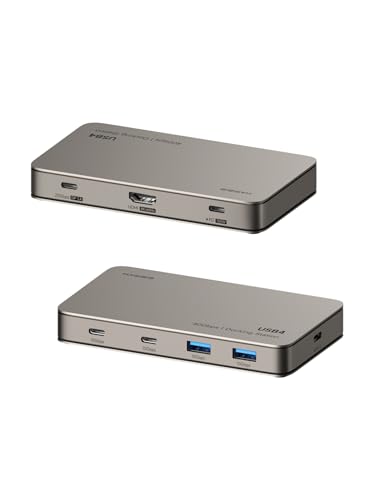


At a Glance
A genuine 40Gbps USB4 dock delivers roughly four times the upstream bandwidth of a standard USB-C 3.2 Gen 2 dock, but that 40Gbps figure can apply to the upstream host connection, individual downstream ports, or both, and the distinction matters for real throughput.
We compared this lineup on where exactly the 40Gbps bandwidth applies, host charging wattage, and display support, since one listing specifically notes that most standard Type-C docking stations only offer 10Gbps upstream, four times slower than a genuine USB4 connection.
5 Criteria to Look For Before Buying a USB 4 40Gbps Dock
Key buying criteria so you get the right fit the first time.
A Genuine 40Gbps USB4 Connection Delivers Roughly 4x the Bandwidth of a Standard 10Gbps USB-C Dock
The Hagibis pick's listing specifically states that most standard Type-C docking stations only offer 10Gbps upstream bandwidth, making its full 40Gbps connection 4 times faster, a concrete comparison that clarifies why 'USB4' or '40Gbps' branding represents a meaningfully different tier of dock than a standard USB-C 3.2 hub. This matters directly if you regularly transfer large files, work with external SSDs, or run multiple bandwidth-intensive peripherals simultaneously, and matters less if you only use a dock for basic charging and a single display. Check whether a dock specifically states a 40Gbps figure (indicating genuine USB4 or Thunderbolt bandwidth) versus a lower figure like 10Gbps (indicating standard USB-C 3.2), since these represent fundamentally different performance tiers despite superficially similar-looking product listings.
Whether 40Gbps Applies Upstream, Downstream, or Both Determines Real Multi-Device Performance
The Hagibis pick specifically clarifies its USB4 downstream port delivers a full-function 40Gbps connection combining data, video, and power simultaneously, while some docks might advertise a 40Gbps upstream host connection but step down individual downstream ports to lower speeds for cost reasons. This matters if you plan to run multiple demanding peripherals from the dock's downstream ports simultaneously, where a bottlenecked downstream port limits your actual multi-device throughput regardless of the impressive upstream figure, and matters less if you only use one primary downstream connection at a time. Look for a listing that specifically clarifies whether its stated 40Gbps bandwidth applies to the upstream host connection, individual downstream ports, or the full system, rather than assuming a single headline figure applies everywhere.
Thunderbolt Certification and Intel EVO Certification Are Distinct, Verifiable Third-Party Standards
The 3-port Plugable pick specifically states Thunderbolt certification built on the Intel Goshen Ridge chipset, while the 5-in-1 Plugable pick specifically states it's uniquely certified as Engineered for EVO by Intel, two different but both genuine third-party certification programs that verify specific performance and compatibility standards beyond a manufacturer's own marketing claims. This matters if formal certification is a priority for compatibility assurance across a wide range of laptops, and matters less if you're comfortable relying on user reviews and general product reputation instead. Check for the specific named certification (Thunderbolt certified, Intel EVO certified, or similar) rather than assuming any dock claiming '40Gbps' or 'USB4 compatible' has gone through equivalent formal certification testing.
A Dock's Own Power Consumption Reduces the Effective Charging Wattage Delivered to Your Laptop
The Hagibis pick's listing transparently discloses that the dock itself consumes approximately 20W of its 100W PD input, meaning it delivers up to 80W (not the full 100W) to the connected laptop, a real-world power budget detail that affects whether the dock can keep pace with your laptop's actual charging needs during heavy use. This matters if your laptop requires close to the dock's maximum rated wattage to charge while under load, where the dock's own power draw could leave insufficient headroom, and matters less if your laptop's charging needs are comfortably below the dock's rated output even after accounting for its own consumption. Check whether a listing discloses the dock's own power draw and the resulting net wattage delivered to your laptop, rather than assuming the full stated PD wattage reaches your device.
Portable Power Adapter Size Matters More Than Buyers Often Consider for a Travel-Oriented Dock
The ACASIS pick specifically includes a notably smaller power adapter designed for road warriors who also travel with a portable USB-C monitor, a genuinely different design priority than the bulkier, higher-wattage adapters bundled with the desk-anchored Plugable picks in this comparison. This matters if you regularly travel with your dock and want to minimize bag weight and bulk, and matters less if the dock lives permanently at one desk where adapter size is irrelevant. Consider a dock's specific power adapter size and portability, not just its core bandwidth specs, if travel use is a genuine part of your intended use case.
4 Best USB 4 40Gbps Docks in 2026
Hagibis USB4 Docking Station, 40Gbps Triple Display Hub
About this pick
This dock's listing specifically calls out that most standard Type-C docking stations only offer 10Gbps upstream bandwidth, positioning its full 40Gbps total bandwidth as 4 times faster, a concrete comparative claim that clarifies exactly what the 40Gbps figure covers. Its 8K@60Hz, 4K@144Hz, or 2K@360Hz display support gives genuinely flexible resolution and refresh rate combinations.
Compared to the Plugable picks below, this one's USB4 downstream port specifically combines data, video, and power into one full-function connection, delivering 20Gbps plus DP1.4 plus 7.5W simultaneously without lag across multiple connected devices. Its listing transparently discloses that the dock itself consumes approximately 20W of its own 100W PD input, delivering up to 80W to the host laptop.
Best for buyers who want a clear explanation of where the 40Gbps bandwidth actually applies, paired with flexible display options.
Best for: buyers who want a transparent explanation of the dock's bandwidth allocation with flexible display support
Check price on AmazonPros
- +Transparently explains exactly where the 40Gbps bandwidth applies
- +Flexible display support up to 2K@360Hz for gaming-grade smoothness
- +USB4 downstream port combines data, video, and power in one connection
Cons
- −Dock's own 20W power draw reduces the effective host charging wattage
- −Apple M1/M2/M3 base chips limited to a single external display
Plugable Thunderbolt 4 Hub, 3x Thunderbolt 4 Ports
About this pick
This hub is Thunderbolt certified and built on the Intel Goshen Ridge chipset, a formal certification that verifies interoperability standards beyond a generic USB4 branding claim, with each of its 3 downstream Thunderbolt ports specifically supporting the full 40Gbps data transfer rate. Its listing includes an unusually detailed Mac-specific compatibility breakdown by exact chip generation, from base M1/M2 single-display support up to M4/M5 or Pro/Max dual-display support.
Compared to the Hagibis pick above, this one supports daisy-chaining up to 6 additional Thunderbolt peripherals from its 3 downstream ports, letting you build a content creation setup with multiple high-performance SSDs connected simultaneously. Its 2-year warranty and lifetime support from Plugable's North American team back the certified build quality.
Best for buyers who want Thunderbolt-certified reliability with daisy-chain expansion for multiple SSDs.
Best for: buyers who want Thunderbolt-certified reliability with daisy-chain expansion
Check price on AmazonPros
- +Thunderbolt certified for verified interoperability
- +Detailed per-chip Mac compatibility breakdown
- +Daisy-chain support for up to 6 additional peripherals
Cons
- −Requires an external power adapter for operation
- −Highest price in this comparison at under $180
ACASIS 40Gbps Dock with DP Port
About this pick
This dock's 11-in-1 design specifically expands to 2x 40Gbps ports plus a dedicated 8K 60Hz DisplayPort, delivering genuine dual high-bandwidth connections at the lowest price in this comparison. Its listing explicitly states the Apple M1 chip does not support dual monitors, a transparent disclosure of a real Apple platform limitation rather than glossing over it.
Compared to the pricier Plugable picks above, this one includes a notably smaller, more portable power adapter, appealing specifically to road warriors who also travel with a portable USB-C monitor. Its ability to simultaneously power both the host laptop and a non-self-powered portable dual monitor setup is a genuinely distinct capability among these picks.
Best for buyers who want dual 40Gbps ports at the lowest price with a portable power adapter for travel.
Best for: buyers who want dual 40Gbps ports at the lowest price with travel-friendly power
Check price on AmazonPros
- +Lowest price in this comparison at under $100
- +Notably smaller, more portable power adapter for travel
- +Can simultaneously power laptop and a non-self-powered portable monitor
Cons
- −Apple M1 chip explicitly does not support dual monitors
- −Fewer daisy-chain and expansion features than the Plugable picks
Plugable 5-in-1 Thunderbolt 4 Hub
About this pick
This hub is specifically certified as Engineered for EVO by Intel, the only device of its kind with that certification according to the listing, built on the same Intel Goshen Ridge chipset as the pricier 3-port Plugable pick above. Its 3 Thunderbolt 4 ports flexibly function as Thunderbolt 4/3, USB4, or standard USB-C depending on what's connected, giving genuine adaptability to mixed peripheral setups.
Compared to the 3-port Plugable pick above, this one is a more compact 5-in-1 design at a lower price, trading some downstream port count for a smaller footprint while still delivering the full 40Gbps data bandwidth and a bundled USB-C to HDMI adapter. Its 2-year coverage with lifetime support matches the pricier Plugable pick's warranty terms.
Best for buyers who want Intel EVO-certified reliability in a more compact, lower-priced form factor.
Best for: buyers who want Intel EVO-certified reliability in a more compact form factor
Check price on AmazonPros
- +Uniquely certified as Engineered for EVO by Intel
- +Ports flexibly function as Thunderbolt 4/3, USB4, or USB-C
- +More compact than the 3-port Plugable pick at a lower price
Cons
- −Fewer downstream Thunderbolt ports than the pricier 3-port Plugable pick
- −Thunderbolt 3 Windows systems and MacBook Neo not recommended
How We Evaluated These USB 4 40Gbps Docks
Each pick was assessed across 5 criteria weighted for real-world use.
Bandwidth Allocation Transparency
Compared how clearly each listing discloses whether 40Gbps applies upstream, downstream, or both.
Certification
Compared Thunderbolt certification and Intel EVO certification against generic USB4 branding.
Display Support
Compared maximum resolution, refresh rate, and per-chip Mac compatibility details.
Expansion Capability
Compared daisy-chain support and downstream port flexibility.
Price and Portability
Compared price against power adapter size and travel-friendliness.
How to Choose the Right USB 4 40Gbps Docks
By Primary Need
| If you mainly need | Recommended pick |
|---|---|
| Transparent bandwidth allocation with flexible displays | Hagibis USB4 Docking Station |
| Thunderbolt-certified reliability with daisy-chain expansion | Plugable Thunderbolt 4 Hub, 3x Ports |
| Dual 40Gbps ports at the lowest price | ACASIS 40Gbps Dock with DP Port |
| Intel EVO-certified reliability in a compact form | Plugable 5-in-1 Thunderbolt 4 Hub |
By Budget
| Price range | Recommended pick |
|---|---|
| Under $100 | ACASIS 40Gbps Dock (under $100) |
| Under $110 | Hagibis USB4 Docking Station (under $110) |
| Under $170 | Plugable 5-in-1 Hub (under $170) |
| Under $180 | Plugable Thunderbolt 4 Hub, 3x Ports (under $180) |
Upstream-Only vs Full Upstream-and-Downstream 40Gbps
Full 40Gbps throughout (Hagibis, both Plugable picks)
Delivers the full 40Gbps bandwidth on both the host connection and individual downstream ports, ideal for simultaneously running multiple high-bandwidth peripherals.
40Gbps host with mixed downstream speeds (ACASIS)
Delivers 40Gbps on primary ports while some downstream ports run at standard USB 3.0 speeds, still a major upgrade over 10Gbps-only docks.
If you'll run multiple demanding peripherals simultaneously (fast SSD plus high-res display plus more), a dock with full 40Gbps throughout avoids bottlenecks. If you mainly need one fast connection plus basic peripherals, a mixed-speed dock still delivers strong value.
By Certification Type
| Your priority | Recommended pick |
|---|---|
| Thunderbolt certification specifically | Plugable Thunderbolt 4 Hub, 3x Ports |
| Intel EVO certification specifically | Plugable 5-in-1 Thunderbolt 4 Hub |
For Content Creators Running Multiple SSDs Specifically
Look for
Daisy-chain support across multiple downstream Thunderbolt ports, so you can connect several high-performance SSDs simultaneously without running out of direct connections.
In this comparison
The Plugable Thunderbolt 4 Hub with 3 ports specifically supports daisy-chaining up to 6 additional Thunderbolt peripherals.
When to Spend More
Spend more if
You want Thunderbolt-certified reliability with maximum daisy-chain expansion for a content creation setup, where the 3-port Plugable pick justifies its under $180 price.
Save if
You want dual 40Gbps ports with a portable power adapter, where the ACASIS pick delivers that for under $100.
Frequently Asked Questions
Does 40Gbps mean I'll get faster internet speeds through these docks?
No, the 40Gbps figure refers to the USB4 or Thunderbolt data bandwidth for connected devices like external drives and displays, not internet or network speed, which is instead determined by the dock's separate Ethernet port speed if one is included.
What's the most common mistake buyers make when shopping for a 40Gbps USB4 dock?
Assuming any dock advertising '40Gbps' or 'USB4' delivers that bandwidth uniformly across every port, when some docks apply the full 40Gbps only to specific ports while others run at standard, slower USB speeds.
Is the Thunderbolt-certified Plugable pick worth the extra cost over the Hagibis dock for general use?
If formal Thunderbolt certification and daisy-chain expansion for multiple SSDs matter to you, the Plugable pick's higher price is justified, but for general dual-display and peripheral use, the Hagibis dock's transparent bandwidth disclosure and lower price make it a strong alternative.
Can I daisy-chain multiple external monitors using the Plugable Thunderbolt 4 Hub's 3 ports?
Yes, the listing specifically states you can connect multiple high-performance SSDs or daisy-chain up to 6 additional Thunderbolt peripherals total, which can include additional Thunderbolt-compatible displays depending on your host system's own display output limits.
Will these docks work with a laptop that only has USB-C but not USB4 or Thunderbolt?
They will generally work at reduced functionality, since standard USB-C ports without USB4 or Thunderbolt support won't unlock the dock's full 40Gbps bandwidth or maximum display resolution, so checking your specific laptop's exact port type is worth doing before purchase.
Do I need the exact power adapter included with these docks, or can I use a different one?
Using the specifically included or manufacturer-recommended power adapter is generally advised to ensure you receive the dock's full rated wattage and stable operation, since a substitute adapter with different specifications may not deliver the same performance or could be incompatible.
Bottom Line
best overall: Hagibis USB4 Docking Station, 40Gbps Triple Display Hub - best overall pick in this roundup.
See the full rankings above for all picks with pros, cons, and best-for summaries.
Browse on Amazon
All Prime-eligible options with current pricing.
Shop on Amazon →