
8 Best Under-Desk Printer Stands in 2026
8 best under-desk printer stands in 2026, fit-tested against desk clearance and printer height, with honest notes on which picks are repurposed CPU or monitor stands.

New to Amazon Prime?
Get fast, free shipping on every pick in this guide, plus Prime Video and exclusive deals.
Try Prime Free



At a Glance
HUANUO Printer Stand with Cable Management and Storage Drawer
↓ See why we picked itLiitrton Mobile CPU Stand, Adjustable Computer Tower Stand
↓ See why we picked itHovadova Adjustable Mobile CPU Stand, Ventilated Computer Tower Stand
↓ See why we picked itWALI Computer Monitor Stand with Underneath Storage
↓ See why we picked itVASAGLE CUSTOS 2-Drawer File Cabinet Printer Stand
↓ See why we picked itSISESOL 2 Drawer File Cabinet with Lock, Narrow Vertical Filing Cabinet
↓ See why we picked itAn under-desk printer stand only works if the combined height of your desk clearance, the stand, and the printer itself actually fits together. A standard desk clears about 24 inches underneath, a standing desk at its lowest setting clears 27 inches or more, and an adjustable desk can reach 28 to 30 inches. A roughly 14-inch stand plus a printer that stands 10 to 15 inches tall can total 24 to 29 inches on its own, which is close enough to the edge that it is worth measuring before buying rather than after.
Below are 8 under-desk printer stands and stand-adjacent products we evaluated on fit, rolling stability, and honest use-case framing, including a couple of picks that are genuinely CPU tower stands or monitor stands rather than printer-specific furniture. Prices range from under $10 for a compact riser up to under $60 for a full rolling file cabinet with an extended desktop.
5 Criteria to Look For Before Buying a Under-Desk Printer Stand
Key buying criteria so you get the right fit the first time.
Verify real weight capacity against your printer's actual weight, not the display model
A printer stand's listed weight capacity is often demonstrated with a small inkjet in marketing photos, which understates the load a genuinely heavy all-in-one laser printer or multifunction unit with a large paper tray actually places on the platform.
This matters because a stand rated below your specific printer's real weight can flex, wobble, or fail over time even if it looks sturdy when empty, and this category overlaps heavily with CPU tower stands and monitor risers that were never marketed for printer weight specifically.
Check your printer's actual listed weight in its own spec sheet, and compare it directly against the stand's stated capacity with real margin, not just enough to technically clear the number.
Check for genuine vibration stability, not just static weight capacity
A printer generates real vibration during operation, especially a laser printer's internal mechanisms or an inkjet's print head carriage moving back and forth, and a stand that holds static weight fine can still wobble or transmit noise during active printing if its construction isn't rigid enough.
This matters more for a printer used frequently throughout the day, where vibration and noise become a real recurring annoyance, less for one used only occasionally.
Check reviews specifically for mentions of stability or wobble during actual printing, not just whether the stand holds the printer's weight while sitting idle.
Consider ventilation clearance for a printer's exhaust and paper path
Many printers vent heat from internal components and need clearance around the paper output tray for pages to eject without jamming, and a stand or enclosure that boxes the printer in too tightly can interfere with both, and this becomes a real issue with fully enclosed cabinet-style stands versus open shelf designs.
This matters more for a printer under regular heavy use generating real internal heat, and for any stand style that partially encloses the unit rather than a simple open platform.
Check the stand's design for open sides or back clearance around where your printer vents and ejects paper, not just its front-facing dimensions.
Match storage features to what you'll actually use them for
Many printer stands include drawers or shelves for paper and supplies, and while this consolidates printer supplies in one spot, an oversized storage-heavy stand can eat significantly more floor or desk space than a simple platform-only riser, without adding proportional benefit if you don't actually keep much paper or supplies nearby.
This matters directly if floor or desk space is genuinely tight, where a simpler platform-only design maximizes the space savings that's likely the whole point of buying a stand in the first place.
Check the stand's actual footprint including any drawers or shelves against your available space, not just the platform surface dimensions.
Weigh honest labeling: a CPU stand or monitor riser can work just as well as a dedicated printer stand
This product category overlaps heavily with CPU tower stands and monitor risers, since a low, stable platform rated for real weight works just as well under a compact printer as under a computer tower, even when it was never marketed specifically as a printer stand, and this often means more design and price options than searching "printer stand" alone would surface.
This matters because limiting your search strictly to products labeled "printer stand" can mean missing a better-built, better-priced option marketed for a different but functionally identical use case.
Check listed dimensions and real weight capacity rather than the product category label alone, since a well-built CPU stand or monitor riser with adequate capacity is a legitimate substitute.
8 Best Under-Desk Printer Stands in 2026
HUANUO Printer Stand with Cable Management and Storage Drawer
About this pick
The HUANUO is built to slide fully under a desk at a maximum height of 14.1 inches, which fits under most standard desks with room left over for the printer itself when clearance runs closer to 24 inches. A rear cable management channel keeps the power and USB cords from getting pinned under the desk edge.
Locking wheels let you roll it out for loading paper, then push it back into place afterward, which solves the biggest usability complaint about under-desk stands: harder access to paper trays and status lights. It is best suited to compact and mid-size printers rather than large business AIOs.
Rolls out easily for paper loading and back for storage. On the other hand, not sized for large business AIO printers. Both are worth keeping in mind before deciding.
Best for: Buyers with a standard desk who want the closest fit-tested match for under-desk use
Check price on AmazonPros
- +Low enough height to fit under most standard desks
- +Rolls out easily for paper loading and back for storage
- +Dedicated cable management
- +Locking wheels hold position
Cons
- −Not sized for large business AIO printers
- −Rolling in and out adds a step versus a fixed desktop spot
- −Single drawer limits total storage
HOOBRO 2-Tier Printer Stand with Charging Station
About this pick
The HOOBRO's compact 2-tier profile is designed for under-desk placement, and its lower overall height gives extra breathing room in the total height stack if your desk clearance is closer to the standard 24-inch range rather than a taller standing desk setting. A built-in charging station adds function without adding footprint.
Being genuinely open on the sides also helps with a real under-desk drawback: an enclosed space can trap sound and make a printer's fan or paper feed noise more noticeable, so an open-frame stand like this one avoids compounding that noise problem the way a fully boxed-in unit would.
A genuine advantage here is that open-frame design avoids trapping noise. The tradeoff is that open shelves offer less dust protection under a desk.
Best for: Buyers with tighter desk clearance who want the lowest realistic profile
Check price on AmazonPros
- +Low profile leaves margin in tight desk clearance
- +Open-frame design avoids trapping noise
- +Charging shelf adds function without added footprint
- +Affordable at under $30
Cons
- −Open shelves offer less dust protection under a desk
- −Smaller tabletop than larger printer stands
- −No locking wheels
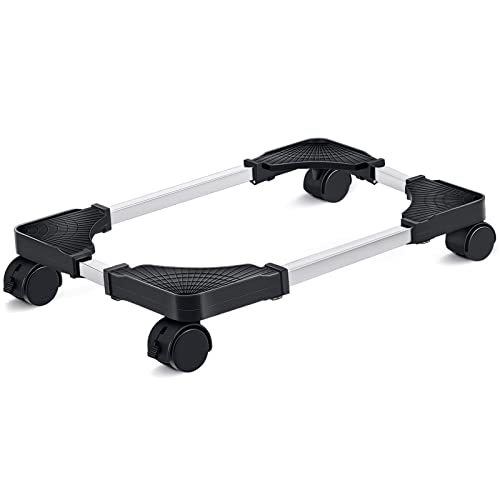
Liitrton Mobile CPU Stand, Adjustable Computer Tower Stand
About this pick
This is a CPU tower stand, not printer-specific furniture, and we are naming it accurately rather than positioning it as something it is not. Its low, adjustable height is exactly the kind of compact platform that can work under a desk given a printer's typical 10 to 15 inch height, since the CPU stand itself sits close to the floor.
Rolling casters let you slide a compact printer out for access, matching the same basic function as a purpose-built under-desk printer stand. Confirm your printer's weight against the stand's rated capacity before relying on it, since it was engineered for a computer tower's weight distribution, not a printer's.
Rolling casters for sliding in and out. That said, not designed or marketed as a printer stand. Neither should be a surprise once you know to look for it.
Best for: Buyers with very tight under-desk clearance who need the lowest possible platform height
Check price on AmazonPros
- +Very low profile suits tight under-desk clearance
- +Rolling casters for sliding in and out
- +Adjustable width
- +Lowest price in this list
Cons
- −Not designed or marketed as a printer stand
- −No dedicated cable management
- −Best limited to compact, lightweight printers
Hovadova Adjustable Mobile CPU Stand, Ventilated Computer Tower Stand
About this pick
Another genuine CPU tower stand rather than printer furniture, the Hovadova's ventilated design happens to solve a real under-desk concern: airflow. An enclosed under-desk space limits ventilation, and that matters most for a laser printer, which generates heat and needs airflow to dissipate it properly during longer print jobs.
Four caster wheels let it roll out from under the desk for access, and the adjustable frame fits most compact printer footprints even though it was built around a computer tower's dimensions. As with the Liitrton stand, this is a repurposed platform, not a marketed printer solution, so weigh that against a dedicated stand if ventilation and low price are not your top priorities.
Worth calling out specifically: 4 caster wheels for easy rolling access. The catch is not designed or marketed as a printer stand.
Best for: Buyers using a laser printer under an enclosed desk who want better ventilation than a solid platform
Check price on AmazonPros
- +Ventilated design helps airflow in an enclosed under-desk space
- +4 caster wheels for easy rolling access
- +Adjustable to fit different printer footprints
- +Low price
Cons
- −Not designed or marketed as a printer stand
- −No cable management
- −Best suited to compact printers rather than large AIOs
WALI Computer Monitor Stand with Underneath Storage
About this pick
This is a monitor and laptop riser, not a printer stand, and it is the honest answer for a specific under-desk scenario: when your desk clearance simply is not tall enough for a stand plus printer to fit together at all. Instead of forcing a compact printer under the desk, this riser puts it on top of the desk while still using the vertical space above the desk surface efficiently. It is the cheapest pick in this list, and its underneath storage compartment holds spare ink or cables. It is not an under-desk solution in the literal sense, but it is the practical fallback when the fit-test math for a true under-desk stand does not add up. Works when desk clearance is too tight for any under-desk stand. Set against that, not an actual under-desk placement, sits on top of the desk instead. Both matter when comparing it to the other picks here.
Best for: Buyers whose desk clearance genuinely cannot fit a stand plus printer underneath
Check price on AmazonPros
- +Cheapest pick in this list
- +Works when desk clearance is too tight for any under-desk stand
- +Underneath storage adds a bonus compartment
- +Keeps the printer within easy reach on the desk surface
Cons
- −Not an actual under-desk placement, sits on top of the desk instead
- −Only suits small, light compact printers
- −No cable management
Letaya 3 Drawer Mobile File Cabinet with Lock
About this pick
Marketed as an under-desk mobile file cabinet, the Letaya arrives fully assembled with a locking mechanism across its 3 drawers, useful if you keep sensitive documents near a printer used for tax paperwork or contracts. It is deep enough to sit under most desks with a flat top rated to hold a compact printer.
Being a metal file cabinet first, expect a narrower tabletop depth than a stand built specifically for printer use, and check your printer's footprint against the top surface before ordering. Its locking drawers are the clearest differentiator versus every other pick in this list.
The standout detail is that ships fully assembled. Balancing that out, most expensive pick in this list.
Best for: Buyers who want locked document storage combined with an under-desk printer platform
Check price on AmazonPros
- +Only pick with a genuine locking mechanism
- +Ships fully assembled
- +Durable metal construction
- +Doubles as document storage under the desk
Cons
- −Most expensive pick in this list
- −Tabletop sized for compact printers, not large AIOs
- −Taller than the dedicated low-profile stands
VASAGLE CUSTOS 2-Drawer File Cabinet Printer Stand
About this pick
VASAGLE markets this compact 2-drawer rolling file cabinet directly as a printer stand, and its 15.7 by 16.5 inch footprint fits under most desks without eating up excessive depth. At 27.6 inches tall, though, it runs closer to the upper end of what many standard desks can clear, so this is one to fit-test carefully against your specific desk height.
Its matte black finish and rolling base make it easy to reposition, and the two drawers hold A4 or letter documents directly beneath the printer. Buyers with a lower desk clearance should compare this height against the HUANUO or HOOBRO before ordering.
Compact footprint fits under most desks. That's a real strength, but weigh it against the flip side: 27.6-inch height is taller than the low-profile picks.
Best for: Buyers who want a genuine printer-stand-labeled file cabinet under a taller desk
Check price on AmazonPros
- +Marketed and sized specifically for printer use
- +Compact footprint fits under most desks
- +Two drawers for document storage
- +Clean matte black finish
Cons
- −27.6-inch height is taller than the low-profile picks
- −Needs careful fit-testing against desk clearance
- −Two drawers offer less capacity than a 3-drawer cabinet
SISESOL 2 Drawer File Cabinet with Lock, Narrow Vertical Filing Cabinet
About this pick
The SISESOL is a narrow vertical file cabinet designed to fit under a desk without eating up side-to-side space, with a lock across its 2 drawers for basic document security. Its narrow profile makes it a better fit for a tight under-desk gap than a wider file cabinet or utility cart would be.
Easy assembly is a genuine claim here versus some flat-pack furniture, though as with any file-cabinet-style pick, its flat top is narrower in depth than furniture built specifically as a printer stand, so confirm your printer's base footprint fits before ordering.
Locking drawers for document security. On the other hand, narrower top than dedicated printer stand furniture. Both are worth keeping in mind before deciding.
Best for: Buyers with a narrow under-desk gap who still want locked document storage
Check price on AmazonPros
- +Narrow footprint fits tight under-desk gaps
- +Locking drawers for document security
- +Straightforward assembly
- +Fits multiple document sizes
Cons
- −Narrower top than dedicated printer stand furniture
- −Vertical design has less horizontal surface for larger printers
- −Metal exterior is less warm looking than wood-finish picks
How We Evaluated These Under-Desk Printer Stands
Each pick was assessed across 5 criteria weighted for real-world use.
Desk clearance versus stand-plus-printer height
Compared each stand's height against standard desk clearance (about 24 inches), standing desk minimum clearance (27 inches or more), and adjustable desk range (28 to 30 inches), adding an estimated 10 to 15 inches for the printer itself.
Real usability under an enclosed desk
Weighed honest usability tradeoffs of under-desk placement, including harder access to paper trays, harder visibility of status lights, and whether rolling casters offset those issues by letting the stand slide out.
Noise and ventilation in an enclosed space
Considered whether an enclosed under-desk area could amplify printer noise and whether open-frame designs help airflow, especially relevant for laser printers that generate heat during longer jobs.
Honest product category labeling
Confirmed whether each pick is genuinely printer-specific furniture or a CPU tower stand, monitor riser, or file cabinet repurposed for the role, and framed each one according to what it actually is.
Fit for top-load versus front-load printers
Factored in that a top-load printer needs overhead clearance that an under-desk placement can block entirely, while a front-load printer generally tolerates the confined space better.
How to Choose the Right Under-Desk Printer Stands
By Rating Confidence: Highest Rated vs Most Reviewed
| Your priority | Recommended pick |
|---|---|
| Highest average rating | HUANUO Printer Stand with Cable Management and Storage Drawer |
| Largest review base, strongest reliability signal | HUANUO Printer Stand with Cable Management and Storage Drawer |
By Budget
| Budget | Recommended pick |
|---|---|
| Under $10 | WALI Computer Monitor Stand with Underneath Storage |
| Up to $100 | Letaya 3 Drawer Mobile File Cabinet with Lock |
Rolling vs Stationary
Rolling (casters)
Easy to reposition for access or cleaning, worth it if the stand needs to move regularly. In this comparison: HUANUO Printer Stand with Cable Management and Storage Drawer, Liitrton Mobile CPU Stand, Hovadova Adjustable Mobile CPU Stand, VASAGLE CUSTOS 2.
Stationary
More stable under a heavy printer since there's no wheel mechanism to add wobble. In this comparison: HOOBRO 2, WALI Computer Monitor Stand with Underneath Storage, Letaya 3 Drawer Mobile File Cabinet with Lock, SISESOL 2 Drawer File Cabinet with Lock.
Default to stationary unless you specifically need to reposition the stand often.
By Ventilation Clearance
Check each pick's design for open clearance around your printer's exhaust and paper output path before buying, not just its front-facing dimensions. HUANUO Printer Stand with Cable Management and Storage Drawer is the most-reviewed option here if you want the safer bet.
For a Heavy All-in-One Printer Specifically
Look for
A weight capacity with real margin above your printer's actual listed weight, and genuine vibration stability confirmed in reviews, not just static capacity.
In this comparison
Check each pick's listing directly, since weight capacity isn't consistently disclosed across every stand in this comparison.
When to Spend More
Spend more if
Your printer is heavy or used frequently throughout the day, where Letaya 3 Drawer Mobile File Cabinet with Lock's capacity and stability give real headroom over the cheaper picks.
Save if
You have a light, compact printer used only occasionally, where WALI Computer Monitor Stand with Underneath Storage covers the same job at a lower price.
Frequently Asked Questions
How do I know if a printer stand will actually fit under my desk?
Add your desk's clearance (about 24 inches for a standard desk, 27 inches or more for a standing desk at its lowest setting, 28 to 30 inches for an adjustable desk) and compare it against the stand's height plus your printer's height, typically 10 to 15 inches. A 14-inch stand plus a 12-inch printer already totals 26 inches, which will not clear a standard desk even though each piece looks compact separately.
Is it harder to use a printer once it's placed under a desk?
Yes, and it is worth being upfront about it: loading paper, checking status lights, and grabbing printed pages all become harder when the printer sits below desk level rather than at eye level. Stands with rolling casters, like the HUANUO, meaningfully offset this by letting you slide the whole unit out for use.
Can an enclosed under-desk space make a printer louder?
It can. Sound reflecting off the underside of a desk can make a printer's fan or paper feed noticeably louder than the same printer sitting in the open. Open-frame stands like the HOOBRO avoid compounding this effect compared to a fully boxed-in cabinet.
When should I avoid putting a printer under my desk at all?
Skip under-desk placement for an all-in-one with a top-opening scanner lid, since it needs 12 to 15 inches of overhead clearance a desk blocks entirely, and for top-load paper tray printers generally. A desktop riser like the WALI is the more honest fit for those cases.
Do CPU stands or monitor risers actually work as printer stands under a desk?
They can, and we frame them honestly in this list rather than calling them printer furniture. The Liitrton and Hovadova CPU stands sit low and roll easily, which solves the same height-stacking problem a dedicated under-desk printer stand solves, though they lack dedicated cable management and are rated for lighter loads.
Does a laser printer need special consideration for under-desk placement?
Yes. Laser printers generate real heat and need airflow to dissipate it during longer print jobs, and a fully enclosed under-desk cabinet with no ventilation can trap that heat. An open-frame or ventilated stand, like the Hovadova CPU stand, is the safer choice for a laser printer than a solid-sided cabinet.
Bottom Line
best overall: HUANUO Printer Stand with Cable Management and Storage Drawer - best overall under-desk fit pick in this roundup.
See the full rankings above for all picks with pros, cons, and best-for summaries.
Browse on Amazon
All Prime-eligible options with current pricing.
Shop on Amazon →