
7 Best Ultrawide Monitor Stands in 2026
7 best ultrawide monitor stands in 2026, covering both riser/shelf stands and VESA arm mounts, from a $26.99 riser to a heavy-duty 49-inch arm. Compare capacity and adjustability.

New to Amazon Prime?
Get fast, free shipping on every pick in this guide, plus Prime Video and exclusive deals.
Try Prime Free




At a Glance
"Ultrawide monitor stand" actually covers two very different products. A riser or shelf stand is just a platform your monitor's own base sits on top of, no VESA mount needed, cheaper, and it usually adds storage space underneath for a keyboard. An arm or mount stand instead grips your desk and holds the monitor by its VESA pattern, letting you adjust height, tilt, and rotation, which is generally better for posture but requires your monitor to actually have a VESA mount.
Below are 7 ultrawide monitor stands we evaluated across both categories, weighing platform size and weight capacity for the risers and range of motion plus VESA compatibility for the arms, ranging from a $26.99 adjustable-width riser to a $93.98 heavy-duty arm rated for 49" super-ultrawides.
5 Criteria to Look For Before Buying a Ultrawide Monitor Stand
Key buying criteria so you get the right fit the first time.
Confirm your desk can actually grip the mounting base before comparing arms
A monitor arm's clamp or grommet base needs a solid desk edge to grip securely, and this is the real first question to answer before comparing gas spring tension or weight capacity, since a hollow honeycomb-core desktop, a glass top, or a desk under about an inch thick can rule out an entire category of arms regardless of how good the arm itself is.
This matters because discovering after purchase that your desk simply can't mount the arm you bought is a common and entirely avoidable problem.
Check your desk's actual edge thickness and construction (solid, hollow-core, or glass), and confirm the arm's clamp or grommet base is explicitly rated for that construction before ordering.
Check real per-arm weight capacity, not the bundled-stand weight printed on the monitor box
Monitor weight ratings printed on the box often reference the monitor's included stand, not the bare panel weight relevant to a monitor arm, and a monitor arm's real weight capacity needs to match your specific monitor's actual panel weight without its stand, information usually found in the monitor's separate spec sheet rather than the box itself.
This matters directly for a larger or ultrawide monitor, where the gap between stand-inclusive and bare-panel weight can be substantial enough to matter.
Check your monitor's bare panel weight (without its stand) in its official spec sheet, and compare that specifically against the arm's rated capacity, not a generalized weight class.
Verify VESA compatibility for both your monitor and the arm's mounting plate
VESA mounting patterns come in a few standard sizes (75x75mm and 100x100mm are most common), and a mismatch between your monitor's VESA pattern and the arm's mounting plate means the arm simply won't attach, some arms include an adapter for multiple patterns while others support only one.
This matters directly for a monitor with a non-standard or larger VESA pattern, particularly some ultrawide or curved monitors, where assuming universal compatibility can lead to an unusable purchase.
Check your monitor's specific VESA pattern in its spec sheet, and confirm the arm explicitly supports that pattern, either natively or with an included adapter, before ordering.
Understand gas spring tension and how it affects long-term reliability
A gas spring monitor arm relies on an internal pressurized cylinder to hold the monitor at any height with minimal effort, and tension needs to be roughly matched to your monitor's actual weight, a monitor lighter than the spring's calibrated range can drift upward on its own, while pressure calibrated too low for a heavier monitor won't hold position and will slowly droop.
This matters for long-term usability, not just initial setup, since gas springs can also lose tension gradually over years of use.
Check the arm's rated weight range against your monitor's actual weight, favoring a monitor that falls comfortably within the middle of that range rather than at either extreme.
Consider reach and range of motion against your actual desk depth and seating position
An arm's horizontal reach and vertical range of motion determine how far the monitor can extend from the mounting point and how much height adjustment is available, and these dimensions matter differently depending on your desk depth and how far back you sit, a shallow desk needs less reach than a deep one, and a standing desk that changes height throughout the day needs a wider vertical range to stay at eye level.
This matters more for anyone switching between sitting and standing regularly, less for a fixed single seated position.
Check the arm's listed reach and height range against your actual desk depth and how much your seated or standing eye level varies throughout the day.
7 Best Ultrawide Monitor Stands in 2026
WESTREE Dual Monitor Stand Riser
About this pick
The WESTREE is a riser, not an arm, so no VESA mount is needed, your ultrawide's own base simply sits on top of its 35.8" x 10.2" steel-and-wood platform. It holds up to 150 lbs, the highest capacity riser in this list, and assembles in about 2 minutes.
A non-slip surface keeps the monitor from sliding, and the open space underneath fits a keyboard or accessories, adding real desk storage rather than just height. It's the pick for buyers who don't want to deal with VESA compatibility at all.
No VESA mount required, works with any monitor base. That's a real strength, but weigh it against the flip side: fixed height, no tilt or rotation adjustment.
Best for: Buyers who want maximum capacity and don't need height or tilt adjustment
Check price on AmazonPros
- +Highest weight capacity of any riser in this list
- +No VESA mount required, works with any monitor base
- +Very quick 2-minute assembly
- +Adds real storage space underneath
Cons
- −Fixed height, no tilt or rotation adjustment
- −Wider footprint needs a deep enough desk
- −Not a fit for monitors without a stable base of their own
Across-Star Dual Monitor Stand Riser
About this pick
The Across-Star is the cheapest and highest-rated riser in this list, and it's the only one here with adjustable length, 32" to 40", so it can be sized to fit different desk widths rather than committing to one fixed platform size. Metal and wood construction holds up to 80 lbs.
Its modular 3-piece design makes it easy to assemble or break down, and it still leaves storage space underneath for a keyboard or accessories. This is a riser, not an arm, so it needs no VESA mount at all.
Worth calling out specifically: highest-rated pick in this list at 4.7 stars. The catch is 80 lb capacity is lower than the WESTREE riser above.
Best for: Buyers who need a riser sized to fit a specific desk width
Check price on AmazonPros
- +Cheapest riser in this list at $26.99
- +Highest-rated pick in this list at 4.7 stars
- +Only riser here with adjustable width
- +No VESA mount needed
Cons
- −80 lb capacity is lower than the WESTREE riser above
- −Fixed height, no tilt or rotation
- −Modular pieces mean more parts to assemble than a one-piece riser
VIVO Single Monitor Desk Stand (Freestanding)
About this pick
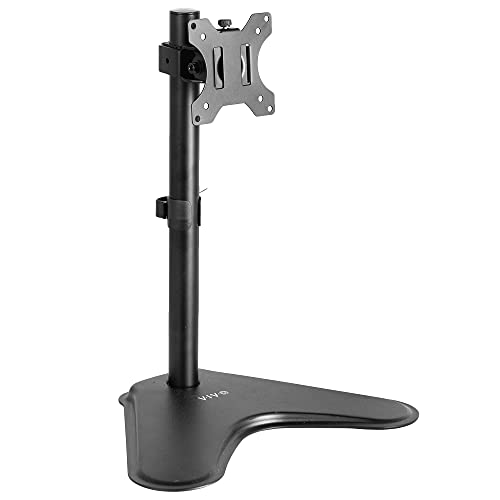
This VIVO is the only pick in this list that's freestanding, it does not clamp to the desk at all, which matters if you're in a rental or office where desk clamping isn't allowed. It supports up to 38" ultrawide monitors via VESA 75/100mm and lifts 18", with 360 degree rotation and plus or minus 15 degrees of tilt.
Because it's an arm-style stand rather than a riser, your monitor needs an actual VESA mount for this to work. Steel construction keeps the base stable despite not being clamped down.
Full height, tilt, and rotation adjustment. Set against that, requires your monitor to have VESA 75/100mm mounting. Both matter when comparing it to the other picks here.
Best for: Desks or offices where clamping to the edge isn't allowed
Check price on AmazonPros
- +Only freestanding pick in this list, no clamping required
- +Full height, tilt, and rotation adjustment
- +Large review base at 5,275 ratings
- +Works where desk clamps aren't allowed
Cons
- −Requires your monitor to have VESA 75/100mm mounting
- −Not rated for true 49" super-ultrawides
- −Freestanding base takes up desk footprint an arm otherwise wouldn't
VIVO Extra Tall Single Monitor Desk Mount
About this pick
This VIVO mount has the tallest pole in this list at 39", supporting ultrawides up to 38" at 22 lbs with plus or minus 90 degrees of tilt and full 360 degree rotation. The extra height makes it a strong fit for both sitting and standing desk setups, since it can position the monitor comfortably at either height.
It's by far the most-reviewed pick in this entire list at over 20,000 ratings, and it mounts via C-clamp or grommet. As a VESA arm rather than a riser, your monitor needs a compatible VESA mount.
A genuine advantage here is that tallest pole here, good for standing desk setups. The tradeoff is 22 lb capacity limits it to 38" and under.
Best for: Sit-stand desks that need extra height range from the mount itself
Check price on AmazonPros
- +Most-reviewed pick in this entire list by a wide margin
- +Tallest pole here, good for standing desk setups
- +Wide ±90° tilt range
- +Affordable at $39.59
Cons
- −22 lb capacity limits it to 38" and under
- −Not built for true 49" super-ultrawide weight
- −Requires a VESA-compatible monitor
VIVO Dual Vertically Stacked Monitor Stand
About this pick
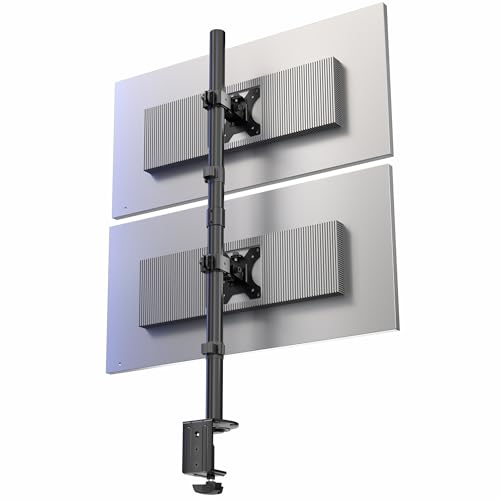
This is the only pick in this list designed to stack two ultrawide monitors vertically, up to 34" each, rather than mounting a single wide panel or spreading two side by side. Each arm is rated for 22 lbs on a 28.5" pole, with plus or minus 15 degrees of tilt and 360 degree rotation on each arm independently.
Steel and aluminum construction mounts via C-clamp or grommet. It's a niche pick, useful specifically for buyers who want two 34" ultrawides stacked to save desk width rather than a single 49" super-ultrawide.
Saves desk width compared to side-by-side monitors. That's a real strength, but weigh it against the flip side: only supports up to 34" per monitor, not 49" ultrawides.
Best for: Buyers stacking two 34" ultrawides vertically instead of using one wide panel
Check price on AmazonPros
- +Only pick in this list built for vertical dual-stacking
- +Saves desk width compared to side-by-side monitors
- +Independent tilt and rotation per monitor
- +Steel and aluminum build
Cons
- −Only supports up to 34" per monitor, not 49" ultrawides
- −Niche use case, not a fit for single wide-panel setups
- −22 lb per-arm limit rules out heavier curved panels
OImaster Monitor Stand Riser with USB 3.0 Hub
About this pick
The OImaster is a riser, not an arm, and it's the only one in this list with a built-in USB 3.0 hub plus a USB-C port, adding real functionality beyond just lifting the monitor. It adjusts to 3 height settings, 16.5", 18.5", and 20.5", and holds 50-55 lbs.
ABS and metal construction includes a phone holder and a storage drawer, and it folds flat for travel or storage when not in use. No VESA mount is required since your monitor's base rests on top.
Worth calling out specifically: 3 adjustable height settings, more flexible than a fixed riser. The catch is smaller review sample than the other risers.
Best for: Buyers who want a riser that doubles as a USB hub and phone holder
Check price on AmazonPros
- +Only riser in this list with a built-in USB 3.0 hub
- +3 adjustable height settings, more flexible than a fixed riser
- +Includes a phone holder and storage drawer
- +Folds flat for travel or storage
Cons
- −Smaller review sample than the other risers
- −50-55 lb capacity is lower than the WESTREE riser
- −No VESA arm functionality, height adjusts only in fixed steps
HUANUO TitanLift Heavy Duty Monitor Arm
About this pick
The TitanLift is the true heavy-duty arm-style stand in this list, built to hold screens up to 49" at 44 lbs with an arm 20% thicker and a base 30% wider than the brand's standard model, engineering aimed directly at the torque sag curved super-ultrawides cause over time. It's been tested through 50,000 movement cycles.
Premium aluminum construction, a dual C-clamp mount, and a 5-year warranty, the longest in this list, back it up. It's also the highest-rated pick in this entire guide at 4.7 stars, and unlike every riser above, it does require your monitor to have a VESA mount.
Only pick here rated for true 49" super-ultrawide weight. Set against that, requires a VESA-compatible monitor, unlike the risers above. Both matter when comparing it to the other picks here.
Best for: 49" super-ultrawide owners who want full arm adjustability instead of a fixed riser
Check price on AmazonPros
- +Highest-rated pick in this entire list at 4.7 stars
- +Only pick here rated for true 49" super-ultrawide weight
- +Longest warranty in this list at 5 years
- +Full height, tilt, and rotation adjustment
Cons
- −Requires a VESA-compatible monitor, unlike the risers above
- −Most expensive pick in this list
- −Dual C-clamp needs a compatible desk edge
How We Evaluated These Ultrawide Monitor Stands
Each pick was assessed across 5 criteria weighted for real-world use.
Category fit: riser vs arm
Judged each pick against what it's actually built to do, a riser adding storage and stability with no VESA requirement, or an arm adding adjustability that requires a VESA mount.
Weight and platform capacity
Compared rated lb capacity and platform size for risers, and rated lb capacity plus VESA size for arms, against realistic ultrawide monitor weights.
Adjustability
For arm-style stands, scored height range, tilt range, and rotation. For risers, scored whether height was fixed, stepped, or otherwise adjustable.
Desk compatibility
Checked mounting method, C-clamp, grommet, or freestanding, against common desk edge types and situations where clamping isn't allowed.
Added functionality and value
Weighed extras like USB hubs, storage drawers, or vertical dual-stack design against price to see which picks added real utility beyond just holding the monitor up.
How to Choose the Right Ultrawide Monitor Stands
By Rating Confidence: Highest Rated vs Most Reviewed
| Your priority | Recommended pick |
|---|---|
| Highest average rating | Across |
| Largest review base, strongest reliability signal | VIVO Extra Tall Single Monitor Desk Mount |
By Budget
| Budget | Recommended pick |
|---|---|
| Under $27 | Across |
| Up to $94 | HUANUO TitanLift Heavy Duty Monitor Arm |
Dual-Monitor Arm vs Single-Monitor Arm
Dual-monitor arm
Mounts two monitors from one clamp point, worth checking the combined weight rating. In this comparison: WESTREE Dual Monitor Stand Riser, Across, VIVO Dual Vertically Stacked Monitor Stand, HUANUO TitanLift Heavy Duty Monitor Arm.
Single-monitor arm
Simpler and usually cheaper per monitor, fine for a one-screen setup. In this comparison: VIVO Single Monitor Desk Stand, VIVO Extra Tall Single Monitor Desk Mount, OImaster Monitor Stand Riser with USB 3.0 Hub.
Default to single arms unless you're mounting two monitors from the same desk clamp point.
By Mounting Method
| Desk situation | Recommended pick |
|---|---|
| Standard desk edge, clamp mount | VIVO Single Monitor Desk Stand |
| Need a grommet hole mount instead | WESTREE Dual Monitor Stand Riser |
For a Standing Desk Specifically
Look for
A wide vertical height range to stay at eye level through sit-stand transitions, plus a clamp rated for your desk's edge thickness.
In this comparison
VIVO Extra Tall Single Monitor Desk Mount is worth checking against its listed height range before buying, given its strong review base.
When to Spend More
Spend more if
You have a heavier or ultrawide monitor, where HUANUO TitanLift Heavy Duty Monitor Arm's weight capacity and gas spring quality give real headroom over the cheaper picks.
Save if
You have a light, standard monitor and just want basic height adjustment, where Across covers the same job at a lower price.
Frequently Asked Questions
What's the difference between a monitor riser and a monitor arm?
A riser is a platform your monitor's own base sits on top of, no VESA mount needed, and it's usually cheaper while adding storage space underneath. A monitor arm clamps or mounts to the desk and holds the monitor by its VESA pattern instead, letting you adjust height, tilt, and rotation, but it only works if your monitor actually has a VESA mount.
Do I need a VESA mount for an ultrawide monitor stand?
Only if you're buying an arm-style stand. Risers like the WESTREE, Across-Star, and OImaster in this list need no VESA mount at all since the monitor's existing base rests on the platform. Arms like the VIVO or HUANUO picks require your monitor to have a VESA 75mm or 100mm mounting pattern.
Which stand in this list works for a true 49" super-ultrawide?
The HUANUO TitanLift is the only arm-style stand in this list rated for up to 49" at 44 lbs, with reinforcement specifically for the torque a curved super-ultrawide panel adds. The WESTREE riser can also handle a 49" monitor's weight at up to 150 lbs since it's not VESA-dependent, as long as the monitor's own base fits the platform.
Can I use a riser if I want the option to add an arm mount later?
Not directly, a riser and an arm are two different mounting approaches and aren't interchangeable on the same monitor at the same time. If you think you might want height and tilt adjustability down the line, it's worth starting with an arm-style stand instead of a riser, provided your monitor has a VESA mount.
Why would I choose a freestanding stand instead of a clamp-on arm?
A freestanding stand like the VIVO pick in this list doesn't clamp to the desk edge at all, which matters in rentals or shared offices where desk clamping isn't allowed. It still takes up desk footprint since nothing is anchored, so it's a solution for mounting restrictions, not for saving desk space.
Bottom Line
best overall: WESTREE Dual Monitor Stand Riser - cheapest riser pick in this roundup.
See the full rankings above for all picks with pros, cons, and best-for summaries.
Browse on Amazon
All Prime-eligible options with current pricing.
Shop on Amazon →