
6 Best Trackball Mice Under $75 in 2026
Six trackball mice from $37 to $60 compared by ball size, thumb or finger control, tilt, connectivity and hand fit, with a clear pick for each buyer.

New to Amazon Prime?
Get fast, free shipping on every pick in this guide, plus Prime Video and exclusive deals.
Try Prime Free



At a Glance
A trackball mouse never moves, so the price question is really a question about what your hand and thumb will feel for the next six hours. Under $75 you get everything from a 34mm thumb ball on a brand-name vertical shell to an oversized 55mm ball that suits either hand.
The six picks here are all priced between $37 and $60, so none stretches the cap. They split into thumb-operated and finger-operated designs, and that split matters more than the price differences inside the group. We compared listed ball size, tilt, connectivity and hand-size notes from spec sheets and buyer feedback, and we gave no weight to the polite language marketing teams use around wrist strain.
6 Criteria to Look For Before Buying a Trackball Mice Under $75
Key buying criteria so you get the right fit the first time.
Thumb ball versus finger ball
A thumb ball sits at the side and is rolled by your thumb, so it feels closest to a regular mouse. A finger ball sits in the center and uses your index and middle fingers, spreading load to different muscles. Check whether the listing says thumb-operated or finger-operated, because the two feel very different.
Ball size
A bigger ball gives finer cursor control at the cost of reach. Thumb balls are around 34mm, while finger balls run 44 to 55mm. Check the ball diameter in millimeters in the spec list.
Vertical tilt angle
A steeper tilt of 60 to 65 degrees turns the forearm toward a handshake position. It is a big change from a flat mouse. Look for a stated degree and expect an adjustment period of a week or two.
Hand size and handedness
Thumb models are usually right-handed and shaped for average hands. Finger balls like the 55mm Nulea suit left-handers. Check for the word ambidextrous in the title and compare the listing's size note with your hand.
Connectivity and battery
Bluetooth plus a USB receiver gives you fallback options, and a rechargeable cell avoids AA swaps. The Kensington adds a wired USB-C mode and four-device pairing. Check the number of devices and battery type.
Cleaning and bearings
Dust and skin oils collect under the ball, and a sticky ball is the top complaint with trackballs. A ball you can push out without tools makes cleaning easy. Check for a removable ball and a push-out hole on the underside.
6 Best Trackball Mice Under $75 in 2026
Kensington TB675 Wireless Vertical Trackball
About this pick
Kensington's TB675 has a 60 degree vertical shell, a 34mm thumb-operated ball, a high-precision optical sensor and four DPI steps from 400 to 1600. It connects through a 2.4GHz dongle, dual Bluetooth or a wired USB-C cable, and a selector switches among up to four devices.
At about $60 it costs $15 more than the Nulea 65 degree model and is the only pick listing a wired USB-C option and four-device pairing. The listing says the shape suits average-sized hands, so it is a poor match for very large or small hands.
Choose it if you split time across a laptop, desktop and tablet. The caveat is the price, which is the highest here, for a smaller ball than the finger models.
Best for: Multi-device desk users
Check price on AmazonPros
- +Four-device connectivity
- +Wired USB-C fallback
- +Rechargeable and vertical
- +Clear hand-size guidance
Cons
- −Highest price in list
- −Smaller 34mm ball
Nulea 65 Degree Vertical Thumb Trackball Mouse
About this pick
This Nulea has a 65 degree vertical angle, a wave-textured palm shape, a thumb-controlled trackball, quiet clicks and a rechargeable battery. Its infinite scroll wheel switches between precise and fast modes based on how quickly you spin it, with 4-way scrolling.
At $45 it is about $15 cheaper than the Kensington and has a steeper tilt, but no wired mode or multi-device selector is mentioned. Compared with the JOMAA, it costs about $8 more and adds the scroll behavior and quiet clicks.
Best for a thumb-trackball newcomer who wants a steep vertical angle for less. The caveat is that 65 degrees is a big posture change that may take time to feel natural.
Best for: First vertical thumb trackball
Check price on AmazonPros
- +Steep 65 degree tilt
- +Quiet clicks
- +Rechargeable
- +Smart scroll wheel
Cons
- −No wired mode listed
- −Steep angle takes adjusting
PORLEI 44mm Finger Trackball Mouse
About this pick
PORLEI uses a 44mm index finger trackball with five DPI levels, aimed at larger hands and small-desk setups. The listing says the ball stays in place, so the mouse needs no desk sweep.
At about $44 it costs $1 less than the Nulea 65 degree and moves control to the finger, which spreads strain to different muscles than a thumb ball. Against the Adesso it has a larger ball but fewer buttons.
Best for a large-handed user who wants finger control. The caveat is that the listing is short on battery and connectivity detail.
Best for: Large hands, finger control
Check price on AmazonPros
- +Large 44mm ball
- +Five DPI settings
- +Finger control spreads load
- +Stays put on small desks
Cons
- −Connectivity detail is thin
- −Fewer buttons than the Adesso
Adesso iMouse T40 Wireless Finger Trackball
About this pick
Adesso's iMouse T40 has a built-in 1.5 inch trackball, an ergonomic contour, a nano USB receiver, seven programmable buttons and DPI from 400 to 4800. The ball is removable by pushing it out from underneath, which makes cleaning easy.
At $42 it costs $2 less than PORLEI and gives more buttons and a wider DPI range. Against the Nulea 55mm, it has a smaller ball and no ambidextrous claim.
Best for people who want to program buttons and keep the ball clean. The caveat is that the listing is older and plainer in style than the newer models.
Best for: Programmable buttons and easy cleaning
Check price on AmazonPros
- +Seven programmable buttons
- +Wide 400 to 4800 DPI range
- +Easy ball removal
- +Nano USB receiver
Cons
- −Receiver only, no Bluetooth listed
- −Plain styling
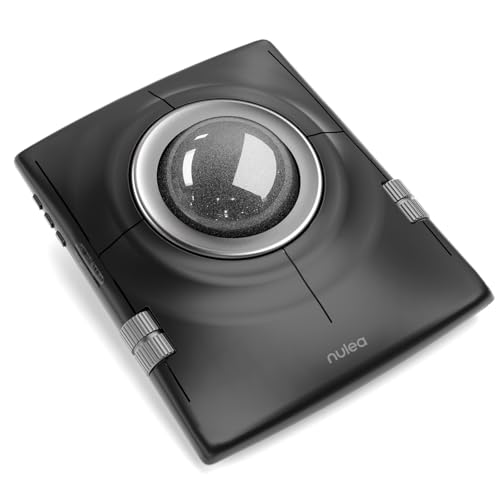
Nulea 55mm Ambidextrous Trackball Mouse
About this pick
This Nulea has a 55mm oversized trackball, four DPI levels from 400 to 1600, an ambidextrous design and Bluetooth, aimed at design, editing and everyday work. The oversized ball is the headline feature.
At about $40 it is $2 cheaper than the Adesso and has the largest ball in the list. A thumb model like the Kensington will feel more like a normal mouse, whereas this one rewards finger control and left-handers.
Best for left-handed users or anyone who wants a big ball. The caveat is the ball size, which may feel stretched for small hands.
Best for: Left-handers and precision work
Check price on AmazonPros
- +Largest 55mm ball
- +Works for left or right hand
- +Four DPI steps
- +Low price
Cons
- −Large ball for small hands
- −Details on battery are thin
JOMAA Dual Mode Vertical Thumb Trackball
About this pick
JOMAA is a vertical thumb-control trackball with 2.4GHz and Bluetooth dual modes, five buttons plus a scroll wheel, three CPI levels from 800 to 1600, quiet clicks and a built-in 500mAh battery. The shell is tilted to bring the hand toward a handshake position.
At about $37 it is the cheapest pick and $8 under the Nulea 65 degree. It gives up the Nulea's scroll mode and has fewer DPI steps.
Best for trying a thumb trackball at the lowest price. The caveat is that the listing says less about tilt angle than the others.
Best for: Cheapest way to try a trackball
Check price on AmazonPros
- +Lowest price in list
- +Dual wireless modes
- +Quiet clicks
- +Rechargeable battery
Cons
- −Tilt angle not stated
- −Fewer CPI steps
How We Evaluated These Trackball Mice Under $75
Each pick was assessed across 5 criteria weighted for real-world use.
Ball and control type
We compared thumb and finger designs and ball diameters.
Tilt and fit
We compared tilt angles and hand-size notes.
Connectivity
We compared Bluetooth, receivers, wired options and device counts.
Cleaning
We noted removable balls and button layouts.
Price
We compared price across the six, all under $60.
How to Choose the Right Trackball Mice Under $75
By Control Style
| Your preference | Recommended pick |
|---|---|
| Thumb ball, multi-device | Kensington TB675 Wireless Vertical Trackball |
| Thumb ball, steepest tilt | Nulea 65 Degree Vertical Thumb Trackball Mouse |
| Finger ball for large hands | PORLEI 44mm Finger Trackball Mouse |
| Finger ball, programmable buttons | Adesso iMouse T40 Wireless Finger Trackball |
By Budget
| Price range | Recommended pick |
|---|---|
| $36 to $40 | JOMAA Dual Mode Vertical Thumb Trackball |
| $40 to $42 | Nulea 55mm Ambidextrous Trackball Mouse |
| $42 to $45 | Adesso iMouse T40 Wireless Finger Trackball |
| $45 to $60 | Kensington TB675 Wireless Vertical Trackball |
Thumb Ball vs Finger Ball
Thumb ball
Feels closest to a normal mouse. Kensington TB675 Wireless Vertical Trackball, Nulea 65 Degree Vertical Thumb Trackball Mouse and JOMAA Dual Mode Vertical Thumb Trackball are thumb models.
Finger ball
Spreads load to fingers. PORLEI 44mm Finger Trackball Mouse, Adesso iMouse T40 Wireless Finger Trackball and Nulea 55mm Ambidextrous Trackball Mouse are finger models.
Most first-timers should start with a thumb model.
By Handedness and Hand Size
| Your hand | Recommended pick |
|---|---|
| Left-handed | Nulea 55mm Ambidextrous Trackball Mouse |
| Large hands | PORLEI 44mm Finger Trackball Mouse |
| Average right hand | Kensington TB675 Wireless Vertical Trackball |
| Small to average right hand, cheap | JOMAA Dual Mode Vertical Thumb Trackball |
For Laptop and Desktop Switchers Specifically
Look for
Multi-device pairing and a wired fallback.
In this comparison
Kensington TB675 Wireless Vertical Trackball pairs four devices with a USB-C wired mode.
When to Spend More
Spend more if
You switch devices daily, as with Kensington TB675 Wireless Vertical Trackball.
Save if
You are trying a trackball for the first time, where JOMAA Dual Mode Vertical Thumb Trackball is enough.
Frequently Asked Questions
Do I need to learn a trackball?
Expect a week or two to feel natural, and precision for fast games is lower than with a mouse. Check the return window before buying.
Is a left-hand trackball available?
Finger models such as the Nulea 55mm are ambidextrous. Thumb models are usually right-hand only.
Is the Kensington worth $15 more than the Nulea?
If you use several devices or want a wired USB-C mode, yes. For one computer, the Nulea 65 degree is the better value.
How do I clean it?
Push the ball out from underneath and wipe the rollers every few weeks. The Adesso is built for this.
Will it help wrist pain?
A trackball reduces wrist movement and may feel more comfortable, but it is a comfort product, not a medical device. See a doctor for persistent pain.
Bottom Line
best overall: Kensington TB675 Wireless Vertical Trackball - best overall pick in this roundup.
See the full rankings above for all picks with pros, cons, and best-for summaries.
Browse on Amazon
All Prime-eligible options with current pricing.
Shop on Amazon →