
5 Best Trackball Mice Under $50 in 2026
Five trackball mice at $49.99 or less compared by ball size, tilt, vertical grip, battery claims and device pairing for mid-budget desks.

New to Amazon Prime?
Get fast, free shipping on every pick in this guide, plus Prime Video and exclusive deals.
Try Prime Free



At a Glance
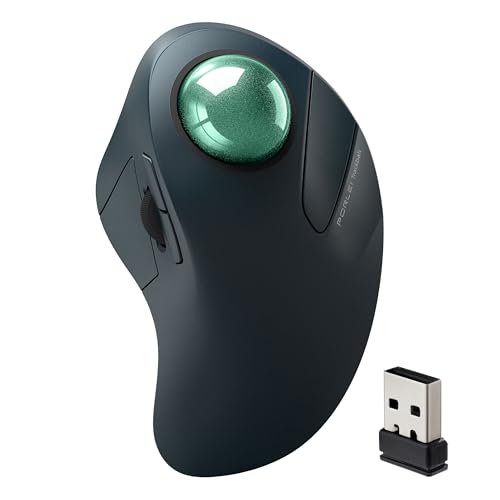
Porlei Wireless Index Finger Trackball for Large Hands (44mm)
↓ See why we picked itFifty dollars opens up larger balls, vertical shells and longer battery claims that the sub-$30 group skips. It is also where a few extras start to matter: a 44mm finger ball, 120 days between charges or a tilt hinge that actually adjusts.
The five picks are all listed at $49.99 or less, and they cover a tilting thumb ball, two 44mm finger balls, a vertical SANWA and an ambidextrous YUMQUA that runs on AAA. We compared them on listed specs, such as ball size, angle and battery claims. Because the listings are from lesser-known brands, we also noted how clearly each states its details.
6 Criteria to Look For Before Buying a Trackball Mice Under $50
Key buying criteria so you get the right fit the first time.
Finger ball versus thumb ball at this price
Under $50 you can get either style from lesser-known brands, and each loads a different part of the hand. Thumb balls feel closest to a regular mouse, while finger balls spread work across the index and middle fingers. Look for thumb or finger wording in the title, and test it in the return window.
Battery claims
Listings quote 60 days, 120 days or 21 days, but those are manufacturer claims measured in light use. Heavy daily use drains faster, and a sealed cell eventually fades. Look for the cell size and the exact claim wording, and treat any number as a best case.
Vertical versus flat shells
A 54 degree vertical shell puts your hand in a handshake position, which reduces palm-down forearm twist. It takes a week or two to feel natural, and not every hand fits. Look for a stated degree and a hand size note such as medium hands.
Number of device slots
Some models pair three devices while others pair two, and a few are receiver only. That matters if you switch between a laptop and a tablet. Check the device count and whether the receiver counts as one.
Software remapping
Button remapping lets you assign shortcuts such as back, copy or a DPI change to the extra buttons. Some models need vendor software for this, and a few use a web tool instead, so the feature can vanish on an unsupported system. Check whether the listing names a Windows or Mac app before you rely on custom shortcuts.
Brand support and warranty
At this price you meet brands with thin support records. A stated warranty or return window is your safety net. Check the listing for warranty text and the marketplace return policy.
5 Best Trackball Mice Under $50 in 2026
SABLUTE MAM1 Pro Wireless Thumb Trackball (Purple Ball)
About this pick
The MAM1 Pro offers a 0 or 18 degree angle, a rechargeable battery with backlight, and five DPI levels from 800 to 4800. It connects to three devices by Bluetooth and USB and has silent clicks.
It sits at the top of the price cap, and compared with the Nulea M505A Wireless Index Finger Trackball (44mm) it uses a thumb ball rather than a finger ball. Against the SANWA Vertical Wireless Trackball Mouse (54 Degree), it is a flat or gently tilted body, while the SANWA is vertical.
A good match for a thumb-ball user who wants a tilt choice and the widest DPI range in the group. The caveat is that this purple-ball version costs more than the grey-ball version of the same mouse sold elsewhere, so compare variants.
Best for: Tilt, backlight and fast DPI range
Check price on AmazonPros
- +Two tilt positions
- +Widest DPI range here
- +Rechargeable with backlight
- +Silent clicks
Cons
- −Priciest in the group
- −Thumb ball only
Nulea M505A Wireless Index Finger Trackball (44mm)
About this pick
The M505A has a 44mm index finger trackball, five DPI modes and a rechargeable battery that the listing says lasts up to 60 days. It pairs with three devices over Bluetooth or a USB receiver.
Compared with the Porlei Wireless Index Finger Trackball for Large Hands (44mm), it is a couple of dollars pricier with a shorter claimed battery life, though the ball is the same 44mm. Against the SABLUTE MAM1 Pro Wireless Thumb Trackball (Purple Ball), it moves control to the fingers and spreads the effort.
A fit for a desk that wants a mid-size finger ball. The caveat is that the 60 day figure is the maker's claim, and real use will vary.
Best for: A larger finger-rolled ball with recharging
Check price on AmazonPros
- +Larger 44mm ball
- +Rechargeable, 60 day claim
- +Three device pairing
- +Five DPI modes
Cons
- −Costs more than the Porlei
- −Battery life is a claim
Porlei Wireless Index Finger Trackball for Large Hands (44mm)
About this pick
The Porlei wireless trackball has a 44mm index finger ball, five DPI levels, and a rechargeable battery the listing says lasts up to 120 days. It connects through Bluetooth or the included USB receiver to three devices.
It undercuts the Nulea M505A Wireless Index Finger Trackball (44mm) and claims twice the battery life. Compared with the YUMQUA Wireless Finger Trackball Handheld Mouse, it is rechargeable rather than AAA and has Bluetooth.
Best for large hands that want infrequent charging. The caveat is that 120 days is a claim, and the listing is light on button detail.
Best for: Large hands wanting long charge gaps
Check price on AmazonPros
- +Longest battery claim here
- +Suits large hands
- +Bluetooth and receiver
- +Lower price than the Nulea
Cons
- −Battery figure is a claim
- −Few button details
SANWA Vertical Wireless Trackball Mouse (54 Degree)
About this pick
SANWA's vertical trackball uses a 54 degree angle, switchable between a 2.4GHz receiver and Bluetooth for two devices, with silent clicks and three DPI levels. The listing says it is for medium hands and right-handed users, and the buttons can be remapped through software.
It is the only vertical shell in the group, and compared with the SABLUTE MAM1 Pro Wireless Thumb Trackball (Purple Ball) it changes your whole forearm position rather than tilting slightly. Against the YUMQUA Wireless Finger Trackball Handheld Mouse, it costs a bit more and is aimed at one hand.
A fit for right-handed medium hands wanting a handshake grip. The caveat is that it offers only two device slots and three DPI steps.
Best for: Medium right hands wanting a handshake grip
Check price on AmazonPros
- +Handshake position
- +Silent clicks
- +Software remapping
- +Two connection types
Cons
- −Right hand and medium hands only
- −Only 3 DPI levels
YUMQUA Wireless Finger Trackball Handheld Mouse
About this pick
YUMQUA's wireless handheld trackball has a 2.4GHz receiver, four DPI levels from 400 to 1200, an ambidextrous shape and runs on a single AAA battery included in the box. The listing mentions PS/2 or USB compatibility.
It is the cheapest pick, and the only handheld, so compared with the SABLUTE MAM1 Pro Wireless Thumb Trackball (Purple Ball) it trades desk stability for off-table freedom. Against the Porlei Wireless Index Finger Trackball for Large Hands (44mm), it has no Bluetooth.
A fit for couch use or presenting. The caveat is lower precision and a smaller feature list than the desk trackballs.
Best for: Presentations and off-table use
Check price on AmazonPros
- +Off-table design
- +Either hand works
- +Battery included
- +Lowest price in list
Cons
- −Less precise
- −No Bluetooth
How We Evaluated These Trackball Mice Under $50
Each pick was assessed across 5 criteria weighted for real-world use.
Ball size and style
We compared finger and thumb designs and listed ball diameters.
Angle and shell shape
Tilt options and vertical shells were noted from the listing text.
Battery and connection
Charge claims, device counts and Bluetooth support were compared.
Listing clarity
We noted how clearly each listing states its specs, since brand support varies.
Value for price
Pricing was read against listed hardware and common owner feedback, not brand reputation.
How to Choose the Right Trackball Mice Under $50
By Control Style
| Your situation | Recommended pick |
|---|---|
| You want a thumb ball with tilt options | SABLUTE MAM1 Pro Wireless Thumb Trackball (Purple Ball) |
| You want a bigger finger ball | Nulea M505A Wireless Index Finger Trackball (44mm) |
| You have large hands and want long charge gaps | Porlei Wireless Index Finger Trackball for Large Hands (44mm) |
| You want a vertical handshake shell | SANWA Vertical Wireless Trackball Mouse (54 Degree) |
| You want a handheld | YUMQUA Wireless Finger Trackball Handheld Mouse |
By Budget
| Budget | Recommended pick |
|---|---|
| $32 to $33 | YUMQUA Wireless Finger Trackball Handheld Mouse |
| $39 to $40 | SANWA Vertical Wireless Trackball Mouse (54 Degree) |
| $43 to $44 | Porlei Wireless Index Finger Trackball for Large Hands (44mm) |
| $45 to $46 | Nulea M505A Wireless Index Finger Trackball (44mm) |
| $49 to $50 | SABLUTE MAM1 Pro Wireless Thumb Trackball (Purple Ball) |
Desk Trackball vs Handheld
Desk trackball
A desk model stays put and gives better precision. The SABLUTE MAM1 Pro Wireless Thumb Trackball (Purple Ball), Nulea M505A Wireless Index Finger Trackball (44mm), Porlei Wireless Index Finger Trackball for Large Hands (44mm) and SANWA Vertical Wireless Trackball Mouse (54 Degree) are desk models.
Handheld
A handheld is held in the air and needs no surface. The YUMQUA Wireless Finger Trackball Handheld Mouse is the handheld pick.
Most buyers should choose a desk model unless they present or work from a couch.
Hand Size and Grip
| Your situation | Recommended pick |
|---|---|
| You have large hands | Porlei Wireless Index Finger Trackball for Large Hands (44mm) |
| You have medium hands and a right hand | SANWA Vertical Wireless Trackball Mouse (54 Degree) |
| You want to share with a left-hander | YUMQUA Wireless Finger Trackball Handheld Mouse |
| You want to keep your wrist flat | SABLUTE MAM1 Pro Wireless Thumb Trackball (Purple Ball) |
For a Mid-Budget Home Office Specifically
Look for
Rechargeable battery, three-device pairing and a ball you can roll with relaxed fingers.
In this comparison
The Nulea M505A Wireless Index Finger Trackball (44mm) and Porlei Wireless Index Finger Trackball for Large Hands (44mm) both list 44mm finger balls with three-device pairing.
When to Spend More
Spend more if
You want a brand with longer support history, which means stepping above $50 to models like the Logitech line.
Save if
You want only basic wireless control, where the YUMQUA Wireless Finger Trackball Handheld Mouse costs the least.
Frequently Asked Questions
Is a 44mm ball better than a 34mm thumb ball?
A larger ball usually gives smoother, finer cursor control but needs a wider body and more finger reach. A 34mm thumb ball is easier to learn. Pick based on hand size and comfort.
Are 60 or 120 day battery claims realistic?
They are manufacturer claims, typically measured with light use. Expect less if you use the mouse for many hours daily. Treat them as a best case.
Can I use these with a tablet?
Models with Bluetooth, such as the SABLUTE, Nulea and Porlei, can pair with tablets that accept Bluetooth mice. Receiver-only models need a USB port. Check the listing.
Is a vertical trackball worth trying?
It can ease forearm twist, but it feels odd at first. SANWA's version is aimed at medium right hands. Use the return window to test.
Is the SABLUTE worth the top of the price band?
It is worth it if you want a tilt choice and a wide DPI range. If you prefer a finger ball, the Nulea or Porlei costs a little less. Compare variants of the same model.
How do I clean a finger trackball?
Pop the ball out through the hole on the underside and wipe the ball and rollers. Do it every few weeks. Use a lint-free cloth.
Bottom Line
best overall: SABLUTE MAM1 Pro Wireless Thumb Trackball (Purple Ball) - best overall under $50 pick in this roundup.
See the full rankings above for all picks with pros, cons, and best-for summaries.
Browse on Amazon
All Prime-eligible options with current pricing.
Shop on Amazon →