
5 Best Trackball Mice Under $30 in 2026
Five trackball mice priced at $29.99 or less, compared by tilt, battery, pairing and handheld options, for anyone testing a trackball without a big spend.

New to Amazon Prime?
Get fast, free shipping on every pick in this guide, plus Prime Video and exclusive deals.
Try Prime Free



At a Glance
Thirty dollars is enough to find out whether a trackball suits you, which is the real question for a first-timer. The learning curve is a week or two, and a cheap model lets you survive that without regret if the idea does not stick.
All five picks below are listed at $29.99 or less. They split into rechargeable tilted thumb balls, an AAA-powered one, a vertical 55 degree body and a tiny wired handheld. We compared them on listed specs and warranty text, and we note where a spec sheet is thin. Cheap listings often skip details such as battery life, so read the page before ordering.
6 Criteria to Look For Before Buying a Trackball Mice Under $30
Key buying criteria so you get the right fit the first time.
What a budget trackball skips
Under $30 you usually give up a recognised brand, a long battery claim and polished software. The cheaper listings often omit battery life, ball diameter or polling rate entirely. Read the bullets for the specs that are present and treat missing numbers as a reason to check the return policy.
Rechargeable or AAA
A sealed rechargeable cell costs nothing to run but cannot be swapped when it fades, while AAA cells cost a couple of dollars a few times a year and can be changed in seconds. On a budget model the sealed cell is the part most likely to wear out first. Look for the battery type in the title or bullets, and a capacity such as 500mAh for rechargeable units.
Warranty and return window
A cheap trackball is a risk if it arrives with a sticky ball or a dead button. A written guarantee, such as one year replacement or a 60 day refund, turns that into a free retry. Check the warranty text on the listing and the marketplace return window.
Tilt versus vertical shape
A tilted body of 15 to 30 degrees lifts the outer edge of your hand, while a vertical shell near 55 degrees puts it in a handshake position. A steeper angle can reduce forearm twist but takes longer to feel natural. Look for the degree figure in the title and expect a week or two of adjustment.
Connection options at a low price
Bluetooth with a three-device switch is common even at this price, but some models only offer a USB receiver. A receiver-only unit loses a USB port and cannot pair with a tablet. Check the listing for Bluetooth and the device count.
Handheld trade-offs
A handheld mini needs no desk surface, which suits a laptop bag, but its small ball and body give less precise control than a desk trackball. It is a convenience tool, not a primary mouse. Check the weight and dimensions in the listing.
5 Best Trackball Mice Under $30 in 2026
EDJO Wireless Thumb Trackball Mouse, 30 Degree Tilt
About this pick
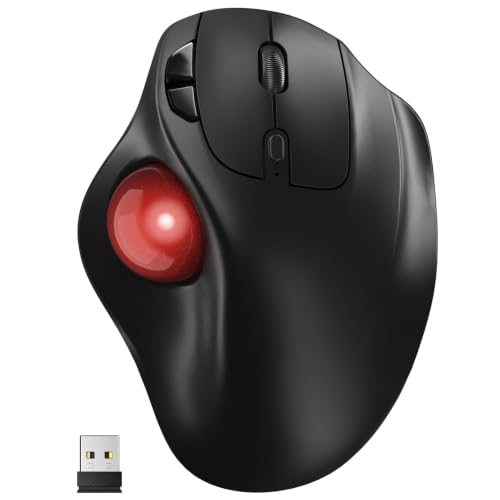
The EDJO is a stationary thumb trackball with a 30 degree tilt, five DPI levels and a built-in 500mAh battery that charges over USB-C. It pairs with three devices over Bluetooth or 2.4GHz.
At the top of the price band, it gives the most complete feature list, including a steeper tilt than any other pick here. Compared with the Yadkbo Ergonomic Wireless Trackball Mouse, it replaces disposable AAA cells with a rechargeable one. Against the MicroPack Vertical Wireless Trackball Mouse (55 Degree), it tilts less than that model's vertical shell but pairs more devices.
Choose it if you want a rechargeable, tilted thumb ball for the least money. The caveat is that a 30 degree tilt is steep and takes getting used to, and the listing gives no battery life figure.
Best for: Rechargeable tilt on a small budget
Check price on AmazonPros
- +Steep tilt for forearm posture
- +Rechargeable via USB-C
- +Three device pairing
- +Stays in place on any desk
Cons
- −Steep tilt takes adjusting
- −No battery life figure
MicroPack Vertical Wireless Trackball Mouse (55 Degree)
About this pick
MicroPack makes a right-handed vertical trackball at a 55 degree angle, with a 34mm ball, five DPI settings from 400 to 2400 and eight buttons. The listing says plug and play, and offers 60 days refund and one year free replacement.
It has the most buttons in this price band and the widest DPI range. Compared with the EDJO Wireless Thumb Trackball Mouse, 30 Degree Tilt, it is vertical rather than tilted, which is a bigger change in how your arm sits. Next to the J-Tech Digital Wireless Thumb Trackball Mouse (V728), it adds buttons and a stated guarantee.
Pick it if you like the idea of a handshake position and want a guarantee in writing. The caveat is that the listing does not spell out how it connects beyond plug and play.
Best for: Handshake grip on a tiny budget
Check price on AmazonPros
- +Handshake grip
- +Eight buttons
- +Wide DPI range
- +60 day refund stated
Cons
- −Connection details thin
- −Vertical shapes need adjusting
Yadkbo Ergonomic Wireless Trackball Mouse
About this pick
Yadkbo's trackball runs on two AAA batteries, which the listing says are required and not included, and connects to three devices through two Bluetooth channels and a 2.4GHz receiver. The range is quoted at 33 feet, and it offers five DPI levels with silent clicks.
The AAA design avoids a sealed battery that eventually fades, which is the opposite choice from the EDJO Wireless Thumb Trackball Mouse, 30 Degree Tilt. Compared with the J-Tech Digital Wireless Thumb Trackball Mouse (V728), it adds Bluetooth and a three-device switch.
A good fit for anyone who dislikes charging cables. The caveat is that the batteries are an extra cost and the listing gives no estimate of how long they last.
Best for: Desks that prefer swapping batteries
Check price on AmazonPros
- +Replaceable batteries
- +Three device pairing
- +Silent clicks listed
- +Low price
Cons
- −Batteries not included
- −No battery life estimate
J-Tech Digital Wireless Thumb Trackball Mouse (V728)
About this pick
The J-Tech V728 is a wireless thumb trackball that connects through a USB receiver, with DPI steps at 800, 1200, 1600 and 2400. The listing says all J-Tech products include a one-year manufacturer replacement warranty and free lifetime technical support.
It is the cheapest wireless pick here and the one with the clearest support promise. Compared with the Yadkbo Ergonomic Wireless Trackball Mouse, it is receiver only, with no Bluetooth. Against the MicroPack Vertical Wireless Trackball Mouse (55 Degree), it has fewer buttons.
Good for someone who wants a simple wireless ball with a support line. The caveat is that Bluetooth and multi-device pairing are not listed.
Best for: Buyers who value a warranty
Check price on AmazonPros
- +One year warranty stated
- +Lifetime technical support
- +Wide DPI range
- +Lowest wireless price
Cons
- −No Bluetooth listed
- −Single receiver link
4D Mini Handheld USB Trackball Mouse
About this pick
This 4D mini is a wired handheld trackball with a thumb-rolled ball, a 3-button layout and 4D scrolling. It weighs about 3.53 ounces, plugs into USB 2.0 with no software and is aimed at laptop and desktop users with limited space.
It is the only handheld in the list, and also the cheapest pick, which is the point: it needs no desk surface at all. Compared with the EDJO Wireless Thumb Trackball Mouse, 30 Degree Tilt, it has no tilt and no wireless option.
A fit for a laptop bag or a crowded desk. The caveat is lower precision than any desk trackball and a short wired tether.
Best for: Travel and off-table use
Check price on AmazonPros
- +Needs no desk space
- +Light enough for a bag
- +Plug and play
- +Lowest price in the list
Cons
- −Less precise than desk models
- −Wired only
How We Evaluated These Trackball Mice Under $30
Each pick was assessed across 5 criteria weighted for real-world use.
Feature set for the price
We compared tilt, battery, DPI range and buttons across five models listed at $29.99 or less.
Support and warranty
Listings that state a warranty, refund or replacement policy were scored higher because cheap hardware is a bigger risk.
Connection flexibility
Bluetooth, 2.4GHz receivers and wired options were compared, along with device counts.
Missing specs
We noted where listings omit battery life or ball size, since that is where budget products usually fall short.
Value for price
Cost only counted as justified when the listing showed a concrete feature the cheaper picks lack.
How to Choose the Right Trackball Mice Under $30
By Shape
Pick the body shape first, since price is almost identical across these five.
| Your situation | Recommended pick |
|---|---|
| You want a rechargeable tilted thumb ball | EDJO Wireless Thumb Trackball Mouse, 30 Degree Tilt |
| You want a handshake grip | MicroPack Vertical Wireless Trackball Mouse (55 Degree) |
| You want replaceable batteries | Yadkbo Ergonomic Wireless Trackball Mouse |
| You want a warranty and simple wireless | J-Tech Digital Wireless Thumb Trackball Mouse (V728) |
| You want a pocket-size off-desk device | 4D Mini Handheld USB Trackball Mouse |
By Budget
| Budget | Recommended pick |
|---|---|
| $29 to $30 | EDJO Wireless Thumb Trackball Mouse, 30 Degree Tilt |
| $27.50 to $28 | MicroPack Vertical Wireless Trackball Mouse (55 Degree) |
| $27 to $27.50 | J-Tech Digital Wireless Thumb Trackball Mouse (V728) |
| Under $27 | 4D Mini Handheld USB Trackball Mouse |
Rechargeable vs AAA
Rechargeable
A built-in cell charges over USB-C and never needs spare batteries, but it cannot be swapped when it ages. The EDJO Wireless Thumb Trackball Mouse, 30 Degree Tilt is the rechargeable pick.
AAA powered
Disposable cells can be replaced instantly and cost little. The Yadkbo Ergonomic Wireless Trackball Mouse and J-Tech Digital Wireless Thumb Trackball Mouse (V728) are AAA-style wireless models, though check the listing for the exact battery.
Most buyers should choose rechargeable unless they hate cables.
Connection and Support
| Your situation | Recommended pick |
|---|---|
| You want Bluetooth plus a receiver | Yadkbo Ergonomic Wireless Trackball Mouse |
| You want three devices on one ball | EDJO Wireless Thumb Trackball Mouse, 30 Degree Tilt |
| You want written support and a warranty | J-Tech Digital Wireless Thumb Trackball Mouse (V728) |
| You want no wireless at all | 4D Mini Handheld USB Trackball Mouse |
For Trying a Trackball for the First Time Specifically
Look for
A return window, a familiar thumb layout, and a shape that does not force a big posture change.
In this comparison
The EDJO Wireless Thumb Trackball Mouse, 30 Degree Tilt and Yadkbo Ergonomic Wireless Trackball Mouse use a standard thumb layout, and the MicroPack Vertical Wireless Trackball Mouse (55 Degree) lists a 60 day refund.
When to Spend More
Spend more if
You find the EDJO Wireless Thumb Trackball Mouse, 30 Degree Tilt comfortable and want a brand with a longer support record, which means stepping above $30.
Save if
You only want to test the idea, where the 4D Mini Handheld USB Trackball Mouse or J-Tech Digital Wireless Thumb Trackball Mouse (V728) costs the least.
Frequently Asked Questions
Is a trackball under $30 good enough to judge whether I like trackballs?
Yes, for the basic question of whether thumb or finger rolling suits you. A cheaper model may feel less smooth than a premium one. If you like it, you can always upgrade later.
How long does a trackball take to learn?
Plan for roughly one to two weeks of regular use before the cursor feels natural. That is a rule of thumb rather than a promise. Stick with it for browsing and email first.
Do cheap trackballs need drivers?
Most plug in or pair with no drivers for basic cursor movement. Extra buttons may need software, which these listings do not detail. Check the page if you need custom shortcuts.
Is Bluetooth worth looking for at this price?
It is helpful if you use a laptop or tablet, because it saves a USB port and pairs with more devices. Both the EDJO and Yadkbo list it. A receiver-only unit like the J-Tech works fine on a desktop.
Is a 30 degree tilt too much?
It is steeper than most trackballs. Some people find it relieves forearm twist, while others find it awkward at first. Try it within the return window.
How do I keep a cheap trackball smooth?
Pop the ball out every few weeks and wipe the ball and rollers with a lint-free cloth. Dust and skin oil are the usual cause of a sticky ball. Keep it away from food and sticky drinks.
Bottom Line
best overall: EDJO Wireless Thumb Trackball Mouse, 30 Degree Tilt - best overall under $30 pick in this roundup.
See the full rankings above for all picks with pros, cons, and best-for summaries.
Browse on Amazon
All Prime-eligible options with current pricing.
Shop on Amazon →