
4 Best Thunderbolt SSD Enclosures Under $50 in 2026
We compared Thunderbolt SSD enclosures under $50 by controller chip, cooling design, and cable inclusion, since these decide real-world transfer speeds.

New to Amazon Prime?
Get fast, free shipping on every pick in this guide, plus Prime Video and exclusive deals.
Try Prime Free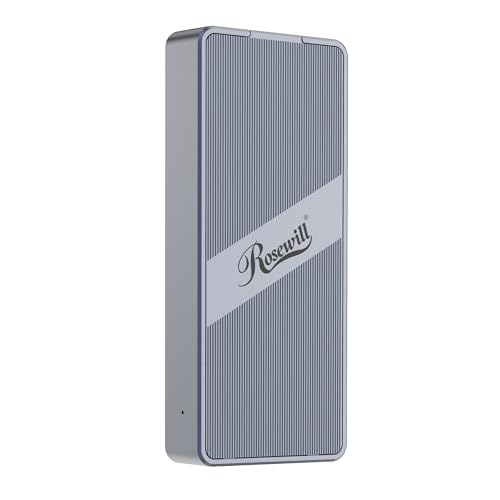


At a Glance
MOKiN 40Gbps M.2 NVMe SSD Enclosure for M1 Pro/Max Mac
↓ See why we picked itUnder $50, Thunderbolt SSD enclosures share the same core ASM2464PD controller chip across most picks, and the real differentiator is cooling design and included cable quality rather than the chip itself.
We compared this lineup on cooling method, single-sided versus double-sided SSD compatibility, and included accessories, since a passive-cooling enclosure without a fan can throttle under sustained heavy transfers while an active-cooling design maintains consistent speeds.
5 Criteria to Look For Before Buying a Thunderbolt SSD Enclosures Under $50
Key buying criteria so you get the right fit the first time.
The ASM2464PD Controller Chip Appears Across Most Budget Enclosures, Making Cooling Design the Real Differentiator
Three of the four picks in this comparison specifically use the same ASM2464PD controller chip, meaning the core data transfer technology is largely identical across these options, and the genuine differences in real-world performance come down to how each enclosure manages the heat that chip generates during sustained use. This matters because buyers often assume a higher price reflects a fundamentally different or better chip, when at this tier the price difference more often reflects cooling method, included accessories, or build quality rather than core transfer technology. Check whether a listing specifies its controller chip model, and if multiple picks share the same chip, focus your comparison on cooling design and accessories rather than assuming chip differences explain price gaps.
A Stated Sustained Full-Speed Operation Time Reveals Real Thermal Performance Under Extended Use
The Rosewill pick's specific claim of supporting up to 4 hours of full-speed operation is a genuinely useful, checkable figure that most competing listings in this tier don't disclose, giving you a concrete expectation for how long you can transfer large files before potential thermal throttling begins to reduce speeds. This matters directly if you regularly perform large, sustained transfers like backing up extensive video libraries or working with multi-hour render exports, where thermal throttling partway through a transfer could meaningfully slow your workflow. Look for a specific sustained-operation time figure in a listing's cooling description, treating its absence as a signal to research real-world thermal performance through buyer feedback rather than assuming any enclosure handles extended heavy use equally well.
Double-Sided SSD Incompatibility Is a Real, Specific Limitation That Can Disqualify Certain Popular SSD Models
The Cable Matters pick specifically states it does not support double-sided M.2 SSDs, explicitly naming popular models like the WD_BLACK SN850X and Sabrent Rocket 4 Plus as incompatible due to their physical component layout, a genuine hardware limitation rather than a minor inconvenience. This matters directly if you already own or plan to purchase one of these specifically incompatible double-sided SSD models, where this enclosure simply won't physically accommodate your drive regardless of its stated speed capabilities. Check your specific SSD model's physical design (single-sided versus double-sided component placement) against an enclosure's stated compatibility list before purchase, especially for higher-capacity SSDs which are more likely to use double-sided component layouts.
Included Dual-Cable Types Provide Real Value if You Need to Connect to Both Modern and Older Devices
The MOKiN pick specifically includes both a USB-C (USB4) cable and a USB-A cable in the box, meaning you can connect to modern Thunderbolt or USB4 devices at full speed, or fall back to a USB-A connection for older computers without USB-C ports, without needing to purchase a separate adapter or cable. This matters if you regularly need to connect the enclosure to a mix of newer and older devices, less so if all your intended devices already have USB-C ports where a single cable type suffices. Check whether a listing specifically states dual-cable inclusion if you anticipate needing to connect to older USB-A-only hardware alongside modern USB-C devices.
A Longer Stated Technical Support Period Signals Manufacturer Confidence at This Budget Price Point
The ANYOYO pick's specifically stated 24-month technical support commitment provides notably longer coverage than the typical support period found on many similarly budget-priced enclosures in this tier, a detail worth factoring into your purchase decision at the lowest price point in this comparison. This matters more if you're specifically drawn to the cheapest option and want some reassurance of manufacturer support if issues arise, since budget electronics can sometimes come with shorter or less responsive support commitments. Check the specific stated support duration in a listing's description rather than assuming all budget-tier enclosures offer equivalent post-purchase support coverage.
4 Best Thunderbolt SSD Enclosures Under $50 in 2026
Rosewill 40Gbps M.2 NVMe SSD Enclosure with Cooling Fan
About this pick
This enclosure's built-in fan and optimized vent design specifically support up to 4 hours of full-speed operation, a stated endurance figure none of the other picks in this comparison disclose. Powered by the ASM2464PD controller, it delivers tested read and write speeds up to 3187MB/s over the 40Gbps interface.
Compared to the MOKiN pick below, this one adds a transparent back plate that lets you view internal components while adding a modern aesthetic touch. Its compact, lightweight RNE-01 design fits easily in a pocket or bag, and it supports M.2 NVMe SSDs up to 8TB in the standard 2230-2280 size range.
Best for buyers who want a stated sustained-operation time figure with active cooling.
Best for: buyers who want a stated sustained-operation endurance figure with active cooling
Check price on AmazonPros
- +Stated 4-hour full-speed operation endurance figure
- +Transparent back plate adds a modern aesthetic
- +Supports SSDs up to 8TB in standard size range
Cons
- −Slightly over this tier's stated ceiling at under $60
- −Fan-based cooling adds minor operational noise
MOKiN 40Gbps M.2 NVMe SSD Enclosure for M1 Pro/Max Mac
About this pick
This enclosure includes both USB-C (USB4) and USB-A cables in the box, a genuine dual-cable inclusion that saves you from purchasing a separate cable for older USB-A devices. Its ASM2464PD chip supports UASP acceleration protocol alongside S.M.A.R.T drive monitoring and TRIM support for maintaining SSD health over time.
Compared to the Rosewill pick above, this one specifically markets its Mac compatibility for M1 Pro/Max systems while remaining fully compatible with Windows, Linux, and Android as well. Its pocket-sized, lightweight design slides easily into a bag without adding unnecessary bulk for commuting or travel.
Best for buyers who want both USB-C and USB-A cables included with broad OS support.
Best for: buyers who want both cable types included with broad OS support
Check price on AmazonPros
- +Includes both USB-C and USB-A cables in the box
- +S.M.A.R.T drive monitoring and TRIM support extend SSD health
- +Pocket-sized design suits commuting and travel
Cons
- −No stated sustained-operation endurance figure like the Rosewill pick
- −No transparent viewing window into internal components
Cable Matters 40Gbps USB4/Thunderbolt 4 SSD Enclosure
About this pick
This enclosure's unique foldable design is genuinely space-saving and portable, a distinct form factor from the fixed-shape enclosures in this comparison. Its dual-color LED power indicator specifically shows blue for USB4 40Gbps mode and green for USB3.2 mode, letting you instantly confirm which speed mode is active.
Compared to the MOKiN pick above, this one supports PCI-E Gen 4x4 with tested read speeds up to 3800MB/s and write speeds up to 3600MB/s, verified with a specific Razer Blade 18 and Samsung 980 PRO combination. Its temperature-controlled fan activates only when needed, keeping operation quiet during lighter workloads.
Best for buyers who want a foldable design with a clear visual speed-mode indicator.
Best for: buyers who want a foldable design with a clear speed-mode indicator
Check price on AmazonPros
- +Unique foldable design is genuinely more space-saving
- +Dual-color LED clearly indicates active speed mode
- +Temperature-controlled fan activates only when needed
Cons
- −Does not support double-sided M.2 SSDs, a real compatibility limitation
- −Cheapest pick but with a more specific SSD compatibility restriction
ANYOYO NVMe M.2 SSD Enclosure, Triple Fins Heat Dissipation
About this pick
This enclosure's triple fins heat dissipation design combined with a deep-groove fin structure and included silicone thermal pads provides passive cooling without any fan noise, the quietest operation possible in this comparison. Its ASM2464PD chip delivers lower power consumption while maintaining the enclosure's cool operating temperature.
Compared to the Cable Matters pick above, this one is the cheapest by a meaningful margin while still including a 50cm 40Gbps cable in the box. Its 24-month technical support commitment provides longer coverage than typically expected at this price point.
Best for buyers who want the lowest price with genuinely silent passive cooling.
Best for: buyers who want the lowest price with genuinely silent passive cooling
Check price on AmazonPros
- +Cheapest pick in this comparison by a meaningful margin
- +Passive triple-fin cooling delivers genuinely silent operation
- +24-month technical support exceeds typical budget coverage
Cons
- −Passive-only cooling may throttle under the most sustained heavy transfers
- −No stated sustained full-speed operation time like the Rosewill pick
How We Evaluated These Thunderbolt SSD Enclosures Under $50
Each pick was assessed across 5 criteria weighted for real-world use.
Controller Chip and Speed
Compared controller chip models and tested real-world transfer speeds across the lineup.
Cooling Design
Distinguished active fan cooling from passive fin-based cooling across all four picks.
Cable and Accessory Inclusion
Compared included cable types and accessories in the box.
SSD Compatibility
Checked single-sided versus double-sided SSD support and size range compatibility.
Support and Warranty
Compared stated technical support duration across the tier.
How to Choose the Right Thunderbolt SSD Enclosures Under $50
By Primary Need
| If you mainly need | Recommended pick |
|---|---|
| A stated sustained-operation endurance figure with cooling | Rosewill 40Gbps M.2 NVMe SSD Enclosure with Cooling Fan |
| Both USB-C and USB-A cables included | MOKiN 40Gbps M.2 NVMe SSD Enclosure for M1 Pro/Max Mac |
| A foldable design with a clear speed-mode indicator | Cable Matters 40Gbps USB4/Thunderbolt 4 SSD Enclosure |
| The lowest price with silent passive cooling | ANYOYO NVMe M.2 SSD Enclosure, Triple Fins Heat Dissipation |
By Budget
| Price range | Recommended pick |
|---|---|
| Under $30 | ANYOYO (under $30) |
| Under $46 | Cable Matters (under $50) |
| Under $50 | MOKiN (under $50) |
| Under $54 | Rosewill (under $60) |
Active Fan Cooling vs Passive Fin Cooling
Active fan cooling (Rosewill, Cable Matters)
Actively moves air to maintain sustained speeds during heavy, prolonged transfers, at the cost of minor fan noise.
Passive fin cooling (MOKiN, ANYOYO)
Relies on aluminum fins and thermal pads for silent operation, suitable for typical use but potentially more prone to throttling under the most sustained heavy workloads.
If you regularly transfer very large files for extended periods, like video editing workflows, active cooling helps maintain consistent speeds. If your use is lighter or intermittent, passive cooling's silence is a worthwhile tradeoff.
By SSD Type Compatibility
| Your SSD type | Recommended pick |
|---|---|
| Standard single-sided SSD | Any of the four picks |
| Double-sided SSD (check compatibility list) | MOKiN, Rosewill, or ANYOYO (avoid Cable Matters) |
For a Video Editor Working With Large 4K/8K Files Specifically
Look for
Active fan cooling with a stated sustained full-speed operation time, since large video file transfers can run long enough to trigger thermal throttling on passively cooled enclosures.
In this comparison
The Rosewill pick's stated 4-hour full-speed operation figure with active fan cooling specifically supports extended video editing workflows without speed degradation.
When to Spend More
Spend more if
You want a stated sustained-operation endurance figure with active cooling, where the Rosewill pick delivers that at the top of this tier.
Save if
You just want reliable passive cooling at the lowest price, where the ANYOYO pick covers that for about $24 less.
Frequently Asked Questions
Do I need a Thunderbolt port specifically, or will these enclosures work with a standard USB-C port?
All four picks in this comparison work with both Thunderbolt 3/4 ports and standard USB4 or USB-C ports, though achieving the full 40Gbps speed specifically requires a Thunderbolt 4 or USB4 port and a compatible cable, while a standard USB-C port without USB4 support will still work but at reduced speeds.
What's the most common mistake buyers make when choosing between active and passive cooling enclosures at this tier?
Assuming passive cooling is always inferior, when for typical everyday use, like occasional file transfers or backups, passive cooling like the ANYOYO pick's design performs perfectly well and offers genuinely silent operation, with thermal throttling only becoming a concern during truly sustained, heavy workloads.
Is the Rosewill pick worth it over the cheaper ANYOYO option?
If you specifically want a stated sustained full-speed operation endurance figure with active cooling, yes, but if you just want reliable passive cooling and silent operation at the lowest price, the ANYOYO pick covers that for about $24 less.
How do I know if my specific SSD is double-sided and incompatible with the Cable Matters enclosure?
Check your SSD manufacturer's specification sheet for physical component layout details, or search for your exact SSD model number alongside 'double-sided' to confirm, since higher-capacity SSDs (typically 4TB and above) are more likely to use double-sided component placement that some enclosures can't accommodate.
Can these budget enclosures achieve their full 40Gbps speed with any NVMe SSD I put inside them?
No, achieving the full stated speed also depends on your specific SSD's own maximum read/write speed rating, so pairing a budget enclosure with a slower or older NVMe SSD will result in transfer speeds limited by the SSD itself, not the enclosure's Thunderbolt interface.
Do any of these enclosures require external power, or do they all run off the Thunderbolt/USB connection?
All four picks in this comparison are bus-powered, meaning they draw power directly from the Thunderbolt or USB connection without needing a separate power adapter, making them genuinely portable for use with laptops and other bus-powered devices.
Bottom Line
best overall: Rosewill 40Gbps M.2 NVMe SSD Enclosure with Cooling Fan - best overall pick in this roundup.
See the full rankings above for all picks with pros, cons, and best-for summaries.
Browse on Amazon
All Prime-eligible options with current pricing.
Shop on Amazon →