
6 Best Thunderbolt SSD Enclosures for Mac Mini
Keep this narrower than a general Mac NVMe page by requiring genuine Thunderbolt-class host behavior and desk/dock integration.

New to Amazon Prime?
Get fast, free shipping on every pick in this guide, plus Prime Video and exclusive deals.
Try Prime Free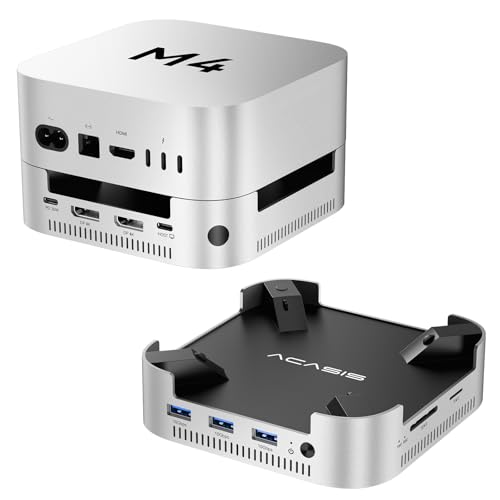


At a Glance
Mac mini users often want an enclosure that becomes a permanent desk fixture rather than a portable drive, which changes the priority list: desk footprint, cable reach, sleep/wake reliability, and whether the enclosure is molded specifically to the Mac mini's shape.
We prioritized products either explicitly molded for Mac mini M4 (Satechi, UGREEN, ACASIS all publish a 1:1 fit design) or with genuine Thunderbolt-class host behavior documented for Mac mini use, over generic portable enclosures repurposed for a desk setup.
6 Criteria to Look For Before Buying a Thunderbolt SSD Enclosures for Mac Mini
Key buying criteria so you get the right fit the first time.
USB-C is a connector, not a speed
A USB-C port can carry 10, 20, 40, or 80Gbps depending on the underlying protocol. Require the exact USB/Thunderbolt protocol and link rate from the listing, not USB-C wording alone, before assuming an enclosure matches your host's real speed.
Check the bridge controller, not just the interface label
Two enclosures with the same 40Gbps label can behave differently depending on the bridge chip (ASM2464PD, JHL7440, RTL9210, and others each have different real-world characteristics). Where a listing names its controller, treat that as a real signal of build quality.
Verify NVMe-only versus NVMe+SATA support
Some enclosures in this category support only NVMe M-Key SSDs, others add SATA/NGFF support via M+B Key. Confirm which protocol your specific SSD uses before buying, since a mismatch means the drive simply won't work.
Separate peak benchmark speed from sustained performance
A short benchmark can hit peak speed even on a design that throttles heavily during long transfers. Favor listings that publish tested read/write numbers with a named SSD and host over theoretical link-rate claims alone.
Confirm your exact M.2 size and keying before buying
2230, 2242, 2260, and 2280 SSDs are not interchangeable in every enclosure, and M-Key versus B+M Key compatibility varies by product. Check your SSD's exact length and key type against the listing's stated support, not just "M.2 compatible".
Cable and host requirements can silently cap speed
A USB-C cable rated below the enclosure's maximum speed, or a host port that doesn't support the exact protocol claimed, will cap real throughput well below the advertised number. Check both before assuming full speed.
6 Best Thunderbolt SSD Enclosures for Mac Mini
ACASIS 40Gbps Mac mini M4 Dock with Dual-Bay NVMe
About this pick
Supports two NVMe SSDs for up to 16TB at 2,869MB/s in RAID 0 or 8TB at 1,594MB/s in other modes, paired with dual/triple display support (dual DisplayPort at 4K@144Hz single-screen or 4K@60Hz dual-screen) alongside the Mac mini M4's own ports.
The included 30W PD adapter provides stable self-power to minimize disconnection or drive-failure risk, and ACASIS warns not to plug/unplug SSDs while powered on. Dual cooling fans (~52dB) maintain a safe 60°C even after hours of operation, molded to a 1:1 match of the Mac mini M4's shape.
Best for: buyers prioritizing 40gbps, dual-bay nvme, up to 16tb raid 0
Check price on AmazonPros
- +Dual-bay NVMe with RAID 0 support for up to 16TB at 2,869MB/s
- +Dual DisplayPort output alongside storage in one dock
- +1:1 molded fit to the Mac mini M4 with anti-slip padding
- +Dual fans keep sustained temperature at a safe 60°C over hours
Cons
- −ACASIS explicitly warns against hot-plugging SSDs while powered on
- −Requires careful troubleshooting steps (per ACASIS's own guide) if display or SSD issues occur
Satechi Mac mini M4 Hub & Stand with NVMe
About this pick
Purpose-built for Mac mini M4 setups, combining an NVMe enclosure (up to 4TB, 2230-2280) with a 5-in-1 front-facing port hub: two USB-A 3.2 (10Gbps), one USB-A 2.0, and a UHS-II SD card reader (up to 312MB/s), all in one stand.
Heat-dissipating bottom vents and a recessed top ensure proper airflow without blocking the Mac mini's own fan, in an aluminum build 61% smaller in packaging than Satechi's previous-generation model. Note the USB-A ports don't support CD readers, Apple SuperDrive, or iPad charging, and only one bus-powered device at a time.
Best for: buyers prioritizing 10gbps nvme, up to 4tb, 2230-2280
Check price on AmazonPros
- +Combines NVMe storage with a genuinely useful front-facing port hub
- +Heat-dissipating design specifically avoids blocking the Mac mini's own fan
- +UHS-II SD card reader at up to 312MB/s for media workflows
- +2-year Satechi warranty
Cons
- −Designed exclusively for Mac mini M4, not a general-purpose enclosure
- −USB-A ports have real limitations: no CD readers, no Apple SuperDrive, no iPad charging
UGREEN Mac mini M4 Dock 11-in-1 with NVMe
About this pick
An 11-port hub built around the Mac mini M4's exact curves, adding an NVMe enclosure (up to 8TB, 2230-2280) alongside 3x USB-A 3.2 (10Gbps), 2x USB-A 3.0 (5Gbps), 2x USB-C 3.2 (10Gbps), and a UHS-I SD/TF reader at 170MB/s.
A power-button lever lets you turn the Mac mini on without lifting it off the dock, and anti-slip silicone pads add stability and scratch protection. The short included 4cm cable keeps desk cable clutter to a minimum.
Best for: buyers prioritizing 10gbps nvme, up to 8tb, 2230-2280
Check price on AmazonPros
- +Highest capacity (8TB) among Mac mini dock-plus-NVMe combos in this cluster
- +11 total ports covers most peripheral needs without extra hubs
- +Power-button lever avoids having to lift the Mac mini to turn it on
- +Anti-slip silicone pads add stability and scratch protection
Cons
- −Flexible power draw setup (from Mac or external adapter) adds a decision point for multi-device users
- −Precision fit to Mac mini M4 curves means it won't suit other hosts
UGREEN Mac mini M4 Dock DP 4K@144Hz with NVMe
About this pick
Adds a DisplayPort output (4K@144Hz on M4, 4K@240Hz on M4 Pro) to UGREEN's Mac mini dock-plus-NVMe formula, alongside the same 8TB NVMe enclosure (2230-2280) and 10Gbps USB-A/C data ports plus SD/TF and audio.
For multi-screen setups, UGREEN suggests combining the dock's DP port with the Mac's own Thunderbolt port for a second display. Same precision fit to Mac mini M4's curves with a power-button lever and anti-slip silicone pads.
Best for: buyers prioritizing 10gbps nvme, up to 8tb, 2230-2280
Check price on AmazonPros
- +Adds display output (4K@144-240Hz) that Satechi's and UGREEN's basic hub don't offer
- +Same 8TB NVMe capacity as UGREEN's non-DP model
- +Can combine with the Mac's own Thunderbolt port for dual external displays
- +Power-button lever avoids lifting the Mac mini
Cons
- −No DP++ support, HDMI monitors need an active adapter, passive adapters won't work
- −Higher price than UGREEN's non-display dock for the same NVMe capacity
ACASIS TBU405 Pro 40Gbps NVMe Enclosure
About this pick
Built around the Intel JHL7440 certified chip for true USB4/Thunderbolt 4/3 compatibility with a dual-chip design, plus an integrated cooling fan and precision heat-dissipation holes to prevent thermal throttling under sustained load.
ACASIS tested read/write speeds up to 2,805/2,734 MB/s using a Samsung 980 Pro on a MacBook, and it supports 2230/2242/2260/2280 sizes for M1/M2/M3 Mac and PC hosts. Its compact, travel-friendly form factor targets pro users needing a genuine Thunderbolt-certified enclosure, not just a compatible one.
Best for: buyers prioritizing 40gbps via intel jhl7440, usb4/tb3/tb4
Check price on AmazonPros
- +Intel JHL7440 is a certified Thunderbolt chip, not just compatible hardware
- +Tested real-world speeds published (2,805/2,734 MB/s), not just theoretical link rate
- +Active cooling fan with precision heat-dissipation holes
- +Compact, travel-friendly form factor for pro use
Cons
- −Requires Thunderbolt 4/3 or USB4 host for full speed
- −Fan adds some operating noise
How We Evaluated These Thunderbolt SSD Enclosures for Mac Mini
Each pick was assessed across 5 criteria weighted for real-world use.
Interface Protocol & Link Rate
Verified the exact USB/Thunderbolt protocol and rated speed from each listing rather than assuming USB-C connector shape implies a specific bandwidth tier.
Bridge Controller & Host Compatibility
Checked which bridge chip each enclosure uses where published, and cross-referenced explicit host compatibility statements (Mac generation, Thunderbolt version, USB4 V1 vs V2) against real-world limitations sellers disclosed.
M.2 Size, Keying & SSD Compatibility
Confirmed supported M.2 lengths (2230/2242/2260/2280), keying (M-Key vs B+M Key), and NVMe-versus-SATA protocol support rather than assuming universal compatibility.
Thermal Design & Sustained Performance
Weighed published tested throughput figures, fan trigger temperatures, and passive-versus-active cooling design over marketing language that repeats across nearly identical products.
Real Feature Differentiators
Prioritized genuine differentiators, RAID mode support, write-lock switches, health-monitoring displays, magnetic attachment systems, over generic "fast and durable" claims with nothing behind them.
How to Choose the Right Thunderbolt SSD Enclosures for Mac Mini
Match the Interface to Your Host
Before buying, check your computer's exact port protocol, not just whether it has a USB-C connector.
| Your host port | What to look for |
|---|---|
| USB-C 10Gbps (USB 3.2 Gen 2) | Any 10Gbps-rated pick above works at full speed |
| USB-C 20Gbps (USB 3.2 Gen 2x2) | Confirm the enclosure specifically states Gen 2x2 support, not just USB-C |
| Thunderbolt / USB4 40Gbps or higher | Check for genuine Thunderbolt/USB4 certification, not just a compatible claim |
When to Spend More
Interface speed, bridge controller sophistication, and cooling design all scale price in this category.
Occasional file transfers
A 10Gbps pick from this list covers most casual thunderbolt ssd enclosures for mac mini needs without paying for bandwidth you won't use.
Video editing or large sustained transfers
Step up to a 40Gbps USB4/Thunderbolt pick with active cooling to avoid thermal throttling mid-transfer.
Professional or archival workflows
An 80Gbps Thunderbolt 5 enclosure or a RAID-capable multi-bay design is worth the premium if downtime or data loss has real cost.
Frequently Asked Questions
Does a faster enclosure automatically mean faster real-world transfers?
Not necessarily. Real throughput depends on the SSD's own generation and speed, the bridge controller inside the enclosure, cable quality, and whether the host port actually supports the claimed protocol. A 40Gbps enclosure with a slow SSD won't outperform a 10Gbps enclosure with a fast one by much.
Can I use any M.2 NVMe SSD in any enclosure in this list?
No. Check the exact M.2 length (2230/2242/2260/2280) and keying (M-Key vs B+M Key) the enclosure supports against your specific SSD before buying, and confirm whether the enclosure supports NVMe only or also SATA M.2 drives.
Why does my enclosure run slower than its advertised speed?
The most common causes are a host port that doesn't actually support the claimed protocol (many Macs cap USB 3.2 Gen 2x2 at 10Gbps, for example), an underrated USB-C cable, or sustained thermal throttling on a fanless design during a long transfer.
Bottom Line
best overall: ACASIS 40Gbps Mac mini M4 Dock with Dual-Bay NVMe - best overall pick in this roundup.
See the full rankings above for all picks with pros, cons, and best-for summaries.
Browse on Amazon
All Prime-eligible options with current pricing.
Shop on Amazon →