
8 Best Standing Desks with Keyboard Trays in 2026
8 standing desks and converters with keyboard trays, evaluated for negative tilt angle, usable depth loss, and which listings actually confirm a tray at all.

New to Amazon Prime?
Get fast, free shipping on every pick in this guide, plus Prime Video and exclusive deals.
Try Prime Free




At a Glance
OffiGo 55 Inch U Shaped Electric Standing Desk with Keyboard Tray, White
↓ See why we picked itVIVO 36 Inch Height Adjustable Stand Up Desk Converter, V Series, Dual Monitor Riser
↓ See why we picked itVIVO 32 Inch Desk Converter, K Series, Dual Monitor with Wide Keyboard Tray
↓ See why we picked itVIVO Height Adjustable 42 Inch Standing Desk Converter with Dual Monitor Stand
↓ See why we picked itErGear Electric Standing Desk with Keyboard Tray, 44x24 Inches, Black
↓ See why we picked itAODK 55 Inch Standing Desk with Drawers and Keyboard Tray, Rustic Brown
↓ See why we picked itSANODESK 42 Inch Electric Standing Desk Converter with Large Keyboard Tray
↓ See why we picked itAX WABER Keyboard Tray Under Desk Pull Out with Extra Sturdy Adjustable C Clamp Mount
↓ See why we picked itA keyboard tray is only ergonomically useful if it tilts negatively, meaning the front edge angles down and away from you, which keeps wrists in a neutral position instead of bending them upward. Most budget trays on Amazon are flat, and flat is still better than typing directly on a raised standing desk surface, but it is not the same as a genuine negative-tilt tray, and few listings are explicit about which angle they actually offer. We checked all 8 listings below for exactly what each one confirms about tray angle, size, and weight rating.
Two of the picks in this guide do not clearly confirm a keyboard tray in their own title or description, and we flag that honestly rather than assuming a model number implies a feature it does not state. A tray also eats into usable desktop depth, typically 6 to 8 inches, which matters more on desks already shallow to begin with. Below we rank 8 options with a clear read on tilt angle, tray depth cost, and weight rating for anyone who leans on the tray while typing.
5 Criteria to Look For Before Buying a Standing Desks with Keyboard Tray
Key buying criteria so you get the right fit the first time.
Match actual size and capacity to your real need, not the category label alone
Listings for a standing desk with keyboard tray often use a size or capacity label ("compact," "large," "heavy-duty") that isn't standardized across brands, so the same label can mean meaningfully different actual dimensions or capacity from one product to the next.
This matters because buying based on the category label rather than the specific listed dimensions or capacity is a common way to end up with something that doesn't actually fit your space or handle your real load.
Check the listing for exact measurements or a stated capacity figure, and compare that directly against your actual space or need, not just the marketing size category.
Verify build material and construction quality from reviews, not just spec-sheet claims
A product description can describe material or construction in flattering terms that don't always hold up under real, sustained use, and the gap between a listing's claimed quality and its actual durability only shows up in how the product performs after weeks or months of real use, not in day-one photos.
This matters more for anything you'll use daily or under real load, less for occasional light use where durability matters less.
Check reviews specifically for mentions of how the standing desk with keyboard tray holds up over time, not just unboxing-day impressions, and treat a listing's own quality claims as a starting point to verify, not a guarantee.
Confirm any headline feature actually works as advertised, not just that it's listed
A feature appearing in a product's bullet points doesn't guarantee it performs well in practice, some features are functional but limited, and a few are closer to a marketing checkbox than a genuinely useful capability.
This matters directly if a specific feature is the main reason you're choosing this standing desk with keyboard tray over a simpler, cheaper alternative, since a feature that underperforms in practice undermines the whole reason for paying more.
Check reviews specifically for real-world experiences with the exact feature that matters most to you, not just whether the feature is listed at all.
Weigh review count alongside rating, not rating alone
A high star rating built on a small number of reviews carries meaningfully less confidence than a slightly lower rating built on a large, established review base, since a small sample can be skewed by a handful of early, enthusiastic buyers before any longer-term issues would show up in later reviews.
This matters more for a purchase you're relying on to perform consistently over time, less for a low-stakes, easily replaceable item.
Check both the star rating and the review count together for any standing desk with keyboard tray you're considering, and treat a high rating on a very small review count as a promising but less-proven signal.
Check compatibility and fit with your existing setup before ordering
A standing desk with keyboard tray that looks like a straightforward fit in photos can still have a compatibility detail, a connector type, a mounting requirement, a size threshold, that doesn't match your existing setup, and this kind of mismatch is one of the most common and avoidable reasons for a return.
This matters directly if the product needs to physically connect to, mount on, or otherwise integrate with something you already own.
Check the listing's specific compatibility details against your exact existing setup, not just the general product category, before ordering.
8 Best Standing Desks with Keyboard Trays in 2026
OffiGo 55 Inch U Shaped Electric Standing Desk with Keyboard Tray, White
About this pick
This 55-inch U-shaped desk explicitly confirms a keyboard tray in its title, one of the clearer confirmations in this guide. The U-shape gives a wraparound work surface, and the tray sits below the main desktop for a lower typing position than typing directly on the desk surface.
The listing does not specify whether the tray angle is negative, flat, or positive, so buyers who need a true negative tilt for wrist positioning should verify this in the product Q&A before assuming. Even without confirmed negative tilt, a lower tray position is generally an improvement over typing at standing-desk height with no tray at all.
U-shape adds wraparound work surface. That's a real strength, but weigh it against the flip side: tilt angle not specified, verify negative tilt before assuming.
Best for: Buyers who want a full U-shaped desk with a confirmed tray, if tilt angle is not a hard requirement
Check price on AmazonPros
- +Keyboard tray explicitly confirmed in the listing
- +U-shape adds wraparound work surface
- +Lower typing position than desk-surface typing
Cons
- −Tilt angle not specified, verify negative tilt before assuming
- −Larger U-shaped footprint needs more floor space
- −Lower review count than some other picks
VIVO 36 Inch Height Adjustable Stand Up Desk Converter, V Series, Dual Monitor Riser
About this pick
This converter's title and description focus on dual monitor and laptop workstation features and do not explicitly confirm a keyboard tray, so we are including it here as a reference point rather than a genuine keyboard-tray recommendation. It has the largest review base in this guide by a wide margin, which speaks to its general reliability as a converter.
If a dedicated negative-tilt keyboard tray is a requirement, this listing does not confirm one, and buyers should check current product images and the Q&A section directly rather than assume the V Series includes it. Treat this as a strong converter pick for other reasons, not for tray ergonomics specifically.
Worth calling out specifically: quick sit-to-stand mechanism. The catch is keyboard tray not confirmed in the title or description.
Best for: Buyers focused on dual monitor conversion who will separately verify tray presence before assuming one exists
Check price on AmazonPros
- +Massive review volume and strong overall rating
- +Quick sit-to-stand mechanism
- +Solid dual monitor support
- +Reputable, established converter brand
Cons
- −Keyboard tray not confirmed in the title or description
- −Tilt angle unknown since tray presence itself is unconfirmed
- −Not a genuine keyboard-tray recommendation without verification
VIVO 32 Inch Desk Converter, K Series, Dual Monitor with Wide Keyboard Tray
About this pick
The K Series explicitly confirms a wide keyboard tray in its title, and it has by far the largest review base of any pick in this guide, which gives real confidence in its long-term reliability. It supports a dual monitor and laptop workstation on top while the tray sits below for typing.
Wide keyboard trays like this one generally have enough room for a full keyboard and a right-hand mouse platform, though left-handed mouse placement is rarely offered on any tray in this price range. As with the OffiGo pick, tilt angle is not explicitly stated, so verify negative tilt in the Q&A if that specific angle matters to you.
Set against that, tilt angle not specified, verify negative tilt before assuming. Both matter when comparing it to the other picks here.
Best for: Buyers who want a confirmed wide tray with the strongest review track record in this guide
Check price on AmazonPros
- +Wide keyboard tray explicitly confirmed
- +Supports both dual monitor and laptop use
- +32 inch tabletop workstation space
Cons
- −Tilt angle not specified, verify negative tilt before assuming
- −Left-hand mouse placement not offered
- −Reduces usable riser depth once the tray is deployed
VIVO Height Adjustable 42 Inch Standing Desk Converter with Dual Monitor Stand
About this pick
This converter's model number includes KB, which could suggest keyboard tray, but the title and description describe a dual monitor mount and desk riser without explicitly stating a keyboard tray feature. We are not going to assume a tray exists just because of a model code, so treat this listing as unconfirmed until verified directly with the seller or through current product photos.
If you need a confirmed keyboard tray, the VIVO K Series or the OffiGo U-shaped desk above are safer bets. This 42-inch converter's real strength is the dual 13 to 30 inch monitor stand, which is a separate and well-documented feature.
A genuine advantage here is that solid rating and reasonable review base. The tradeoff is keyboard tray not explicitly confirmed in the listing.
Best for: Buyers primarily wanting a dual monitor stand who will verify keyboard tray presence separately
Check price on AmazonPros
- +Well-documented dual monitor stand range
- +Solid rating and reasonable review base
- +No floor assembly required
- +Good option for renters
Cons
- −Keyboard tray not explicitly confirmed in the listing
- −Model number hint (KB) should not be assumed to mean tray
- −Reduces usable riser depth if a tray is in fact present
ErGear Electric Standing Desk with Keyboard Tray, 44x24 Inches, Black
About this pick
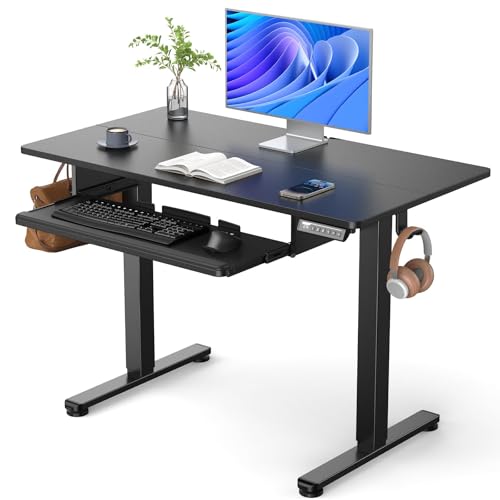
This is a full 44x24 inch electric standing desk with a keyboard tray explicitly confirmed in the title, giving both the elevated main desktop and a lower typing surface in one unit. The tray adds meaningful depth reduction to an already moderate 24-inch desktop, so measure your remaining usable depth before committing to a monitor arm or other accessories.
Because the tray sits below a full standing desk rather than on a tabletop converter, this suits buyers who want a dedicated standing desk from the ground up rather than converting an existing one. Tilt angle is not stated, so check the Q&A if negative tilt specifically matters for your wrists.
Dedicated desk design, not a tabletop conversion. On the other hand, tray further reduces an already moderate 24-inch depth. Neither should be a surprise once you know to look for it.
Best for: Buyers who want a dedicated standing desk with a tray rather than converting an existing desk
Check price on AmazonPros
- +Keyboard tray explicitly confirmed on a full standing desk
- +Dedicated desk design, not a tabletop conversion
- +Reasonable price for a tray-equipped full desk
Cons
- −Tray further reduces an already moderate 24-inch depth
- −Tilt angle not specified
- −Lower review count than the VIVO converters
AODK 55 Inch Standing Desk with Drawers and Keyboard Tray, Rustic Brown
About this pick
This 55-inch desk confirms both drawers and a keyboard tray directly in the title, making it one of the more feature-complete picks in this guide for anyone who also wants built-in storage. The rustic brown finish and wider footprint suit a dedicated home office setup rather than a compact space.
With drawers taking up some under-desk clearance, check that the drawer placement does not conflict with the tray's slide range at your typical sitting distance. As with most picks here, tilt angle is not explicitly stated, so verify before assuming negative tilt.
Wider 55-inch surface for a dedicated home office. That's a real strength, but weigh it against the flip side: drawer placement should be checked against tray slide range.
Best for: Buyers who want a confirmed keyboard tray plus built-in drawer storage in one desk
Check price on AmazonPros
- +Both drawers and keyboard tray explicitly confirmed
- +Wider 55-inch surface for a dedicated home office
- +Built-in storage reduces need for separate furniture
Cons
- −Drawer placement should be checked against tray slide range
- −Tilt angle not specified
- −Larger footprint needs more floor space
SANODESK 42 Inch Electric Standing Desk Converter with Large Keyboard Tray
About this pick
This converter explicitly confirms a large keyboard tray in its title, and the extra tray size gives more room for a keyboard plus mouse platform than the standard-width trays on some other picks. It supports a dual monitor and laptop workstation on the upper riser.
The review count here is the lowest among the converters in this guide, so treat the rating as a smaller sample size than the VIVO picks with thousands of reviews. If a large tray specifically matters for your setup, this is the clearest confirmed option, but weigh that against the limited review history.
Worth calling out specifically: more tray room than standard-width alternatives. The catch is lowest review count among the converters in this guide.
Best for: Buyers who specifically want a larger confirmed tray and are comfortable with a smaller review sample
Check price on AmazonPros
- +Large keyboard tray explicitly confirmed
- +More tray room than standard-width alternatives
- +Supports dual monitor and laptop use
- +Reasonable price for the feature set
Cons
- −Lowest review count among the converters in this guide
- −Tilt angle not specified
- −Less established track record than the high-volume VIVO picks
AX WABER Keyboard Tray Under Desk Pull Out with Extra Sturdy Adjustable C Clamp Mount
About this pick
This is a standalone keyboard tray add-on that clamps to an existing desk, not a full standing desk or converter, and it should not be compared directly against the other 7 picks as if it were the same product category. It gives a 27.3-inch slide-out platform, extending to about 32.5 inches including the clamps, for buyers who want to add a tray to a desk that does not already have one.
The C-clamp mount system is rated for the added lean pressure of resting your wrists while typing, not just the static weight of a keyboard and mouse, which is a meaningfully higher bar than some integrated trays quietly assume. This is a genuinely useful low-cost option if you already own a standing desk without a tray.
Sturdy C-clamp mount rated for lean pressure. Set against that, not a full desk or converter, a different product category. Both matter when comparing it to the other picks here.
Best for: Buyers who already own a standing desk without a tray and want a low-cost add-on
Check price on AmazonPros
- +Low-cost way to add a tray to a desk that lacks one
- +Sturdy C-clamp mount rated for lean pressure
- +Large review base with a solid rating
- +Slide-out platform works with most standard desks
Cons
- −Not a full desk or converter, a different product category
- −Requires a compatible desk edge for clamp mounting
- −Track extension length should be checked against your sitting distance
How We Evaluated These Standing Desks with Keyboard Trays
Each pick was assessed across 5 criteria weighted for real-world use.
Confirmed keyboard tray presence
Checked each listing's title and description directly for an explicit keyboard tray mention, flagging picks where only a model number or category placement suggested one without confirming it.
Tray tilt angle transparency
Noted whether a listing specifies negative, flat, or positive tilt, since none of the 8 picks explicitly state their tilt angle and buyers need to verify this themselves.
Usable desktop depth after tray installation
Weighed each desk's stated depth against the typical 6 to 8 inch depth reduction a tray introduces, flagging shallower desks where that loss matters more.
Tray size and mouse platform accommodation
Compared standard-width trays against wide or large trays for how much room they leave for a keyboard plus a right-hand mouse platform.
Weight rating relative to lean pressure, not just static load
Considered whether a tray's rated capacity accounts for the 20 to 25 pound lean pressure typing puts on the front edge, not just the static weight of a keyboard and mouse.
How to Choose the Right Standing Desks with Keyboard Trays
By Rating Confidence: Highest Rated vs Most Reviewed
| Your priority | Recommended pick |
|---|---|
| Highest average rating | OffiGo 55 Inch U Shaped Electric Standing Desk with Keyboard Tray |
| Largest review base, strongest reliability signal | VIVO 32 Inch Desk Converter |
By Budget
| Budget | Recommended pick |
|---|---|
| Under $42 | AX WABER Keyboard Tray Under Desk Pull Out with Extra Sturdy Adjustable C Clamp Mount |
| Up to $220 | VIVO Height Adjustable 42 Inch Standing Desk Converter with Dual Monitor Stand |
AX WABER Keyboard Tray Under Desk Pull Out with Extra Sturdy Adjustable C Clamp Mount vs VIVO Height Adjustable 42 Inch Standing Desk Converter with Dual Monitor Stand
AX WABER Keyboard Tray Under Desk Pull Out with Extra Sturdy Adjustable C Clamp Mount
The lower-priced option in this comparison, worth checking its actual specs and review history against your specific need before assuming it's enough.
VIVO Height Adjustable 42 Inch Standing Desk Converter with Dual Monitor Stand
The higher-priced option, worth it if it offers real, checkable headroom in build quality, capacity, or features over the cheaper pick.
Default to AX WABER Keyboard Tray Under Desk Pull Out with Extra Sturdy Adjustable C Clamp Mount unless your specific need genuinely calls for the pricier pick's extra headroom.
By Review Base Confidence
| Your priority | Recommended pick |
|---|---|
| Largest, most-established review base | VIVO 32 Inch Desk Converter |
For a First-Time Buyer Specifically
Look for
Clear, specific dimensions or capacity and a real, established review history, not just marketing language.
In this comparison
VIVO 32 Inch Desk Converter is worth checking against its listed specs before buying, given its strong review base.
When to Spend More
Spend more if
You need real durability and feature depth for regular use, where VIVO Height Adjustable 42 Inch Standing Desk Converter with Dual Monitor Stand's build gives real headroom over the cheaper picks.
Save if
You only need this for light or occasional use, where AX WABER Keyboard Tray Under Desk Pull Out with Extra Sturdy Adjustable C Clamp Mount covers the same job at a lower price.
Frequently Asked Questions
Which of these 8 picks actually confirm a keyboard tray?
6 of the 8 explicitly confirm a keyboard tray in the title: the OffiGo 55-inch, VIVO 32-inch K Series, ErGear 44x24, AODK 55-inch, SANODESK 42-inch, and the AX WABER standalone tray. The VIVO 36-inch V Series and the VIVO 42-inch converter do not clearly confirm a tray in their listings, and the 42-inch model's KB code should not be assumed to mean keyboard tray.
What is negative tilt and why does it matter for a keyboard tray?
Negative tilt means the tray's front edge angles down and away from you, which keeps your wrists in a neutral position while typing instead of bending them upward the way a flat or positive-tilt surface does. None of the 8 listings in this guide state their tilt angle explicitly, so check current product photos or the Q&A section if negative tilt is a requirement.
How much desktop depth do I lose by adding a keyboard tray?
Expect to lose roughly 6 to 8 inches of usable depth once a tray is installed or deployed. This matters more on a desk that starts at 24 inches deep than on one starting at 28 inches, so factor it into your depth planning before ordering.
Can I add a keyboard tray to a standing desk that does not already have one?
Yes. The AX WABER is a standalone clamp-mounted tray designed exactly for that, at a much lower cost than buying a new tray-equipped desk. Confirm your desk's edge is compatible with a C-clamp mount before ordering.
Does a higher weight rating on a keyboard tray mean it will not flex while typing?
Not necessarily. Typing puts ongoing lean pressure on the tray's front edge, generally 20 to 25 pounds, which is a different stress than the static weight of a keyboard and mouse sitting on it. A tray rated only for static load can still flex under sustained lean pressure even with a high stated number.
Are left-handed mouse platforms available on these trays?
Rarely. Most keyboard trays with an integrated mouse platform are built for right-hand use only, and none of the listings in this guide specifically confirm a left-hand option. Left-handed buyers should check current product photos closely before assuming accommodation exists.
Bottom Line
best overall: OffiGo 55 Inch U Shaped Electric Standing Desk with Keyboard Tray, White - best confirmed keyboard tray, full desk pick in this roundup.
See the full rankings above for all picks with pros, cons, and best-for summaries.
Browse on Amazon
All Prime-eligible options with current pricing.
Shop on Amazon →