
8 Best Smart Network Switches in 2026
Smart managed switches offer VLAN and QoS control without full enterprise complexity. We compared the current lineup.

New to Amazon Prime?
Get fast, free shipping on every pick in this guide, plus Prime Video and exclusive deals.
Try Prime Free



At a Glance
"Smart managed" sits between unmanaged simplicity and full enterprise management, offering VLAN configuration, QoS, and port monitoring through an accessible web GUI without the CLI-heavy complexity of a fully managed Layer 2/3 switch.
We compared this cluster on how much real functionality each "smart" switch actually delivers, since the term gets applied to products with meaningfully different feature depth.
6 Criteria to Look For Before Buying a Smart Network Switch
Key buying criteria so you get the right fit the first time.
Port count is a headroom decision, not a current-need one
Buy for what you'll plug in over the next 2-3 years, not just today. An 8-port switch that's already full the day it arrives means buying a second switch and daisy-chaining, which adds a hop of latency and another point of failure.
PoE budget is a shared pool, not per-port
A switch rated for 8 PoE+ ports at 120W total does not mean every port gets 30W simultaneously. Add up the real draw of every camera, AP, and phone you'll connect, and make sure the total budget clears it with room to spare.
Managed vs unmanaged changes what you can diagnose later
An unmanaged switch is zero-configuration but gives you no visibility when something goes wrong. A smart-managed switch adds VLANs, port mirroring, and traffic monitoring for a modest price increase, worth it the first time you need to isolate a misbehaving device.
Fanless does not always mean silent under load
Most desktop switches are genuinely fanless and silent, but high-port-count PoE switches sometimes add active cooling once the power budget climbs past 200-300W. Check for a fan explicitly if a quiet office or bedroom install matters.
Multi-gig speed needs matching cable and network gear
A 2.5G or 10G switch only delivers those speeds if your cabling is Cat5e or better (Cat6a for 10G) and the devices on both ends actually support that speed. Mixing a multi-gig switch into an all-Gigabit network gets you nothing extra.
Renewed enterprise gear needs a licensing check first
Cisco Meraki, Juniper, and some Aruba/HPE switches on Amazon are frequently sold as renewed hardware without an active license or support contract. Confirm what functions before assuming a discounted enterprise switch works like a new one out of the box.
8 Best Smart Network Switches in 2026
TP-Link TL-SG108E 8-Port Easy Smart Switch
About this pick
The TL-SG108E brings TP-Link's Easy Smart management to 8 ports, supporting up to 32 simultaneous VLANs (out of 4K VLAN IDs), port mirroring, loop prevention, and cable diagnostics through a free web-based configuration utility.
Layer 2 features like Link Aggregation add real throughput and redundancy options rarely found this low in the product line, backed by TP-Link's standard 3-year warranty.
Best for: buyers prioritizing 8 ports, 32 simultaneous vlans
Check price on AmazonPros
- +Link Aggregation available at an entry price point
- +Cable diagnostics help troubleshoot wiring issues
- +32 VLANs from a 4K-ID pool
Cons
- −Free software utility adds a setup step vs unmanaged
- −No PoE on this specific model
NETGEAR GS308E 8-Port Easy Smart Managed Switch
About this pick
The GS308E scales NETGEAR's Easy Smart management to 8 ports, with a genuinely cross-platform web GUI on Windows, Mac, or Linux rather than a Windows-only utility some competing managed switches require.
Up to 64 VLANs, QoS, IGMP snooping, and port mirroring keep traffic organized, while auto DoS prevention, loop detection, and broadcast storm control add real stability protections, all in a rugged fanless housing running at 0 dBA.
Best for: buyers prioritizing 8 ports, up to 64 vlans
Check price on AmazonPros
- +Web GUI works on any OS, not just Windows
- +64 VLANs is generous for an 8-port switch
- +Built-in DoS and storm-control protections
Cons
- −More setup complexity than unmanaged switches
- −US/CA regional model only
NETGEAR GS308EP 8-Port PoE+ Smart Managed Switch
About this pick
The GS308EP steps up from purely unmanaged with an Easy Smart web interface offering VLANs, QoS, port monitoring, and per-port PoE controls across 8 PoE+ ports with a 62W total budget, plus uninterrupted PoE that keeps power flowing during a switch reboot.
It targets small businesses that need basic network segmentation without a full managed-switch learning curve. The fanless metal design and desktop/wall-mount flexibility carry over from NETGEAR's unmanaged line.
Best for: buyers prioritizing 8x poe+ ports @62w, easy smart managed
Check price on AmazonPros
- +Real VLAN/QoS management at a modest price
- +Uninterrupted PoE avoids camera drop during reboots
- +Per-port power control aids troubleshooting
Cons
- −62W budget is modest for 8 PoE+ ports
- −Web UI adds setup complexity vs pure unmanaged
NETGEAR GS305E 5-Port Easy Smart Managed Switch
About this pick
The GS305E adds NETGEAR's Easy Smart Managed layer to the standard 5-port Gigabit form factor, offering VLAN configuration, QoS traffic prioritization, port monitoring, and basic network security tools through an intuitive software interface.
It keeps the same fanless metal housing and desktop/wall-mount flexibility as NETGEAR's unmanaged models while adding just enough management for a small business network without a steep learning curve.
Best for: buyers prioritizing 5 ports, easy smart managed
Check price on AmazonPros
- +Real VLAN/QoS at a 5-port entry price
- +Easy Smart interface avoids CLI complexity
- +Fanless despite added management features
Cons
- −Only 5 ports limits growth
- −US/CA regional model only
NETGEAR GS108E 8-Port Easy Smart Managed Switch
About this pick
The GS108E is NETGEAR's classic 8-port Easy Smart managed switch, offering VLAN configuration, QoS, port monitoring, and network security tools through an intuitive interface at 8 ports, a common sweet spot for small office deployments.
It shares the fanless, energy-efficient design of NETGEAR's unmanaged line while adding just enough management capability for basic network segmentation.
Best for: buyers prioritizing 8 ports, easy smart managed
Check price on AmazonPros
- +Real VLAN/QoS management at 8 ports
- +Easy Smart interface avoids CLI complexity
- +Fanless despite added management features
Cons
- −More setup than pure unmanaged switches
- −US/CA regional model only
TP-Link TL-SG1024DE 24-Port Easy Smart Switch
About this pick
The TL-SG1024DE scales TP-Link's Easy Smart management to 24 ports with 9K jumbo frame support for large file transfers, plus port mirroring, loop prevention, and cable diagnostics for keeping a larger network healthy.
Abundant VLAN features improve security through traffic segmentation at scale, while tag-based QoS keeps latency-sensitive traffic smooth even as port count grows well past desktop-switch territory.
Best for: buyers prioritizing 24 ports, 9k jumbo frames
Check price on AmazonPros
- +Jumbo frame support aids large-scale NAS transfers
- +Diagnostics tools scale well to 24-port networks
- +Consistent 3-year TP-Link warranty
Cons
- −No PoE on this model
- −Easy Smart software required to unlock VLANs
NETGEAR GS724T 24-Port Smart Managed Switch
About this pick
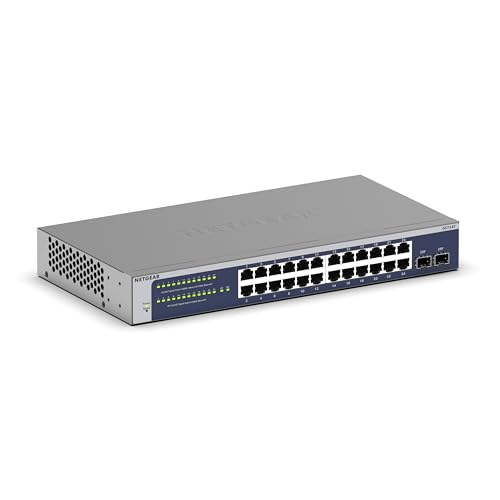
The GS724T brings NETGEAR's Smart Managed layer to 24 ports with 2 SFP fiber ports for expansion, a year of NETGEAR Insight included for remote cloud management, and SNMP support through NMS 300 for serious network monitoring.
It stays fanless despite the 24-port count and management features, with the same desktop or rack-mount flexibility as NETGEAR's other 24-port models.
Best for: buyers prioritizing 24 ports + 2 sfp, smart managed
Check price on AmazonPros
- +Included year of remote cloud management
- +SFP expansion ports for fiber uplinks
- +Fanless despite full management stack
Cons
- −No PoE on this model
- −Insight subscription cost after year one
TP-Link TL-SG1428PE 24-Port PoE+ Easy Smart Switch
About this pick
The TL-SG1428PE packs 24 PoE+ ports into a 28-port switch with a 250W total budget, 2 non-PoE Gigabit ports, and 2 SFP slots, managed through TP-Link's Easy Smart web interface for VLAN segmentation and traffic control.
PoE Auto Recovery automatically restarts dropped devices without manual intervention, a genuine time-saver for a 24-camera or AP deployment where checking every port manually isn't practical.
Best for: buyers prioritizing 24x poe+ @250w total, 2 sfp slots
Check price on AmazonPros
- +250W budget covers a large PoE+ fleet
- +SFP slots add fiber uplink option
- +Auto-recovery reduces manual camera resets
Cons
- −Web management setup step vs unmanaged
- −Larger physical footprint at 28 total ports
How We Evaluated These Smart Network Switches
Each pick was assessed across 5 criteria weighted for real-world use.
Port Count & Speed Tier
Verified the actual port count, Gigabit vs multi-gig speed rating, and whether every port runs at the advertised speed or only some do, since several switches mix full-speed and lower-speed ports.
PoE Power Budget
Checked the total PoE wattage budget against realistic device counts, not just the per-port maximum, since a switch's total power pool is what actually limits how many cameras or access points it can run.
Management Depth
Classified each switch as unmanaged, smart/easy-managed, or fully managed Layer 2/3, since this determines what troubleshooting and segmentation options are available after installation, not just at setup.
Build & Mounting Flexibility
Weighed fanless vs active cooling, metal vs plastic housing, and desktop/wall/rack mounting options against the switch's likely install environment.
Real-World Documentation Honesty
Favored listings that clearly state cabling requirements, host port requirements, and speed caveats over ones that only advertise the theoretical maximum.
How to Choose the Right Smart Network Switches
What 'Smart' Actually Gets You
Expect VLAN tagging, basic QoS, port mirroring for diagnostics, and loop prevention across this tier. What you don't get versus fully managed: static routing, advanced ACLs, and dynamic routing protocols.
Frequently Asked Questions
Is smart managed the same as fully managed?
No. Smart managed switches offer a subset of fully managed features through a simplified web GUI, generally sufficient for small business networks. Fully managed Layer 2/3 switches add deeper protocol support and routing capability most small networks never need.
Bottom Line
best overall: TP-Link TL-SG108E 8-Port Easy Smart Switch - best easy smart 8-port pick in this roundup.
See the full rankings above for all picks with pros, cons, and best-for summaries.
Browse on Amazon
All Prime-eligible options with current pricing.
Shop on Amazon →