
8 Best Rolling Printer Stands in 2026
8 best rolling printer stands in 2026, from locking-wheel printer carts to general-purpose utility carts. Compare caster type, capacity, and floor fit.

New to Amazon Prime?
Get fast, free shipping on every pick in this guide, plus Prime Video and exclusive deals.
Try Prime Free




At a Glance
GYIIYUO 2 Drawer File Cabinet with 24-Inch Extended Desktop
↓ See why we picked itSimple Houseware 3-Tier Heavy Duty Metal Utility Rolling Cart
↓ See why we picked itSywhitta 3-Tier Plastic Rolling Utility Cart with Handle
↓ See why we picked itA rolling printer stand needs to do two things a fixed shelf never has to worry about: hold the printer level while it prints and roll smoothly out of the way when you need the floor space back. That means caster quality, not just shelf count, is often the difference between a stand that stays put and one that drifts a few inches every time you press a button on the printer.
Below are 8 rolling printer stands we evaluated on caster type, locking ability, per-shelf capacity, and how stable each one stays mid-print, ranging from dedicated printer carts with cable cutouts to general-purpose rolling utility carts that happen to work just as well under a compact printer.
5 Criteria to Look For Before Buying a Rolling Printer Stand
Key buying criteria so you get the right fit the first time.
Verify real weight capacity against your printer's actual weight, not the display model
A printer stand's listed weight capacity is often demonstrated with a small inkjet in marketing photos, which understates the load a genuinely heavy all-in-one laser printer or multifunction unit with a large paper tray actually places on the platform.
This matters because a stand rated below your specific printer's real weight can flex, wobble, or fail over time even if it looks sturdy when empty, and this category overlaps heavily with CPU tower stands and monitor risers that were never marketed for printer weight specifically.
Check your printer's actual listed weight in its own spec sheet, and compare it directly against the stand's stated capacity with real margin, not just enough to technically clear the number.
Check for genuine vibration stability, not just static weight capacity
A printer generates real vibration during operation, especially a laser printer's internal mechanisms or an inkjet's print head carriage moving back and forth, and a stand that holds static weight fine can still wobble or transmit noise during active printing if its construction isn't rigid enough.
This matters more for a printer used frequently throughout the day, where vibration and noise become a real recurring annoyance, less for one used only occasionally.
Check reviews specifically for mentions of stability or wobble during actual printing, not just whether the stand holds the printer's weight while sitting idle.
Consider ventilation clearance for a printer's exhaust and paper path
Many printers vent heat from internal components and need clearance around the paper output tray for pages to eject without jamming, and a stand or enclosure that boxes the printer in too tightly can interfere with both, and this becomes a real issue with fully enclosed cabinet-style stands versus open shelf designs.
This matters more for a printer under regular heavy use generating real internal heat, and for any stand style that partially encloses the unit rather than a simple open platform.
Check the stand's design for open sides or back clearance around where your printer vents and ejects paper, not just its front-facing dimensions.
Match storage features to what you'll actually use them for
Many printer stands include drawers or shelves for paper and supplies, and while this consolidates printer supplies in one spot, an oversized storage-heavy stand can eat significantly more floor or desk space than a simple platform-only riser, without adding proportional benefit if you don't actually keep much paper or supplies nearby.
This matters directly if floor or desk space is genuinely tight, where a simpler platform-only design maximizes the space savings that's likely the whole point of buying a stand in the first place.
Check the stand's actual footprint including any drawers or shelves against your available space, not just the platform surface dimensions.
Weigh honest labeling: a CPU stand or monitor riser can work just as well as a dedicated printer stand
This product category overlaps heavily with CPU tower stands and monitor risers, since a low, stable platform rated for real weight works just as well under a compact printer as under a computer tower, even when it was never marketed specifically as a printer stand, and this often means more design and price options than searching "printer stand" alone would surface.
This matters because limiting your search strictly to products labeled "printer stand" can mean missing a better-built, better-priced option marketed for a different but functionally identical use case.
Check listed dimensions and real weight capacity rather than the product category label alone, since a well-built CPU stand or monitor riser with adequate capacity is a legitimate substitute.
8 Best Rolling Printer Stands in 2026
HUANUO Printer Stand with Cable Management and Storage Drawer
About this pick
The HUANUO is a purpose-built rolling printer stand with a 14.1-inch maximum shelf height, a built-in storage drawer, and dedicated cable management cutouts so power and USB cords do not dangle or get pinched when the cart rolls. Locking wheels hold it in place once positioned, which matters more than most buyers expect once a printer is actually mid-job on top.
The drawer underneath gives you a place for paper or ink without adding a second piece of furniture. It is sized for under-desk use, so it slides into a tight gap and rolls back out when you need the drawer or want to reposition it.
Locking wheels hold position during printing. That's a real strength, but weigh it against the flip side: single shelf plus drawer limits total storage.
Best for: Buyers who want a dedicated rolling printer cart with locking wheels and a drawer
Check price on AmazonPros
- +Purpose-built printer cart with cable cutouts
- +Locking wheels hold position during printing
- +Storage drawer included for paper or ink
- +Compact enough to roll under a desk
Cons
- −Single shelf plus drawer limits total storage
- −Plastic casters can mark hardwood over time
- −Not tall enough for a bulky all-in-one printer
YAOHUOO 22"x15" Large Printer Stand with Drawer
About this pick
At 22 by 15 inches, the YAOHUOO has one of the largest top surfaces in this list, enough room for a full-size all-in-one printer plus a paper tray beside it. The 2-tier rolling design adds a lower shelf for supplies, and the included drawer keeps small items like ink cartridges or labels out of view.
Because the platform is larger, it needs a bit more floor clearance to roll cleanly, so measure the path before committing to it in a tight room. The tradeoff is worth it if your printer itself runs large.
2-tier design adds a full lower shelf. On the other hand, larger footprint needs more rolling clearance. Both are worth keeping in mind before deciding.
Best for: Buyers with a full-size all-in-one printer that needs real surface area
Check price on AmazonPros
- +Largest top surface in this list
- +2-tier design adds a full lower shelf
- +Drawer keeps small supplies contained
- +Handles bulkier all-in-one printers
Cons
- −Larger footprint needs more rolling clearance
- −Heavier to reposition than smaller carts
- −Casters are not independently lockable per wheel
GYIIYUO 2 Drawer File Cabinet with 24-Inch Extended Desktop
About this pick
This is a mobile 2-drawer file cabinet with a 24-inch extended desktop on top, not a dedicated printer cart, but the flat rolling top surface and fabric-lined drawers make it a genuinely useful rolling printer stand for anyone who also needs A4 or letter-size file storage nearby. The extended top gives more surface area than a standard file cabinet lid.
Rolling casters let you push it wherever the printer needs to sit that day, and the side bag adds a spot for cables, mail, or loose papers that would otherwise clutter the desktop.
A genuine advantage here is that extended top gives more surface than a standard cabinet. The tradeoff is that marketed as a file cabinet first, printer stand second.
Best for: Buyers who want a rolling printer surface combined with real file drawer storage
Check price on AmazonPros
- +Doubles as real file storage, not just a printer perch
- +Extended top gives more surface than a standard cabinet
- +Rolls easily thanks to caster base
- +Side bag adds extra catch-all storage
Cons
- −Marketed as a file cabinet first, printer stand second
- −Fabric drawers hold less weight than metal drawers
- −Bulkier footprint than a slim printer-specific cart
DEVAISE 3-Drawer Mobile File Cabinet
About this pick
The DEVAISE is a lateral mobile file cabinet with 3 drawers, and its flat, wide top makes a stable rolling platform for a printer once the drawers are handling paper and supply storage. Rustic brown styling means it looks like furniture rather than office equipment, useful if the cart sits somewhere visible.
Its caster base makes repositioning easy, though the lateral width means it needs a wider footprint than a narrow printer-specific cart. For anyone who wants a rolling printer stand and a real filing cabinet in one purchase, this covers both.
Wide flat top gives a stable printer platform. That said, most expensive pick in this list. Neither should be a surprise once you know to look for it.
Best for: Buyers who want a rolling printer surface plus a full lateral filing cabinet
Check price on AmazonPros
- +3 full drawers of lateral file storage
- +Wide flat top gives a stable printer platform
- +Furniture-style finish blends into a room
- +Casters make repositioning simple
Cons
- −Most expensive pick in this list
- −Wider lateral footprint than narrow carts
- −Not designed with cable cutouts for a printer
Simple Houseware 3-Tier Heavy Duty Metal Utility Rolling Cart
About this pick
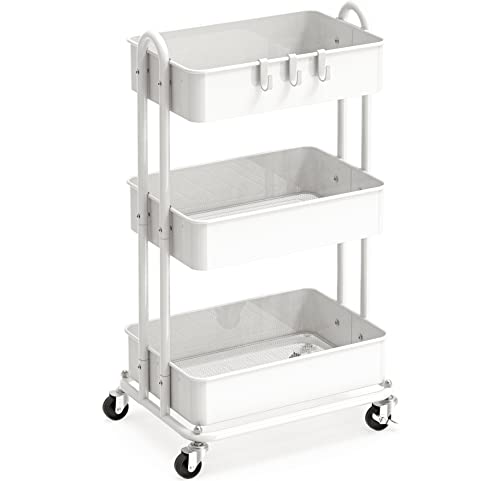
This is a general-purpose 3-tier metal utility rolling cart, not a printer-branded product, but its heavy-duty steel frame and 3 open shelves make it a genuinely solid fit for this guide's theme since every tier rolls and every tier can hold a printer or supplies. The white finish keeps it neutral enough to sit in a home office without looking industrial.
Because it is open-shelf rather than enclosed, cables run freely without cutouts to worry about, and the lower two tiers give you paper and ink storage right below wherever you place the printer.
Worth calling out specifically: 3 full shelves for printer plus supplies. The catch is not marketed or designed specifically for printers.
Best for: Budget-conscious buyers who want a flexible rolling cart that works well for a printer
Check price on AmazonPros
- +Sturdy heavy-duty metal construction
- +3 full shelves for printer plus supplies
- +Budget-friendly relative to dedicated printer carts
- +Open design means no cable cutouts needed
Cons
- −Not marketed or designed specifically for printers
- −No drawer for hiding small supplies
- −Casters are basic, not premium locking wheels
Pipishell 3 Tier Rolling Cart with Wheels and Handle
About this pick
The Pipishell is another general-purpose metal utility cart rather than a printer-specific stand, but its slim 3-tier profile and built-in push handle make it easy to roll a compact printer in and out of a tight nook. It was originally designed for rooms like nurseries and kitchens, which tells you the frame prioritizes narrow footprints over bulk storage.
That slim build is exactly what a small home office often needs: a rolling platform that does not eat floor space when it is not in active use, with two extra tiers below for paper and ink.
Push handle makes rolling easier one-handed. Set against that, not printer-specific, no cable routing features. Both matter when comparing it to the other picks here.
Best for: Small rooms that need the narrowest possible rolling footprint
Check price on AmazonPros
- +Slim footprint fits tight rooms well
- +Push handle makes rolling easier one-handed
- +3 tiers for printer plus supply storage
- +Lowest price among the metal utility cart picks
Cons
- −Not printer-specific, no cable routing features
- −Lighter-gauge metal than the heavy duty picks
- −Top shelf lip is shallow for larger printers
Sywhitta 3-Tier Plastic Rolling Utility Cart with Handle
About this pick
This Sywhitta cart is a plastic, multi-functional storage trolley, not a dedicated printer cart, but its 3 open tiers and rolling wheels make it the lightest option in this list to reposition. Plastic construction means no risk of the caster mounts rusting or scuffing floors the way some metal frames can.
It is the cheapest pick here, which makes sense for buyers who want a rolling printer stand mainly to solve a floor-space problem rather than to make a design statement. Keep the printer's actual weight in mind since plastic shelving has a lower ceiling than steel.
The standout detail is that lowest price of any rolling option here. Balancing that out, lower weight capacity than metal utility carts.
Best for: Buyers who want the lightest, cheapest rolling option for a compact printer
Check price on AmazonPros
- +Lightest pick in this list to move around
- +Lowest price of any rolling option here
- +Plastic frame will not rust or scuff floors
- +Handle makes one-handed rolling simple
Cons
- −Lower weight capacity than metal utility carts
- −Not designed with printers in mind
- −Plastic shelves flex more under a heavier printer
YASONIC 3 Tier Metal Rolling Cart
About this pick
The YASONIC is a black metal utility cart with 3 open tiers, another general-purpose rolling cart rather than a printer-branded product, but the all-black finish gives it a more modern look than the white carts in this list. Its metal frame holds up well under a mid-weight inkjet or laser printer.
Like the other utility carts here, the open shelving means cables run freely without dedicated cutouts, and the two lower tiers handle paper, ink, or a paper shredder if the printer itself does not fill the whole cart.
Solid metal frame for the price. That's a real strength, but weigh it against the flip side: not printer-specific, no cable cutouts.
Best for: Buyers who want a rolling cart with a modern black finish instead of white
Check price on AmazonPros
- +Modern black finish stands out from typical white carts
- +Solid metal frame for the price
- +3 tiers for printer plus supply storage
- +Rolls smoothly on 4 caster wheels
Cons
- −Not printer-specific, no cable cutouts
- −No drawer for hiding small items
- −Casters are basic rather than locking
How We Evaluated These Rolling Printer Stands
Each pick was assessed across 5 criteria weighted for real-world use.
Caster type and floor impact
Compared plastic versus rubber caster wheels, since plastic casters can mark or scratch hardwood floors over time while rubber wheels roll more quietly and grip better.
Stability while printing
Weighed frame rigidity and caster locking ability, since vibration during an active print job combined with a weak lock can cause a rolling stand to drift a few inches mid-job.
Per-shelf and total capacity
Checked shelf material, metal, plastic, or fabric-lined drawers, against realistic printer and supply weight rather than assuming every tier holds the same load.
Cable and floor-clearance realism
Considered cord length relative to rolling distance, since a short power cable limits how far a stand can actually roll before the cord goes taut and gets yanked.
Purpose-built versus flexible utility design
Distinguished dedicated printer carts with cable cutouts and drawers from general-purpose rolling utility carts, and evaluated each honestly against what it was actually designed to do.
How to Choose the Right Rolling Printer Stands
By Rating Confidence: Highest Rated vs Most Reviewed
| Your priority | Recommended pick |
|---|---|
| Highest average rating | HUANUO Printer Stand with Cable Management and Storage Drawer |
| Largest review base, strongest reliability signal | HUANUO Printer Stand with Cable Management and Storage Drawer |
By Budget
| Budget | Recommended pick |
|---|---|
| Under $26 | Sywhitta 3 |
| Up to $95 | DEVAISE 3 |
Weight Capacity vs Price
Sywhitta 3
The lower-priced option in this comparison, worth checking its weight capacity against your printer's actual weight.
DEVAISE 3
The higher-priced option, worth it if it offers real capacity or stability headroom above the cheaper pick.
Default to Sywhitta 3 unless your printer's weight genuinely calls for more capacity.
By Ventilation Clearance
Check each pick's design for open clearance around your printer's exhaust and paper output path before buying, not just its front-facing dimensions. HUANUO Printer Stand with Cable Management and Storage Drawer is the most-reviewed option here if you want the safer bet.
For a Heavy All-in-One Printer Specifically
Look for
A weight capacity with real margin above your printer's actual listed weight, and genuine vibration stability confirmed in reviews, not just static capacity.
In this comparison
Check each pick's listing directly, since weight capacity isn't consistently disclosed across every stand in this comparison.
When to Spend More
Spend more if
Your printer is heavy or used frequently throughout the day, where DEVAISE 3's capacity and stability give real headroom over the cheaper picks.
Save if
You have a light, compact printer used only occasionally, where Sywhitta 3 covers the same job at a lower price.
Frequently Asked Questions
Do rolling printer stands need locking wheels?
They help but aren't strictly required. A locking caster keeps the stand from drifting when the printer vibrates during a job or when someone bumps it while grabbing paper. If a pick doesn't have locking wheels, parking it against a wall or piece of furniture on one side achieves a similar effect.
Can a general-purpose utility cart really work as well as a printer-specific stand?
In most cases, yes. A plain 3-tier metal or plastic utility cart offers the same flat surface, open shelving, and rolling casters a printer needs, it just wasn't marketed with the word 'printer' on the label. The main things a dedicated printer cart adds are cable cutouts and sometimes a drawer, which are conveniences rather than requirements.
Will rolling casters scratch my hardwood floors?
It depends on the caster material. Hard plastic wheels can leave faint marks or scuffs over months of use on hardwood or vinyl, while rubber or soft-wheeled casters roll more gently and are the safer choice if the stand lives on a hard floor rather than carpet.
How much floor space should I leave for a rolling printer stand to actually roll?
Plan for at least the stand's full footprint plus a couple of feet of clear path in the direction you intend to roll it, and check the power cable length against that distance. A short cord is the most common reason a rolling stand ends up parked in one spot permanently instead of actually rolling.
Is a rolling cart with drawers better than open shelving for printer supplies?
A drawer keeps loose items like ink cartridges or labels out of sight, while open shelving is faster to grab from and never restricts cable routing. Picks like the HUANUO and GYIIYUO include drawers, while the metal utility carts in this list rely on open tiers instead.
Are these rolling stands sturdy enough for a heavier laser all-in-one printer?
Metal-framed picks like the DEVAISE, Simple Houseware, and YASONIC handle a heavier laser printer better than the lighter plastic Sywhitta cart. Check the stand's stated capacity against your printer's actual weight, and favor a wider caster base if the printer sits on the upper end of the weight range.
Bottom Line
best overall: HUANUO Printer Stand with Cable Management and Storage Drawer - best overall pick in this roundup.
See the full rankings above for all picks with pros, cons, and best-for summaries.
Browse on Amazon
All Prime-eligible options with current pricing.
Shop on Amazon →