
5 Best Quiet Ergonomic Mice in 2026
Five quiet-click ergonomic mice compared by noise claims, grip angle, battery type and hand size, for shared offices, libraries and late-night desks.

New to Amazon Prime?
Get fast, free shipping on every pick in this guide, plus Prime Video and exclusive deals.
Try Prime Free


At a Glance
A loud mouse click is a small annoyance that adds up fast in an open-plan office, a dorm with a sleeping roommate or a library table. Silent buttons solve the noise, but most buyers also want a shape that keeps the wrist from twisting, and the two goals do not always arrive in the same product.
Here, four of the five picks use a vertical handshake shape and one is a conventional right-handed mouse with silent buttons. Our comparison rests on the listed facts: how the quiet-click claim is worded, connection type, battery arrangement, size and the hand size each one targets. Noise figures are the makers' own claims, so treat them as a direction rather than a measurement.
6 Criteria to Look For Before Buying a Quiet Ergonomic Mice
Key buying criteria so you get the right fit the first time.
Read the click noise claim
A quiet-click mouse uses softer switches or dampers so the button press makes less sound. Listings usually say things like 90% quieter without naming a baseline, and click noise is rarely given in decibels. Look for the exact wording and whether it covers both left and right buttons, then treat any figure as marketing rather than a measurement. If silence matters, read buyer comments about the scroll wheel too, since it can still tick.
Check scroll wheel noise
Silent buttons do not make the scroll wheel silent. A notched wheel clicks with every step, which is audible on a quiet call even when the buttons are hushed. Check whether the listing says anything about the wheel at all, and be wary if it talks only about the left and right buttons. Several makers state this directly, so a missing mention is a mild warning sign.
Match grip angle to your wrist
Vertical mice tilt the hand to roughly 50 to 60 degrees so the forearm rotates toward a handshake position. Higher angles pull the forearm further from flat but take longer to adapt to. A conventional silent mouse keeps your hand flat, which feels normal but offers less relief. Look for the angle in the title or bullets, and expect several days of adjusting the first time you switch to a vertical shape.
Battery type and listed life
Silent mice come with either a built-in rechargeable cell or a replaceable AA or AAA. A replaceable battery means you can swap it in a minute, while a sealed rechargeable cell cannot be changed once it wears out. Check whether the battery is included, since one pick here is not, and compare the listed months of life with the sleep mode details.
USB-A receiver versus Bluetooth
A 2.4GHz receiver needs a free USB-A port, which many thin laptops no longer have, while Bluetooth pairs directly. Bluetooth models often also let you store several devices and switch between them with a button. Look for the words Bluetooth and 3 devices in the title if your laptop lacks USB-A, and note that a lost nano receiver can leave a 2.4GHz-only mouse useless.
Hand size and shell dimensions
A mouse that is too small leaves fingers hanging over the buttons, and one that is too large pushes the hand outward. Listings often say small to medium or medium to large, and a few give millimeter dimensions. Measure from wrist crease to the tip of your middle finger and compare, and check that the listing is not contradicting itself on hand size before you buy.
5 Best Quiet Ergonomic Mice in 2026
TECKNET Silent Vertical Mouse, 3-Device Bluetooth
About this pick
TECKNET's 3-device model combines a near-vertical palm angle with a silent click design that the listing says suits quiet spaces like libraries. It pairs over Bluetooth 5.0/3.0 or a 2.4GHz USB receiver, has 6 DPI steps up to 4800, and comes with a 36-month warranty.
Compared with the cheaper 2.4GHz-only TECKNET models below, it adds Bluetooth and the ability to hop between three devices, which matters if you share one mouse between a laptop and a tablet. It costs a few dollars more than the B0GF63 model but does not list a battery life figure the way that one does.
Pick it if you work across more than one computer and want quiet clicks plus a vertical shape. The caveat is that vertical mice take a few days to get used to, and the listing gives no click-noise number.
Best for: Quiet multi-device desk setups
Check price on AmazonPros
- +Switches between 3 devices
- +Silent buttons for shared rooms
- +Low battery warning
- +Long 36 month warranty
Cons
- −No noise level listed
- −Vertical grip takes adjustment
TECKNET 52-Degree Silent Vertical Mouse
About this pick
This is the lowest-priced pick here and still lists a 52 degree vertical angle, 90% quieter clicks and 6 DPI levels from 800 to 4800. It uses a plug-and-play 2.4GHz nano receiver, and the listing claims up to 24 months from one set of batteries with auto sleep.
Versus the 3-device model above, it drops Bluetooth, so it needs a free USB-A port on the computer. In return it is cheaper and gives a stated battery life, which the pricier TECKNET leaves out.
A good fit for a single desktop or a laptop that still has a USB-A port. The caveat is that many thin laptops lack that port, and the 2.4GHz receiver is the only connection route.
Best for: Single-computer desks on a budget
Check price on AmazonPros
- +Lowest price of the five
- +Clicks claimed 90% quieter
- +6 DPI levels, 800 to 4800
- +Plug and play, no driver
Cons
- −USB-A receiver only
- −No Bluetooth option
HP 280 Silent Wireless Mouse
About this pick
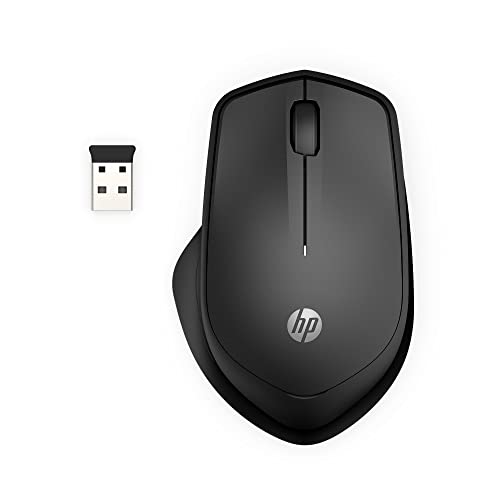
HP 280 is the only non-vertical pick, a right-handed wireless mouse with 3 buttons and a 1600 DPI sensor. The listing claims up to 90% noise reduction on the main buttons, 32.8 feet of range and up to 18 months from 1 AA battery.
Unlike the vertical TECKNET and MICROPACK models, it keeps your wrist in a familiar flat position, so there is no learning curve. The tradeoff is less forearm rotation relief and a single DPI setting rather than several steps.
Best for people who want a quiet mouse that feels like any office mouse. The caveat is that the contour is gentle rather than truly ergonomic, so heavy daily users with wrist strain may prefer a vertical shape.
Best for: Quiet clicks without changing grip
Check price on AmazonPros
- +No learning curve, familiar shape
- +Works on most surfaces
- +USB receiver stores inside
- +Long listed battery life
Cons
- −No vertical angle
- −Fixed DPI, no steps listed
TECKNET 52-Degree Vertical Mouse, 6 Buttons
About this pick
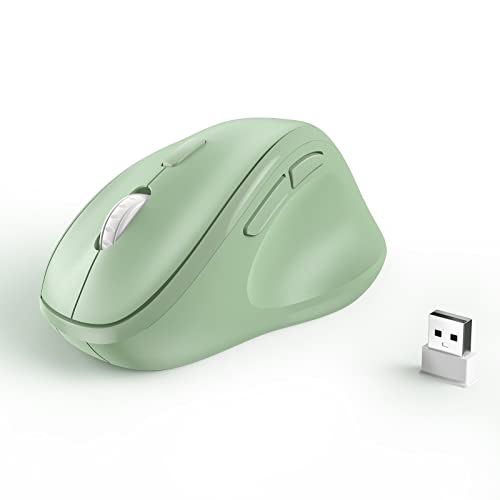
This 2.4GHz vertical mouse has a 52 degree angle, 5 DPI levels up to 4800, forward and back buttons and a rounded shell the listing recommends for small to medium hands. The title calls it silent.
Next to the B0GF63 model it adds the side navigation buttons but has no stated battery life, and the listing notes the side buttons do not work on macOS. It is also a little pricier than that model.
Choose it if your hand is on the smaller side and you browse a lot with back and forward buttons on Windows. The caveat is that large hands may find it cramped, and Mac users lose the side buttons.
Best for: Windows users with smaller hands
Check price on AmazonPros
- +Rounded shell for smaller hands
- +Forward and back buttons
- +Quiet click design
- +No sharp corners
Cons
- −Side buttons skip macOS
- −No battery life listed
MICROPACK Ergo Vertical Mouse, Silent Clicks
About this pick
MICROPACK sized its vertical mouse down after buyers called the first version too big, now listed at about 11.8 x 7.5 x 5.8 cm. It uses a USB dongle with up to 32 feet range, and the listing claims up to 16 months from one AA battery, which is not included.
Compared with HP 280 it sits the hand in a handshake posture and puts thumb controls within reach, while HP is flatter and includes a longer battery claim. It costs less than HP but needs you to buy a battery.
It suits someone with a medium hand who wants vertical posture at a low price. The caveat is that the listing is a little contradictory about hand size, so check the dimensions against your own palm before buying.
Best for: Budget vertical mouse for medium hands
Check price on AmazonPros
- +Compact vertical body
- +Thumb buttons within easy reach
- +Plug and play, no driver
- +Auto-sleep saves battery
Cons
- −Battery not included
- −Hand size guidance is unclear
How We Evaluated These Quiet Ergonomic Mice
Each pick was assessed across 4 criteria weighted for real-world use.
Noise claims
We read how each listing words its quiet-click claim, whether it covers both buttons and whether a figure is attached. Claims backed by a specific percentage ranked above vague mentions.
Ergonomic shape
We compared grip angle, shell dimensions and the hand size each maker targets, favoring picks that state numbers instead of generic comfort language.
Connection and power
We compared Bluetooth versus USB-A receivers, device count, battery type and listed battery life.
Value for price
We weighed the listed features against price, and noted where a cheaper pick drops Bluetooth or a stated battery life.
How to Choose the Right Quiet Ergonomic Mice
By Noise Priority
Match how strict your quiet requirement is to the pick that states it most clearly.
| Your situation | Recommended pick |
|---|---|
| Open office with shared desks | TECKNET Silent Vertical Mouse, 3-Device Bluetooth |
| Library or dorm with a sleeping roommate | TECKNET 52-Degree Silent Vertical Mouse |
| Needs quiet but wants a flat, familiar shape | HP 280 Silent Wireless Mouse |
| Quiet Windows browsing with side buttons | TECKNET 52-Degree Vertical Mouse, 6 Buttons |
Listed noise reductions are maker claims, not measurements.
By Budget
Real prices from this comparison.
| Price range | Recommended pick |
|---|---|
| Under $17 | TECKNET 52-Degree Silent Vertical Mouse |
| $17 to $20 | MICROPACK Ergo Vertical Mouse, Silent Clicks |
| $20 to $23 | TECKNET Silent Vertical Mouse, 3-Device Bluetooth |
| $23 to $25 | HP 280 Silent Wireless Mouse |
Silent mice cluster at low prices, so the extras rather than the price tag should decide.
Vertical vs Conventional Shape
Vertical handshake
The hand stands on its edge at roughly 52 degrees, so the forearm rotates toward a handshake position. Covers TECKNET 3-Device, TECKNET B0GF63, TECKNET 6 Button and MICROPACK.
Conventional flat
The hand lies flat as with any office mouse, so there is no adjustment period, but less forearm rotation. HP 280 Silent is the only one here.
Most buyers with wrist fatigue should try a vertical pick first, unless they cannot tolerate the learning curve.
By Connection Type
Connection decides whether the mouse works with your laptop at all.
| Your situation | Recommended pick |
|---|---|
| Laptop with no USB-A port | TECKNET Silent Vertical Mouse, 3-Device Bluetooth |
| Desktop with a spare USB-A port | TECKNET 52-Degree Silent Vertical Mouse |
| Wants one dongle that stores in the mouse | HP 280 Silent Wireless Mouse |
| Wants a dongle but prefers a smaller shell | MICROPACK Ergo Vertical Mouse, Silent Clicks |
A 2.4GHz receiver is easy to lose, so keep a note of where it lives.
For a Shared Office Specifically
Look for
Silent buttons, a quiet-friendly scroll wheel, a low battery warning so the mouse never dies mid-meeting, and a size that does not crowd a neighboring desk.
In this comparison
TECKNET Silent Vertical Mouse, 3-Device Bluetooth is the strongest fit: quiet buttons, a low battery alert and device switching. HP 280 suits colleagues who dislike vertical mice.
When to Spend More
Spend more if
You work across a laptop and a tablet or a second computer, or you want a long warranty and a battery warning (TECKNET 3-Device Bluetooth).
Save if
You use one desktop with a free USB port, where the TECKNET 52-Degree Silent Vertical Mouse covers the basics at the lowest price.
Frequently Asked Questions
Do silent mice work on every surface?
Most optical silent mice track on common desks, and HP lists multi-surface use. Glossy glass and mirrored surfaces are a problem for almost any optical sensor, so a cheap mouse pad solves it. Check the listing before buying if your desk is glass.
Is a silent click less satisfying to press?
The tactile bump is softer, and some people find it mushy at first. Makers say they keep a similar click feel, but it is subjective. Most users adapt within a few days.
Is a vertical silent mouse worth it over a cheap conventional one?
If you notice wrist or forearm fatigue, a vertical shape can feel more relaxed because it rotates the forearm toward a handshake position. If you have no discomfort, a flat silent mouse like HP 280 may be enough. These are comfort products, not medical devices, so see a doctor or ergonomist if pain persists.
How do I set up a 2.4GHz receiver mouse?
Plug the nano receiver into a USB-A port, turn the mouse on and it normally connects automatically. Some models store the receiver in the battery bay for travel. Keep the receiver plugged in while you work.
Can I use a silent mouse with a MacBook?
Bluetooth models usually pair without a dongle, but the TECKNET 6-button listing says its side buttons do not work on macOS. USB-A receivers need an adapter on most modern MacBooks. Check the compatibility list before ordering.
How often should I change batteries?
Makers claim 16 to 24 months for the AA models, though this depends on use. Turn the power switch off when traveling to save battery. Replace batteries when the pointer starts to stutter.
Bottom Line
best overall: TECKNET Silent Vertical Mouse, 3-Device Bluetooth - best overall pick in this roundup.
See the full rankings above for all picks with pros, cons, and best-for summaries.
Browse on Amazon
All Prime-eligible options with current pricing.
Shop on Amazon →