
5 Best Quad-Screen Extenders for 16-Inch Laptops in 2026
Five quad-screen extenders with three 16-inch panels for 16-inch laptops, compared on drivers, power, weight and Mac support before you buy.

New to Amazon Prime?
Get fast, free shipping on every pick in this guide, plus Prime Video and exclusive deals.
Try Prime Free


At a Glance
When a listing says quad screen, it means your laptop plus three added panels: one that rises above the lid and two that fold out to the sides. That is four displays from a single bag, and at 16 inches each added panel is big enough that the full spread is wider than most small desks.
We evaluated five 16-inch kits from their listing specs. The panels are all 16:10, 1920 x 1200 on paper, so the real differences are weight, how each is powered, whether a driver is required, and what the seller says about Mac compatibility. Quad kits are also heavy and bandwidth hungry, so we treat the physical and wiring limits as the main buying criteria.
5 Criteria to Look For Before Buying a Quad-Screen Extenders for 16-Inch Laptop
Key buying criteria so you get the right fit the first time.
What quad actually means
Quad in these listings means four screens in total: your laptop display plus three added panels, which is why the same kit is also labelled triple. A top screen mounts above the lid and two side screens fold out left and right. Read the bullet that says three screens or one cable for three screens so you know the count includes your own.
Total weight on the laptop hinge
The three-screen kits weigh from 3.88 lb to 5.81 lb, and the top panel rests behind the lid. A heavy panel can tip a light laptop backward or strain the hinge. Check the listed weight and whether the kit has its own stand or backrest, as the FOPO describes.
Bandwidth and driver software
One USB-C cable has to carry three video streams, which is why these kits depend on a driver such as DisplayLink style software. A laptop port that lacks data transfer or full-function support will not drive them at all. Confirm that your port supports data and video, and look for the words driver required in the title.
Power for three backlights
Three 16-inch backlights draw far more than one panel, so a laptop port can under-power them and cause dimming or flicker. Listings from FQQ and RoamPix advise a PD supply, and the Aura includes a 30W adapter. Keep a wall charger with you and look for adapter in the box contents.
Desk width and viewing angle
Spread to the full width, a 16-inch quad layout can reach beyond 40 inches across, which a narrow desk will not hold. Neck turns to the far side screens add strain too. Measure your usable width first and plan to keep the busiest windows on the centre and top panels.
5 Best Quad-Screen Extenders for 16-Inch Laptops in 2026
Aura Displays Triple Go 16" Plus
About this pick
The Triple Go 16" Plus adds three matte IPS panels, each 1920 x 1200 at 16:10 with 300 nits, 1000:1 contrast and 100% sRGB. The top display rotates automatically when flipped 180 degrees and offers four modes the listing calls Panoramic, Triangle, Presentation and Portrait.
It stands apart on power and protection: a 30W adapter is included because there is no built-in battery, and each screen gets a tempered glass protector. A composite chassis with a metal frame and aluminium accents is described. The box also includes two USB-C to USB-C and two USB-C to USB-A cables.
Choose it if you want the most complete package. The driver installs once from the included USB key, and the listing advises checking with your IT department on a company laptop. It costs more than most rivals, and the price buys the accessories.
Best for: mobile professionals who want everything in one box
Check price on AmazonPros
- +Power adapter included
- +Glass protectors for each screen
- +Four top-screen modes
- +Four cables in the box
Cons
- −Highest cost in this guide
- −Driver install needed
FQQ 16" Quad Monitor Laptop Extender
About this pick
The FQQ 16-inch kit adds three screens at 1920 x 1200 on a 16:10 IPS panel and connects to 14 to 18.5 inch laptops by HDMI or full-featured USB-C. The listing says each screen has independent brightness, the top screen flips 300 degrees and the side screens flip 360 degrees.
It is the clearest on Mac compatibility, naming MacBooks from 2019 onward including M1 through M5, while also stating that it does not work with Chromebooks. A carrying bag and the needed cables are in the package.
Pick it if you run a recent MacBook or Windows machine and want an explicit support statement. The listing advises a PD power supply for the quad setup, so budget for a charger.
Best for: MacBook owners who want a stated compatibility list
Check price on AmazonPros
- +Names M1 to M5 MacBooks
- +Per-screen brightness control
- +Bag and cables included
- +360 degree side flip
Cons
- −Not for Chromebooks
- −PD power supply advised
LXU 16" Quad Monitor Laptop Extender
About this pick
The LXU 16-inch kit uses a 1200P 16:10 panel set and is billed as one cable for four screens, with an adaptive top screen and low blue light technology. The seller lists 12 to 18 inch laptop compatibility and says it works with 2019 or later MacBooks and Windows 10 or 11.
Its title includes the words Need Driver, so a driver install is part of the setup. It weighs 5.81 lb, which is the heaviest weight any listing here states, and that is the real cost of a three-screen spread.
It suits a laptop that stays on a desk or in a rolling bag more than a backpack. Compared with the FOPO it is much heavier and costs more, so choose it only if the one-cable setup is the draw.
Best for: desk-based workers who prefer one cable over low weight
Check price on AmazonPros
- +One cable to the laptop
- +Low blue light mode
- +Fits 12 to 18 inch laptops
- +Adaptive top screen
Cons
- −Heavy at 5.81 lb
- −Driver install needed
RoamPix 16" Quad Monitor Laptop Extender
About this pick
The RoamPix 16-inch extender gives three screens at 1200P with a 72% NTSC colour gamut and 1000:1 contrast. The top screen rotates automatically when folded back, and the panels adjust up to 360 degrees for face-to-face viewing.
Its connection note says one cable over USB-C or USB-A drives all three screens, and that a PD power supply should be attached for the quad arrangement. It lists 13.6 to 18.5 inch laptops on Windows 10 and later and 2019 or later MacBooks, including M1, M2 and M3.
It is the cheaper alternative to the FQQ and Aura kits, and the cost is a lower stated colour spec. Pick it if you work mostly with documents and spreadsheets rather than colour-critical content.
Best for: spreadsheet and coding work on a tighter budget
Check price on AmazonPros
- +Lower cost than other quad kits
- +USB-A connection option
- +Auto-rotating top screen
- +360 degree screen adjustment
Cons
- −72% NTSC colour only
- −PD power supply advised
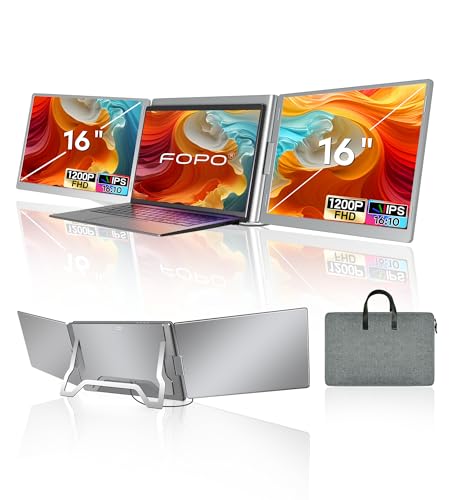
FOPO 16" Quad Monitor Laptop Extender
About this pick
The FOPO 16-inch kit weighs 3.88 lb and is 1.14 inch thick, which is lighter than the 5.81 lb LXU. The listing says it needs a driver from the included USB drive and a laptop with USB-C or two USB-A ports that support data transfer.
It lists 13.3 to 18.5 inch laptops, Windows and macOS including M1 to M3, and gives each screen its own brightness button. The package contains a carrying bag, a dual USB-A to USB-C cable and a 60 cm USB-C to USB-C cable.
One caveat: the title says 1080P while a feature bullet says 1920 x 1200, so confirm the real resolution on the page before buying. It is the lowest-cost kit here and the lightest listed, which makes it the pick for travel.
Best for: travelling buyers who want a lighter quad kit
Check price on AmazonPros
- +Lightest weight listed
- +Lowest cost here
- +Bag and two cables included
- +Own brightness button per screen
Cons
- −Resolution wording inconsistent
- −Driver install needed
How We Evaluated These Quad-Screen Extenders for 16-Inch Laptops
Each pick was assessed across 5 criteria weighted for real-world use.
Weight and bulk
Stated weight and thickness were weighed because a three-panel kit is far heavier than a single extender.
Setup and drivers
We compared driver requirements, cable count and which laptop ports are named.
Power handling
Included adapters, PD advice and the risk of a laptop port under-powering three screens were scored.
Mac and Windows support
Compatibility lists were read for chip generations, operating systems and any stated exclusions such as Chromebooks.
Value for the price
Accessories in the box and stated panel specs were set against the price bucket.
How to Choose the Right Quad-Screen Extenders for 16-Inch Laptops
By How You Carry It
A quad kit is the heaviest thing in most bags, so carry style decides the pick.
| Your situation | Pick from this guide |
|---|---|
| Backpack daily, weight matters | FOPO 16" at 3.88 lb |
| Rolling case or car | LXU 16" at 5.81 lb |
| Everything in one box | Aura Displays Triple Go 16" Plus |
| Recent MacBook, wants stated support | FQQ 16" Quad Monitor |
By Budget
| Budget | Pick from this guide |
|---|---|
| $300 to $400 | FOPO 16" for the lowest cost and weight |
| $400 to $500 | RoamPix 16" for the mid-price option |
| $500 to $600 | Aura Triple Go 16" Plus for the included adapter, FQQ for Mac coverage |
One Cable vs Separate Power
All five kits aim at one cable to the laptop, but power is where they differ.
Single-cable focus
The LXU and RoamPix market one cable to the laptop and advise PD power for stability, so you still end up with a charger in the loop.
Adapter included
The Aura ships its own 30W adapter and has no battery, so full brightness does not depend on your laptop port.
Most buyers should plan on a wall adapter either way and treat one cable as the data link only.
By Laptop Type
| You have | Pick from this guide |
|---|---|
| MacBook with M1 to M5 | FQQ 16" Quad Monitor |
| MacBook with M1 to M3, mid budget | RoamPix 16" Quad Monitor |
| Windows laptop with two USB-A ports | FOPO 16" Quad Monitor |
| Company laptop that needs IT sign-off | Aura Triple Go 16" Plus |
For a Small Home Office Specifically
Look for
A footprint you can fold away, a stand that does not lean on the laptop lid, and a weight a standard laptop hinge can support.
In this comparison
The FOPO at 3.88 lb and 1.14 inch thick is the lightest listed, so it puts the least strain on a lid and folds smallest.
When to Spend More
Spend more if
You want accessories in the box: the Aura adds an adapter and glass protectors, and the FQQ gives you a stated Mac list.
Save if
You just need extra rows for data: the FOPO and RoamPix cover the basics for less.
Frequently Asked Questions
Is a quad screen extender really four screens?
Yes, if you count your laptop. The kit adds three panels, which the listings call triple or quad depending on whether they count the laptop.
Do I need a driver for these extenders?
Most do. The FOPO and Aura both include a driver on a USB drive, and the LXU title says Need Driver. Check with your IT team if the laptop is managed.
Will a 16 inch quad kit work on a MacBook?
FQQ, RoamPix and LXU list 2019 or later MacBooks, and the FQQ names M1 through M5. Confirm on the current listing because Mac support changes with macOS updates.
Can I use one on a Chromebook?
The FQQ listing says it does not work with Chromebooks. Others do not say, so assume a driver-based kit needs a laptop that can install software.
How much power do I need?
Plan for a PD wall adapter. The FQQ and RoamPix advise it for the quad setup, and the Aura includes a 30W unit because it has no battery.
Is a 16 inch quad kit worth it over a single extender?
Only if you need lots of simultaneous windows, such as trading, coding or monitoring. For most small desks a single 15.6 or 16 inch panel is lighter and cheaper.
Bottom Line
best overall: Aura Displays Triple Go 16" Plus - best included power pick in this roundup.
See the full rankings above for all picks with pros, cons, and best-for summaries.
Browse on Amazon
All Prime-eligible options with current pricing.
Shop on Amazon →