
3 Best Portable SSDs Under $30 in 2026
We compared portable SSDs under $30 by real USB standard, drive capacity math, and cross platform format, not just price alone.

New to Amazon Prime?
Get fast, free shipping on every pick in this guide, plus Prime Video and exclusive deals.
Try Prime Free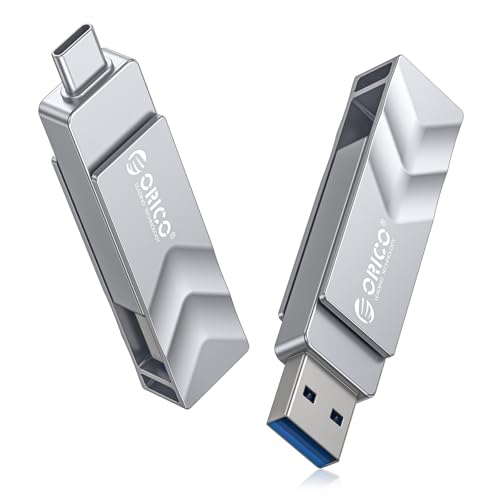

At a Glance
At the sub $30 tier, the real risk isn't a bad SSD, it's a listing that isn't actually an SSD, or one whose spec sheet contradicts its own title, so verifying the basics matters more here than at any other price tier.
We evaluated this lineup on whether the listing's claimed capacity and drive type are internally consistent, real USB bandwidth, and cross platform format, rather than ranking by the lowest price alone.
5 Criteria to Look For Before Buying a Portable SSDs Under $30
Key buying criteria so you get the right fit the first time.
Check That the Listing's Own Details Agree With Each Other
At the very bottom of the price range, some listings contain internal inconsistencies, like a title claiming one capacity while the feature text mentions a completely different number. This usually signals a templated or copy-pasted listing rather than one written specifically for that exact product. Before buying, skim the full feature list for any contradiction with the title or main image, and treat a clear mismatch as a reason for caution rather than assuming it's a harmless typo.
A Vague Speed Claim Tells You Less Than a Specific Number
Some budget listings describe performance only in general terms like "fast and stable" rather than citing an actual MB/s figure, while others state a specific number like 400MB/s read speed. A specific figure gives you something concrete to compare against other drives and against your actual use case, like transferring a folder of photos versus a single large video file. Prefer a listing with a stated number when you can, and treat the absence of one as a minor but real information gap, not a dealbreaker on its own.
64GB Fills Up Faster Than It Sounds
At this price tier, 64GB is a genuinely small amount of storage by modern standards, roughly enough for a few thousand photos or a couple of hours of compressed video, not a general-purpose backup drive. If you're buying primarily to free up space on a phone, 64GB can work fine for that narrow purpose, but if you want one drive to handle transfers, backups, and file storage more broadly, the jump to 128GB for a similar or even lower price, as seen in this comparison, is usually the better default.
Dual Connector Design Avoids Needing a Second Cable
A drive with both a USB-A and USB-C connector built into the same body, rather than just one connector type, means you don't need to separately track down an adapter when moving between an older USB-A laptop and a newer USB-C device. This is a genuine convenience feature at this price tier, not just a marketing checkbox, since a lost or forgotten adapter effectively makes a single-connector drive unusable on the wrong device until you find one.
Brand Recognition Matters More When You Can't Verify Reviews Deeply
At the very cheapest end of any product category, some listings come from brands with little public track record, making it harder to judge long-term reliability from reviews alone. A recognized storage brand, even at the same price point, generally carries more accountability and support infrastructure if something goes wrong. This isn't a reason to avoid unfamiliar brands entirely, since many perform fine, but it's a legitimate factor to weigh if you've had a bad experience with off-brand electronics before.
3 Best Portable SSDs Under $30 in 2026
ORICO 64GB USB Flash Drive SSD
About this pick
This drive is rated at 400MB/s read and 150MB/s write, and it's built around a reversible USB-C plug with a fold-out USB-A connector on the same body, meaning it works with a USB-C iPhone, an Android phone, a MacBook, and a traditional USB-A laptop without carrying a separate adapter or cable. The zinc alloy housing includes a 360-degree swivel cap that protects the connector when not in use, a detail that matters since exposed USB connectors on cheap flash-style drives are a common failure point.
Against the other picks here, ORICO is explicit that this specific model does not support Lightning-port iPhones, only USB-C ones, a limitation worth confirming before buying if your phone is an older iPhone. The listing also offers the same design in 128GB, 256GB, and 512GB if 64GB proves too small later, letting you stay within this brand's ecosystem rather than switching drives entirely.
Best for buyers who specifically want one drive that plugs directly into a USB-C iPhone or Android phone without an adapter, and who don't need more than a modest amount of storage.
Best for: buyers who want a drive that plugs directly into a USB-C phone without an adapter
Check price on AmazonPros
- +Plugs directly into USB-C iPhones with no adapter needed
- +Swivel cap protects the connector from damage
- +Available in larger capacities under the same design if needed later
Cons
- −64GB is a modest capacity for anything beyond quick transfers
- −Not compatible with Lightning-port iPhones
TDRVODA 128GB Portable External SSD
About this pick
At under $18, this is the cheapest 128GB drive in this comparison, double the capacity of the ORICO pick above at a slightly lower price. It uses a Type-C interface and is described as plug-and-play across Mac, Windows, and Type-C smartphones or tablets without needing additional drivers.
The listing is more general than the ORICO or Lexar picks about exact speed figures, describing performance as "fast and stable" rather than citing a specific MB/s number, which is worth noting since a vaguer speed claim gives you less to verify against before buying. It does specifically call out no moving parts for quieter operation and better drop resistance, standard SSD advantages over a mechanical hard drive.
Best for buyers who want the most capacity for the least money at this tier and don't need a precisely documented speed figure to plan around.
Best for: buyers who want the most capacity for the least money and don't need a documented speed spec
Check price on AmazonPros
- +Cheapest 128GB option in this comparison
- +Double the capacity of the 64GB ORICO pick for less money
- +No drivers needed on Mac, Windows, or Type-C devices
Cons
- −Listing doesn't state a specific transfer speed figure
- −Single USB-C connector only, no USB-A included
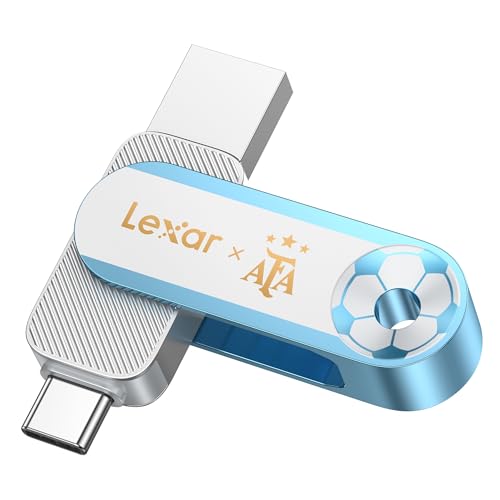
Lexar 128GB Dual Drive D500 SSD
About this pick
This is the only drive in this comparison from an established storage brand rather than a generic listing, and it includes both a USB-A and USB-C connector built into the same compact body, similar to the ORICO pick's dual-connector approach but from Lexar. Rated speed is 400MB/s, matching the ORICO pick, and the metal housing is specifically described as protecting both connectors from damage.
At the top of this price range, it's the priciest pick here, but a recognized storage brand name can matter for buyers who've had reliability issues with unfamiliar brands on cheap electronics before. The compact design is marketed around portability for everyday carry rather than any specific speed or capacity advantage over the other two picks.
Best for buyers who specifically want a known storage brand name at this price tier and are comfortable paying the top of the range for that.
Best for: buyers who want a recognized storage brand name and are willing to pay the top of this price range for it
Check price on AmazonPros
- +Established brand name, unlike the generic listings here
- +Dual connector design works across USB-A and USB-C devices
- +Metal housing protects both connectors
Cons
- −Most expensive pick in this comparison
- −No meaningful speed advantage over the cheaper ORICO pick
How We Evaluated These Portable SSDs Under $30
Each pick was assessed across 5 criteria weighted for real-world use.
Listing Consistency Check
Verified that each listing's title, capacity claim, and feature text agree with each other, since sub $30 storage listings occasionally contain internal contradictions worth flagging before buying.
Real USB Bandwidth
Checked the actual documented speed figure where a listing provided one, rather than accepting vague "fast and stable" language as a stand-in for a real spec.
Capacity-to-Price Math
Compared price per gigabyte across the 64GB and 128GB options here, since capacity varies more than speed at this specific price floor.
Connector Compatibility
Noted which drives include both USB-A and USB-C connectors versus a single connector type, since that affects which of your existing devices the drive works with out of the box.
Brand Recognition
Distinguished generic, unfamiliar-brand listings from an established storage brand name, since reliability track record is harder to verify on unfamiliar brands at this price floor.
How to Choose the Right Portable SSDs Under $30
By Primary Use Case
| If you mainly need | Recommended pick |
|---|---|
| A drive that plugs directly into a USB-C phone | ORICO 64GB USB Flash Drive SSD |
| The most capacity for the least money | TDRVODA 128GB Portable External SSD |
| A recognized storage brand name | Lexar 128GB Dual Drive D500 SSD |
By Budget
| Price range | Recommended pick |
|---|---|
| Under $18 | TDRVODA 128GB Portable External SSD (under $20) |
| $18-$20 | ORICO 64GB USB Flash Drive SSD (under $20) |
| $25-$30 | Lexar 128GB Dual Drive D500 SSD (under $30) |
64GB vs 128GB
64GB (ORICO)
Enough for documents, a modest photo library, or quick file transfers, but tight for video. Best as a phone-storage extender rather than a general-purpose drive.
128GB (TDRVODA, Lexar)
More comfortable everyday capacity for the same or lower price in the TDRVODA's case. Best as a general-purpose transfer or backup drive rather than a phone-specific accessory.
Most buyers should default to a 128GB option like the TDRVODA unless the ORICO's specific USB-C-phone convenience matters more than raw capacity.
By Connector Needs
| Your devices | Recommended pick |
|---|---|
| Mostly USB-C devices only | ORICO 64GB USB Flash Drive SSD or TDRVODA 128GB Portable External SSD |
| Mix of USB-A and USB-C devices | Lexar 128GB Dual Drive D500 SSD |
For USB-C iPhone Backup Specifically
Look for
A listing that explicitly names your iPhone model as compatible, since Lightning-port and USB-C iPhones aren't interchangeable, and not every drive supports both.
In this comparison
The ORICO 64GB USB Flash Drive SSD specifically lists iPhone 16 and 17 series compatibility, making it the clearest confirmed fit for current USB-C iPhones.
When to Spend More
Spend more if
You've had reliability problems with unfamiliar-brand electronics before and specifically want the Lexar 128GB Dual Drive D500 SSD's established brand name, even without a documented speed advantage over the cheaper picks.
Save if
You just need a basic transfer or backup drive and don't have a specific brand preference, where the TDRVODA 128GB Portable External SSD covers the same 128GB capacity for roughly $12 less.
Frequently Asked Questions
Is a $20 portable SSD actually a solid-state drive, or is it a flash drive in disguise?
Check the listing carefully. Most products marketed as "portable SSD" at this price genuinely use solid-state storage, but the packaging and form factor can look similar to a basic USB flash drive. Look for a stated NAND flash or SSD-specific description in the feature text, and be cautious of listings whose title and feature descriptions don't match each other.
Why does one listing say 64GB and mention 1TB somewhere in its description?
This kind of inconsistency shows up occasionally in budget listings that appear to reuse templated description text across multiple product variants without fully updating every mention. Treat it as a signal to double-check the actual capacity you're ordering, and consider it a mark against that specific listing's quality control.
Will a 64GB or 128GB drive at this price work with my USB-C iPhone?
Only if the listing specifically confirms USB-C iPhone compatibility, since Lightning-port and USB-C iPhones use physically different connectors. The ORICO pick in this comparison explicitly lists iPhone 16 and 17 compatibility; don't assume a generic "works with iPhone" claim covers your specific model without checking.
Is it worth paying more for a recognized storage brand at this price tier?
It can be, mainly for peace of mind and support if something goes wrong, rather than for a meaningful performance difference. In this comparison, the branded Lexar pick doesn't outperform the cheaper generic options on speed, so the extra cost is really paying for brand track record, not raw capability.
How much storage do I actually need for basic phone backup?
It depends heavily on how many photos and videos you're storing, but 64GB is workable for a modest photo library and occasional video, while 128GB gives noticeably more breathing room for the same or only slightly higher price at this tier, based on the picks in this comparison.
Do these drives need to be reformatted before use on both Mac and Windows?
Most drives at this price ship ready to use across major platforms without reformatting, since manufacturers generally pre-format for broad compatibility, but always check the specific listing's compatibility section to confirm before assuming it works with both operating systems out of the box.
Bottom Line
best overall: ORICO 64GB USB Flash Drive SSD - best overall pick in this roundup.
See the full rankings above for all picks with pros, cons, and best-for summaries.
Browse on Amazon
All Prime-eligible options with current pricing.
Shop on Amazon →