
8 Best Portable Monitors for Photo Editing in 2026
8 portable monitors we evaluated for photo editing, with an honest note that gamut coverage percentage and color accuracy (Delta E) are different measurements.

New to Amazon Prime?
Get fast, free shipping on every pick in this guide, plus Prime Video and exclusive deals.
Try Prime Free




At a Glance
Newsoul 4K Portable Monitor 1200Nits Ultra Bright 16'' Laptop Monitor
↓ See why we picked itYodoit 4K Portable Monitor, 16" 3840x2400 UHD, 1200nit Sunlight-Readable
↓ See why we picked itEVICIV Portable Monitor 4K 1200 Nits 16", 3840x2400 UHD, 145% sRGB
↓ See why we picked itcocopar Portable Monitor 15.6 Inch 4K UHD 60Hz 145% sRGB
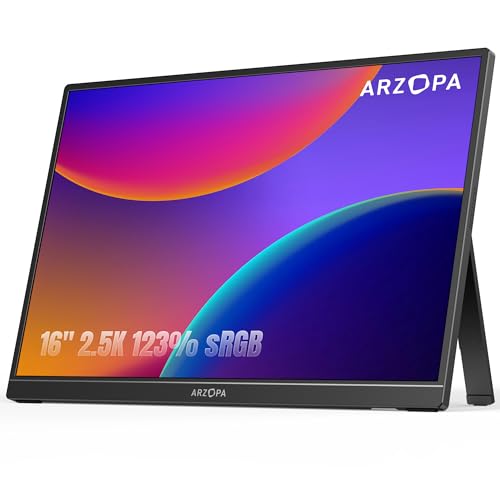
↓ See why we picked itARZOPA 16" 2.5K Portable Monitor, 2560x1600 QHD IPS Display 123% sRGB
↓ See why we picked itVisionOwl Portable Monitor 16 Inch 2.5K QHD 144Hz, 470 Nits
↓ See why we picked itcocopar Portable Monitor 18.5 Inch 2K QHD 120Hz 120% sRGB
↓ See why we picked itASUS ProArt PA278CV 27 Inch 1440p QHD USB-C Professional Monitor
↓ See why we picked itA panel can cover 100% of the sRGB gamut while still displaying colors inaccurately out of the box, gamut coverage and color accuracy (Delta E) are different measurements. Only one pick in this guide, a non-portable desktop reference monitor included for comparison, has independently verified Delta E accuracy, none of the truly portable panels here carry that certification.
Also worth knowing: a glossy screen can make images look more vivid than they truly are due to increased apparent contrast, while ambient reflections simultaneously interfere with accurate color judgment, a real editing-workflow conflict most gamut-percentage marketing doesn't address.
5 Criteria to Look For Before Buying a Portable Monitors for Photo Editing
Key buying criteria so you get the right fit the first time.
Check the refresh rate ceiling for each port separately, not just the headline spec
A portable monitor's advertised refresh rate is typically its maximum achievable rate on its best-performing port, usually USB-C using DisplayPort Alt Mode, but the same panel connected over HDMI, especially older HDMI 2.0, frequently caps at a meaningfully lower rate because HDMI 2.0's bandwidth can't sustain the same data throughput as USB-C at higher resolutions.
This is a genuinely common source of buyer disappointment: someone buys a monitor rated 144Hz specifically to pair with a game console over HDMI, only to discover the HDMI port caps at 120Hz or even 60Hz on that specific model, a distinction the headline spec doesn't disclose.
Check the listing specifically for per-port refresh rate figures (USB-C rate versus HDMI rate stated separately), and match the port you'll actually use to the rate you actually need, not the single highest number in the title.
Confirm your specific source device can actually output above 60Hz before paying extra for a high refresh panel
A monitor's refresh rate capability is meaningless if the connected source device can't output a signal above 60Hz in the first place, and this is a genuinely common mismatch: many laptop USB-C ports are data-only or video-limited to 60Hz regardless of Thunderbolt or USB4 branding, and handheld gaming PCs like Steam Deck and ROG Ally specifically output capped at 60Hz over USB-C in their current hardware generation, making a 144Hz-rated monitor's extra capability completely unused for that pairing despite the higher price paid for it.
Before buying specifically for the refresh rate, check your exact source device's documented maximum output refresh rate over the connection type you'll actually use (not just its general spec sheet), since a monitor's rated capability and your source device's actual output are two entirely separate specifications that both need to support the higher rate.
Understand that response time (GtG) affects visible motion clarity as much as refresh rate does
Refresh rate (how many times per second the image updates) and response time (how quickly individual pixels can change color, commonly measured in milliseconds as gray-to-gray or GtG) are two separate specs that both affect how smooth and clear fast motion looks, and a high refresh rate paired with a slow response time still produces visible ghosting or blur trailing behind fast-moving objects, since the panel can't physically change pixel colors fast enough to keep up with the higher refresh rate's demands.
This matters because response time is disclosed far less consistently than refresh rate across portable monitor listings, many simply omit it entirely, making direct comparison difficult even when two panels share the same headline refresh number.
Check specifically for a stated GtG response time in milliseconds, and treat a genuinely high refresh rate spec with some skepticism if the listing doesn't also disclose response time, since the refresh number alone doesn't guarantee smooth-looking motion.
Check power delivery and cable requirements, since a portable monitor's convenience depends on how it's actually powered
Portable monitors typically draw power either through the same USB-C cable carrying the video signal (single-cable operation, the more convenient setup) or through a separate dedicated power input, and some models support pass-through charging that lets your laptop's own charger power both the laptop and the monitor simultaneously through one connection.
This matters concretely for actual portability: a monitor requiring two separate cables (one for video, one for power) is meaningfully less convenient to set up and pack away than genuine single-cable operation, undermining part of the appeal of a "portable" monitor in the first place.
Check specifically whether the monitor supports single-cable USB-C operation with your source device, and confirm pass-through charging wattage if you want your laptop's charger to power both devices without needing two outlets.
Weigh review volume against star rating, since this category includes both established models and many newer, similar-looking entrants
Portable monitors from well-established sellers with years of accumulated sales carry review counts in the thousands, giving genuine statistical confidence in panel quality and long-term reliability, while newer listings, sometimes from the same manufacturer under a different model number or from less established brands entirely, can carry only a handful of reviews despite looking similarly specified and priced.
This is a real practical concern for a portable monitor specifically because panel defects (dead pixels, backlight bleed, uneven brightness) are a documented failure mode across this category, and a thin review base provides much less confidence that a specific listing's panel quality is consistent across units.
When comparing two similarly specified and priced portable monitors, check both the star rating and the review count together, and treat a very small review count as a reason for extra caution even if the rating itself looks strong.
8 Best Portable Monitors for Photo Editing in 2026
Newsoul 4K Portable Monitor 1200Nits Ultra Bright 16'' Laptop Monitor
About this pick
A claimed 145% sRGB gamut and matte screen make this a genuinely strong photo-review companion, the matte finish specifically reduces the reflection interference that can distort color judgment on a glossy panel. Remember: 145% sRGB is a coverage percentage, not a verified accuracy (Delta E) figure, this listing doesn't claim factory calibration to any specific Delta E standard.
It earns the top spot in this comparison over Yodoit 4K Portable Monitor for one main reason. Wide gamut coverage claim. On price, it comes in below Yodoit 4K Portable Monitor, which is worth weighing if cost is your deciding factor between the two.
Worth knowing before you decide: Matte screen reduces glare-driven color misjudgment. On the other side, Smaller review base than the top picks. That's the main tradeoff to weigh against everything above.
Best for: Field photographers who want a bright, wide-gamut panel for on-location image review
Check price on AmazonPros
- +Wide gamut coverage claim
- +Matte screen reduces glare-driven color misjudgment
- +Very bright for field photo review
- +VESA mountable
Cons
- −No verified Delta E accuracy claimed
- −No factory calibration report included
- −Smaller review base than the top picks
Yodoit 4K Portable Monitor, 16" 3840x2400 UHD, 1200nit Sunlight-Readable
About this pick
Explicitly marketed for on-location photo editing with a 16:10 4K panel, 145% sRGB claim, and a complete DSLR-ready cable kit including mini-HDMI. Like every portable pick in this guide, its 145% sRGB is a coverage claim, not an independently verified color accuracy figure, treat final color decisions with a grain of salt until checked against a calibrated reference display.
One spot below Newsoul 4K Portable Monitor 1200Nits Ultra Bright 16'' Laptop Monitor in this ranking, it costs more than Newsoul 4K Portable Monitor 1200Nits Ultra Bright 16'' Laptop Monitor. The compromise here is straightforward: No verified Delta E accuracy claimed. What you gain in return: Complete field-photography cable kit included. Whether that trade is worth it depends on which side matters more for your setup.
Worth knowing before you decide: Large review base. On the other side, Best treated as a review screen, not final color grading. That's the main tradeoff to weigh against everything above.
Best for: Location photographers who want a DSLR-ready field monitor with a complete cable kit
Check price on AmazonPros
- +Complete field-photography cable kit included
- +Large review base
- +16:10 ratio for more vertical review space
- +Bright and matte for outdoor location work
Cons
- −No verified Delta E accuracy claimed
- −2.2 lb is not the lightest option
- −Best treated as a review screen, not final color grading
EVICIV Portable Monitor 4K 1200 Nits 16", 3840x2400 UHD, 145% sRGB
About this pick
The largest review base of the 145% sRGB 4K picks in this guide, at a competitive price. Same gamut-versus-accuracy caveat applies, this is a coverage claim, and no calibration hardware compatibility (SpyderX, i1Display) is confirmed for this panel.
Sitting just under Yodoit 4K Portable Monitor, it costs more than Yodoit 4K Portable Monitor. Here's the honest tradeoff: No verified Delta E accuracy or calibration compatibility claimed. And here's what it gets you instead: Largest review base among the wide-gamut 4K picks. That's the real difference between the two picks, not just a ranking number.
Worth knowing before you decide: Matte anti-glare screen. On the other side, 145% sRGB is a coverage claim, not an accuracy guarantee. That's the main tradeoff to weigh against everything above.
Best for: Buyers who want the most proven wide-gamut 4K panel at a competitive price
Check price on AmazonPros
- +Largest review base among the wide-gamut 4K picks
- +Matte anti-glare screen
- +Aluminum build
- +VESA mountable
Cons
- −No verified Delta E accuracy or calibration compatibility claimed
- −No dedicated photography accessory kit like the Yodoit pick
- −145% sRGB is a coverage claim, not an accuracy guarantee
cocopar Portable Monitor 15.6 Inch 4K UHD 60Hz 145% sRGB
About this pick
At 1.54 lb this is the lightest 4K wide-gamut panel in this guide, with the highest rating and largest review base of the true portable picks. Matte screen for reduced glare, and VESA mounting for a stable review station.
Ranked just behind EVICIV Portable Monitor 4K 1200 Nits 16", it costs more than EVICIV Portable Monitor 4K 1200 Nits 16". The real tradeoff against that pick: No verified Delta E accuracy claimed. In exchange, it offers this instead: Highest rating and review base of the true portable picks. That's the swap that decides whether this pick or the one above it is the better fit for your source device.
Worth knowing before you decide: Lightest 4K wide-gamut option here. On the other side, 60Hz only. That's the main tradeoff to weigh against everything above.
Best for: Photographers who want the lightest wide-gamut 4K panel with the strongest track record
Check price on AmazonPros
- +Highest rating and review base of the true portable picks
- +Lightest 4K wide-gamut option here
- +Matte anti-glare screen
- +VESA mountable
Cons
- −No verified Delta E accuracy claimed
- −Priciest pick among the standard 4K options
- −60Hz only
ARZOPA 16" 2.5K Portable Monitor, 2560x1600 QHD IPS Display 123% sRGB
About this pick
A lighter, cheaper alternative to the 4K picks above, still with a genuine 123% sRGB claim and 2560x1600 resolution, enough sharpness for photo culling and rough review work without the 4K price premium. No calibration hardware compatibility is confirmed here either.
One spot below cocopar Portable Monitor 15.6 Inch 4K UHD 60Hz 145% sRGB in this ranking, it's priced lower than cocopar Portable Monitor 15.6 Inch 4K UHD 60Hz 145% sRGB. The compromise here is straightforward: Lower gamut claim than the 4K picks. What you gain in return: Lighter and cheaper than the 4K wide-gamut picks. Whether that trade is worth it depends on which side matters more for your setup.
Worth knowing before you decide: Good resolution for culling and review work. On the other side, Lower rating than the premium picks. That's the main tradeoff to weigh against everything above.
Best for: Photographers who want a lighter, cheaper screen for culling and review rather than final color work
Check price on AmazonPros
- +Lighter and cheaper than the 4K wide-gamut picks
- +Good resolution for culling and review work
- +Built-in stand
- +Reasonable mid-range price
Cons
- −Lower gamut claim than the 4K picks
- −No verified accuracy or calibration compatibility
- −Lower rating than the premium picks
VisionOwl Portable Monitor 16 Inch 2.5K QHD 144Hz, 470 Nits
About this pick
Highest rating in this guide, with a bright 470-nit panel and sharp 2.5K resolution, a solid non-4K alternative for photo review if you don't specifically need the widest gamut. 110% sRGB is a real but more modest gamut claim than the 4K picks' 145%.
Sitting just under ARZOPA 16" 2.5K Portable Monitor, it costs more than ARZOPA 16" 2.5K Portable Monitor. Here's the honest tradeoff: Lower gamut claim than the dedicated 4K picks (110% vs 145%). And here's what it gets you instead: Highest rating in this guide. That's the real difference between the two picks, not just a ranking number.
Worth knowing before you decide: Brightest non-4K pick here. On the other side, Metal chassis adds weight. That's the main tradeoff to weigh against everything above.
Best for: Buyers who want a bright, sharp, well-reviewed panel without paying for the widest gamut
Check price on AmazonPros
- +Highest rating in this guide
- +Brightest non-4K pick here
- +Sharp 2.5K resolution
- +VESA mountable
Cons
- −Lower gamut claim than the dedicated 4K picks (110% vs 145%)
- −No verified color accuracy claimed
- −Metal chassis adds weight
cocopar Portable Monitor 18.5 Inch 2K QHD 120Hz 120% sRGB
About this pick
At 18.5 inches with 120% sRGB, this gives photographers the most screen real estate in this guide for side-by-side before/after comparisons or a large Lightroom/Photoshop workspace. Same gamut-not-accuracy caveat as every pick here.
Ranked just behind VisionOwl Portable Monitor 16 Inch 2.5K QHD 144Hz, it costs more than VisionOwl Portable Monitor 16 Inch 2.5K QHD 144Hz. The real tradeoff against that pick: Heaviest pick in this guide. In exchange, it offers this instead: Largest screen for side-by-side comparisons or a bigger workspace. That's the swap that decides whether this pick or the one above it is the better fit for your source device.
Worth knowing before you decide: Strong rating and review base. On the other side, Lower gamut than the dedicated 4K picks. That's the main tradeoff to weigh against everything above.
Best for: Photographers who want maximum screen space for a desk-based editing workflow
Check price on AmazonPros
- +Largest screen for side-by-side comparisons or a bigger workspace
- +Strong rating and review base
- +VESA mountable
- +Full-size HDMI
Cons
- −Heaviest pick in this guide
- −No verified color accuracy claimed
- −Lower gamut than the dedicated 4K picks
ASUS ProArt PA278CV 27 Inch 1440p QHD USB-C Professional Monitor
About this pick
Included here as the honest reference point: this is the only monitor in this guide with Calman-verified Delta E < 2 accuracy and 100% Rec. 709 gamut, factory-calibrated to an actual industry standard rather than a coverage-percentage marketing claim. It's a 27-inch desktop monitor, not a portable one, so treat it as the answer to 'what would genuine color accuracy actually look like' rather than a travel recommendation.
One spot below cocopar Portable Monitor 18.5 Inch 2K QHD 120Hz 120% sRGB in this ranking, it costs more than cocopar Portable Monitor 18.5 Inch 2K QHD 120Hz 120% sRGB. The compromise here is straightforward: Not a portable monitor, a 27-inch desktop display. What you gain in return: Only monitor in this guide with independently verified Delta E accuracy. Whether that trade is worth it depends on which side matters more for your setup.
Worth knowing before you decide: Genuine factory calibration to an industry standard. On the other side, Highest price among the picks here. That's the main tradeoff to weigh against everything above.
Best for: Photographers who need genuinely verified color accuracy and don't require portability
Check price on AmazonPros
- +Only monitor in this guide with independently verified Delta E accuracy
- +Genuine factory calibration to an industry standard
- +5-year warranty available
- +DisplayPort daisy-chaining for multi-monitor setups
Cons
- −Not a portable monitor, a 27-inch desktop display
- −Doesn't travel like the other picks in this guide
- −Highest price among the picks here
How We Evaluated These Portable Monitors for Photo Editing
Each pick was assessed across 3 criteria weighted for real-world use.
Gamut coverage vs. color accuracy (Delta E), kept separate
Distinguished each panel's stated color gamut coverage percentage from actual verified accuracy, since a panel can cover 100%+ of sRGB while still displaying colors inaccurately out of the box.
Factory calibration verification
Checked whether any listing claims independently verified (not just manufacturer-stated) calibration, only the non-portable ASUS ProArt reference pick in this guide does.
Matte vs. glossy tradeoff for color judgment
Weighed how a glossy panel's increased apparent contrast can make images look more vivid than they truly are, while ambient reflections simultaneously interfere with accurate color assessment.
How to Choose the Right Portable Monitors for Photo Editing
By Refresh Rate
| Your priority | Recommended pick in this comparison |
|---|---|
| Standard smooth motion | cocopar Portable Monitor 15.6 Inch 4K UHD 60Hz 145% sRGB |
| Maximum refresh headroom | VisionOwl Portable Monitor 16 Inch 2.5K QHD 144Hz |
By Budget
| Price range | Recommended pick |
|---|---|
| Under $170 | ARZOPA 16" 2.5K Portable Monitor |
| Mid-range | EVICIV Portable Monitor 4K 1200 Nits 16" |
| No firm budget ceiling, prioritizing panel quality or resolution | ASUS ProArt PA278CV 27 Inch 1440p QHD USB-C Professional Monitor |
USB-C DisplayPort Alt Mode vs HDMI
USB-C (DisplayPort Alt Mode)
Usually the port that hits the panel's full rated refresh rate, and can carry power alongside video on one cable. In this comparison: check each listing's stated USB-C refresh rate directly.
HDMI
Reliable for consoles and older sources, but often capped below the panel's full rated refresh, especially at higher resolutions. In this comparison: check each listing's stated HDMI refresh ceiling directly.
Check each listing's per-port refresh specs directly before assuming HDMI matches the headline rate.
By VESA Mount Compatibility
| Your setup | Recommended pick |
|---|---|
| Want a permanent mounted setup | Newsoul 4K Portable Monitor 1200Nits Ultra Bright 16'' Laptop Monitor |
| Prefer the included kickstand or case | Yodoit 4K Portable Monitor |
For a Handheld Gaming PC or Console Specifically
Look for
Your exact source device's documented maximum output refresh rate over the connection type you'll use, checked independently from the monitor's own rated capability, since handhelds like Steam Deck and ROG Ally commonly cap at 60Hz over USB-C.
In this comparison
Newsoul 4K Portable Monitor 1200Nits Ultra Bright 16'' Laptop Monitor fits this specifically: Wide gamut coverage claim.
When to Spend More
Spend more if
You want what ASUS ProArt PA278CV 27 Inch 1440p QHD USB-C Professional Monitor offers: Only monitor in this guide with independently verified Delta E accuracy. That's a real functional upgrade over the budget picks here, not just a brand markup.
Save if
ARZOPA 16" 2.5K Portable Monitor already covers the essentials: Lighter and cheaper than the 4K wide-gamut picks. The main thing you'd be paying extra for elsewhere in this list is headroom you may not actually use.
Frequently Asked Questions
Does '145% sRGB' mean a portable monitor is color accurate?
No. Gamut coverage percentage tells you how much of the color spectrum a panel can display, not whether it displays those colors accurately. None of the portable monitors in this guide claim independently verified color accuracy (Delta E).
Can I calibrate a portable monitor with a colorimeter like a SpyderX?
None of the portable picks in this guide confirm calibration hardware or ICC profile loading support. If hardware calibration matters to your workflow, a desktop reference monitor is the safer choice.
Is matte or glossy better for photo editing outdoors?
Matte, generally, since it reduces the glare and reflections that interfere with accurate color judgment outdoors. The tradeoff is slightly reduced perceived contrast and vibrancy compared to a glossy panel.
Should I use a portable monitor for final color grading before print?
Not ideally. None of the portable monitors in this guide claim verified Delta E accuracy. Use them for review, culling, and rough editing on location, and finish final color-critical decisions on a calibrated reference display.
Which product in this roundup earns the top overall recommendation?
Field photographers who want a bright, wide-gamut panel for on-location image review
Which pick offers the best value for a tight budget?
Photographers who want a lighter, cheaper screen for culling and review rather than final color work At under $130, it's the lowest-cost pick in this comparison.
Bottom Line
best overall: Newsoul 4K Portable Monitor 1200Nits Ultra Bright 16'' Laptop Monitor - best wide gamut for photo review pick in this roundup.
See the full rankings above for all picks with pros, cons, and best-for summaries.
Browse on Amazon
All Prime-eligible options with current pricing.
Shop on Amazon →