
6 Best Mount-It! Standing Desk Converters in 2026
6 current Mount-It! converters compared across compact, dual-monitor, triple-monitor, and standard platform designs, with real specs and pricing.

New to Amazon Prime?
Get fast, free shipping on every pick in this guide, plus Prime Video and exclusive deals.
Try Prime Free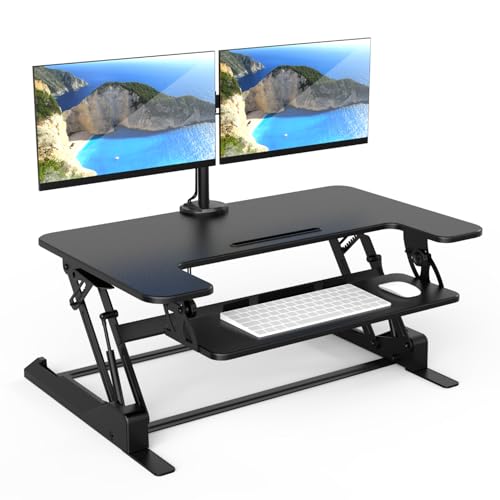


At a Glance
Mount-It! Standing Desk Converter Dual Monitor, 2 Screen Mounts Included
↓ See why we picked itMount-It! Standing Desk Converter 32 x 22, Sit Stand Desk Riser with Gas Spring Lift
↓ See why we picked itMount-It! Compact Standing Desk Riser, Height Adjustable Desktop Sit Stand Workstation
↓ See why we picked itMount-It! Height Adjustable Standing Desk Converter, Compact 30 Inch Wide Tabletop
↓ See why we picked itMount-It! Triple Monitor Electric Standing Desk Converter, 3 Screens
↓ See why we picked itMount-It! currently sells compact, dual-monitor, triple-monitor electric, and standard gas-spring converter variants, supporting a genuine brand comparison rather than a single undifferentiated list.
We compared these current models directly on platform size, mount type, and price, since Mount-It!'s lineup spans a wide range of use cases within the same brand.
5 Criteria to Look For Before Buying a Mount-It! Standing Desk Converter
Key buying criteria so you get the right fit the first time.
Measure your existing desk's height before ordering
A standing desk converter sits on top of your current desk and adds its own height on top of that, even at the converter's lowest seated setting, sometimes adding several inches before you've raised anything at all.
This matters because if your desk is already at a comfortable seated typing height, most gas-spring and electric converters can push your keyboard and monitor uncomfortably high the moment you set the converter down, forcing you into an awkward seated typing posture even when you never plan to stand.
Before ordering, check the listing for the converter's minimum or lowest platform height (not just its maximum standing height), measure your desk's current height, and add the two together to confirm the result still feels comfortable seated.
Match platform size to your actual number of monitors
Platform size is usually listed in inches of width, and it directly determines how many monitors and how much keyboard and mouse space you'll realistically have once everything is set up.
A platform in the mid-20s to high-20s of inches comfortably fits a single monitor or laptop, while dual monitors typically need at least 32 inches and three monitors usually need 42 inches or more with a dedicated multi-monitor mount, since monitors, a keyboard, and a mouse all need to coexist on the same riser surface without overhanging the edge.
Check the listing's stated platform width against the combined width of your actual monitors plus keyboard, not just the number of monitors the title claims to support.
Weigh electric versus manual lift for how often you'll adjust it
A manual converter typically uses a gas-spring or counterbalance mechanism you push or pull to raise and lower, requiring no power and generally costing less, while an electric converter uses a motor and push-button control for smoother, more precise height changes at the cost of needing a nearby power outlet and a meaningfully higher price.
If you plan to switch between sitting and standing multiple times a day, the effortless one-touch adjustment of an electric lift genuinely reduces the friction that causes people to stop bothering with height changes altogether, while an occasional adjuster may not find that premium worth paying.
Check the listing for words like "electric," "motorized," or "push-button" versus "gas spring" or "manual" to confirm which mechanism you're buying, and if electric, confirm an outlet is within reach of where the desk sits.
Check your desk's depth against the converter's base footprint
A converter's base, the part that actually sits on your desk, is typically deeper front-to-back than the platform surface alone, since it needs room for the lifting mechanism and stability at full height, and larger platforms generally require a proportionally larger base.
This matters because a desk that's wide enough for the platform can still be too shallow for the base, leaving the converter's back edge hanging off the desk or blocking a monitor from sitting far enough back to be comfortable to view.
Check the listing's stated base or footprint dimensions, not just the platform width, and measure your desk's actual depth (front edge to back edge) before ordering rather than assuming platform width is the only number that matters.
Check weight capacity against your actual load
The weight capacity listed on a converter must cover your monitors, keyboard, laptop and anything else on the platform, and gas springs lose smoothness near the limit. A dual-monitor load of two 24 inch screens can approach 30 lb before accessories. Find the number on the listing, and treat a missing capacity as a reason to move on.
6 Best Mount-It! Standing Desk Converters in 2026
Mount-It! Standing Desk Converter, Compact Design
About this pick
The largest review base among Mount-It!'s current converter lineup, with a solid rating for a compact design.
It earns the top spot in this comparison over Mount-It! Standing Desk Converter Dual Monitor for one main reason. Largest review base in Mount-It!'s current lineup. On price, it comes in below Mount-It! Standing Desk Converter Dual Monitor, which is worth weighing if cost is your deciding factor between the two.
Worth knowing before you decide: Largest review base in Mount-It!'s current lineup. On the other side, Current price not confirmed, verify on listing. That's the main tradeoff to weigh against everything above.
Best for: Buyers who want Mount-It!'s most proven current converter.
Check price on AmazonPros
- +Largest review base in Mount-It!'s current lineup
Cons
- −Current price not confirmed, verify on listing
Mount-It! Standing Desk Converter Dual Monitor, 2 Screen Mounts Included
About this pick
Includes two dedicated monitor mounts rather than open platform space, a genuinely distinct design within Mount-It!'s lineup.
One spot below Mount-It! Standing Desk Converter in this ranking, pricing between it and Mount-It! Standing Desk Converter isn't directly comparable here. The compromise here is straightforward: Requires VESA-compatible monitors. What you gain in return: Includes two dedicated monitor mounts. Whether that trade is worth it depends on which side matters more for your setup.
Worth knowing before you decide: Second-largest review base in Mount-It!'s current lineup. On the other side, Requires VESA-compatible monitors. That's the main tradeoff to weigh against everything above.
Best for: Buyers who want Mount-It!'s integrated dual-monitor mount design.
Check price on AmazonPros
- +Includes two dedicated monitor mounts
- +Second-largest review base in Mount-It!'s current lineup
Cons
- −Requires VESA-compatible monitors
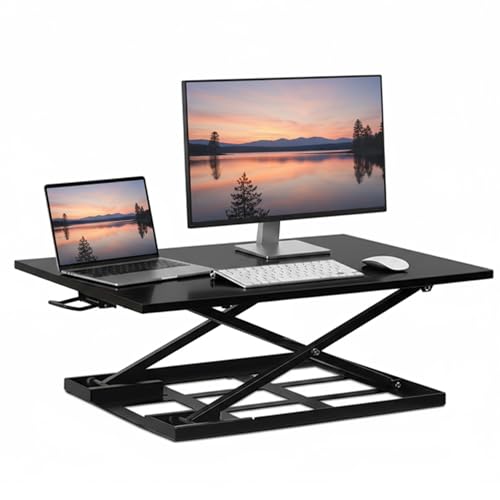
Mount-It! Standing Desk Converter 32 x 22, Sit Stand Desk Riser with Gas Spring Lift
About this pick
The highest-rated model in Mount-It!'s current lineup, a standard 32 by 22 inch gas-spring platform.
Sitting just under Mount-It! Standing Desk Converter Dual Monitor, it's priced lower than Mount-It! Standing Desk Converter Dual Monitor. Here's the honest tradeoff: Smaller review base than the compact and dual-monitor picks. And here's what it gets you instead: Highest rating among Mount-It!'s current converters. That's the real difference between the two picks, not just a ranking number.
Worth knowing before you decide: Highest rating among Mount-It!'s current converters. On the other side, Smaller review base than the compact and dual-monitor picks. That's the main tradeoff to weigh against everything above.
Best for: Buyers who want Mount-It!'s highest-rated standard converter.
Check price on AmazonPros
- +Highest rating among Mount-It!'s current converters
Cons
- −Smaller review base than the compact and dual-monitor picks
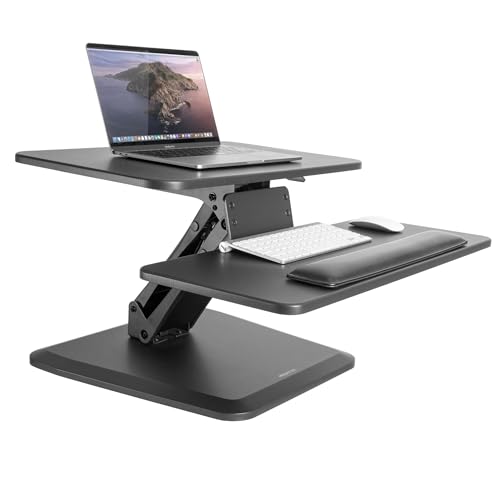
Mount-It! Compact Standing Desk Riser, Height Adjustable Desktop Sit Stand Workstation
About this pick
A compact ergonomic riser design, the lowest-rated model in Mount-It!'s current lineup though still a reasonable score.
Ranked just behind Mount-It! Standing Desk Converter 32 x 22, it costs more than Mount-It! Standing Desk Converter 32 x 22. The real tradeoff against that pick: Lowest rating among Mount-It!'s current converters. In exchange, it offers this instead: Compact form factor for smaller desks. That's the swap that decides whether this pick or the one above it is the better fit for your desk.
Worth knowing before you decide: Compact form factor for smaller desks. On the other side, Lowest rating among Mount-It!'s current converters. That's the main tradeoff to weigh against everything above.
Best for: Buyers with a smaller desk who still want Mount-It!'s ergonomic design.
Check price on AmazonPros
- +Compact form factor for smaller desks
Cons
- −Lowest rating among Mount-It!'s current converters
Mount-It! Height Adjustable Standing Desk Converter, Compact 30 Inch Wide Tabletop
About this pick
The lowest price in Mount-It!'s current lineup, a 30 inch compact tabletop design with a solid rating.
One spot below Mount-It! Compact Standing Desk Riser in this ranking, it's priced lower than Mount-It! Compact Standing Desk Riser. The compromise here is straightforward: Smaller platform than the standard-size options. What you gain in return: Lowest price in Mount-It!'s current converter lineup. Whether that trade is worth it depends on which side matters more for your setup.
Worth knowing before you decide: Lowest price in Mount-It!'s current converter lineup. On the other side, Smaller platform than the standard-size options. That's the main tradeoff to weigh against everything above.
Best for: Budget-conscious buyers who want a lower-cost entry into the Mount-It! brand.
Check price on AmazonPros
- +Lowest price in Mount-It!'s current converter lineup
Cons
- −Smaller platform than the standard-size options
Mount-It! Triple Monitor Electric Standing Desk Converter, 3 Screens
About this pick
The only current Mount-It! model built for three monitors with electric lift, at the highest price in this comparison.
Sitting just under Mount-It! Height Adjustable Standing Desk Converter, it costs more than Mount-It! Height Adjustable Standing Desk Converter. Here's the honest tradeoff: Lowest rating and smallest review base in Mount-It!'s current lineup. And here's what it gets you instead: Only current Mount-It! model built for three monitors with electric lift. That's the real difference between the two picks, not just a ranking number.
Worth knowing before you decide: Only current Mount-It! model built for three monitors with electric lift. On the other side, Highest price. That's the main tradeoff to weigh against everything above.
Best for: Buyers who specifically need triple-monitor electric support and accept the lower rating.
Check price on AmazonPros
- +Only current Mount-It! model built for three monitors with electric lift
Cons
- −Lowest rating and smallest review base in Mount-It!'s current lineup
- −Highest price
How We Evaluated These Mount-It! Standing Desk Converters
Each pick was assessed across 5 criteria weighted for real-world use.
Platform size against your monitors
Platforms run from the 30 inch compact tabletop to the 32 by 22 inch riser and the dual and triple monitor models. We matched each width to how many screens it really holds, since a monitor that overhangs the edge makes the platform unstable at standing height.
Lift mechanism: gas spring or electric
Five of the six use a gas-spring lift that needs no outlet, while only the Triple Monitor model is electric. We weighed this against how often you adjust, since a gas-spring needs a push each time and an electric motor needs a nearby outlet. Gas springs also soften with age, so capacity headroom matters.
Monitor mounts and VESA needs
The Dual Monitor model includes two dedicated mounts and requires VESA-compatible monitors, while the other picks are open platforms. We checked that distinction because a VESA mount saves desk space but excludes monitors without a mounting pattern. A monitor without VESA holes needs an open platform instead.
Desk depth and base footprint
A converter's base is deeper than its platform, and deeper models need much of the desk. We compared compact designs against the 32 by 22 riser, because a shallow desk leaves little room for the keyboard tray and legroom once the platform is raised. We assumed a desk at least 24 inches deep for the larger models.
Value inside one brand's lineup
Prices run from under $130 for the 30 inch model to near $500 for the electric triple, so we asked what each step buys. The 32 by 22 gas-spring model sits in the middle, and the electric triple only makes sense for a three-screen setup. Spend only where the extra monitors or motor are actually used.
How to Choose the Right Mount-It! Standing Desk Converters
By Platform Size
Pick the platform by how many monitors you plan to put on it, then check the depth of your desk.
| Your situation | Recommended pick |
|---|---|
| One laptop or one monitor on a shallow desk | Mount-It! Height Adjustable Standing Desk Converter, Compact 30 Inch Wide Tabletop, the smallest and cheapest |
| One or two monitors with open platform space | Mount-It! Standing Desk Converter 32 x 22, a 32 by 22 inch gas-spring platform |
| Two VESA monitors held on dedicated mounts | Mount-It! Standing Desk Converter Dual Monitor, with two mounts included |
| A compact desk that needs a small footprint | Mount-It! Compact Standing Desk Riser, a compact gas-spring workstation |
| Three screens and heavy daily use | Mount-It! Triple Monitor Electric Standing Desk Converter, an electric lift with three mounts |
By Budget
The lineup spans from under $130 to close to $500, so each tier changes what you get.
| Price range | Recommended pick |
|---|---|
| Under $130, a basic 30 inch riser | Mount-It! Height Adjustable Standing Desk Converter, Compact 30 Inch Wide Tabletop |
| Under $200, a larger platform | Mount-It! Standing Desk Converter 32 x 22, a roomier gas-spring platform |
| Under $225, compact ergonomic design | Mount-It! Compact Standing Desk Riser, a compact riser for tight desks |
| Under $280, built-in monitor mounts | Mount-It! Standing Desk Converter Dual Monitor, with two mounts included |
| Under $500, three monitors and motorized lift | Mount-It! Triple Monitor Electric Standing Desk Converter, the only electric option |
Manual (Gas-Spring) vs Electric Lift
Manual gas-spring
Needs no outlet, costs less, and suits adjusting once or twice a day. It covers the compact, 32 by 22, Dual Monitor and 30 inch models, which all use gas-spring lift.
Electric motor
Smoother and easier on a heavy load, but you need an outlet and pay far more. The Triple Monitor model is the only electric pick here.
Most buyers should default to a gas-spring model like the 32 by 22 and spend more on electric only for three screens or frequent adjustments.
By Monitor Mounting Needs
How your monitors attach decides whether you want an open platform or built-in mounts.
| Your situation | Recommended pick |
|---|---|
| Monitors with VESA holes and a wish to free desk space | Mount-It! Standing Desk Converter Dual Monitor, which uses two included VESA-ready mounts |
| Monitors without VESA mounting | Mount-It! Standing Desk Converter 32 x 22, an open platform you can set screens on |
| A laptop on a riser with a separate keyboard | Mount-It! Height Adjustable Standing Desk Converter, Compact 30 Inch Wide Tabletop, for laptop plus keyboard |
| Three monitors on a deep desk | Mount-It! Triple Monitor Electric Standing Desk Converter, three mounts with electric lift |
For a Dual-Monitor Setup Specifically
Look for
A platform at least 32 inches wide or built-in mounts, plus a stated weight capacity that covers two monitors, a keyboard and a mouse. Confirm the monitors are VESA-compatible if the model uses mounts.
In this comparison
The Mount-It! Standing Desk Converter Dual Monitor includes two dedicated mounts, and the 32 x 22 inch riser has open platform space for two screens set side by side.
When to Spend More
Spend more if
You run three monitors or change position many times a day. The Mount-It! Triple Monitor Electric model adds motorized lift and a third mount, and the Dual Monitor model suits two screens with VESA mounts.
Save if
You have one monitor and a modest desk. The 30 inch compact converter under $130 gives you gas-spring lift for far less, and the 32 by 22 riser adds space for under $200.
Frequently Asked Questions
Which Mount-It! converter is best for a small desk?
The compact 30 inch model suits the shallowest desks and costs the least here, under $130. A 30 inch platform holds one monitor and a keyboard, but a second screen will overhang. The 32 by 22 inch riser offers more surface if your desk is at least about 24 inches deep.
How does a gas-spring lift compare with an electric lift?
A gas spring needs no outlet and costs less, but you push or pull a handle and the platform can feel heavy to lift with a loaded desk. The Triple Monitor model uses a motor and buttons for smooth changes, at a much higher price and with a cable to manage.
Do I need VESA monitors for the dual-monitor model?
Yes. The Mount-It! Dual Monitor converter includes two dedicated monitor mounts, and those need monitors with a VESA mounting pattern on the back. If your screens lack one, choose an open platform like the 32 by 22 inch riser and set the monitors on it directly.
Is the triple-monitor electric converter worth the extra cost?
Only for a three-screen setup. It is the only Mount-It! model here built for three monitors with electric lift, and it carries the highest price in the lineup. If you use two monitors, the dual-monitor gas-spring model is a far better fit.
Will a converter fit my desk and monitor arm?
Measure depth first. A converter's base sits in front of a wall-side gap, and deeper platforms need much of the desk, often 24 inches or more. A clamp-on monitor arm may not fit through the converter frame, so check the arm's clamp type and the platform height range.
How high will it raise my screens?
Check the listed height range and add it to your desk height. A converter adds its own height even when lowered, so a taller person should confirm the top setting puts the keyboard at elbow height. Remember that a heavy monitor load can make a gas spring lift feel stiffer.
Bottom Line
best overall: Mount-It! Standing Desk Converter, Compact Design - best overall pick in this roundup.
See the full rankings above for all picks with pros, cons, and best-for summaries.
Browse on Amazon
All Prime-eligible options with current pricing.
Shop on Amazon →