
4 Best Mechanical Keyboards Under $150 in 2026
We compared mechanical keyboards under $150 by acoustic foam design, low-profile switches, and brand ecosystem, since premium refinements appear at this tier.

New to Amazon Prime?
Get fast, free shipping on every pick in this guide, plus Prime Video and exclusive deals.
Try Prime Free


At a Glance
Keychron K10 Max QMK Wireless Custom Mechanical Keyboard
↓ See why we picked itNear $150, mechanical keyboards from Keychron and Logitech add advanced multi-layer acoustic foam, low-profile switch designs, and on-board displays, refinements that go beyond the hot-swap and wireless basics covered in lower tiers.
We compared this lineup on acoustic engineering, switch profile height, and ecosystem software depth, since these are the details that separate a genuinely premium board from one that simply costs more for the same core feature set.
5 Criteria to Look For Before Buying a Mechanical Keyboards Under $150
Key buying criteria so you get the right fit the first time.
Low-Profile Switches Reduce Both Typing Height and Noise Compared to Standard Mechanical Switches
The Logitech MX Mechanical's low-profile switches have a shorter total travel distance than the standard-height switches on the other three picks in this comparison, which reduces both the physical height of the keyboard and the resulting noise level, since less total keystroke distance generally means less bottom-out impact sound. This matters directly if you're using the keyboard in an open office or during video calls where typing noise could be distracting to others, less so in a private space where noise isn't a concern. Check the listing specifically for 'low-profile' switch language if reducing both keyboard height and typing noise matters for your specific work environment.
An 8kHz Report Rate Requires Compatible Software to Actually Unlock, Not Just the Hardware Alone
The Logitech G316 X's 8kHz report rate capability specifically requires Logitech's G HUB software to enable, meaning simply plugging in the keyboard without installing the companion software leaves you at a lower default report rate rather than automatically getting the full advertised performance. This matters if you're specifically buying for the stated 8kHz performance figure, where skipping the software setup step means you won't actually experience that benefit. Check whether a keyboard's top-tier performance specification requires a specific companion software installation, and factor that setup step into your expectations before purchase.
Dual-Layer Foam Acoustic Design Represents a More Sophisticated Approach Than Single-Layer Foam Dampening
The Keychron K10 Max's combination of IXPE acoustic foam for comfort and separate EPDM foam specifically for switch support represents a more engineered, multi-material approach to sound dampening than the single foam layer used in many gasket-mounted keyboards at lower price tiers, since each foam type is chosen for a distinct acoustic or structural purpose rather than one material serving both roles. This matters if typing sound quality and consistency across the entire board is a priority, where a more sophisticated foam approach tends to produce more even acoustic results across different key positions. Look for a listing that names multiple distinct foam types serving different purposes, rather than a single generic 'sound-absorbing foam' mention, if acoustic sophistication is a priority.
An On-Board LED Display and Dial Provide Control Without Alt-Tabbing Out of a Game or Application
The Logitech G316 X's physical LED dot-matrix display and dial let you adjust report rate, volume, and brightness directly on the keyboard itself without needing to alt-tab to a software window, a genuine convenience during an active game or focused work session where interrupting your current task to adjust settings is disruptive. This matters more for gaming or any workflow requiring uninterrupted focus, less so for general office use where occasionally opening a settings app isn't a meaningful inconvenience. Consider how disruptive it would be to your specific workflow to alt-tab for settings adjustments before treating an on-board display as a must-have feature.
Cross-Computer Control Software Like Flow Solves a Genuinely Different Problem Than Standard Multi-Device Bluetooth Pairing
The Logitech MX Mechanical's Flow feature lets one keyboard and mouse combination seamlessly control multiple computers as if they were one continuous workspace, including moving your cursor and even copying text between machines, a meaningfully more integrated experience than simply pairing a keyboard to 3 separate Bluetooth devices and manually switching between them like the Keychron picks in this tier support. This matters specifically for a hybrid work setup involving both a personal and work computer used side by side regularly, less so if you only ever use the keyboard with one device at a time. Assess whether your actual workflow involves genuinely simultaneous multi-computer use before treating Flow-style integration as a meaningful differentiator over standard Bluetooth device switching.
4 Best Mechanical Keyboards Under $150 in 2026
Logitech MX Mechanical Wireless Illuminated Keyboard
About this pick
This board's low-profile mechanical switches deliver a tactile bump with noticeably less noise than a standard-height mechanical switch, specifically engineered for office environments where typing sound matters. Its smart illumination automatically lights up as your hands approach and adjusts to ambient lighting conditions, a genuinely convenient touch none of the other picks in this comparison offer.
Compared to the Keychron picks below, this one is built around Logitech's broader ecosystem, supporting Flow for seamless cross-computer control and multi-device pairing through Logi Options+. USB-C quick charging keeps the board powered up to 15 days with backlighting on, or up to 10 months with it off.
Best for buyers who want low-profile quiet switches with automatic smart illumination and cross-device Flow support.
Best for: buyers who want quiet low-profile switches with smart automatic features
Check price on AmazonPros
- +Low-profile switches genuinely reduce typing noise for office use
- +Smart illumination automatically adjusts to hand proximity and lighting
- +Flow feature enables seamless cross-computer control
Cons
- −Priced slightly above this tier's stated ceiling
- −No hot-swap support, switches are fixed
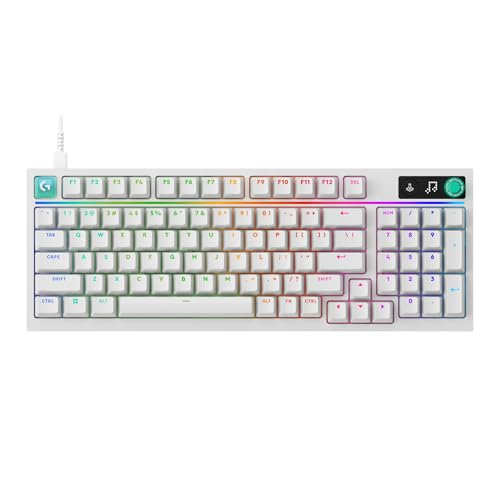
Logitech G316 X 98 Mechanical Gaming Keyboard
About this pick
This board's interactive LED dot-matrix display paired with a physical dial lets you adjust report rate, volume, and brightness without leaving your game, a genuinely unique on-board control feature not found on any other pick in this comparison. Its 8kHz report rate delivers near-instantaneous responsiveness for competitive play, while hot-swappable switches let you customize feel without soldering.
Compared to the Logitech MX Mechanical pick above, this one prioritizes gaming performance and customization over quiet office use, with a gasket-mounted structure using sound-dampening silicone and foam layers for a refined yet still audible typing experience. Its space-saving 98% layout retains a full number pad in a more compact footprint than a traditional full-size board.
Best for buyers who want on-board display controls with hot-swappable competitive gaming performance.
Best for: buyers who want on-board display controls with hot-swappable gaming performance
Check price on AmazonPros
- +On-board LED display and dial control settings without alt-tabbing
- +8kHz report rate delivers near-instantaneous input response
- +Hot-swappable switches allow customization without soldering
Cons
- −Requires G HUB software to unlock the full 8kHz report rate
- −Less quiet than the low-profile MX Mechanical pick
Keychron K10 Max QMK Wireless Custom Mechanical Keyboard
About this pick
This board's advanced IXPE acoustic foam paired with resilient EPDM foam for switch support represents a more sophisticated dual-foam acoustic engineering approach than the single-foam-layer designs found in lower tiers, working alongside a steel plate for both responsive feedback and a genuinely quieter typing sound. Its 108-key 100% layout supports full QMK firmware plus the Keychron Launcher web app for complete key remapping.
Compared to the Logitech G316 X pick above, this one connects via 2.4GHz, Bluetooth, or wired at a 1000Hz polling rate rather than pursuing an 8kHz report rate, positioning it more toward productivity and general use than pure competitive gaming. Pre-lubed tactile brown switches are hot-swappable with nearly any 3-pin or 5-pin MX-style switch.
Best for buyers who want the most sophisticated acoustic foam engineering with full QMK customization.
Best for: buyers who want the most sophisticated acoustic foam engineering with QMK
Check price on AmazonPros
- +Dual-layer IXPE and EPDM foam provides sophisticated acoustic engineering
- +Full QMK programmability with open-source firmware support
- +Added weight from the steel plate enhances overall stability
Cons
- −No 8kHz report rate like the Logitech G316 X
- −Full-size 100% layout takes more desk space than compact options
Keychron V5 Max Custom Wireless Mechanical Keyboard
About this pick
This board's compact 96% layout retains a full number pad while saving desk space compared to the 100% layout Keychron K10 Max pick above, and its upgraded MCU alongside gasket design and sound-absorbing foam deliver all-around typing comfort at a meaningfully lower price than the other three picks in this tier. Both 2.4GHz wireless and wired connections support a 1000Hz polling rate.
Compared to the K10 Max, this one costs about $15 less while still offering full QMK programmability through the Keychron Launcher web app and hot-swap support for nearly any 3-pin or 5-pin MX-style switch on the market. OSA profile double-shot PBT keycaps provide excellent oil resistance and prevent legend fading over time.
Best for buyers who want QMK programmability and gasket-mount comfort at the lowest price in this tier.
Best for: buyers who want QMK programmability and gasket-mount comfort at the lowest price
Check price on AmazonPros
- +Cheapest pick in this tier while still offering full QMK support
- +96% layout balances number pad access with desk space savings
- +OSA PBT keycaps resist oil and legend fading over time
Cons
- −No on-board display or dial like the Logitech G316 X
- −No dual-layer acoustic foam like the pricier K10 Max
How We Evaluated These Mechanical Keyboards Under $150
Each pick was assessed across 5 criteria weighted for real-world use.
Acoustic Engineering
Compared single-layer versus dual-layer foam designs and their impact on typing sound.
Switch Profile and Noise Level
Compared standard-height versus low-profile switches and their relative typing noise.
Report Rate and Responsiveness
Compared 1000Hz versus 8kHz report rates and their competitive gaming implications.
Programmability Ecosystem
Compared QMK open-source support against proprietary software ecosystems like G HUB and Logi Options+.
On-Board Controls
Checked for physical displays, dials, or knobs providing direct control without software.
How to Choose the Right Mechanical Keyboards Under $150
By Primary Need
| If you mainly need | Recommended pick |
|---|---|
| Quiet low-profile switches with smart illumination | Logitech MX Mechanical Wireless Illuminated Keyboard |
| On-board display controls with gaming performance | Logitech G316 X 98 Mechanical Gaming Keyboard |
| The most sophisticated acoustic foam engineering | Keychron K10 Max QMK Wireless Custom Mechanical Keyboard |
| QMK programmability and comfort at the lowest price | Keychron V5 Max Custom Wireless Mechanical Keyboard |
By Budget
| Price range | Recommended pick |
|---|---|
| Under $105 | Keychron V5 Max (under $110) |
| Under $120 | Logitech G316 X or Keychron K10 Max (both under $120) |
| Under $160 | Logitech MX Mechanical (under $160) |
Quiet Office Use vs Competitive Gaming Performance
Quiet office use (Logitech MX Mechanical)
Uses low-profile switches specifically engineered to reduce typing noise, ideal for shared offices or video calls.
Competitive gaming (Logitech G316 X)
Prioritizes an 8kHz report rate and on-board display controls over quiet operation, better for fast-paced gameplay.
If your primary use is office work or calls where typing noise matters, the Logitech MX Mechanical's low-profile design is worth prioritizing. If competitive gaming performance is the priority, the Logitech G316 X's higher report rate and gaming-focused features are the better fit.
By Programmability Ecosystem
| Your customization preference | Recommended pick |
|---|---|
| Open-source QMK firmware | Keychron K10 Max or V5 Max |
| Proprietary G HUB gaming software | Logitech G316 X |
| Proprietary Logi Options+ with Flow | Logitech MX Mechanical |
For a Hybrid Work Setup Moving Between Multiple Computers Specifically
Look for
Cross-computer control software like Logitech's Flow feature, which lets one keyboard and mouse control multiple computers seamlessly without manual device switching.
In this comparison
The Logitech MX Mechanical's Flow support specifically enables seamless cross-computer control, a feature none of the Keychron picks in this tier offer.
When to Spend More
Spend more if
You want quiet low-profile switches with smart illumination and cross-computer Flow support, where the Logitech MX Mechanical delivers all three at the top of this tier.
Save if
You want full QMK programmability with solid gasket-mount comfort, where the Keychron V5 Max covers that for about $55 less.
Frequently Asked Questions
Do I need to install Logitech's G HUB software to use the G316 X's basic features?
No, basic typing and standard functionality work without it, but the full 8kHz report rate, custom RGB lighting, and macro programming specifically require G HUB to be installed and configured.
What's the most common mistake buyers make when choosing between the Keychron K10 Max and V5 Max?
Assuming the pricier K10 Max is automatically the better choice, when the V5 Max's 96% layout and gasket design deliver very similar day-to-day typing comfort and full QMK support for about $15 less, making the K10 Max worth it mainly if the dual-layer acoustic foam specifically matters to you.
Is the Logitech MX Mechanical worth it over the cheaper Keychron K10 Max?
If you specifically want quiet low-profile switches with smart illumination and cross-computer Flow support, yes, but if you want full QMK programmability with a full-size layout, the Keychron K10 Max covers that for about $40 less.
How does the Logitech MX Mechanical's Flow feature actually work between two computers?
Once set up through Logi Options+ on both computers, moving your cursor to the edge of one screen automatically transitions keyboard and mouse control to the second computer, and copied text can also transfer between the two machines seamlessly.
Can I hot-swap the switches on the Logitech MX Mechanical like the other three picks in this tier?
No, the MX Mechanical does not support hot-swappable switches, so if switch customization is a priority alongside quiet low-profile typing, that's a tradeoff to consider against the other picks in this comparison.
Do the Keychron picks in this tier require any software installation for basic QMK remapping?
No installation is required since QMK remapping is done through the web-based Keychron Launcher app, which works directly in a browser rather than requiring a downloaded and installed program.
Bottom Line
best overall: Logitech MX Mechanical Wireless Illuminated Keyboard - best overall pick in this roundup.
See the full rankings above for all picks with pros, cons, and best-for summaries.
Browse on Amazon
All Prime-eligible options with current pricing.
Shop on Amazon →