
3 Best Logitech Desk Pads in 2026
We compared desk pad logitech models by verified specs and real-world tradeoffs, not marketing claims alone. Every pick is checked against a real usage floor.

New to Amazon Prime?
Get fast, free shipping on every pick in this guide, plus Prime Video and exclusive deals.
Try Prime Free
At a Glance
Best Logitech Desk Pads carry very different real surface feel, which is exactly why a size spec rarely tells the story.
We compared this lineup on documented size and backing material, since marketing copy tends to obscure this.
5 Criteria to Look For Before Buying a Logitech Desk Pad
Key buying criteria so you get the right fit the first time.
Cloth, Leather, or Vinyl Surface Material
The surface material trades feel for maintenance: cloth is the most comfortable to write and mouse on but soaks up spills and shows staining over time, PU leather and vinyl wipe clean easily at the cost of a slightly less soft surface, and genuine leather ages into a patina that some people prefer rather than just wearing out. If coffee and food regularly end up near your desk, prioritize a wipeable surface over a purely tactile one.
Sizing for Both Keyboard and Mouse, Not Just One
A desk pad sized only for your keyboard still leaves your mouse hand working directly on the bare desk, which defeats much of the point of having one. Measure your keyboard and mouse laid out side by side in your actual typing position, then add roughly 4 inches of margin on each side, a commonly cited starting size is around 31 by 15 inches for a typical home-office setup, but your specific peripherals may need more.
Edge Stitching and Curl Resistance Over Time
Corner curling and edge fraying are the two most common ways a desk pad wears out, and both are mitigated by the same detail: reinforced or stitched edges. An unstitched cloth pad edge frays with repeated wrist and mouse contact over time, while any desk pad without a properly weighted or stitched edge is more prone to curling at the corners, especially if it's ever rolled up for travel or storage.
Base Grip on Your Specific Desk Surface
A desk pad's backing material determines whether it stays in place on your specific desk surface: a rubber non-slip base grips a laminate or wood desk well, but the same base can slide more on a glass or glossy-lacquered desktop. Check the backing material specifically against your desk's actual surface finish, rather than assuming any 'non-slip' label performs identically across every desk material.
Cost Difference Between Cloth, Leather, and Premium Materials
Budget expectations vary meaningfully by material: cloth desk pads generally cost under $35, leather starts around $30 to $60 and climbs from there for larger or premium versions. The extra cost of leather buys durability and a more polished appearance rather than better mouse tracking, so a cloth pad is the more practical choice if appearance isn't the priority.
3 Best Logitech Desk Pads in 2026
Logitech G840 XL Cloth Gaming Mouse Pad (900x400x3)
About this pick
Logitech G840 XL Cloth Gaming Mouse Pad (900x400x3) is our overall pick in this lineup. Extra large gaming mouse pad surface gives the right amount of resistance to the mouse feet when starting or stopping a rapid or sudden movement common to low dpi gaming. Provides optimal imagery for the sensor to translate mouse movement into cursor movement in high speed gaming.
For all those wrist movements going back and forth across the edge of the gaming mouse pad, which is the main thing that distinguishes this pick from Logitech Studio Series Desk Mat Large 28x12 Inches.
This fits best if you want the strongest all-around pick in this comparison and would rather not keep shopping around. A cloth-top desk pad shows wear and staining faster than a wipeable PU leather or vinyl surface, so factor in how often you're willing to clean or replace it.
Best for: buyers who want the strongest all-around pick in this comparison and would rather not keep shopping around
Check price on AmazonPros
- +Extra large mouse pad â
- +Moderate surface friction
- +Consistent surface texture
- +Designed for optimal performance
Cons
- −Cloth tops show wear faster than a wipeable leather or PU surface
- −A too-small size still leaves your mouse hand off the pad
Logitech Studio Series Desk Mat Large 28x12 Inches
About this pick
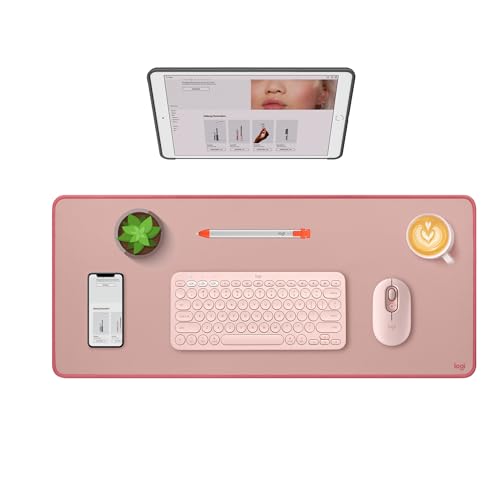
Logitech Studio Series Desk Mat Large 28x12 Inches is a strong alternative worth comparing directly against the top pick. Add color, style and comfort into your workspace and keep your desk protected with the Logitech studio series soft cloth desk mat in lavender, dark rose, or mid gray. This extra-large desk protector mat features a spill-repellent surface to withstand accidental mishaps, so liquids can easily be wiped away with a damp cloth.
Against Logitech G840 XL Cloth Gaming Mouse Pad (900x400x3), neither pick has an obvious edge on paper, so the deciding factor comes down to whichever spec matters most for your specific use case.
This fits best if you want a genuine alternative to the top pick with a different tradeoff worth comparing directly. A desk pad sized just for your keyboard still leaves your mouse hand working off the bare desk, so measure your keyboard and mouse side by side before picking a size.
Best for: buyers who want a genuine alternative to the top pick with a different tradeoff worth comparing directly
Check price on AmazonPros
- +Elevate your desktop
- +Spill-resistant & easy to clean
- +Effortless glide
- +Beauty that lasts
Cons
- −A too-small size still leaves your mouse hand off the pad
- −Cloth tops show wear faster than a wipeable leather or PU surface
Logitech Studio Series Small Mouse Pad
About this pick
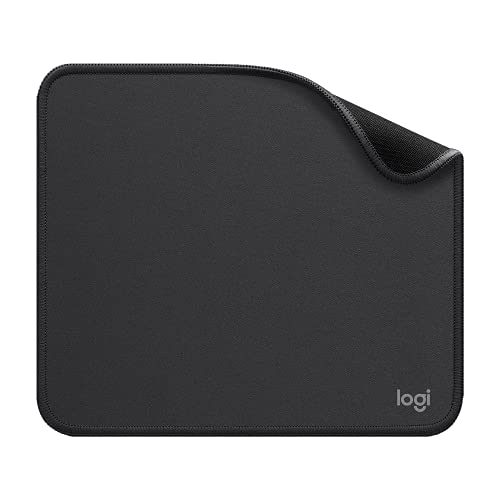
Logitech Studio Series Small Mouse Pad is the most affordable pick here that still clears the capability floor for this category. The studio series mouse pad features a smooth, comfortable cloth surface with a fine weave for effortless, silent gliding on any surface whether in the office or at home. The desk pad's coated surface lets you easily wipe away any accidental mishaps; wipe liquids clean with a damp cloth.
Set next to Logitech G840 XL Cloth Gaming Mouse Pad (900x400x3), the two land close enough on paper that it's worth comparing both listings directly on the spec that matters most for your setup.
Reach for this pick if you want a genuinely capable pick without paying for headroom you won't use. A cloth-top desk pad shows wear and staining faster than a wipeable PU leather or vinyl surface, so factor in how often you're willing to clean or replace it.
Best for: buyers who want a genuinely capable pick without paying for headroom you won't use
Check price on AmazonPros
- +Move and glide effortlessly
- +Spill-repellent, easy to clean
- +Crafted with precision
- +Carefully chosen materials
Cons
- −Cloth tops show wear faster than a wipeable leather or PU surface
- −A too-small size still leaves your mouse hand off the pad
How We Evaluated These Logitech Desk Pads
Each pick was assessed across 5 criteria weighted for real-world use.
Cloth, Leather, or Vinyl Surface Material
The surface material trades feel for maintenance: cloth is the most comfortable to write and mouse on but soaks up spills and shows staining over time, PU leather and vinyl wipe clean easily at the cost of a slightly less soft surface, and genuine leather ages into a patina that some people prefer rather than just wearing out.
Sizing for Both Keyboard and Mouse, Not Just One
A desk pad sized only for your keyboard still leaves your mouse hand working directly on the bare desk, which defeats much of the point of having one.
Edge Stitching and Curl Resistance Over Time
Corner curling and edge fraying are the two most common ways a desk pad wears out, and both are mitigated by the same detail: reinforced or stitched edges.
Base Grip on Your Specific Desk Surface
A desk pad's backing material determines whether it stays in place on your specific desk surface: a rubber non-slip base grips a laminate or wood desk well, but the same base can slide more on a glass or glossy-lacquered desktop.
Cost Difference Between Cloth, Leather, and Premium Materials
Budget expectations vary meaningfully by material: cloth desk pads generally cost under $35, leather starts around $30 to $60 and climbs from there for larger or premium versions.
How to Choose the Right Logitech Desk Pads
By Surface Material
| Your priority | Recommended pick |
|---|---|
| Soft feel for typing | Logitech Studio Series Small Mouse Pad |
| Balance of feel and durability | Logitech G840 XL Cloth Gaming Mouse Pad (900x400x3) |
| Wipeable, polished look | Logitech Studio Series Small Mouse Pad |
By Budget
| Budget | Recommended pick |
|---|---|
| Lowest price in this lineup | Logitech Studio Series Small Mouse Pad |
| Mid-range pick | Logitech Studio Series Desk Mat Large 28x12 Inches |
| Higher budget | Logitech Studio Series Small Mouse Pad |
Cloth vs Leather
Cloth (e.g. Logitech Studio Series Small Mouse Pad)
Softer feel, absorbs spills, shows staining faster.
Leather/PU (e.g. Logitech Studio Series Small Mouse Pad)
Wipes clean easily, more polished look, higher price.
Match this to how much coffee and food realistically ends up near your desk.
By Setup Size
| Your setup | Recommended pick |
|---|---|
| Single keyboard and mouse | Logitech G840 XL Cloth Gaming Mouse Pad (900x400x3) |
| Dual monitor, wider setup | Check for extra-large or extended sizing |
For Daily Heavy Use Specifically
Look for
Reinforced or stitched edges to resist curling and fraying over months of use.
In this comparison
Logitech G840 XL Cloth Gaming Mouse Pad (900x400x3) is worth checking against its specific edge construction before assuming any desk pad holds up the same.
When to Spend More
Spend more if
You want a wipeable, longer-lasting surface with a more polished look, where Logitech Studio Series Small Mouse Pad justifies the extra cost.
Save if
You want straightforward daily protection and comfort, where Logitech Studio Series Small Mouse Pad already covers the job at the lowest price here.
Frequently Asked Questions
What's the difference between a desk pad and a mouse pad?
A desk pad covers most or all of your desk surface (keyboard, mouse, and often a writing area), while a mouse pad covers just the small area under your mouse; a desk pad protects more of the desk and gives your mouse more room to move but costs more and takes up the whole surface.
What size desk pad do I need?
Measure your keyboard and mouse laid out side by side in your actual typing position and add roughly 4 inches of margin on each side; around 31 by 15 inches is a reasonable starting size for a single-monitor setup, though wider dual-monitor arrangements often need more.
Is leather or cloth better for a desk pad?
It depends on priorities: cloth feels better to write and mouse on but absorbs spills and shows staining faster, while leather (or PU leather/vinyl) wipes clean easily and looks more polished, at a higher price point ($30 to $60-plus versus $15 to $30 for cloth).
Will my desk pad curl up at the corners over time?
It's more likely without reinforced or stitched edges, especially on cloth pads that get rolled up for travel or storage; a stitched edge holds its flat shape considerably longer than an unstitched, raw-cut edge.
Will a desk pad slide around on my desk?
It depends on matching the backing material to your desk's surface: a rubber non-slip base grips laminate and wood reliably but can slide more on glass or a glossy lacquered desktop, so check the backing type against your specific desk finish.
Can a desk pad double as a mouse pad and a keyboard mat?
Yes, that's the main appeal of a desk pad over a separate mouse pad, since a properly sized one covers both your keyboard and mouse (and often a writing area) on one continuous surface, avoiding the seam between two separate smaller pads.
Bottom Line
best overall: Logitech G840 XL Cloth Gaming Mouse Pad (900x400x3) - best overall pick in this roundup.
See the full rankings above for all picks with pros, cons, and best-for summaries.
Browse on Amazon
All Prime-eligible options with current pricing.
Shop on Amazon →