
7 Best Laser Engravers in 2026
We compared laser engravers by verified power output, enclosure safety hardware, and real cutting depth rather than ranking by marketed wattage alone.

New to Amazon Prime?
Get fast, free shipping on every pick in this guide, plus Prime Video and exclusive deals.
Try Prime Free




At a Glance
Laser engraver listings routinely advertise machine input power (60W, 72W) right next to a much smaller actual laser output, and the two numbers get conflated more often than not.
We compared this lineup on verified output power, whether each machine ships with genuine enclosure safety hardware or leaves containment to the buyer, and real cutting depth on wood and acrylic rather than ranking by the biggest number on the box.
5 Criteria to Look For Before Buying a Laser Engraver
Key buying criteria so you get the right fit the first time.
Verified Power vs Marketed Power
Many listings advertise machine input power, sometimes 60-72W, rather than the actual laser output (typically 5-10W) that determines real cutting and engraving performance. Look for a listing that states both figures, or one independently verified, before assuming a higher marketed number means more cutting capability. A 10W diode engraver that clearly separates input from output power is more trustworthy than one that only lists a large single number.
Enclosure and Physical Safety Hardware
An open-frame laser leaves eye protection, fume containment, and stray-beam exposure entirely to the buyer, while a fully enclosed design with a lid interlock stops the laser automatically when opened. Buyers in apartments, homes with children, or shared workspaces should weigh this before working area or price, since retrofitting an enclosure onto an open-frame machine after purchase is both costly and imperfect. Flame sensors and tilt cutoffs add a further layer that's worth checking for explicitly rather than assumed.
Working Area vs Physical Footprint
A larger working area only helps if the machine's overall footprint still fits the intended space, since some large-bed machines exceed 20 inches per side once housing and cable clearance are included. Match the bed size to actual planned projects (sign blanks need 16in+, most gift and craft work fits an A4-size 12in bed) rather than buying the largest available bed by default. Object height clearance matters separately from bed footprint for anything taller than a flat panel.
Control Software and Workflow
Some machines run entirely from a companion phone app or offline TF card, while others require a permanently connected computer running LightBurn, a paid license after a trial period, or LaserGRBL, a free but less polished tool. Decide up front whether jobs will be designed and queued from a phone, a shared shop computer, or offline, since this affects both real project turnaround time and any recurring software cost. AI-assisted design generation from a photo or prompt is a genuine time-saver for buyers without vector-design experience.
Material Compatibility and Cutting Depth
Confirm the specific cutting depth claimed for wood and acrylic (commonly stated in millimeters at a given power), not just a general materials list, since a lower-power machine may only mark a material a higher-power one can cleanly cut through in one pass. Machines under 5W typically handle engraving only, while 10W-class diode lasers cut thin plywood and acrylic in a single pass. Multi-pass cutting is possible on lower-power machines but adds real project time.
7 Best Laser Engravers in 2026
Creality Laser Engraver 10W Output, 72W
About this pick
Creality builds this around a Class IIIa module rated for 72,000mW of input and a genuine 10W output, enough to cut a 5mm basswood board or 3mm black acrylic in a single pass rather than requiring the multiple passes cheaper diode engravers need. The all-aluminum frame and steel shaft guide rails keep the beam tracking straight at speed, and the compressed 0.06mm spot size holds engraving accuracy within 0.004 inches.
The 17" x 16" open frame is large enough for full sign blanks and cutting boards, and it works with both LightBurn and the free LaserGRBL, so new users are not locked into paid software just to get started. An anti-UV acrylic shield filters most of the UV output during operation.
Best for: buyers who want real cutting power on a large open-frame bed and don't mind sourcing their own enclosure and ventilation
Check price on AmazonPros
- +Genuine one-pass cutting on 5mm wood and 3mm dark acrylic
- +Large 17x16in bed handles full sign blanks
- +Assembles in 10-20 minutes with a tool-free focus plate
Cons
- −Open frame needs a dedicated ventilated space and eye protection
- −No enclosure means fumes and stray beam exposure are on the user to manage
Woxcker Laser Engraver 10W, 300mm Enclosed
About this pick
Woxcker's case for this machine is safety first: a fully enclosed 360-degree cover with a lid interlock that halts the laser the moment it's opened, a flame sensor that stops the job on unusual heat, an emergency stop button, and a 15-degree tilt cutoff. That combination of physical safeguards is uncommon at this power level, where most competitors ship an open frame and leave containment to the buyer.
Inside that enclosure sits a 10W semiconductor laser with a 0.01mm compressed focus point and a 300mm working area, rated at 20,000mm/min, roughly twice the speed of comparable open-frame machines in this lineup. It also supports Wi-Fi, USB, app, and offline TF card control, and pairs with LightBurn, LaserGRBL, and Cutlabx.
Best for: buyers in shared homes or apartments who need physical containment and hardware safety cutoffs, not just a warning label
Check price on AmazonPros
- +Genuine full enclosure with lid interlock, not a partial shield
- +Flame sensor and tilt cutoff add real hardware safety layers
- +20,000mm/min speed is roughly double most open-frame peers here
Cons
- −Costs more than comparable open-frame machines in this lineup
- −300mm bed is smaller than the largest open-frame options
Carverall K15 Pro Laser Engraver 10W
About this pick
The K15 Pro's pitch is that it removes the two biggest first-machine obstacles: software and setup. CutLabX, its free companion app, runs from a phone, tablet, or computer and can generate a design from a typed prompt or a photo, and offline batch jobs load straight from a TF card without a PC in the loop. Assembly is six screws and a claimed three minutes.
Carverall backs the diode module's rating with an independently verified 10.36-10.58W output rather than an inflated marketing number, and pairs it with dual cooling fans aimed at cutting heat buildup on long runs. The 11.8" x 7.9" bed is A4-sized, small enough to tuck under a desk but rated to cut 12mm plywood and 8mm acrylic cleanly.
Best for: first-time buyers who want a verified power rating and phone-based software instead of a steep LightBurn learning curve
Check price on AmazonPros
- +Verified real-world power output instead of an inflated spec sheet number
- +CutLabX app removes the software learning curve for a first machine
- +Compact A4 bed fits under a desk without giving up cutting power
Cons
- −11.8x7.9in bed is too small for large sign or panel projects
- −Four heightening columns are needed separately for tall objects
LONGER Laser Engraver Ray5 10W, 60W
About this pick
The Ray5 runs on a 240MHz ESP32 chipset, a step up from the 8-bit controllers still common in this price range, and LONGER pairs it with a 3.5" touch screen so basic jobs can run without opening a laptop. Dual-beam technology pushes engraving speed to 10,000mm/min with a 0.06mm spot and 0.01mm precision.
At 400mm x 400mm, the working area is the largest enclosed footprint in this lineup, rated to cut 0.8in wood and 1.2in acrylic. Safety features include an emergency stop, vibration-triggered motion protection, heat protection, and a hidden active cooling system, and it connects over USB, TF card, Wi-Fi, or app in addition to LightBurn and LaserGRBL support.
Best for: buyers who want the largest working area here plus touchscreen control for jobs that don't need a full LightBurn session
Check price on AmazonPros
- +3.5in touchscreen runs simple jobs without a connected computer
- +400x400mm bed is the largest working area in this lineup
- +Motion, heat, and vibration protection built into the controller
Cons
- −Larger footprint needs more dedicated desk or shop space
- −Faster ESP32 controller adds cost versus simpler 8-bit boards
Twotrees TS1 Mini Laser Engraver, Enclosed
About this pick
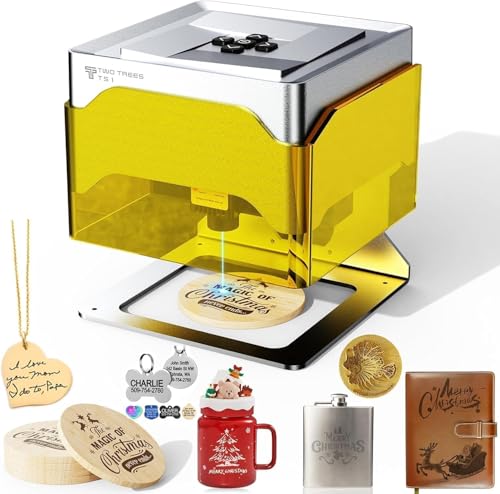
The TS1 trades cutting power for footprint and safety: a fully enclosed acrylic cover, included safety goggles, and true plug-and-play setup with no assembly beyond unboxing, aimed squarely at classrooms and family use under adult supervision. At 157mm x 157mm x 167mm and about 1kg, it's small enough to store in a drawer between projects.
The adjustable 3W module is tuned for fine detail work rather than deep cutting, engraving an 80mm x 80mm bed at up to 3000mm/min with 0.1mm positioning accuracy and auto-focus at 2.5-6.5cm. Control runs through the MKSLaser Bluetooth app or a wired LightBurn connection, and it takes plywood, MDF, bamboo, paper, and leather.
Best for: buyers who want the smallest, safest first machine for small-object detail engraving rather than cutting or large panels
Check price on AmazonPros
- +Genuinely no-assembly plug-and-play setup out of the box
- +1kg and a small footprint make it easy to store between uses
- +Fully enclosed housing suits supervised classroom or family use
Cons
- −80mm x 80mm bed limits it to small objects and detail work
- −3W power is not enough for cutting anything beyond thin material
Creality Falcon A1C 5W Mini Laser Engraver
About this pick
The A1C's headline feature is a laser module that swaps in 15 seconds, letting one machine move between a 5W diode, a 10W diode, and a 1.2W IR module (sold separately) as a project's needs change, rather than buying a separate machine for each power level. A built-in HD camera gives a real-time preview for design alignment, and auto focus removes the manual height calibration most diode engravers still require.
Creality rates it for 15,000mm/min and backs the enclosure with a Class 1 eye-safe rating plus automatic flame detection that halts the job and alerts the connected app. The portable, lightweight build is aimed at moving between rooms rather than staying fixed in one shop location.
Best for: buyers who want to start light and upgrade laser power later without replacing the whole machine
Check price on AmazonPros
- +Quick-swap modules let one machine scale up in power later
- +Built-in camera and auto focus cut real setup time per job
- +Class 1 enclosed rating means no goggles needed in normal use
Cons
- −Base 5W module is the lowest cutting power of the enclosed machines here
- −Higher-power module swaps are an added purchase, not included
ATOMSTACK P1 5W Laser Engraver Dual
About this pick
The P1 pairs a 5W diode with a separate 1.2W infrared laser in one unibody frame, letting it cover both standard organic-material engraving and applications the IR module handles better, inside a fully enclosed Class 1 housing with auto-shutdown on tilt and enclosure detection. Atomstack markets it as the first entry-level Class 1 safety machine in its category, meaning no goggles are required for normal operation.
At 3kg and 265mm x 303mm x 185mm, it's compact for a dual-laser design, and the CoreXY structure with dual-motor drive keeps the 110mm x 110mm bed accurate to 0.1mm positioning. The bundled AtomStack software includes a 1000+ material library with automatic accessory recognition.
Best for: buyers who need both standard diode engraving and infrared-specific material work from one enclosed machine
Check price on AmazonPros
- +Dual diode plus IR laser covers more material types than a single-laser machine
- +Class 1 enclosed rating means no goggles required in normal use
- +CoreXY dual-motor drive keeps a compact frame accurate
Cons
- −110mm x 110mm bed is small relative to its price point
- −Dual-laser design costs more than comparable single-laser machines here
How We Evaluated These Laser Engravers
Each pick was assessed across 5 criteria weighted for real-world use.
Verified Power vs Marketed Power
Compared each listing's claimed output wattage against independently reported or manufacturer-verified figures, since diode engravers commonly advertise machine input power (e.g. 72W) rather than the smaller actual laser output that determines cutting performance.
Enclosure and Safety Hardware
Checked whether each machine ships with a genuine physical enclosure, lid interlock, flame sensor, or tilt cutoff, versus an open frame that leaves containment and eye protection entirely to the buyer.
Working Area vs Physical Footprint
Weighed usable bed size against total machine footprint and weight, since a larger work area is only a real advantage if the machine still fits the space it's bought for.
Software and Control Path
Tested which control paths each machine actually supports, phone app, offline TF card, touchscreen, or LightBurn/LaserGRBL only, since a machine that requires a paid license or a permanently connected laptop changes the real cost and workflow.
Material Compatibility Claims
Cross-checked stated cutting depth (wood, acrylic) and material lists against the laser's rated output, since underpowered machines sometimes list materials they can only mark, not cleanly cut.
How to Choose the Right Laser Engravers
By Primary Use Case
| If you mainly need to | Recommended pick |
|---|---|
| Cut wood or acrylic in one pass on a large bed | Creality Laser Engraver 10W Output, 72W |
| Engrave safely in a shared home or apartment | Woxcker Laser Engraver 10W, 300mm Enclosed |
| Learn on a first machine with minimal software setup | Carverall K15 Pro Laser Engraver 10W |
| Detail-engrave small objects only, no cutting | Twotrees TS1 Mini Laser Engraver, Enclosed |
By Budget
| Budget tier | Recommended pick |
|---|---|
| Entry-level, smallest footprint | Twotrees TS1 Mini Laser Engraver, Enclosed |
| Mid-range, best all-around value | Creality Laser Engraver 10W Output, 72W |
| Higher budget, enclosed safety priority | Woxcker Laser Engraver 10W, 300mm Enclosed |
Open Frame vs Fully Enclosed
Open frame (e.g. Creality 72W)
Cheaper for the power delivered and usually a larger bed, but containment, ventilation, and eye protection during operation are entirely on the buyer to set up.
Fully enclosed (e.g. Woxcker, Twotrees TS1, ATOMSTACK P1)
Costs more for the same power tier, but adds a lid interlock, contains fumes and stray beam exposure, and in several cases removes the goggles requirement during normal use.
Most buyers in a shared living space should default to a fully enclosed model unless a dedicated, ventilated workshop space is already available.
By Working Area
| Bed size needed | Recommended pick |
|---|---|
| Full sign blanks and large panels (17x16in / 400x400mm) | Creality Laser Engraver 10W Output, 72W or LONGER Ray5 |
| Standard A4-size projects (11.8x7.9in) | Carverall K15 Pro Laser Engraver 10W |
| Small objects only (under 4in square) | Twotrees TS1 Mini Laser Engraver, Enclosed or ATOMSTACK P1 |
For First-Time Buyers Specifically
Look for
A verified (not inflated) power rating, an app-based or offline control path that doesn't require learning LightBurn on day one, and tool-free or minimal assembly.
In this comparison
Carverall K15 Pro Laser Engraver 10W publishes an independently verified output range and runs from a free phone app with AI-assisted design, cutting the learning curve most first machines carry.
When to Spend More
Spend more if
You need genuine enclosed containment (Woxcker) or want a module system that lets the same machine scale up in power later (Creality Falcon A1C).
Save if
You only need small-object detail engraving with no cutting, where Twotrees TS1 Mini Laser Engraver, Enclosed covers the job at the lowest price in this lineup.
Frequently Asked Questions
Is a 10W laser engraver actually more powerful than a 5W one?
Usually yes for cutting depth, but check whether both wattage figures refer to actual laser output rather than one listing input power and another output power, since some listings mix the two. A verified 10W output diode laser will cut thicker material in fewer passes than a verified 5W unit.
Do I need a fully enclosed laser engraver at home?
Not strictly, but an open-frame machine requires the buyer to source their own ventilation, eye protection, and a way to contain stray beam exposure, which a fully enclosed design handles by default. In an apartment, shared house, or any space with children or pets nearby, a fully enclosed model is the safer default.
What's the difference between LightBurn and the free apps some machines include?
LightBurn is a paid, general-purpose laser design and control tool used across many brands, while manufacturer apps like CutLabX or MKSLaser are free but typically limited to that specific machine's ecosystem. Either can run a job well; the choice mainly affects whether design work is done on a phone or a full desktop tool.
Can a diode laser engraver cut metal?
No. Diode lasers in this power range (3W to 10W) can mark or engrave coated or painted metal surfaces but cannot cut through bare metal; that requires a fiber laser, a different technology entirely. Wood, acrylic, leather, and similar organic materials are what these machines are built to cut.
How much working area do I actually need?
Most gift, sign, and craft projects fit comfortably within an A4-size bed (roughly 12in x 8in); a larger 16in-plus bed only matters if projects regularly include full sign blanks or oversized panels. Buying a bed larger than actual projects require mostly adds footprint and cost without a practical benefit.
Does a laser engraver need special ventilation?
Yes, for any cutting or heavy engraving job, since the process produces smoke and fine particulate regardless of enclosure. A fully enclosed machine still needs to vent that exhaust outside or through a filter; the enclosure contains fumes during the job but does not eliminate the need for ventilation.
Bottom Line
best overall: Creality Laser Engraver 10W Output, 72W - best overall pick in this roundup.
See the full rankings above for all picks with pros, cons, and best-for summaries.
Browse on Amazon
All Prime-eligible options with current pricing.
Shop on Amazon →