
7 Best Laptop Stands Under $50 in 2026
Seven laptop stands under $50 compared, from a Rain Design mStand to rotating aluminum risers, a wooden drawer stand and USB-C docking stands.

New to Amazon Prime?
Get fast, free shipping on every pick in this guide, plus Prime Video and exclusive deals.
Try Prime Free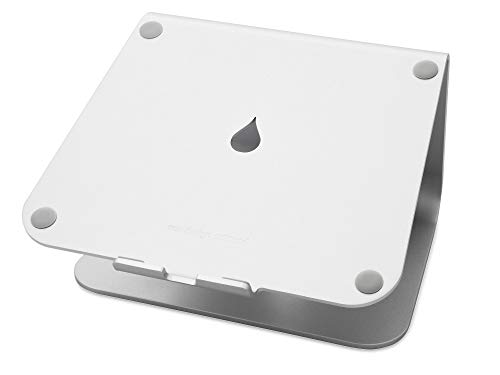




At a Glance
Between $30 and $50 a laptop stand becomes either a better-built riser or a stand with ports. That makes this tier about choosing a job: a clean aluminum lift, a rotating base, a desk organiser or a USB-C dock under the laptop.
We evaluated seven stands from their listings and sorted them by height, build, ports and storage. If you buy a stand with ports, check your laptop's USB-C video support first.
5 Criteria to Look For Before Buying a Laptop Stands Under $50
Key buying criteria so you get the right fit the first time.
Height range and eye-level geometry
A laptop stand raises the screen so the top third sits near eye level, which usually means a lift of around 6 to 12 inches depending on your chair and desk. The catch is that once the screen is up, the laptop keyboard is too high to type on, so you need a separate keyboard and mouse. Measure the gap from your desk to your eye line when seated, compare it with the stand's listed maximum height, and budget for a keyboard.
Ports on a docking stand: what the numbers mean
Some stands add an HDMI port, USB-A ports and a charging pass-through, but the spec line matters: 4K@30Hz feels sluggish while 4K@60Hz is smooth, and a stand with 100W input may reserve 15W for itself, leaving about 85W for the laptop. That matters because a laptop that draws more than the stand passes through will slowly drain even while plugged in. Match the listed numbers to your laptop's charger and display, and confirm your laptop supports DisplayPort over USB-C.
Non-slip grips and the laptop footprint
Silicone pads at the ledge stop the laptop sliding, and a rear lip keeps it from creeping back. Stands also have a maximum depth, for example about 10.4 inches on a minimalist design, which can exclude large gaming laptops. Measure your laptop's depth and check the grip description in the listing.
Wood and storage stands
A desk stand with MDF or wood and a drawer doubles as a small organiser, but it is wider and heavier than aluminum risers. The catch is the footprint: these stands are often 15 to 20 inches wide and take desk space that a slim riser would not. Check the listed weight rating and the dimensions, since a bulky stand on a small desk can cost more than it saves.
Rotation, hinges and stability
A 360 degree base lets you turn the screen toward a colleague, but each extra pivot is another place for wobble. Dual-hinge designs hold better when they have locking knobs or damping hinges. Look for a stated hinge test count or locking mechanism, and avoid designs that rely only on friction for the highest settings.
7 Best Laptop Stands Under $50 in 2026
Rain Design mStand
About this pick
The Rain Design mStand is a single-piece aluminum stand that raises the screen 5.9 inches, with a 2 inch cable management hole and a keyboard stash that clears desk space.
It has no adjustability, unlike the JOYEKY or Lamicall, but its single-piece build is very stable.
Choose it for a clean fixed setup. Skip it for a laptop deeper than 10.4 inches.
Best for: MacBook users who want a minimalist stand
Check price on AmazonPros
- +Single-piece aluminum acts as a heat sink
- +Cable management hole
- +Keyboard stash underneath
- +Fits MacBook and similar
Cons
- −Fixed height
- −Depth limit of 10.4 inches
JOYEKY 360 Rotating
About this pick
The JOYEKY stand lifts the laptop up to 11.81 inches with a dual-axis 360 degree base and an aluminum alloy build for 10 to 16 inch laptops.
It reaches much higher than the mStand and lets you turn the screen.
Choose it for tall users.
Best for: taller users or standing desks
Check price on AmazonPros
- +Highest lift at 11.81 inches
- +360 degree swivel
- +Large heavy base
- +Folds flat
Cons
- −Pivot adds some wobble
- −Not for 17 inch
Lamicall 360 Rotating
About this pick
The Lamicall rotating stand fits laptops from 10 to 17.3 inches, with a 360 degree base, an aluminum build and a large heavy base.
It adds rotation to the base model.
Choose it for a large laptop.
Best for: people with a 17 inch laptop who want rotation
Check price on AmazonPros
- +Fits up to 17.3 inch
- +Rotates 360 degrees
- +Foldable and adjustable
- +Heat dissipation
Cons
- −Similar to the entry Lamicall
- −Rotation adds a pivot
AFOOYO Wood with Drawer
About this pick
The AFOOYO is a wooden MDF stand that lifts the laptop 5.5 inches and includes a built-in drawer, supporting up to 66 lb with anti-slip feet.
It trades portability for storage.
Choose it for a home office desk.
Best for: people who want a desk organiser
Check price on AmazonPros
- +Built-in drawer
- +Supports up to 66 lb
- +Raises 5.5 inches
- +Anti-slip feet
Cons
- −Wider footprint
- −MDF not aluminum
BENFEI 7-in-1 Dock Stand
About this pick
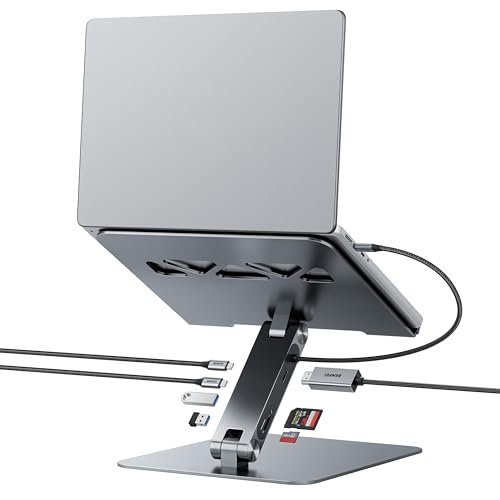
The BENFEI stand includes a 7-in-1 dock with HDMI 4K@60Hz, SD and micro SD slots, 100W power delivery and 10Gbps USB-C and USB-A ports, on an adjustable aluminum stand.
It offers 4K@60Hz, which the Umaniy lacks.
Choose it if you want to cut cables.
Best for: people who want ports plus a stand
Check price on AmazonPros
- +4K@60Hz HDMI
- +100W power delivery
- +10Gbps ports
- +Aluminum stand
Cons
- −Needs a video-capable USB-C
- −Most expensive
Umaniy 8-in-1 Dock Stand
About this pick
The Umaniy stand adds eight ports including 4K@30Hz HDMI and 100W power delivery with 85W for the laptop, and folds to 0.9 lb.
It is cheaper than the BENFEI but limited to 30Hz video.
Choose it for travel.
Best for: travellers who want ports
Check price on AmazonPros
- +Eight ports
- +Folds to carry
- +Lightweight at 0.9 lb
- +100W input
Cons
- −4K only at 30Hz
- −15W reserved
Mukiya 8-in-1 Dock Stand
About this pick
The Mukiya dock stand has nine height levels, 4K HDMI and 90W power delivery in an aluminum body.
It offers more heights than the other dock stands.
Choose it for height flexibility.
Best for: people who want height levels and ports
Check price on AmazonPros
- +Nine height levels
- +4K HDMI
- +90W power delivery
- +Portable
Cons
- −Heavy with a cable
- −Fewer ports than a hub
How We Evaluated These Laptop Stands Under $50
Each pick was assessed across 5 criteria weighted for real-world use.
Height and adjustability
Each stand was compared on its stated height range and angle options and how close it gets the screen to eye level.
Stability and capacity
Listed weight capacity, base design and hinge type were weighed for wobble under typing.
Materials and airflow
Aluminum, wood or plastic construction and the ventilation design were compared.
Portability and extras
Folded size, weight, rotation and any ports were weighed against how a typical user works.
Value at this price
Price was weighed against build and extras, with extra weight on whether a dock stand's ports are a real benefit for the laptop in use.
How to Choose the Right Laptop Stands Under $50
By Primary Need
Pick the job first.
| Your situation | Pick from this guide |
|---|---|
| Clean fixed lift | Rain Design mStand |
| Tall lift for standing desks | JOYEKY 360 Rotating |
| 17 inch laptop | Lamicall 360 Rotating |
| Desk organiser | AFOOYO Wood with Drawer |
| Ports and stand | BENFEI 7-in-1 Dock Stand or Umaniy 8-in-1 Dock Stand |
By Budget
| Budget | Pick from this guide |
|---|---|
| $30 to $40 | Lamicall 360 Rotating, JOYEKY 360 Rotating, AFOOYO Wood with Drawer, Rain Design mStand, Umaniy 8-in-1 Dock Stand or Mukiya 8-in-1 Dock Stand |
| $40 to $50 | BENFEI 7-in-1 Dock Stand |
Plain Stand vs Dock Stand
The big split in this tier is a plain lift versus a stand that also carries ports.
Plain stand
Lifts the laptop and nothing else, which makes it simpler, more rigid and independent of your laptop's video support. Rain Design mStand, JOYEKY 360 Rotating, Lamicall 360 Rotating and AFOOYO Wood with Drawer are plain stands.
Dock stand
Adds HDMI, USB and charging under the laptop so one cable runs to the desk, but it depends on a USB-C port with video output and may cap video at 30Hz. BENFEI 7-in-1 Dock Stand, Umaniy 8-in-1 Dock Stand and Mukiya 8-in-1 Dock Stand are dock stands.
Most people should default to a plain stand unless they really need to cut cables.
By Video Needs
| Need | Pick from this guide |
|---|---|
| 4K at 60Hz | BENFEI 7-in-1 Dock Stand |
| 4K at 30Hz is acceptable | Umaniy 8-in-1 Dock Stand |
| No video needed | Rain Design mStand |
For a MacBook Setup Specifically
Look for
A stand lip and depth limit that match your laptop, since a minimalist stand can exclude deeper machines.
In this comparison
Rain Design mStand lists a depth limit under 10.4 inches and a 5.9 inch lift, which fits MacBook-style laptops.
When to Spend More
Spend more if
You want fewer cables on a daily desk: BENFEI 7-in-1 Dock Stand gives 4K@60Hz and 100W charging in the stand.
Save if
You only need height: Rain Design mStand or Lamicall 360 Rotating lift the screen for less than a dock stand.
Frequently Asked Questions
Is 4K@30Hz good enough?
For documents yes, for video it can feel sluggish.
Will a dock stand charge my laptop?
Yes up to its listed wattage.
Does a stand need a keyboard?
Yes.
What is MDF?
A pressed wood board.
Can I use one with a 17 inch laptop?
Yes if the listing says so.
Do stands scratch laptops?
Silicone pads help.
Bottom Line
best overall: Rain Design mStand - best overall pick in this roundup.
See the full rankings above for all picks with pros, cons, and best-for summaries.
Browse on Amazon
All Prime-eligible options with current pricing.
Shop on Amazon →