
8 Best Laptop Locks for Desks in 2026
8 laptop locks and desk anchors compared as a full security chain, since a strong cable looped around a weak furniture component is a poor deployment.

New to Amazon Prime?
Get fast, free shipping on every pick in this guide, plus Prime Video and exclusive deals.
Try Prime Free





At a Glance
Kensington Combination Cable T-Bar Standard Lock, K64673AM
↓ See why we picked itKensington Desk Mount Anchor Accessory for Cable Locks, K64613WW
↓ See why we picked itSecurity Anchor Base Plate for Keyed or Combination Cable Locks
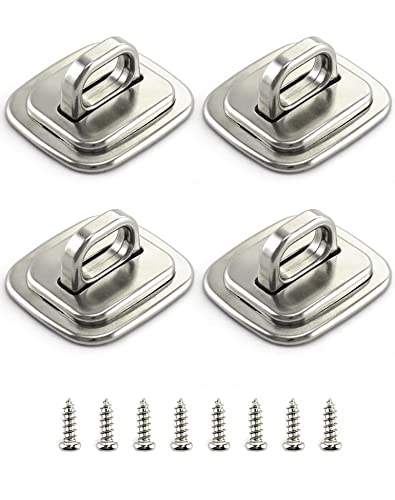
↓ See why we picked itQWORK Laptop Cable Lock Anchor, 4 Pack Steel Desk Mount
↓ See why we picked itQWORK Laptop Cable Lock Anchor, 10 Pack Steel Desk Mount
↓ See why we picked itKensington Universal 3-in-1 Combination Laptop Lock, K62316WW
↓ See why we picked itTargus DEFCON T-Lock Resettable Combo Cable Lock, PA410U
↓ See why we picked itMost laptop-lock roundups treat the cable as the whole product and give little attention to what it actually loops around. We evaluated the desk anchor as part of the security chain, since a strong cable secured to a removable or weak furniture component defeats the purpose.
This comparison mixes complete cable locks with dedicated desk-anchor accessories, since sit-stand desks, open-frame desks, and removable table components can all create weak or moving anchor points that need a purpose-built solution rather than just wrapping the cable around a table leg.
5 Criteria to Look For Before Buying a Laptop Locks for Desk
Key buying criteria so you get the right fit the first time.
Confirm your exact laptop's security slot type, since it varies by model and generation, not just brand
Laptop security slots come in a handful of genuinely different physical standards, most commonly the Kensington Standard T-Bar slot (the original, widest design), the smaller Kensington Nano slot found on select thin and light models, and the Noble Wedge slot used by some other manufacturers, and these are not interchangeable, a lock built for one slot type simply will not physically engage a different slot shape.
This is not a brand-wide constant either: a manufacturer's lineup commonly mixes slot types across different model lines and even across generations of the same model line as laptops get thinner over time, so a lock confirmed compatible with one specific model doesn't guarantee compatibility with a different model from the same brand.
Check your exact laptop's model number and generation against the lock manufacturer's own documented compatibility list, rather than trusting a generic "fits all laptops" or brand-name-only claim from a retailer listing.
Choose between combination, keyed, and keypad locking mechanisms based on your actual daily habits
A combination lock uses a resettable numeric dial, avoiding the risk of losing a physical key but requiring you to remember (or securely record) the code, a keyed lock uses a physical key that's simple and fast to use but can be lost or need duplicating for multiple users, and a keypad lock uses an electronic push-button code entry, often with additional features like code memory or tamper alerts, at a typically higher price than the other two mechanisms.
None of these is universally superior, the right choice depends on whether you're more likely to lose a small physical key or forget a numeric code, and whether multiple people need independent access (easier to manage with individually cut keys than a single shared combination).
Match the mechanism to your own habits and whether you've historically been better at keeping track of small keys or remembering codes, rather than defaulting to whichever type looks most secure in marketing photos.
Understand that a laptop lock is a deterrent, not a guarantee against a determined thief
Every cable-based laptop lock, regardless of price or brand reputation, can theoretically be defeated by a determined attacker with the right cutting tools and enough uninterrupted time, since the lock's actual security model relies on making theft slow, visible, and effortful enough to discourage casual or opportunistic theft rather than physically preventing a prepared attacker.
This matters because marketing language around "military-grade" or "unbreakable" cable locks can create a false sense of absolute security that leads to complacency, such as leaving an expensive laptop locked but unattended in a genuinely high-risk environment for extended periods.
Treat any laptop lock as one layer of a broader security approach (also including where and how long you leave a device unattended), not a standalone guarantee, and set expectations accordingly regardless of how confidently a specific product is marketed.
Check cable length and material against your actual anchor point and desk setup
A laptop lock's cable needs to physically reach from your laptop's security slot to a suitably solid anchor point, such as a desk leg or a permanently fixed structure, and cable length varies meaningfully between products, from roughly 4 feet up to 6 feet or more, a real practical constraint if your nearest solid anchor point is further from your typical laptop position than a shorter cable can reach.
Cable material and construction (braided steel versus a simpler coated cable) also affects cut resistance, a genuinely relevant factor if the lock will sit in a semi-public space like a shared office or a coffee shop rather than a private, supervised room.
Measure the actual distance from where your laptop typically sits to your nearest solid anchor point before ordering, and favor a reinforced or braided steel cable construction specifically for any semi-public use case.
Weigh review volume against star rating, especially for lesser-known brands versus established names like Kensington
Kensington effectively created and still dominates the laptop lock category, and its established products carry review counts in the hundreds or thousands built up over years, giving genuine statistical confidence, while newer or lesser-known brands selling similarly-specified locks at a lower price sometimes carry only a handful of reviews, a meaningfully thinner sample for judging real-world reliability of the locking mechanism itself over time.
This doesn't mean a lesser-known brand is automatically worse, security hardware doesn't require brand-name recognition to function correctly, but it does mean the claims on a thin-review listing carry less independently verified weight, particularly for a security product where mechanism failure has real consequences.
When comparing an established brand against a newer, less-reviewed alternative at a similar price, factor the review depth into your confidence level, not just the star rating or the price alone.
8 Best Laptop Locks for Desks in 2026
Kensington Combination Cable T-Bar Standard Lock, K64673AM
About this pick
The largest confirmed review base in this comparison, with a resettable 4-wheel dial and independently tested torque and pull resistance. A full 6-foot cable gives real reach to a desk anchor a few feet from where the laptop sits.
It earns the top spot in this comparison over Kensington Desk Mount Anchor Accessory for Cable Locks for one main reason. Largest confirmed review base in this comparison. On price, it's actually priced above Kensington Desk Mount Anchor Accessory for Cable Locks, which is worth weighing if cost is your deciding factor between the two.
Worth knowing before you decide: Full 6-foot cable reaches a nearby dedicated anchor. On the other side, Cable alone doesn't solve a weak or missing desk anchor point. That's the main tradeoff to weigh against everything above.
Best for: Standard-slot laptop owners needing a proven cable to pair with a desk anchor.
Check price on AmazonPros
- +Largest confirmed review base in this comparison
- +Full 6-foot cable reaches a nearby dedicated anchor
Cons
- −Standard slot only
- −Cable alone doesn't solve a weak or missing desk anchor point
Kensington Desk Mount Anchor Accessory for Cable Locks, K64613WW
About this pick
A dedicated anchor point for any work surface, sold separately from the laptop lock itself, solving the exact problem this guide is built around: a desk with no closed structural loop. Two one-way security screws and full steel construction resist cutting or removal.
One spot below Kensington Combination Cable T-Bar Standard Lock in this ranking, it's priced lower than Kensington Combination Cable T-Bar Standard Lock. The compromise here is straightforward: Sold separately from the laptop lock itself, an added purchase. What you gain in return: Largest confirmed review base among dedicated anchors in this comparison. Whether that trade is worth it depends on which side matters more for your device.
Worth knowing before you decide: Mounting tape option for desks you can't drill into. On the other side, Anchor only, doesn't include a cable lock. That's the main tradeoff to weigh against everything above.
Best for: Buyers with a desk lacking a closed structural loop, wanting the most-proven single anchor.
Check price on AmazonPros
- +Largest confirmed review base among dedicated anchors in this comparison
- +Mounting tape option for desks you can't drill into
Cons
- −Sold separately from the laptop lock itself, an added purchase
- −Anchor only, doesn't include a cable lock
Security Anchor Base Plate for Keyed or Combination Cable Locks
About this pick
Documents resisting up to 88 pounds of force, a specific pull-resistance figure the Kensington anchor above doesn't publish, at a slightly lower price. Full steel construction and the same two-screw tamper-resistant design apply here.
Sitting just under Kensington Desk Mount Anchor Accessory for Cable Locks, it's priced lower than Kensington Desk Mount Anchor Accessory for Cable Locks. Here's the honest tradeoff: Smaller review base than the Kensington-branded anchor. And here's what it gets you instead: Documents a specific 88 lbs force-resistance figure. That's the real difference between the two picks, not just a ranking number.
Worth knowing before you decide: Slightly lower price than the Kensington-branded equivalent. On the other side, Sold separately from the laptop lock itself. That's the main tradeoff to weigh against everything above.
Best for: Buyers wanting a documented force-resistance figure at a slightly lower price than the Kensington anchor.
Check price on AmazonPros
- +Documents a specific 88 lbs force-resistance figure
- +Slightly lower price than the Kensington-branded equivalent
Cons
- −Smaller review base than the Kensington-branded anchor
- −Sold separately from the laptop lock itself
QWORK Laptop Cable Lock Anchor, 4 Pack Steel Desk Mount
About this pick
Four anchor base plates for a competitive price, the lowest per-unit price of any dedicated anchor in this comparison, useful for equipping multiple desks in a home office or shared workspace at once. Each ships with mounting screws and the same 88 lbs force resistance the single-pack anchors document. Ranked just behind Security Anchor Base Plate for Keyed or Combination Cable Locks, it's priced lower than Security Anchor Base Plate for Keyed or Combination Cable Locks. The real tradeoff against that pick: Sold separately from any laptop lock. In exchange, it offers this instead: Lowest per-unit price of any anchor in this comparison. That's the swap that decides whether this pick or the one above it is the better fit for your laptop. Worth knowing before you decide: Equips multiple desks in one purchase. On the other side, Overkill if you only need to anchor one desk. That's the main tradeoff to weigh against everything above.
Best for: Buyers equipping multiple desks or workstations with anchors at once.
Check price on AmazonPros
- +Lowest per-unit price of any anchor in this comparison
- +Equips multiple desks in one purchase
Cons
- −Sold separately from any laptop lock
- −Overkill if you only need to anchor one desk
Kensington T-Bar Standard Keyed Lock, K65035AM
About this pick
A hinged cable-to-head connection specifically eliminates the awkward locking angle that a rigid cable-to-head design forces on a crowded desk, a real detail that matters once you're routing a cable to a specific anchor point rather than a nearby standard slot.
One spot below QWORK Laptop Cable Lock Anchor in this ranking, it costs more than QWORK Laptop Cable Lock Anchor. The compromise here is straightforward: Standard slot only. What you gain in return: Hinge design specifically reduces cable strain from awkward desk angles. Whether that trade is worth it depends on which side matters more for your device.
Worth knowing before you decide: Longest support window in this comparison. On the other side, Keyed only, no combination backup. That's the main tradeoff to weigh against everything above.
Best for: Buyers on a crowded desk wanting a cable-and-head design built for awkward anchor angles.
Check price on AmazonPros
- +Hinge design specifically reduces cable strain from awkward desk angles
- +Longest support window in this comparison
Cons
- −Standard slot only
- −Keyed only, no combination backup
QWORK Laptop Cable Lock Anchor, 10 Pack Steel Desk Mount
About this pick
Ten anchor base plates plus 20 mounting screws for a competitive price, built for classrooms, offices, or computer labs anchoring many desks at once rather than a single home workstation. Each anchor carries the same 88 lbs documented force resistance as the smaller QWORK pack. Sitting just under Kensington T-Bar Standard Keyed Lock, it's priced lower than Kensington T-Bar Standard Keyed Lock. Here's the honest tradeoff: Significant overkill for a single home desk. And here's what it gets you instead: Lowest per-unit cost of any anchor pack in this comparison at institutional scale. That's the real difference between the two picks, not just a ranking number. Worth knowing before you decide: Enough anchors for a classroom or computer lab in one purchase. On the other side, Sold separately from any laptop lock. That's the main tradeoff to weigh against everything above.
Best for: Classrooms, labs, or offices anchoring 10 or more desks at once.
Check price on AmazonPros
- +Lowest per-unit cost of any anchor pack in this comparison at institutional scale
- +Enough anchors for a classroom or computer lab in one purchase
Cons
- −Significant overkill for a single home desk
- −Sold separately from any laptop lock
Kensington Universal 3-in-1 Combination Laptop Lock, K62316WW
About this pick
Covers Standard, Nano, and Wedge slots with interchangeable tips, useful if a shared desk sees different laptop brands over time. The full 6-foot cable pairs well with any of the dedicated desk anchors in this comparison for a complete security chain.
Ranked just behind QWORK Laptop Cable Lock Anchor, it costs more than QWORK Laptop Cable Lock Anchor. The real tradeoff against that pick: Slightly more setup than a dedicated single-slot lock. In exchange, it offers this instead: Covers multiple slot standards for a shared or hot-desk setup. That's the swap that decides whether this pick or the one above it is the better fit for your laptop.
Worth knowing before you decide: Full 6-foot cable pairs well with any dedicated desk anchor. On the other side, Doesn't help slotless laptops like most MacBook Air models. That's the main tradeoff to weigh against everything above.
Best for: Shared or hot-desk setups where different laptop brands may show up over time.
Check price on AmazonPros
- +Covers multiple slot standards for a shared or hot-desk setup
- +Full 6-foot cable pairs well with any dedicated desk anchor
Cons
- −Slightly more setup than a dedicated single-slot lock
- −Doesn't help slotless laptops like most MacBook Air models
Targus DEFCON T-Lock Resettable Combo Cable Lock, PA410U
About this pick
The only cable lock in this comparison that bundles its own desk anchor base plate (PA400P) in the box, removing the need to buy the cable and the anchor as two separate purchases. A user-resettable 4-digit code gives 10,000 possible combinations.
One spot below Kensington Universal 3-in-1 Combination Laptop Lock in this ranking, it costs more than Kensington Universal 3-in-1 Combination Laptop Lock. The compromise here is straightforward: Smaller review base than the top Kensington cable lock. What you gain in return: Only pick in this comparison bundling both a cable lock and a desk anchor. Whether that trade is worth it depends on which side matters more for your device.
Worth knowing before you decide: Single purchase solves both parts of the security chain. On the other side, Bundled anchor may not suit every desk material as well as the dedicated anchor options. That's the main tradeoff to weigh against everything above.
Best for: Buyers wanting a single-purchase solution for both the cable lock and the desk anchor.
Check price on AmazonPros
- +Only pick in this comparison bundling both a cable lock and a desk anchor
- +Single purchase solves both parts of the security chain
Cons
- −Smaller review base than the top Kensington cable lock
- −Bundled anchor may not suit every desk material as well as the dedicated anchor options
How We Evaluated These Laptop Locks for Desks
Each pick was assessed across 4 criteria weighted for real-world use.
Evaluated the fixed desk anchor as part of the security chain, not an afterthought
We included dedicated anchor accessories directly in this comparison rather than assuming every desk has a closed structural loop the cable can wrap around.
Compared documented force-resistance figures where published
Several anchors here document an 88 lbs pull-resistance figure. We surfaced that specific number rather than a vague 'strong' claim.
Distinguished single-desk anchors from multi-pack institutional options
The 4-pack and 10-pack anchors serve genuinely different scales of deployment, and we sorted picks accordingly rather than ranking them identically to single anchors.
Flagged which cable lock bundles its own anchor versus requiring a separate purchase
Only one pick in this comparison includes both the cable lock and a desk anchor in one purchase, and we called that out explicitly.
How to Choose the Right Laptop Locks for Desks
By Slot Type
| Your laptop's slot | Recommended pick in this comparison |
|---|---|
| Confirmed standard slot | Kensington Combination Cable T-Bar Standard Lock |
| Confirmed nano slot | Kensington Universal 3-in-1 Combination Laptop Lock |
By Budget
| Price range | Recommended pick |
|---|---|
| Under $11 | QWORK Laptop Cable Lock Anchor |
| Mid-range | Kensington Combination Cable T-Bar Standard Lock |
| No firm budget ceiling, prioritizing documented compatibility | Kensington T-Bar Standard Keyed Lock |
Combination vs Keyed
Combination
A resettable dial avoids the risk of losing a physical key, at the cost of remembering or securely recording a code. In this comparison: Kensington Combination Cable T-Bar Standard Lock, Security Anchor Base Plate for Keyed or Combination Cable Locks, Kensington Universal 3-in-1 Combination Laptop Lock.
Keyed
Simple and fast to use, but a lost key means real trouble unless a spare is kept safe. In this comparison: Kensington T-Bar Standard Keyed Lock.
By Confirmed Brand/Model Documentation
| Your priority | Recommended pick |
|---|---|
| Most explicit model-level compatibility documentation | Kensington Combination Cable T-Bar Standard Lock |
| Widest general slot-type compatibility | Targus DEFCON T-Lock Resettable Combo Cable Lock |
For a Specific Device Model Specifically
Look for
The lock manufacturer's own documented compatibility list naming your exact model and generation, not just a retailer's generic "fits most laptops" claim.
In this comparison
Kensington Combination Cable T-Bar Standard Lock fits this specifically: Largest confirmed review base in this comparison.
When to Spend More
Spend more if
You want what Kensington T-Bar Standard Keyed Lock offers: Hinge design specifically reduces cable strain from awkward desk angles. That's a real functional upgrade over the budget picks here, not just a brand markup.
Save if
QWORK Laptop Cable Lock Anchor already covers the essentials: Lowest per-unit price of any anchor in this comparison. The main thing you'd be paying extra for elsewhere in this list is documentation depth or cable reinforcement you may not need.
Frequently Asked Questions
Do I need a separate desk anchor if my laptop lock has a strong cable?
Only if your desk lacks a closed structural loop to wrap the cable around directly. Sit-stand desks, open-frame desks, and removable table components typically need a dedicated anchor accessory.
What's the best overall desk anchor?
The Kensington Desk Mount Anchor Accessory, for its combination of the largest confirmed review base among dedicated anchors and a mounting-tape option for desks you can't drill into.
Is there a cable lock that includes its own desk anchor?
Yes, the Targus DEFCON T-Lock Resettable Combo Cable Lock is the only pick in this comparison that bundles a security base plate in the box.
How much force do these anchors actually resist?
Several of the dedicated anchor accessories in this comparison document resisting up to 88 pounds of pull force.
Is there an option for equipping multiple desks at once?
Yes, the QWORK anchors come in 4-pack and 10-pack options, proportionate for a home office with several desks or an institutional deployment like a classroom.
Bottom Line
best overall: Kensington Combination Cable T-Bar Standard Lock, K64673AM - best overall lock (standard slot) pick in this roundup.
See the full rankings above for all picks with pros, cons, and best-for summaries.
Browse on Amazon
All Prime-eligible options with current pricing.
Shop on Amazon →