
6 Best Heated Mouse Pads in 2026
Six heated mouse pads and hand warmers compared on temperature, timers, USB power needs and wrist support for cold-handed mouse users at a desk.

New to Amazon Prime?
Get fast, free shipping on every pick in this guide, plus Prime Video and exclusive deals.
Try Prime Free


At a Glance
Your mouse hand is the one that never moves much, never gets blood pumping from typing, and ends up the coldest part of you in a chilly office. A heated mouse pad warms just that hand without heating the room, and most of them are small enough to run from a USB port.
That small size is also the catch. These are not full desk mats: they are palm-sized pads, tunnels and wrist rests drawing around 10W, so the power source matters, since the weaker USB ports on some laptops may leave a pad merely lukewarm. We compared six on stated temperatures, timers, power requirements and wrist support. These are comfort products and not medical devices, so ask a doctor about any condition affecting your hands.
6 Criteria to Look For Before Buying a Heated Mouse Pad
Key buying criteria so you get the right fit the first time.
USB power versus wall adapter
Most heated mouse pads draw around 10W, which is 5V at 2A, while some computer ports supply much less. On a weak laptop port, a pad may run lukewarm or heat slowly. Check the listing for its required amps, and if it says not suitable for computer USB ports, as Nauttxon does, plan on a wall charger.
Temperature steps in degrees
A pad that lists 110F, 130F and 145F tells you far more than 'low, medium, high'. On a small pad, heat concentrates in the palm, so the highest step may feel hot after an hour. Pick the model whose middle step you would be happy with all afternoon, and prefer listings that publish degrees.
Timer length stated clearly
Several pads offer 2, 4 or 8 hour timers, but others say only 'timer function'. An unstated timer means you cannot be sure the pad turns off when you leave for lunch. Look for the hour options in the bullets and avoid the 8 hour setting unless you will be at the desk.
Wrist support and surface feel
A wrist rest changes your hand angle, and plush fleece feels warmer than faux leather but is harder to wipe clean. Wrist support helps on long sessions, while a flat pad suits low-profile mice. Check for the words wrist rest or support and for whether the cover is removable and washable.
Pad versus enclosed heater
A pad warms from below, a double-sided pad warms above and below, and a mini heater surrounds your hand with warm air. Enclosed designs feel warmer but cost more, and a heater may fall under office or dorm appliance rules. Decide what level of coverage you need before choosing.
Comfort product, not medical device
Listings often mention Raynaud's, circulation or pain relief, but these are comfort products and not medical devices. If you have reduced sensation in your hand, you may not feel a surface getting too warm, so ask a doctor first. Choose lower settings and a timer.
6 Best Heated Mouse Pads in 2026
Nauttxon USB Dual-Sided Heated Mouse Pad
About this pick
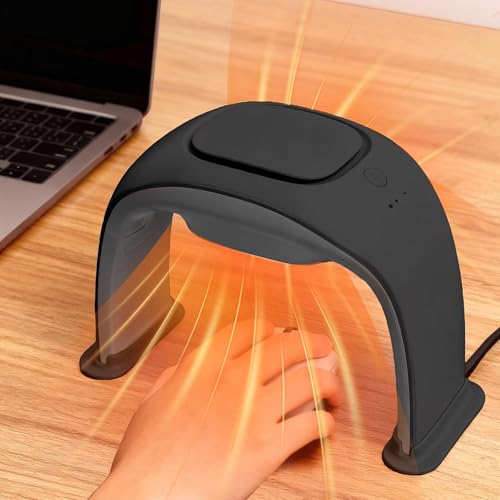
Nauttxon wraps your hand with heat from both below and above through a curtain-style cover. It offers 3 heat settings, 2, 4 or 8 hour timers and runs on 10W USB, measuring 10.2 by 8.1 by 4.5 inches with a waterproof faux leather surface.
Compared with Flyyears below, it surrounds the hand instead of just warming from beneath, and the curtain is meant to block drafts. It costs about $8 more than Flyyears and, per the listing, needs a 5V 2A source: it is not suitable for computer USB ports.
Best for someone whose hand gets cold from AC vents. The caveat is the charger requirement, so plan on a wall adapter, and the highest setting carries a caution in the listing.
Best for: Hands chilled by air conditioning
Check price on AmazonPros
- +Warms above and below the hand
- +Curtain blocks cold drafts
- +Waterproof faux leather surface
- +Room for ergonomic mice
Cons
- −Needs a 5V 2A adapter
- −Not for computer USB ports
Flyyears USB Heated Mouse Pad with Wrist Rest
About this pick
Flyyears is a soft pad with a built-in wrist rest, 3 heat levels and 2, 4 or 8 hour timers. The listing says it connects to a compatible USB port on a laptop, power bank or adapter, which makes it the most flexible about power.
It is simpler than Nauttxon, which wraps the hand, and lists no temperatures. It costs less than the Nauttxon and SooQi while adding wrist cushioning that IriQuart lacks.
Best for a hybrid worker who moves between a laptop and a desk. The caveat is the missing temperatures, and a laptop port may deliver less warmth than a wall adapter.
Best for: Laptop users who move around
Check price on AmazonPros
- +Works from laptop, bank or adapter
- +Soft surface with wrist rest
- +Timer choices of 2, 4, 8 hours
- +Mid range price
Cons
- −No temperatures listed
- −May run cooler on a laptop port
IriQuart USB Heated Mouse Pad
About this pick
IriQuart lists 3 heat levels of 110F, 130F and 145F, a smart auto shut-off of 2, 4 or 8 hours, and USB power from a laptop, desktop, power bank or adapter with no batteries needed.
The 145F top level is the hottest in this guide, so it is the choice for very cold hands, while HRZOUKP shares the same steps at a lower price. Compared with Flyyears, it states real degrees but has no wrist rest.
Best for people who want a clearly specified pad with real heat. The caveat is that 145F can be too warm for long contact, so start on the low setting.
Best for: Very cold hands, clear specs
Check price on AmazonPros
- +Real temperatures listed
- +Hottest top level here
- +USB from laptop or bank
- +Choice of three timers
Cons
- −No wrist rest mentioned
- −145F is warm for long use
HRZOUKP USB Heated Mouse Pad with Wrist Support
About this pick
HRZOUKP has 3 temperature levels of 110F, 130F and 145F, a timer function, a plush short-fleece surface and an ergonomic wrist support. It uses USB power and plugs into a computer, power bank or adapter.
It matches IriQuart's temperatures at the lowest price in this guide, and unlike IriQuart it includes a wrist support. The listing does not say how long the timer runs.
Best for a low cost pad that includes wrist support. The caveat is the vague timer length, which matters if you walk away from the desk.
Best for: Budget buyers wanting wrist support
Check price on AmazonPros
- +Lowest price in this guide
- +Includes wrist support
- +Same temperatures as IriQuart
- +Soft plush surface
Cons
- −Timer hours not stated
- −Plush surface harder to wipe
SooQi USB Heated Wrist Rest for Mouse
About this pick
SooQi is a heated wrist rest rather than a flat pad, with 3 modes of Gentle (98F to 104F), Comfort (104F to 111F) and Blaze (111F to 118F). One side is cotton filled and warm, the other is bead filled with a cooling cover, and the cover is removable and machine washable.
It is the gentlest heater in the guide, with a top of 118F compared with 145F on IriQuart. It also costs about $4 more than Flyyears and comes with a power adapter the listing calls UL certified.
Best for someone who wants wrist cushioning with mild warmth. The caveat is that it warms the wrist, not the whole hand, and the listing's pain claims should be treated as marketing.
Best for: Mild warmth and wrist cushioning
Check price on AmazonPros
- +Gentlest heat range
- +Cooling bead side for summer
- +Washable cover
- +Stays put without slipping
Cons
- −Warms the wrist, not the hand
- −Pain claims are marketing
NIFBANG Ceramic Desk Hand Warmer
About this pick
NIFBANG is a mini ceramic desk heater that surrounds your mouse hand rather than a pad. It has 3 levels of 100F, 120F and 140F, air directed from four sides, a 8.1 inch space diameter, 6.3 inches high, and tip-over and overheat shut-offs. The listing says it runs at about 15dB.
It is the priciest pick here and works by moving warm air rather than by contact, and the listing gives no USB spec, so plan on a wall outlet. Unlike the pads, your hand is enclosed.
Best for someone who wants warmth all around the hand. The caveat is that it is a heater, not a pad, so check your office rules about desk heaters.
Best for: Enclosed warmth around the mouse hand
Check price on AmazonPros
- +Warms the hand from all sides
- +Tip-over protection included
- +Flame retardant casing, per listing
- +Quiet, about 15dB listed
Cons
- −It is a heater, not a pad
- −Highest price here
How We Evaluated These Heated Mouse Pads
Each pick was assessed across 5 criteria weighted for real-world use.
Power requirements
We compared stated USB needs and flagged pads that do not suit computer ports.
Heat clarity
Listed temperatures and level counts were weighed above vague 'warm' claims.
Timer and safety
Auto shut-off lengths, tip-over protection and adapter claims were checked on the page.
Comfort and support
Wrist rest design, cover material and washability were considered.
Value for price
Cost was compared with documented features and power flexibility.
How to Choose the Right Heated Mouse Pads
By Power Source
| Your situation | Recommended pick |
|---|---|
| Laptop and power bank user | Flyyears USB Heated Mouse Pad with Wrist Rest |
| Have a 2A wall adapter handy | Nauttxon USB Dual-Sided Heated Mouse Pad |
| Desktop with USB ports | IriQuart USB Heated Mouse Pad |
| Near a wall outlet only | NIFBANG Ceramic Desk Hand Warmer |
By Budget
| Price range | Recommended pick |
|---|---|
| Under $20 | HRZOUKP USB Heated Mouse Pad with Wrist Support |
| $20 to $25 | IriQuart USB Heated Mouse Pad |
| $25 to $30 | Flyyears USB Heated Mouse Pad with Wrist Rest |
| $30 to $34 | Nauttxon USB Dual-Sided Heated Mouse Pad |
| $29 to $30, wrist cushioning | SooQi USB Heated Wrist Rest for Mouse |
| Around $40 | NIFBANG Ceramic Desk Hand Warmer |
Warm From Below vs Wrapped Around
From below
A flat or cushioned pad warms the underside of the hand and wrist, cheaper and low profile. That covers Flyyears USB Heated Mouse Pad with Wrist Rest, IriQuart USB Heated Mouse Pad, HRZOUKP USB Heated Mouse Pad with Wrist Support and SooQi USB Heated Wrist Rest for Mouse.
Wrapped around
A curtain or enclosure warms the top of the hand as well, blocking drafts at the cost of space. That covers Nauttxon USB Dual-Sided Heated Mouse Pad and NIFBANG Ceramic Desk Hand Warmer.
Most people should start with a pad from below, and only step up to an enclosed design if drafts are the real problem.
By Temperature Preference
| Your concern | Recommended pick |
|---|---|
| Want the hottest option | IriQuart USB Heated Mouse Pad |
| Want the gentlest heat | SooQi USB Heated Wrist Rest for Mouse |
| Want a moderate 100F to 140F range | NIFBANG Ceramic Desk Hand Warmer |
For Gamers Specifically
Look for
A surface that lets the mouse glide, wrist support for long sessions and a cord that does not tug the mouse. Heat should stay on a low step to avoid sweaty palms.
In this comparison
Flyyears USB Heated Mouse Pad with Wrist Rest and HRZOUKP USB Heated Mouse Pad with Wrist Support include wrist support, while Nauttxon USB Dual-Sided Heated Mouse Pad lists room for gaming mice.
When to Spend More
Spend more if
Drafts or a cold desk are your real problem. Nauttxon USB Dual-Sided Heated Mouse Pad and NIFBANG Ceramic Desk Hand Warmer wrap the hand.
Save if
You just need a warm base. HRZOUKP USB Heated Mouse Pad with Wrist Support and IriQuart USB Heated Mouse Pad cost under $23.
Frequently Asked Questions
Can a laptop USB port power a heated mouse pad?
Some can, but many pads need about 5V and 2A, and the Nauttxon listing says it is not suitable for computer ports. A wall adapter is the safer choice.
Is it safe to leave one on all day?
Choose a pad with a 2 or 4 hour timer and avoid the 8 hour setting unless you are at the desk. Unplug it when you leave.
Is a wrist rest style worth it over a flat pad?
If you use a mouse for hours, wrist support helps hand angle. Flat pads suit low-profile mice and keep your wrist level with the desk.
How do I clean a plush heated pad?
Follow the listing. SooQi has a removable washable cover, while plush pads like HRZOUKP are usually spot cleaned. Never soak the heating element.
Are these medical devices for Raynaud's?
No. Listings may mention Raynaud's, but these are comfort products. Ask a doctor about any condition, and use low settings if you have reduced sensation.
Will a mini heater be allowed at my workplace?
A mini heater like NIFBANG is a space heater under some office or dorm rules, even a small one. A USB pad is usually less controversial, but check your policy.
Bottom Line
best overall: Nauttxon USB Dual-Sided Heated Mouse Pad - best overall pick in this roundup.
See the full rankings above for all picks with pros, cons, and best-for summaries.
Browse on Amazon
All Prime-eligible options with current pricing.
Shop on Amazon →