
4 Best HDMI PoE Extenders Over IP in 2026
We compared HDMI-over-IP extenders by whether they use true PoE switch power or PoC, a different single-cable power scheme most listings label similarly.

New to Amazon Prime?
Get fast, free shipping on every pick in this guide, plus Prime Video and exclusive deals.
Try Prime Free

At a Glance
PWAY 400ft HDMI Extender Over Ethernet (PW-DT273P)
↓ See why we picked itPWAY HDMI Extender 500ft (Gigabit One-to-Many)
↓ See why we picked itAn HDMI extender over IP sends video across a standard Ethernet network instead of a dedicated HDMI cable, but most products in this category actually use PoC (Power over Cable), a proprietary single-cable power scheme specific to HDMI extenders, rather than true IEEE-standard PoE that draws power from a network PoE switch.
We compared this lineup on which power scheme each listing actually uses, since only one specifically confirms compatibility with a genuine PoE switch, while the others use PoC to send power from transmitter to receiver over the same cable without connecting to your existing network's PoE infrastructure.
5 Criteria to Look For Before Buying a HDMI PoE Extenders Over IP
Key buying criteria so you get the right fit the first time.
Most 'PoE' HDMI-Over-IP Extenders Actually Use PoC, a Different Proprietary Power Scheme
Only the PWAY 400ft pick in this comparison specifically confirms compatibility with a genuine PoE switch, while the OREI, Steetek, and PWAY 500ft picks all use PoC (Power over Cable), a scheme that sends power from the transmitter to receiver over the same cable but does not draw from your network's actual PoE infrastructure. This matters significantly if you specifically want to power the extender from an existing PoE switch to avoid using a wall outlet at the receiver end, since a PoC-based extender still requires plugging its power adapter into an outlet, just at one end instead of two. Check whether a listing specifically confirms compatibility with a genuine PoE switch (drawing power from network infrastructure) versus PoC (single-cable power between transmitter and receiver only) before assuming both terms mean the same thing.
4K Resolution Support Comes With Real Cabling and Distance Tradeoffs Compared to 1080p
The OREI KVM 4K pick specifically supports 4K@60Hz but requires high-quality Cat6/Cat7 cable and has a shorter 230ft range, compared to the 1080p-only PWAY and Steetek picks that reach 400-500ft over the same cable categories. This matters if your source content and displays are genuinely 4K and you want to preserve that resolution over the extension, and matters less if your content and displays are 1080p, where the extra 4K support provides no visible benefit. Match your extender's resolution support to your actual source and display capabilities, and factor in the typically shorter range and stricter cable requirements that come with 4K-capable models.
USB KVM Extension Lets You Control a Remote Computer's Keyboard and Mouse From the Receiver End
The OREI KVM pick specifically includes USB KVM Extension, letting you control a PC located at the transmitter end using a keyboard and mouse connected at the receiver end, a genuinely distinct feature not present on the other picks in this comparison. This matters if you're extending a workstation or server to a remote location where you need full input control, not just video display, and matters less if you only need to display video output without remote input control. Check whether an HDMI-over-IP extender specifically includes KVM (keyboard, video, mouse) extension if you need to control the source computer remotely, not just view its output.
One-to-Many Distribution Requires a Compatible Network Switch, Not Just a Direct Cable Connection
The PWAY picks specifically state one-to-many output works through a network switch (standard, 100M/1000M, or gigabit depending on the model), meaning the multi-display broadcast capability depends on routing the signal through compatible network infrastructure rather than simply connecting multiple receivers directly. This matters if you're planning a genuine one-to-many deployment across several displays, since you'll need to budget for and configure a compatible switch alongside the extender units themselves. Check a one-to-many capable extender's specific switch requirements (switch type, port count, gigabit versus standard) before assuming any network switch will support the multi-display feature.
EDID Copy Functionality Helps Establish Correct Resolution Automatically Between Mismatched Source and Display Hardware
The Steetek pick's specifically named built-in EDID copy function reads and stores display information to help the transmitter and receiver establish the correct resolution automatically, reducing a common real-world HDMI extension problem where a source and display fail to negotiate a working resolution over a long cable run. This matters if you've had resolution negotiation issues with HDMI extensions in the past or are connecting mismatched source and display hardware, and matters less if you're using well-matched, modern equipment that reliably negotiates resolution on its own. Check for a specifically named EDID handling feature if you anticipate connecting hardware that might have resolution negotiation issues over an extended HDMI connection.
4 Best HDMI PoE Extenders Over IP in 2026
PWAY 400ft HDMI Extender Over Ethernet (PW-DT273P)
About this pick
This extender's listing specifically states POE switch compatibility, meaning it can draw power from a genuine Power over Ethernet switch already on your network, reducing the need for additional power adapters and simplifying installation in a way the PoC-based picks below cannot match. Its one-to-many design outputs multiple video streams through network switches for flexible, scalable video management up to 400ft.
Compared to the OREI and Steetek picks below, this one's compatibility with both conventional 100M ethernet switches and dedicated PoE switches gives it genuine deployment flexibility for buyers who already have PoE infrastructure in place.
Best for buyers who specifically want to power an HDMI extender from existing PoE switch infrastructure rather than a separate adapter.
Best for: buyers who want to power an HDMI extender from existing PoE switch infrastructure
Check price on AmazonPros
- +Genuinely compatible with existing PoE switch infrastructure
- +One-to-many output supports scalable multi-display setups
- +Works with both conventional and PoE-equipped network switches
Cons
- −Limited to 1080p resolution, not 4K like the OREI picks
- −Higher price than the Steetek pick despite similar 1080p resolution
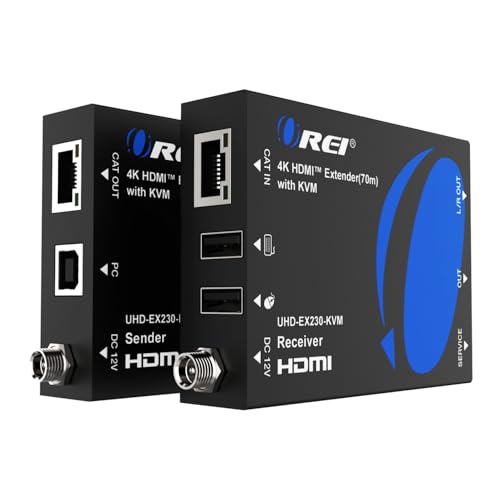
OREI KVM 4K HDMI Over Ethernet Extender Balun (PoC)
About this pick
This extender's listing specifically states PoC (Power over Cable) rather than PoE, sending power from transmitter to receiver over the same Cat6/7 cable carrying video, a different single-cable power scheme than a PoE-switch-powered design. Its USB KVM Extension lets you control a remote PC's keyboard and mouse from the receiver end, a genuinely distinct feature among the picks in this comparison.
Compared to the PWAY pick above, this one delivers full 4K@60Hz with HDCP 2.2 compliance and HDR10/Dolby Vision support, a significantly higher resolution ceiling at the cost of not connecting to existing PoE switch infrastructure.
Best for buyers who want 4K resolution with remote KVM control and don't need true PoE switch compatibility.
Best for: buyers who want 4K resolution with remote KVM control and don't need true PoE switch compatibility
Check price on AmazonPros
- +Full 4K@60Hz resolution, higher than the 1080p picks in this comparison
- +USB KVM Extension enables remote PC control from the receiver
- +Broad HDR format support including Dolby Vision
Cons
- −Uses PoC, not true PoE switch compatibility like the PWAY pick
- −Shorter 230ft range than the PWAY or Steetek picks
Steetek HDMI Extender Over Ethernet (PoC, HT202P)
About this pick
This extender's listing specifically explains its PoC technology sends power from the transmitter to the receiver through the connected Ethernet cable, so only one power adapter is required and it's included in the package, an honest and clear disclosure of exactly how the single-cable power scheme works. Its built-in EDID copy function helps establish the correct resolution automatically between source and display.
Compared to the OREI and PWAY picks above, this one's lowest price in this comparison makes it accessible for a straightforward point-to-point HDMI extension without needing 4K resolution or true PoE switch compatibility.
Best for buyers who want the lowest price for a straightforward point-to-point HDMI extension with reduced cable clutter.
Best for: buyers who want the lowest price for a straightforward point-to-point HDMI extension
Check price on AmazonPros
- +Lowest price in this comparison at under $25
- +PoC design reduces cable clutter with only one power adapter needed
- +Clear, honest explanation of exactly how its power scheme works
Cons
- −Shortest range in this comparison at 164ft
- −1080p resolution only, not 4K like the OREI pick
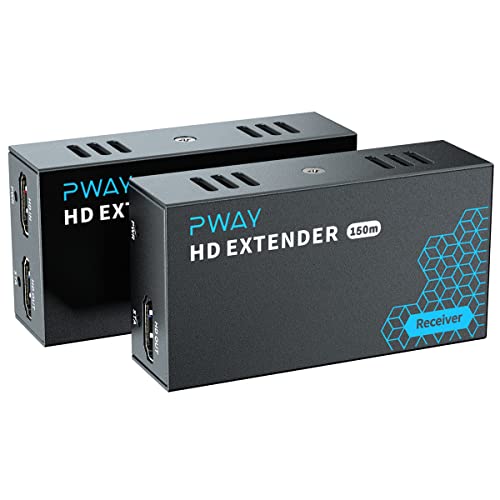
PWAY HDMI Extender 500ft (Gigabit One-to-Many)
About this pick
This extender's listing specifically states one-to-many multi-display distribution over any standard gigabit Ethernet switch, broadcasting a single HDMI source to multiple displays for digital signage, classrooms, or conference rooms, without requiring a PoE-specific switch. Its built-in HDMI loop-out port on the transmitter allows real-time signal verification for troubleshooting during installation.
Compared to the shorter-range PWAY pick above, this one extends to 500ft, the longest range in this comparison, while maintaining the same price point and gigabit switch compatibility.
Best for buyers who want the longest range with one-to-many multi-display distribution for signage or classroom deployments.
Best for: buyers who want the longest range with one-to-many multi-display distribution
Check price on AmazonPros
- +Longest range in this comparison at 500ft
- +One-to-many distribution suits digital signage and classroom deployments
- +HDMI loop-out simplifies installation troubleshooting
Cons
- −Uses standard gigabit switch power adapters, not true PoE switch compatibility
- −1080p resolution only, not 4K
How We Evaluated These HDMI PoE Extenders Over IP
Each pick was assessed across 5 criteria weighted for real-world use.
True PoE vs PoC Power Scheme
Compared whether each listing draws power from a genuine PoE switch or uses PoC's proprietary single-cable power sharing.
Resolution and Video Quality
Compared 1080p versus 4K support and HDR format compatibility.
Range Over Ethernet Cable
Compared maximum documented distance over Cat5e/Cat6/Cat7 cabling.
Multi-Display Distribution
Compared point-to-point versus one-to-many broadcast capability.
Additional Features
Compared KVM control, loop-out ports, and EDID handling across the picks.
How to Choose the Right HDMI PoE Extenders Over IP
By Primary Need
| If you mainly need | Recommended pick |
|---|---|
| True PoE switch compatibility for existing infrastructure | PWAY 400ft HDMI Extender Over Ethernet (PW-DT273P) |
| 4K resolution with remote KVM control | OREI KVM 4K HDMI Over Ethernet Extender Balun |
| The lowest price for a simple point-to-point extension | Steetek HDMI Extender Over Ethernet (HT202P) |
| The longest range with multi-display distribution | PWAY HDMI Extender 500ft (Gigabit One-to-Many) |
By Budget
| Price range | Recommended pick |
|---|---|
| Under $24 | Steetek HDMI Extender (under $25) |
| Under $75 | Either PWAY pick (under $80) |
| Under $99 | OREI KVM 4K Extender (under $100) |
True PoE Switch Power vs PoC Single-Cable Power
True PoE switch power (PWAY 400ft)
Draws power from an existing PoE switch on your network, reducing separate adapters if you already have PoE infrastructure deployed.
PoC single-cable power (OREI, Steetek, PWAY 500ft)
Sends power from transmitter to receiver over the same cable using a proprietary scheme, requiring only one power adapter but not connecting to your network's actual PoE switch.
If you already have a PoE switch deployed and want to draw power from it directly, the PWAY 400ft pick is the only one in this comparison that genuinely supports that. If you just want reduced cable clutter with one power adapter, any PoC-based pick accomplishes that equally well.
By Resolution Need
| Your display resolution | Recommended pick |
|---|---|
| 4K@60Hz with HDR support | OREI KVM 4K HDMI Over Ethernet Extender Balun |
| 1080p for standard displays or projectors | Steetek, either PWAY pick |
| 1080p with remote PC control | OREI pick's KVM feature works at reduced resolution too |
For a Digital Signage or Classroom Deployment Specifically
Look for
One-to-many broadcast capability over a standard network switch, letting a single HDMI source feed multiple displays without running separate HDMI cables to each screen.
In this comparison
Both PWAY picks specifically support one-to-many distribution, making either a strong fit for signage, classroom, or conference room deployments.
When to Spend More
Spend more if
You need 4K resolution with remote KVM control for a workstation or server room application, where the OREI pick's under $100 price is justified by that combination of features.
Save if
You need a simple point-to-point 1080p extension without extra features, where the Steetek pick delivers that for under $25, the lowest price in this comparison.
Frequently Asked Questions
Is a PoC HDMI extender the same thing as a true PoE HDMI extender?
No, PoC (Power over Cable) sends power between the transmitter and receiver over the same cable but doesn't draw from your network's actual PoE switch, while true PoE compatibility, like the PWAY 400ft pick specifically offers, lets the extender draw power directly from an existing PoE switch on your network.
What's the most common mistake buyers make when choosing an HDMI extender labeled 'PoE'?
Assuming any HDMI extender labeled with PoE-related terms draws power from a genuine PoE switch, when most products in this category actually use PoC, a different proprietary single-cable power scheme that still requires a wall outlet at one end.
Is the OREI KVM 4K extender worth the higher price over the Steetek pick?
If you specifically need 4K resolution and remote KVM control for a workstation setup, the OREI's higher price is justified, but for a simple 1080p point-to-point extension, the Steetek pick's much lower price delivers adequate performance.
Can I connect multiple displays to a single HDMI source using these extenders?
Yes, both PWAY picks in this comparison specifically support one-to-many distribution through a compatible network switch, letting one HDMI source feed multiple displays for signage or classroom use.
Do I need a special network switch for a one-to-many HDMI extender setup?
Yes, the PWAY picks specifically require a compatible network switch (standard, 100M/1000M, or gigabit depending on the model) for one-to-many distribution to work, so budgeting for and configuring that switch is a necessary part of the deployment.
Will these HDMI-over-IP extenders work over my regular home Wi-Fi network?
No, these extenders specifically require a wired Ethernet connection using Cat5e, Cat6, or Cat7 cable; they transmit HDMI signals over the physical network cable itself, not over Wi-Fi, and one listing specifically warns against using them on a regular shared home network.
Bottom Line
best overall: PWAY 400ft HDMI Extender Over Ethernet (PW-DT273P) - best true poe switch support pick in this roundup.
See the full rankings above for all picks with pros, cons, and best-for summaries.
Browse on Amazon
All Prime-eligible options with current pricing.
Shop on Amazon →