
6 Best Filing Cabinets with Printer Stands in 2026
6 filing cabinets with printer-stand tops compared on top surface load capacity, footprint versus printer size, and cable routing, not just drawer count.

New to Amazon Prime?
Get fast, free shipping on every pick in this guide, plus Prime Video and exclusive deals.
Try Prime Free


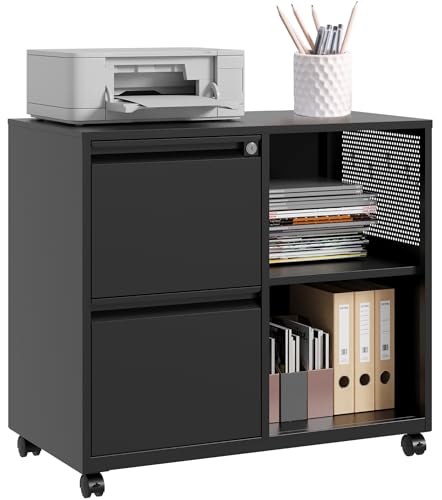
At a Glance
DEVAISE 5-Drawer Wood Drawer Cabinet, Printer Stand for Home Office
↓ See why we picked itDEVAISE Mobile File Cabinet, Rolling Printer Stand with Open Storage Shelf
↓ See why we picked itLetaya 4 Drawer File Cabinets with Lock, Metal Lateral, Printer Stand
↓ See why we picked itGYIIYUO 2 Drawer File Cabinet with 24 Inch Extended Desktop, Printer Stand
↓ See why we picked itDUMOS File Cabinet with 3 Drawers, Wood Under Desk Storage Printer Stand
↓ See why we picked itSISESOL 2 Drawer File Cabinet with Lock and Shelf, Metal Filing Cabinet
↓ See why we picked itA filing cabinet marketed as a printer stand needs a top surface that can actually hold a printer without flexing, and that spec rarely gets the attention it deserves. Inkjet printers typically weigh 12 to 20 pounds, while laser printers commonly run 20 to 40 pounds or more once loaded with paper, so the same cabinet top that comfortably holds one may sag under the other. Footprint matters just as much: a printer that overhangs a narrow cabinet top is an accident waiting to happen if a paper tray gets bumped or a corner takes an unexpected knock.
This guide compares 6 cabinets we evaluated based on product specs and buyer feedback, and we verified from each listing whether it is genuinely marketed as a printer stand rather than a general filing cabinet that happens to have a flat top. Printer vibration during operation is another detail worth planning for, since ongoing vibration can loosen drawer slides over time, and an anti-vibration mat is a cheap fix most buyers never think to add. Prices range from under $60 for a compact rolling model to under $140 for a five-drawer wood cabinet.
5 Criteria to Look For Before Buying a Filing Cabinets with Printer Stand
Key buying criteria so you get the right fit the first time.
Verify actual steel gauge, not just "metal" in the listing
A filing cabinet described as "metal" can still be built with a thin metal face over a particleboard or MDF core rather than genuine steel construction throughout, and even among fully steel cabinets, gauge thickness (a lower number means thicker, sturdier steel) varies meaningfully between products that look nearly identical in listing photos.
This matters directly for how the cabinet holds up to years of drawer use and how well it resists denting or flexing under a fully loaded drawer's weight.
Check the listing specifically for a stated steel gauge number, and be skeptical of the word "metal" alone without a gauge figure or a clear description of full-steel versus metal-faced construction.
Check for full-extension versus partial-extension drawer slides
Full-extension drawer slides let a drawer pull completely out of the cabinet body, giving access to files at the very back, while partial-extension slides only pull the drawer out part way, leaving files at the rear harder to reach without leaning or reaching awkwardly into the cabinet.
This distinction matters a lot for daily usability, especially for a deep drawer holding hanging files toward the back, but rarely gets mentioned clearly in listing bullet points that focus on drawer count instead.
Check the listing specifically for "full-extension" language, and check reviews for mentions of how far drawers actually pull out in practice.
Confirm anti-tip safety features if you have kids, pets, or plan a fully loaded cabinet
A filing cabinet with multiple drawers can tip forward if more than one drawer is pulled open at once while loaded with paper, a real safety hazard, and better-designed cabinets include an anti-tip interlock mechanism that physically prevents opening a second drawer while another is already open.
This matters more in a household with kids or pets who might pull on drawers, or if you plan to keep the cabinet fully loaded with heavy paper files rather than lightly used.
Check the listing specifically for a stated anti-tip or interlock safety feature, since this detail is frequently omitted from budget cabinet listings entirely.
Match hanging file compatibility to your actual folder sizes
Not every filing cabinet drawer accommodates both letter-size and legal-size hanging files, some are sized for letter only, and a drawer that looks roomy in a photo may not actually fit the wider legal-size folders many home offices and small businesses still use for certain documents.
This matters directly if any portion of your filing includes legal-size paperwork, buying based on drawer count or overall cabinet size alone without checking hanging-file compatibility is a common and easily avoidable mistake.
Check the listing specifically for stated letter and/or legal-size hanging file compatibility, not just the general drawer dimensions.
Weigh assembly requirements and real delivered weight before ordering
Filing cabinets range from fully assembled units shipped ready to use to flat-packed kits requiring meaningful assembly time and, for a genuinely heavy steel cabinet, more than one person to safely maneuver into place.
This matters because assembly difficulty and real shipped weight are easy to underestimate from a product photo, and a fully assembled cabinet costs more but eliminates that setup friction and the risk of a DIY assembly not being as sturdy as a factory-built one.
Check the listing for whether the cabinet ships assembled or requires assembly, and check the stated shipping weight against how much lifting and maneuvering you're actually prepared to handle at delivery.
6 Best Filing Cabinets with Printer Stands in 2026
DEVAISE 5-Drawer Wood Drawer Cabinet, Printer Stand for Home Office
About this pick
This listing explicitly markets its flat top as a printer stand, and with five drawers it also carries the most filing capacity in this list. Wheels make it repositionable, useful if you want to move the printer closer to your desk during heavy print jobs and roll it back afterward to free up floor space.
The listing does not state a specific top surface weight limit, so for a heavier laser printer over 30 pounds, check buyer photos and reviews for any mention of surface flex before loading it.
A genuine advantage here is that highest filing capacity in this list at 5 drawers. The tradeoff is that top surface weight limit not stated.
Best for: Buyers who want maximum filing capacity alongside a genuine printer stand top
Check price on AmazonPros
- +Genuinely marketed as a printer stand
- +Highest filing capacity in this list at 5 drawers
- +Five drawers plus an adjustable shelf
Cons
- −Top surface weight limit not stated
- −Wood construction sensitive to humid environments
- −Wheels add convenience but may reduce stability under a heavy printer
DEVAISE Mobile File Cabinet, Rolling Printer Stand with Open Storage Shelf
About this pick
This model is explicitly named a rolling printer stand and adds an open storage shelf below its fabric filing drawer, a useful spot for paper reams or ink cartridges within reach of the printer above. It fits A4 or letter-size hanging files, and the rolling casters make it easy to reposition near an outlet or desk edge.
Fabric drawer fronts are lighter than steel, which keeps the overall unit easier to roll, but check the top surface dimensions against your printer's footprint since overhang on a narrow rolling cabinet raises tip risk more than it would on a wider, heavier stationary cabinet.
Open shelf adds storage for paper and ink. That said, fabric drawer less durable than steel. Neither should be a surprise once you know to look for it.
Best for: Buyers who want a mobile printer stand they can reposition near an outlet or desk
Check price on AmazonPros
- +Genuinely marketed as a rolling printer stand
- +Open shelf adds storage for paper and ink
- +Rolling casters move the stand to your printer spot
Cons
- −Fabric drawer less durable than steel
- −Top surface load capacity not specified
- −Rolling design raises overhang tip risk versus a stationary cabinet
Letaya 4 Drawer File Cabinets with Lock, Metal Lateral, Printer Stand
About this pick
This lateral cabinet's listing calls out printer stand use directly, and its all-metal build and stationary four-drawer design make it a sturdier top surface option than the rolling picks in this list, an advantage for a heavier laser printer. It fits letter, legal, and A4 hanging files across its drawers.
Its lateral footprint is wider than most vertical cabinets, which is worth double-checking against your printer's exact base dimensions so the printer sits fully supported rather than overhanging any edge of the top.
Worth calling out specifically: highest filing capacity among stationary picks. The catch is highest price in this list.
Best for: Buyers with a heavier laser printer who want a stationary, all-metal stand
Check price on AmazonPros
- +Stationary, all-metal build suits heavier printers
- +Highest filing capacity among stationary picks
- +Fits letter, legal, and A4 hanging files
Cons
- −Highest price in this list
- −Top surface weight limit not stated
- −Needs more side clearance as a lateral cabinet
GYIIYUO 2 Drawer File Cabinet with 24 Inch Extended Desktop, Printer Stand
About this pick
This cabinet's 24-inch extended desktop gives more surface area than a standard cabinet top, useful footprint headroom for a printer with a wider base or one that needs extra clearance for paper tray extension. It is explicitly marketed for printer stand use in a home office and fits A4 and letter size files. Fabric drawer fronts are lighter duty than steel, so this is a better match for a lighter inkjet printer than a heavy laser unit, and cable routing from the desktop surface down to a wall outlet is worth planning before setup. Most affordable pick in this list. Set against that, fabric drawers less durable than steel. Both matter when comparing it to the other picks here.
Best for: Buyers with a lighter inkjet printer who want extra desktop surface on a budget
Check price on AmazonPros
- +Extended desktop gives more room for printer footprint and paper trays
- +Most affordable pick in this list
- +Fabric drawer fronts with mobile casters
Cons
- −Fabric drawers less durable than steel
- −Better suited to lighter inkjet printers than heavy laser units
- −Top surface weight limit not specified
DUMOS File Cabinet with 3 Drawers, Wood Under Desk Storage Printer Stand
About this pick
DUMOS explicitly markets this three-drawer wood cabinet as a printer stand, sized for under-desk placement where a compact footprint matters more than a wide top surface. Three drawers give reasonable filing capacity for the price, and the wood finish suits a home office that wants a softer look than an all-metal cabinet.
Its compact top surface is best matched to a smaller inkjet printer rather than a wide-body laser unit, so measure your printer's footprint against the stated top dimensions before buying.
The standout detail is that reasonable 3-drawer filing capacity for the price. Balancing that out, smaller review base than the top picks.
Best for: Buyers who want a compact under-desk printer stand with a softer wood finish
Check price on AmazonPros
- +Genuinely marketed as a printer stand
- +Reasonable 3-drawer filing capacity for the price
- +Compact footprint suits under-desk placement
Cons
- −Smaller review base than the top picks
- −Compact top better suited to smaller printers
- −Wood construction sensitive to humid environments
SISESOL 2 Drawer File Cabinet with Lock and Shelf, Metal Filing Cabinet
About this pick
Honesty check: this listing does not explicitly market itself as a printer stand, so it is included here as a sturdy flat-top alternative rather than a confirmed printer stand pick. Its open storage shelf and locking drawers fit legal, letter, and A4 files, and its solid metal construction gives it a stable, flat top surface that could reasonably support a lighter printer even without the marketing claim.
If you want a confirmed printer stand claim in the listing itself, choose one of the picks above instead, but if a sturdy metal flat top with an open shelf underneath fits your setup, this is a reasonable option.
Open shelf adds storage for supplies. That's a real strength, but weigh it against the flip side: not explicitly marketed as a printer stand.
Best for: Buyers who want a sturdy metal flat-top alternative even without a confirmed printer stand claim
Check price on AmazonPros
- +Solid metal flat top surface
- +Open shelf adds storage for supplies
- +Two locking drawers for supplies
Cons
- −Not explicitly marketed as a printer stand
- −Top surface load capacity not stated
- −Smaller review base than the confirmed printer stand picks
How We Evaluated These Filing Cabinets with Printer Stands
Each pick was assessed across 5 criteria weighted for real-world use.
Explicit printer stand marketing versus a generic flat top
Separated cabinets whose listings directly state printer stand use from ones with a flat top but no such claim, since a stable-looking surface is not the same as a manufacturer-confirmed printer stand.
Top surface footprint versus typical printer dimensions
Compared stated top dimensions, where available, against common inkjet and laser printer footprints to flag overhang risk on narrower cabinet tops.
Stationary versus rolling stability under printer vibration
Weighed stationary, heavier cabinets against rolling models, since ongoing printer vibration can loosen drawer slides and casters over time on a mobile unit more than on a fixed one.
Build material as a proxy for weight-bearing top capacity
Used stated construction material, steel versus wood versus fabric drawer fronts, as a rough signal for which cabinets are likely better suited to heavier laser printers versus lighter inkjet units.
Value for price across confirmed printer stand claims and filing capacity
Weighed price against both a confirmed printer stand claim and total drawer count, flagging the one pick in this list where printer stand use is not explicitly stated.
How to Choose the Right Filing Cabinets with Printer Stands
By Rating Confidence: Highest Rated vs Most Reviewed
| Your priority | Recommended pick |
|---|---|
| Highest average rating | DEVAISE 5 |
| Largest review base, strongest reliability signal | DEVAISE 5 |
By Budget
| Budget | Recommended pick |
|---|---|
| Under $140 | DEVAISE 5 |
| Up to $190 | Letaya 4 Drawer File Cabinets with Lock |
Locking vs Non-Locking
Locking cabinet
Genuine security for sensitive documents, worth it if the cabinet sits in a shared or semi-public space. In this comparison: Letaya 4 Drawer File Cabinets with Lock, SISESOL 2 Drawer File Cabinet with Lock and Shelf.
Non-locking
Simpler and usually cheaper, fine for a private home office. In this comparison: DEVAISE 5, DEVAISE Mobile File Cabinet, GYIIYUO 2 Drawer File Cabinet with 24 Inch Extended Desktop, DUMOS File Cabinet with 3 Drawers.
Default to locking unless the cabinet stays in a fully private, controlled-access space.
By Drawer Count
Check each pick's listed drawer count and interior dimensions against your actual filing volume before buying. DEVAISE 5 is the most-reviewed option here if you want the safer bet.
For Legal-Size Documents Specifically
Look for
Confirmed letter and legal-size hanging file compatibility, not just general drawer dimensions.
In this comparison
DEVAISE 5 is worth checking against its listed hanging-file compatibility before buying, given its strong review base.
When to Spend More
Spend more if
You need real steel construction, anti-tip safety, and full-extension drawers, where Letaya 4 Drawer File Cabinets with Lock's higher price buys real build-quality headroom over the cheaper picks.
Save if
You just need light, occasional storage for a small volume of documents, where DEVAISE 5 covers the same job at a lower price.
Frequently Asked Questions
How do I know if a filing cabinet's top can actually hold my printer?
Few listings state an exact top-surface weight limit, so use printer type as a rough guide: 12 to 20 pounds for most inkjets and 20 to 40 pounds or more for laser printers. Stationary, all-metal picks like the Letaya 4 Drawer Lateral are a safer bet for heavier laser printers than lighter fabric-drawer or rolling cabinets.
Can printer vibration actually damage a filing cabinet over time?
It can gradually loosen drawer slide screws and caster hardware through repeated low-level vibration during print jobs. An inexpensive anti-vibration mat placed under the printer reduces this transfer and is worth adding from day one rather than after slides start rattling.
Is a rolling printer stand cabinet less stable than a stationary one?
Slightly, especially with a heavier printer on top, since casters raise the unit's height and shift its center of gravity. The DEVAISE Mobile Rolling Printer Stand and GYIIYUO Extended Desktop are both rolling designs best matched to lighter inkjet printers rather than heavy laser units.
What happens if my printer overhangs the cabinet top?
An overhanging printer is more likely to tip or get knocked off balance if a paper tray or output tray is bumped during use. Measure your printer's full footprint, including any extended trays, against the cabinet's stated top dimensions before buying.
Should I buy a cabinet that isn't explicitly marketed as a printer stand?
You can, if it has a solid, stable, flat metal top like the SISESOL 2 Drawer with Shelf in this list, but treat it as an unconfirmed choice rather than a manufacturer-endorsed printer stand. If you want that explicit confirmation, choose one of the picks in this list that states printer stand use directly.
Do I need to plan cable routing before setting up a printer stand cabinet?
Yes. Raising the printer to cabinet-top height means power and USB cables need a path down the side or back of the cabinet to reach an outlet or computer. Planning this before setup avoids cables draped awkwardly across drawer fronts or blocking drawer access.
Bottom Line
best overall: DEVAISE 5-Drawer Wood Drawer Cabinet, Printer Stand for Home Office - best high-capacity printer stand combo pick in this roundup.
See the full rankings above for all picks with pros, cons, and best-for summaries.
Browse on Amazon
All Prime-eligible options with current pricing.
Shop on Amazon →