
6 Best Ergonomic Mice with Side Scroll in 2026
Six ergonomic mice with a side or horizontal scroll wheel compared by shape, device switching, battery and price, for spreadsheets and wide timelines.

New to Amazon Prime?
Get fast, free shipping on every pick in this guide, plus Prime Video and exclusive deals.
Try Prime Free



At a Glance
Wide spreadsheets, long design timelines and code diffs all force the same awkward habit: dragging a scrollbar or holding shift and spinning the wheel. A dedicated side wheel lets the thumb do horizontal movement, which is why this feature turns up on mice built for office work.
These six picks all list a horizontal or four-way scroll control. Two are vertical handshake mice, four are conventional ergonomic shapes, and prices run from about $15 to $47. The ranking draws on what each listing states: wheel material and function, how many devices each can pair, DPI range, battery approach and the hand size they target.
6 Criteria to Look For Before Buying a Ergonomic Mice with Side Scroll
Key buying criteria so you get the right fit the first time.
Which scroll wheel type
A side scroll control comes in three forms: a separate thumb wheel, a tilting 4-way main wheel, or a wheel that toggles function. A dedicated thumb wheel is easiest for long horizontal sheets, while a tilt wheel can double as a slower fallback. Look for the exact words side wheel or horizontal scroll, not just fast scrolling, because the latter usually refers to the main wheel.
Horizontal scroll compatibility
Horizontal scroll works only if the app reads it. Excel and web browsers respond to it, but some timeline and design tools treat it differently. Some listings also note that extra buttons are not supported on certain operating systems. Check the compatibility line for your operating system before you buy, and test the thumb wheel in the app you scroll sideways most.
Grip shape and hand fit
A handshake shape rotates the forearm toward a neutral position, while a flat contoured shape feels familiar. Vertical mice here target small to medium hands, so a large palm needs a wider flat shape. Check mouse length and the stated hand size, and expect a few days to adjust if you switch to vertical.
Number of paired devices
Bluetooth plus a 2.4GHz receiver lets one mouse serve a desktop, a laptop and a tablet. Switching is usually by a button on the underside. If you move between machines, look for the numeral 3 in the listing, and confirm that the receiver stores in the mouse so you do not lose it.
Rechargeable or AA batteries
A rechargeable cell avoids buying batteries but cannot be swapped when it wears out. AA or AAA batteries can be replaced in seconds and the listing quotes months of life. Check whether batteries are included, since the SABLUTE models need AAA batteries bought separately.
DPI range and programmable buttons
DPI controls how far the cursor moves per inch, and spreadsheet users usually prefer a middle setting rather than the maximum. Programmable buttons add shortcuts but often need software. Look for the DPI steps and whether remapping needs an app download.
6 Best Ergonomic Mice with Side Scroll in 2026
INFINMIND L910 Pro+ Ergonomic Mouse, Side Wheel
About this pick
INFINMIND is the only pick with metal wheels on both the front and the side, plus 6 programmable buttons set up through downloadable software. It connects over two Bluetooth channels and one 2.4GHz receiver and offers 5 DPI levels from 1000 to 4800.
Compared with TECKNET B0GK8 just below, it adds software button mapping, but it costs roughly $19 more and the listing says less about rechargeability. The contoured palm shape is conventional rather than vertical.
Best for heavy spreadsheet and editing users who want to assign shortcuts to buttons. The caveat is the price, which is the highest here, and the software step is required to remap anything.
Best for: Power users who remap shortcuts
Check price on AmazonPros
- +Metal wheels front and side
- +Buttons remappable in software
- +Pairs with 3 devices
- +Silent click design
Cons
- −Highest price of the six
- −Needs software for custom buttons
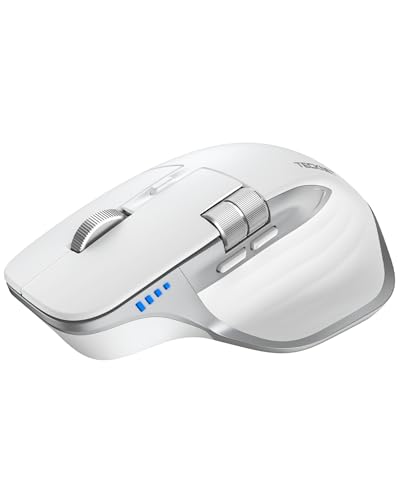
TECKNET Rechargeable Mouse with Side Scroll, BT 5.3
About this pick
TECKNET lists a metal main wheel and a separate side wheel for horizontal flicks, dual Bluetooth 5.3/5.0, a 2.4GHz receiver and even a wired mode. It has 6 DPI levels from 800 to 4800 and a built-in battery the listing says lasts up to 90 days per charge.
Against the cheaper TECKNET B0FB99 below, it adds the wired option and fast charging language, which matters if you want to keep working while it charges. It costs about $3 more.
Pick it if you want connection flexibility and a rechargeable battery that you can still use with a cable. The caveat is that the conventional shape gives less forearm rotation than the vertical SABLUTE models.
Best for: Rechargeable all-rounder for the office
Check price on AmazonPros
- +Works wired while charging
- +Metal wheel for fast flicks
- +6 DPI levels to 4800
- +Quiet clicks
Cons
- −Flat shape, not vertical
- −Side wheel needs thumb reach
TECKNET Side Scroll Bluetooth Mouse, 3-Device
About this pick
This TECKNET sells the same core idea for less, with a side-mounted horizontal wheel, a metal main wheel, two Bluetooth connections plus 2.4GHz and a rechargeable battery. It has 6 DPI steps from 800 to 4800 and silent clicks.
It matches B0GK8 on wheels and DPI but drops the wired mode and the 90-day battery claim, in exchange for a lower price. Compared with the CITLLA below, it recharges rather than using AA batteries.
A solid value pick for people who want side scrolling without paying for software. The caveat is that the listing gives fewer details than its pricier sibling, so battery duration is not stated.
Best for: Side scrolling on a modest budget
Check price on AmazonPros
- +Cheaper than the wired-capable TECKNET
- +Rechargeable, no AA batteries
- +3-device switching
- +Silent clicks
Cons
- −No wired mode
- −Battery life figure not listed
CITLLA Ergonomic Mouse with 4-Way Metal Wheel
About this pick
CITLLA uses a 4-way metal scroll wheel for vertical and horizontal navigation, with 5 programmable buttons and DPI steps of 1000, 1600, 2400 and 3000. It runs on one AA for a lighter mouse or two AAs for the listed 40-month life.
Unlike the rechargeable TECKNET picks, you swap batteries instead of charging, so it never runs flat mid-task if you carry a spare. It is a little cheaper than TECKNET B0FB99 but has a lower DPI ceiling.
Best for someone who wants to forget about charging and likes a 4-way wheel instead of a separate side wheel. The caveat is that a tilting 4-way wheel feels different from a dedicated thumb wheel, and it tops out at 3000 DPI.
Best for: Set-and-forget battery users
Check price on AmazonPros
- +Swap AA instead of charging
- +4-way wheel scrolls both directions
- +5 programmable buttons
- +Silent clicks, 3 devices
Cons
- −Max 3000 DPI
- −AA batteries add weight
SABLUTE MAM51 Vertical Mouse with Side Wheel
About this pick
SABLUTE MAM51 is a 59 degree vertical mouse with a multi-function side scroll wheel and a center button. It pairs via Bluetooth or 2.4GHz, offers 4 DPI levels from 1200 to 4000 and is aimed at small to medium hands.
It is the most ergonomic shape here compared with the flat INFINMIND and TECKNET picks, but the AAA batteries are not included and the shell is smaller. It is a few dollars dearer than the near-identical B0H9SGLB3K.
Choose it if you want handshake posture plus a thumb wheel. The caveat is that the vertical angle takes adjusting to, and large hands may find it small.
Best for: Vertical posture with a thumb wheel
Check price on AmazonPros
- +Handshake angle eases wrist
- +Forward and back buttons
- +Bluetooth or 2.4G receiver
- +Receiver stores in mouse
Cons
- −AAA batteries not included
- −Best for small to medium hands
SABLUTE MAM51 Bluetooth Vertical Mouse, Thumb Wheel
About this pick
This lowest-priced SABLUTE MAM51 version is a 59 degree vertical mouse with a 3-in-1 thumb wheel for horizontal scrolling, app switching and zoom. It offers Bluetooth plus 2.4GHz, four DPI levels up to 4000 and a 24-month support promise.
It costs about $1 less than the B0H9SKR89H listing, with a nearly identical feature list and a note that first-time vertical users need an adjustment period. Compared with CITLLA it has a lower price but needs AAA batteries.
Best for budget shoppers who want to try vertical posture and a thumb wheel together. The caveat is the small to medium hand sizing and the learning curve noted in the listing.
Best for: Cheap way to try a vertical mouse
Check price on AmazonPros
- +Lowest price of the six
- +Thumb wheel zooms and switches apps
- +Sleeps after 10 minutes idle
- +Includes 2.4G receiver
Cons
- −Small to medium hands only
- −Vertical angle takes adjustment
How We Evaluated These Ergonomic Mice with Side Scroll
Each pick was assessed across 5 criteria weighted for real-world use.
Scroll wheel design
We compared wheel type, material and what horizontal control each side wheel offers.
Shape and hand fit
We compared vertical and conventional shapes and the hand size each listing recommends.
Connectivity and switching
We looked at Bluetooth, 2.4GHz and wired options and how many devices can pair.
Power and upkeep
We compared rechargeable versus AA battery approaches and the listed life.
Value for price
We weighed the feature list against each price, from about $15 to $47.
How to Choose the Right Ergonomic Mice with Side Scroll
By Scroll Style
Pick the wheel layout that suits how you scroll sideways.
| Your situation | Recommended pick |
|---|---|
| Long spreadsheets and heavy shortcuts | INFINMIND L910 Pro+ Ergonomic Mouse, Side Wheel |
| Dedicated thumb wheel plus rechargeable | TECKNET Rechargeable Mouse with Side Scroll, BT 5.3 |
| 4-way main wheel, AA battery | CITLLA Ergonomic Mouse with 4-Way Metal Wheel |
| Thumb wheel on a vertical mouse | SABLUTE MAM51 Vertical Mouse with Side Wheel |
By Budget
Real prices from this comparison.
| Price range | Recommended pick |
|---|---|
| $15 to $17 | SABLUTE MAM51 Bluetooth Vertical Mouse, Thumb Wheel |
| $17 to $25 | TECKNET Side Scroll Bluetooth Mouse, 3-Device |
| $25 to $30 | TECKNET Rechargeable Mouse with Side Scroll, BT 5.3 |
| $30 to $47 | INFINMIND L910 Pro+ Ergonomic Mouse, Side Wheel |
The mid-priced TECKNET models cover most needs.
Vertical vs Flat Shape
Vertical handshake
The hand sits on its edge at about 59 degrees, rotating the forearm toward a neutral posture. SABLUTE MAM51 models fall here, for small to medium hands.
Flat contoured
A familiar palm shape with no learning curve. INFINMIND, both TECKNET picks and CITLLA fall here.
Choose flat unless you already feel forearm strain, then try a SABLUTE.
By Power Source
Charging habits matter if you use a mouse every day.
| Your situation | Recommended pick |
|---|---|
| Wants to plug in and keep working | TECKNET Rechargeable Mouse with Side Scroll, BT 5.3 |
| Wants to avoid charging entirely | CITLLA Ergonomic Mouse with 4-Way Metal Wheel |
| Wants rechargeable at a low price | TECKNET Side Scroll Bluetooth Mouse, 3-Device |
| Will buy AAA batteries | SABLUTE MAM51 Bluetooth Vertical Mouse, Thumb Wheel |
For Excel and Spreadsheet Work Specifically
Look for
A dedicated thumb wheel, a main wheel that is not too fast, and enough DPI steps to slow the pointer for cell selection.
In this comparison
INFINMIND L910 Pro+ gives you metal wheels and remappable buttons, while TECKNET Rechargeable Mouse with Side Scroll, BT 5.3 is the more affordable thumb-wheel option.
When to Spend More
Spend more if
You want button remapping and a second metal wheel (INFINMIND L910 Pro+), or a wired fallback (TECKNET Rechargeable Mouse with Side Scroll, BT 5.3).
Save if
You only need horizontal scrolling at a lower price, where SABLUTE MAM51 Bluetooth Vertical Mouse, Thumb Wheel covers it.
Frequently Asked Questions
Does every operating system support horizontal scroll?
Windows and macOS read horizontal scroll events in most apps, but how the app reacts varies. Listings sometimes warn that extra buttons are not supported on certain systems. Check your operating system against the compatibility list.
Will I confuse the thumb wheel with the main wheel at first?
Most users adjust in a day or two once the thumb finds the wheel. The first week may include accidental horizontal moves. Lowering sensitivity in the system settings can help.
Is a vertical side-scroll mouse worth it over a flat one?
If your forearm feels strained, a handshake angle can feel more relaxed. If you have no discomfort, a flat mouse like TECKNET Side Scroll Bluetooth Mouse is easier to adopt. See a doctor or ergonomist if pain keeps returning.
How do I pair the mouse with three devices?
Hold the pairing button on the underside until the light flashes, then pair through Bluetooth settings on each device. A second Bluetooth channel and the 2.4G receiver are used for the third. Switch with the underside button.
Do these mice work for left-handed users?
The SABLUTE vertical models are right-hand shaped. The listings for the flat TECKNET and INFINMIND mice describe contoured shapes, so check the product page for handedness. A left-handed buyer should look for ambidextrous language.
How do I clean a metal scroll wheel?
Power the mouse off and wipe the wheel with a dry or slightly damp microfiber cloth. Avoid soaking it. Dust under the wheel can be blown out with compressed air.
Bottom Line
best overall: INFINMIND L910 Pro+ Ergonomic Mouse, Side Wheel - best overall pick in this roundup.
See the full rankings above for all picks with pros, cons, and best-for summaries.
Browse on Amazon
All Prime-eligible options with current pricing.
Shop on Amazon →