
5 Best Programmable Ergonomic Mice in 2026
Five ergonomic mice with programmable buttons or shortcut controls compared by remapping method, grip shape, connectivity and price for productivity users.

New to Amazon Prime?
Get fast, free shipping on every pick in this guide, plus Prime Video and exclusive deals.
Try Prime Free



At a Glance
Programmable buttons turn a mouse into a shortcut pad: copy, paste, switch app, lock screen, all under a thumb. For people who repeat the same actions all day, that trims a lot of reaching for the keyboard, and an ergonomic shape keeps the wrist in a better position while doing it.
Remapping works differently on each of these five. One uses software on a wired gaming-style vertical mouse, one is set up on an onboard screen without downloads, one adds a shortcut knob, one gives you a single programmable thumb key and one lets you reassign back and forward through Logitech software. Each pick was judged on stated details including, which means how customization is done matters as much as the button count.
6 Criteria to Look For Before Buying a Programmable Ergonomic Mice
Key buying criteria so you get the right fit the first time.
How the buttons get programmed
Some mice map buttons through downloadable software, some through an onboard screen and some only through preset shortcuts. Software gives the most flexibility but means installing an app, which may be blocked on a work computer. Look for the phrase without software if your PC is locked down, and ask whether profiles are stored on the mouse.
Count of truly programmable keys
A listing may say 6 buttons but only 2 are remappable. Forward and back keys are often fixed and some listings state that buttons are non-programmable. Count only the keys the listing says can be assigned, and ignore left click, right click and wheel in the tally.
Vertical or palm-style shape
A handshake angle rotates the forearm toward a neutral position, while a palm shape keeps the familiar flat orientation. Programmable thumb buttons can be hard to reach on very tall vertical shells. Check the angle and the listed hand size.
Wired or wireless
A wired mouse never needs charging and avoids input lag, but the cable clutters a small desk. Wireless picks use Bluetooth or 2.4GHz and either a battery or a rechargeable cell. Decide whether cable clutter or charging bothers you more.
DPI range and sensor
DPI, or dots per inch, sets how far the cursor travels for each inch you move the mouse. A very high DPI helps on large multi-monitor setups and in games, but it makes fine pointing twitchy on a normal office screen. If you work in spreadsheets or documents, a mid setting feels steadier and the extra headroom is wasted. Look for adjustable steps listed in the title or bullets, and a button to cycle them, rather than a single fixed figure.
Compatibility and software support
Remapping apps are often written for Windows first, and a mouse that maps keys through software may be limited on macOS or Linux. This matters because the buttons then work only with their default functions, which defeats the purpose of buying a programmable mouse. Read the compatibility line for your operating system, and look for a statement that settings are saved on the mouse so they follow it between computers.
5 Best Programmable Ergonomic Mice in 2026
Ergodriven Om Vertical Wireless Mouse
About this pick
Ergodriven Om is a vertical mouse with 5 customizable buttons and an onboard screen that the listing says lets you remap buttons in under 10 seconds and without downloading software. It connects over Bluetooth or 2.4GHz, offers 4 DPI levels from 1200 to 2400 and has a rechargeable Li-ion battery.
Compared with the Attoe below, it has far fewer buttons but no software step, and it is wireless where the Attoe is wired. It costs a little more than Herize but gives you a vertical posture instead of a palm shape.
Best for office users who want a handful of shortcuts without installing anything. The caveat is that 5 buttons is modest, and the 2400 DPI ceiling is lower than gaming-style models.
Best for: No-software shortcut remapping
Check price on AmazonPros
- +Remap buttons without software
- +Vertical handshake shape
- +Wireless with rechargeable battery
- +Silent click and copy/paste keys
Cons
- −Only 5 buttons
- −Top DPI is 2400
Attoe Wired Vertical Mouse with 11 Buttons
About this pick
Attoe is a wired vertical mouse listing 11 programmable buttons, a 5-direction thumb rocker and a PAW3325 sensor up to 10000 DPI. Macros and key assignments are made through the programming software, and it has RGB lighting.
It beats every other pick on button count, and the rocker alone acts as five keys. The trade-off against Ergodriven is that it is wired and needs software, while the wireless picks run on batteries.
Choose it if you need many shortcuts for CAD, editing or games. The caveat is the cable and RGB, which suit gaming desks more than minimal offices.
Best for: Heavy shortcut and macro users
Check price on AmazonPros
- +Most buttons of the five
- +Thumb rocker acts as 5 keys
- +Macro support in software
- +30-day return listed
Cons
- −Wired, cable clutter
- −Needs software for mapping
Herize Ergonomic Bluetooth Mouse with Thumb Button
About this pick
Herize is a right-handed ergonomic mouse with a curved palm support for large and medium hands and a programmable thumb side button for shortcuts like copy, paste and back or forward. It pairs via Bluetooth 5.3 or 2.4GHz, charges over USB-C and has a dual-mode metal scroll wheel.
Against Ergodriven it offers just one customizable key and a palm shape rather than a vertical angle, but it is cheaper. Versus NYIEFADA it lacks the display knob.
Best for large to medium right hands wanting one extra shortcut key. The caveat is that one programmable button is limited.
Best for: Larger right hands needing one macro
Check price on AmazonPros
- +Suits large and medium hands
- +Free-spinning metal wheel
- +Silent click design
- +USB-C rechargeable
Cons
- −Only one programmable key
- −Right-handed only
NYIEFADA Vertical Mouse with Shortcut Knob
About this pick
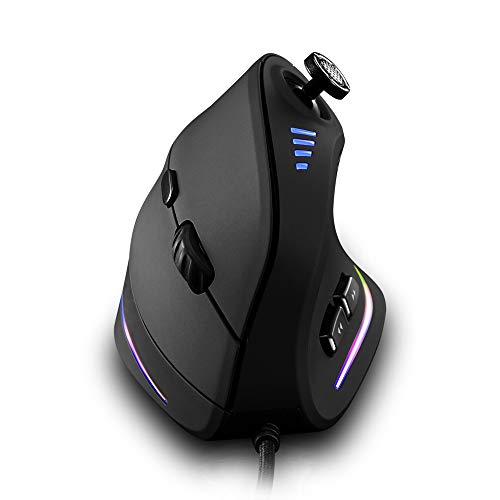
NYIEFADA adds a shortcut control knob with a full-color LED display and 10 preset shortcuts to a vertical rechargeable mouse. It supports dual Bluetooth 5.0 and 2.4GHz for 3 devices, a metal scroll wheel and 5 DPI levels from 800 to 4800.
It costs more than Ergodriven and Herize, and its knob offers presets rather than free remapping per the listing summary. Against Attoe it is wireless and far quieter.
Pick it if you like a dial for volume or zoom style actions. The caveat is that it is the priciest here and customization depth is not clear from the listing.
Best for: Dial-style shortcuts on a vertical mouse
Check price on AmazonPros
- +Knob and LED display
- +Vertical posture
- +Rechargeable battery
- +Metal fast-scroll wheel
Cons
- −Highest price of the five
- −Remapping depth unclear
Logitech M510 Full Size Wireless Mouse
About this pick
M510 is a full-size ambidextrous mouse with a contoured shape, tilt-to-scroll wheel and back/forward buttons that you can program to switch apps or go full screen. It uses a Unifying USB receiver and the listing promises up to two years of battery life.
Compared with the vertical picks, it keeps a conventional hand position and has fewer programmable buttons. It is the cheapest pick here apart from the Herize.
Best for users who want familiar shape, a long battery and a few remappable keys. The caveat is that it is not a vertical design and needs Logitech software to remap.
Best for: Conventional shape, long battery
Check price on AmazonPros
- +Very long battery claim
- +Works with either hand
- +Familiar full-size shape
- +Receiver stays plugged in
Cons
- −Not a vertical mouse
- −Few programmable buttons
How We Evaluated These Programmable Ergonomic Mice
Each pick was assessed across 5 criteria weighted for real-world use.
Remapping method
We compared how customization is done: software, onboard screen or presets.
Button count
We counted only buttons the listing says are programmable.
Ergonomic shape
We compared vertical and palm-style designs and the stated hand sizes.
Connectivity and power
We looked at wired versus wireless and listed battery claims.
Value for price
We weighed features against price, from about $26 to $40.
How to Choose the Right Programmable Ergonomic Mice
By Use Case
Match your shortcut needs to the right mouse.
| Your situation | Recommended pick |
|---|---|
| Office shortcuts with no software | Ergodriven Om Vertical Wireless Mouse |
| CAD, editing or gaming macros | Attoe Wired Vertical Mouse with 11 Buttons |
| One extra shortcut for copy and paste | Herize Ergonomic Bluetooth Mouse with Thumb Button |
| Dial for volume or zoom | NYIEFADA Vertical Mouse with Shortcut Knob |
By Budget
Real prices from this comparison.
| Price range | Recommended pick |
|---|---|
| Under $28 | Logitech M510 Full Size Wireless Mouse |
| $28 to $30 | Attoe Wired Vertical Mouse with 11 Buttons |
| $29 to $40 | Ergodriven Om Vertical Wireless Mouse |
Prices span a narrow range, so choose by remapping method.
Software vs Onboard Setup
Software-based
You assign buttons in an app, which allows deep customization such as macros. Attoe and Logitech M510 fall here.
Onboard screen
You assign keys on the mouse itself, handy on locked-down computers. Ergodriven Om falls here.
Pick onboard setup if you cannot install software.
By Connection
How you connect decides daily convenience.
| Your situation | Recommended pick |
|---|---|
| Wireless with USB-C charging | Herize Ergonomic Bluetooth Mouse with Thumb Button |
| Wired, no battery | Attoe Wired Vertical Mouse with 11 Buttons |
| Long-life replaceable battery | Logitech M510 Full Size Wireless Mouse |
| Bluetooth with 3 devices | NYIEFADA Vertical Mouse with Shortcut Knob |
For Spreadsheet and Editing Work Specifically
Look for
Several programmable keys within thumb reach, a scroll wheel that moves quickly through long files and easy remapping.
In this comparison
Ergodriven Om Vertical Wireless Mouse is the most approachable. Attoe Wired Vertical Mouse with 11 Buttons gives the deepest macro control.
When to Spend More
Spend more if
You need 10 or more shortcuts or macros (Attoe Wired Vertical Mouse with 11 Buttons).
Save if
You only want one or two extra buttons, where Logitech M510 Full Size Wireless Mouse is enough.
Frequently Asked Questions
Do I need software to program the buttons?
It depends. Ergodriven says no, while Attoe and Logitech need their apps. Check the listing for the method before buying.
Is a wired vertical mouse okay for ergonomics?
The angle matters more than the cable, and a wired model avoids charging. The cable can limit positioning on small desks.
Is a vertical mouse worth it over the M510?
If you feel forearm strain, vertical may feel more relaxed, but the M510 is easier to adopt. See a doctor or ergonomist if pain persists.
How do I assign a shortcut to a thumb button?
Open the maker software or onboard menu, select the button and choose the action. Save the profile and test in your main app.
Will programmable buttons work on a Mac?
Hardware buttons usually work, but some remapping software is Windows-first. Check the macOS compatibility line.
How do I clean a mouse with many buttons?
Switch the mouse off or unplug it, then wipe the shell and gaps with a slightly damp microfiber cloth. Use a short blast of compressed air around the buttons and wheel to clear dust. Avoid spraying liquid directly onto a wired model such as the Attoe.
Bottom Line
best overall: Ergodriven Om Vertical Wireless Mouse - best overall pick in this roundup.
See the full rankings above for all picks with pros, cons, and best-for summaries.
Browse on Amazon
All Prime-eligible options with current pricing.
Shop on Amazon →