
5 Best Ergonomic Mice Under $50 in 2026
Five ergonomic mice under $50 compared by vertical angle, multi-device Bluetooth, battery claims and hand size, plus a side-scroll and a travel pick.

New to Amazon Prime?
Get fast, free shipping on every pick in this guide, plus Prime Video and exclusive deals.
Try Prime Free


At a Glance
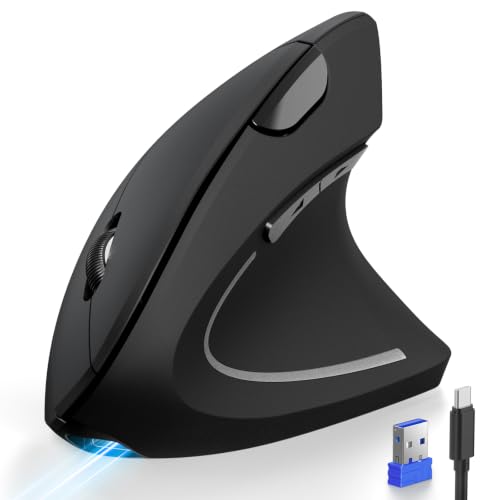
TECKNET Vertical Wireless Mouse for Medium to Large Hands
↓ See why we picked itFifty dollars is enough to skip the barebones tier: rechargeable batteries, three-device Bluetooth and a choice of hand sizes all show up here. Spending closer to the ceiling does not automatically buy a more comfortable mouse, though, since the shape you pick matters more than the brand on it.
This list mixes two TECKNET vertical mice, a TECKNET model with a side scroll wheel, a rotating arc travel mouse and the Dell MS700. Prices run from about $23 to $49. We read every listing for grip angle, stated hand size, scroll features, battery claims and how each is meant to be carried or used, so you can match a shape to your workday rather than chase the highest price.
6 Criteria to Look For Before Buying a Ergonomic Mice Under $50
Key buying criteria so you get the right fit the first time.
Vertical angle in degrees
A vertical mouse stands the hand on its edge so the forearm rotates toward a handshake. Listings quote the angle, such as 57 degrees, and a higher number means a bigger change from a flat mouse. A bigger change can feel better over a long day but also takes longer to learn. Look for the degree figure in the title or first bullet.
Hand size match
A shell that is too small makes fingers hang off the edge, while one that is too large pushes the arm outward. Some listings name a size, like medium to large, while others say nothing. Measure from wrist crease to middle fingertip, and if the listing is silent, check the dimensions in millimeters against your measurement.
Scroll wheel style
A conventional wheel scrolls up and down, a side wheel adds horizontal movement and touch scroll replaces the wheel with a surface. Horizontal scrolling saves time in spreadsheets, but touch scroll can feel imprecise. Look for a named side wheel or the words touch scroll in the listing.
Battery claims in context
A claim such as 200 hours of life sounds huge but depends on the sleep mode and how you use the mouse. A built-in cell can be recharged over USB-C but cannot be swapped, while AAA cells can be replaced anywhere. Check the mAh figure and whether batteries are included.
Connection and device count
Bluetooth plus a 2.4G dongle lets one mouse serve several computers. A USB-A dongle can be lost, and some laptops do not have a port for it. Look for the words 3 devices and confirm what the switch button does.
Travel versus daily support
Travel mice are thin and light so they pack easily, but a thin shell offers less palm support. If this is your main mouse, prefer a taller, contoured or vertical shell. If it is a bag mouse, accept less support in exchange for weight.
5 Best Ergonomic Mice Under $50 in 2026
TECKNET 57-Degree Silent Vertical Mouse, Rechargeable
About this pick
TECKNET lists a 57 degree vertical shape meant to keep the hand and forearm in a handshake position, ultra-quiet buttons and 5 DPI levels. It pairs three devices over Bluetooth and 2.4G and has a 500mAh built-in battery, which the listing claims lasts 200 hours.
It costs the same as the side-scroll TECKNET further down but swaps the horizontal wheel for a steeper vertical angle. Compared with the larger-hand TECKNET just below, it is not tied to a specific hand size in the listing.
Best for a typical hand that wants vertical posture and quiet clicks in one mouse. The caveat is that the steep angle takes a few days to adjust to, and the listing gives no hand size guidance.
Best for: Quiet vertical mouse for typical hands
Check price on AmazonPros
- +Steep vertical shape for forearm rotation
- +Silent click mechanisms
- +Switches among 3 devices
- +Long listed battery life
Cons
- −No hand size guidance
- −Takes days to settle in
TECKNET Vertical Wireless Mouse for Medium to Large Hands
About this pick
This TECKNET vertical mouse is described as built for medium to large right hands. It has three connection modes, BT 5.0, BT 3.0 and 2.4GHz, six DPI levels from 800 to 4800, forward and back buttons and a Type-C charging cable.
It is the lowest-priced pick here, and the only one that clearly says it fits bigger hands, which the 57 degree TECKNET above does not. The listing does not claim silent clicks.
Choose it if most vertical mice feel cramped in your hand. The caveat is that it is right-handed only and carries no quiet-click claim.
Best for: Larger right hands
Check price on AmazonPros
- +Sized for medium to large hands
- +Three connection modes
- +Lowest price of the five
- +Forward and back buttons
Cons
- −Right-handed only
- −No quiet-click claim
TECKNET Side Scroll Bluetooth Mouse, 3-Device
About this pick
This TECKNET pairs a side-mounted horizontal scroll wheel with a metal main wheel, six DPI levels from 800 to 4800, quiet clicks and a rechargeable battery. It supports two Bluetooth links plus a 2.4GHz receiver.
Unlike the two vertical TECKNET picks, it uses a conventional shape, so comfort comes from the contour and the thumb wheel rather than from rotating the forearm. It suits wide spreadsheets and timelines more than posture.
Best for spreadsheet and editing work. The caveat is that the hand stays flatter, and the listing gives no battery life figure.
Best for: Wide spreadsheets and timelines
Check price on AmazonPros
- +Dedicated horizontal scroll wheel
- +Quiet click design
- +Rechargeable battery
- +Pairs 3 devices
Cons
- −Flat shape, no vertical angle
- −No battery life figure
NYIEFADA Rotating Foldable Arc Travel Mouse
About this pick
NYIEFADA is an arc-shaped Bluetooth travel mouse that rotates and snaps flat to fit a pocket. It offers silent soft clicks, Bluetooth 5.0/4.0 plus 2.4G, support for 3 devices and a built-in rechargeable battery. The listing notes the shell is ABS plastic, not aluminum.
Compared with the vertical TECKNET picks it favors portability over palm support, and it costs about $7 more than they do. Next to the Dell MS700 it is rechargeable rather than using AAA cells.
Best for commuters and hot-desk workers who carry the mouse every day. The caveat is that a slim arc offers less hand support for a full day at one desk.
Best for: Commuters and hot-desking
Check price on AmazonPros
- +Folds flat for pockets
- +Silent soft clicks
- +Pairs with 3 devices
- +Rechargeable, no AAA cells
Cons
- −Less palm support
- −ABS plastic, not aluminum
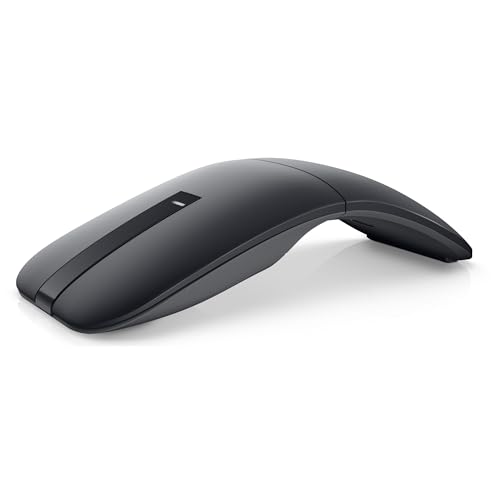
Dell MS700 Bluetooth Travel Mouse
About this pick
Dell MS700 weighs just 56.9 grams and uses a twist-to-stow design, with 4000 DPI, touch scroll and connection to up to 3 devices over Bluetooth 5.0 LE. It runs on AAA batteries.
It is the most expensive pick here, close to $49, and the least ergonomic by shape. Compared with NYIEFADA it is lighter and brand-backed but not rechargeable.
Best for someone who wants a light branded travel mouse and values weight over posture. The caveat is the price for a basic shape.
Best for: Light branded travel mouse
Check price on AmazonPros
- +Very light at 56.9 g
- +Twist to switch off and stow
- +Touch scroll surface
- +3 device Bluetooth
Cons
- −Highest price here
- −Basic shape for the money
How We Evaluated These Ergonomic Mice Under $50
Each pick was assessed across 5 criteria weighted for real-world use.
Ergonomic angle
We compared vertical angles and conventional contours.
Hand size
We noted stated hand sizes and shell sizes.
Features
We compared scroll type, DPI steps and connection modes.
Power
We compared rechargeable and AAA approaches and listed claims.
Price
We kept every pick under $50.
How to Choose the Right Ergonomic Mice Under $50
By Hand Size and Grip
Match the shell to your hand and how you grip.
| Your situation | Recommended pick |
|---|---|
| Typical hand wanting vertical and quiet | TECKNET 57-Degree Silent Vertical Mouse, Rechargeable |
| Medium to large right hand | TECKNET Vertical Wireless Mouse for Medium to Large Hands |
| Flat hand position, lots of scrolling | TECKNET Side Scroll Bluetooth Mouse, 3-Device |
| Pocket-size grip on the go | NYIEFADA Rotating Foldable Arc Travel Mouse |
By Budget
Real prices from this comparison.
| Price range | Recommended pick |
|---|---|
| $22 to $25 | TECKNET Vertical Wireless Mouse for Medium to Large Hands |
| $25 to $32 | NYIEFADA Rotating Foldable Arc Travel Mouse |
| $45 to $49 | Dell MS700 Bluetooth Travel Mouse |
The vertical picks cost the same or less than the travel mice.
Vertical vs Travel Shape
Vertical
The hand stands on its edge and the forearm rotates toward a handshake. TECKNET 57-Degree and TECKNET Medium to Large Hands fall here.
Travel arc or twist
Slim and light so it fits in a bag, but with less palm support. NYIEFADA and Dell MS700 fall here.
Choose vertical for a desk mouse and a travel shape only if you carry it daily.
By Scroll Need
Scrolling matters differently for spreadsheets, documents and travel.
| Your situation | Recommended pick |
|---|---|
| Horizontal scrolling in spreadsheets | TECKNET Side Scroll Bluetooth Mouse, 3-Device |
| Touch scroll on the go | Dell MS700 Bluetooth Travel Mouse |
| Standard wheel with vertical posture | TECKNET 57-Degree Silent Vertical Mouse, Rechargeable |
| Standard wheel for a big hand | TECKNET Vertical Wireless Mouse for Medium to Large Hands |
For Hybrid Workers Specifically
Look for
A mouse that pairs with a laptop and a desktop, stays quiet in shared spaces and recharges without spare batteries.
In this comparison
TECKNET 57-Degree Silent Vertical Mouse, Rechargeable has 3-device pairing, silent buttons and a 200 hour battery claim.
When to Spend More
Spend more if
You carry the mouse every day and want it to fold or twist flat (NYIEFADA Rotating Foldable Arc Travel Mouse).
Save if
You mostly work at one desk, where TECKNET 57-Degree Silent Vertical Mouse, Rechargeable covers the ergonomic basics.
Frequently Asked Questions
Do I need a mouse pad with these?
Optical mice work on most desks. Glass or very glossy surfaces can confuse the sensor, and a cheap pad solves that.
Is the Dell worth the extra money?
It is light and brand-backed, but it is not vertical and costs more than every other pick. Pay for it only if weight matters most.
Is a vertical mouse worth it over an arc travel mouse?
A vertical mouse may feel more relaxed over long sessions, while an arc mouse is easier to carry. See a doctor or ergonomist if pain persists.
How do I switch between devices?
Press the device button, often on the underside, and the mouse cycles between connections. The listing explains the light pattern.
Will the side wheel work on a Mac?
The listings name Mac in compatibility lines, but side features can differ. Check the product page before ordering.
How do I charge the rechargeable models?
Plug the USB or Type-C cable into the mouse and a USB power source, and wait for the indicator light to change. The TECKNET listings describe built-in batteries of about 500mAh. Switch the mouse off between uses to stretch the charge.
Bottom Line
best overall: TECKNET 57-Degree Silent Vertical Mouse, Rechargeable - best overall pick in this roundup.
See the full rankings above for all picks with pros, cons, and best-for summaries.
Browse on Amazon
All Prime-eligible options with current pricing.
Shop on Amazon →