
6 Best Ergonomic Mice Under $25 in 2026
Six ergonomic mice priced at $25 or less compared by shape, quiet clicks, hand fit and battery, from a $9.99 compact mouse to vertical models.

New to Amazon Prime?
Get fast, free shipping on every pick in this guide, plus Prime Video and exclusive deals.
Try Prime Free



At a Glance
A twenty-five dollar ceiling gets you a surprising amount of ergonomic design: handshake-angled shells, multi-device Bluetooth and rechargeable batteries are all within reach. What it will not get you is premium software, long warranties or a wide choice of sizes, so the comparison really comes down to fit.
Every pick here lists a price at or under $25. Five are vertical mice and one is a compact contoured mouse with side grips. Our notes on each product focus on hand size guidance, DPI steps, wireless mode, battery approach and whether the listing gives an honest note about adjustment time. Because many cheap vertical shells target small to medium hands, hand size is the main thing to check first.
6 Criteria to Look For Before Buying a Ergonomic Mice Under $25
Key buying criteria so you get the right fit the first time.
Hand size you actually have
Many budget vertical mice are listed for hand lengths under about 7.5 inches. A mouse too small for your hand makes fingertips hang off the buttons and can tire the wrist faster than a flat mouse would. Measure from the wrist crease to the tip of the middle finger, and compare with the stated range before choosing.
Vertical angle versus contour
A vertical shell tilts the hand to a handshake angle, often 52 degrees or more, which rotates the forearm toward neutral. A contoured flat mouse offers grip but less rotation. At this price both exist, so decide whether you want a true angle change, and expect a few days of adjustment if you pick vertical.
Bluetooth and multi-device pairing
Some picks pair two Bluetooth devices plus a 2.4G receiver, which suits a laptop and a desktop. Others offer only a USB-A dongle. If your laptop lacks USB-A, Bluetooth is the safer choice, and look for the phrase 3 devices in the listing.
Rechargeable versus AAA battery
A built-in rechargeable battery means no spare cells but also no swapping when it fades. AAA batteries are often not included, so they add to the real price. Check mAh for rechargeable models and months for battery ones, and confirm whether batteries are in the box.
Quiet clicks and what they mean
Several picks claim quiet buttons but only one lists a decibel figure. Silent buttons reduce sound but the scroll wheel may still tick. Look for a measured number such as 40 dB and remember it is the maker's claim.
Compatibility notes for side buttons
Forward and back buttons are driven by software on some mice, so they may not work on macOS even when the pointer does. The TECKNET compact listing here, for example, warns about its side button. Read the last bullets of each listing for notes and warnings, and confirm that your operating system is named before ordering.
6 Best Ergonomic Mice Under $25 in 2026
Redragon Rechargeable Vertical Mouse, 3-Device
About this pick
Redragon pairs two Bluetooth connections with a 2.4G USB-A receiver, so it can serve three computers. It has a built-in 500mAh battery, 5 DPI levels from 800 to 4800 and a silent click design, and the listing recommends it for hands up to 7.5 inches long.
It costs more than the seenda and tlkawzy below but gives multi-device switching and a wider DPI range that those do not. Versus Perixx, it is rechargeable rather than battery-powered.
Best for a small to medium hand moving between a laptop and a desktop. The caveat is the narrow hand range, and it is near the top of the budget.
Best for: Switching between laptop and desktop
Check price on AmazonPros
- +Connects up to 3 devices
- +Silent click design
- +Wide DPI range
- +Rechargeable, no AA to buy
Cons
- −Small to medium hands only
- −Pricier than other picks
seenda 52-Degree Vertical Bluetooth Mouse
About this pick
seenda is a 52 degree vertical mouse with a sculpted palm shape, a silicone thumb rest and a matte purple finish. It switches among 3 devices over Bluetooth and a 2.4 GHz receiver and has 3 DPI levels at 1000, 1600 and 2400.
The listing says the left and right buttons are rated under 40 dB, a figure none of the other picks give. It is the cheapest vertical pick with multi-device pairing, undercutting Redragon.
Best for small to medium right hands wanting quiet clicks at the lowest vertical price. The caveat is only 3 DPI levels and limited hand size range.
Best for: Quiet vertical mouse for small hands
Check price on AmazonPros
- +Lowest price vertical with 3 devices
- +Silicone thumb rest
- +Quiet clicks with a dB figure
- +Choice of DPI for spreadsheets
Cons
- −Small to medium right hands only
- −Only 3 DPI levels
Perixx PERIMICE-719 Mini Vertical Mouse
About this pick
Perixx is a right-handed mini vertical mouse with quiet left and right buttons, a soft rubber-coated surface and 3 DPI levels of 800, 1200 and 1600. The listing targets hand lengths under 7.5 inches.
It sits at the top of the budget, offering a rubberized grip that the plastic shells of the others lack. Next to Redragon it is wireless but not multi-device.
Best for small hands that like a soft grip. The caveat is that the listing adds a note about the scroll wheel being separate from the quiet buttons, and DPI tops out at 1600.
Best for: Small hands wanting a soft grip
Check price on AmazonPros
- +Soft rubber-coated grip
- +Quiet main buttons
- +Mini size for small hands
- +Honest adjustment-period note
Cons
- −Scroll wheel not covered by quiet claim
- −Low top DPI
tlkawzy Vertical Wireless Rechargeable Mouse
About this pick
tlkawzy is a 2.4G vertical optical mouse with 800, 1200 and 1600 DPI, forward and back buttons and a built-in rechargeable battery. It cuts power completely after 8 minutes of inactivity to save charge.
It is a no-frills option versus Redragon and seenda, with no Bluetooth and a 2.4G-only receiver. It costs a couple of dollars more than seenda.
Best for a single computer with a USB-A port. The caveat is no Bluetooth, no multi-device switching and a limited DPI range.
Best for: Single-PC desks, no fuss
Check price on AmazonPros
- +Rechargeable battery
- +Forward and back buttons
- +Simple plug-in receiver
- +Handshake neutral position
Cons
- −No Bluetooth
- −One device only
Lekvey Vertical Wireless Mouse, USB-C Rechargeable
About this pick
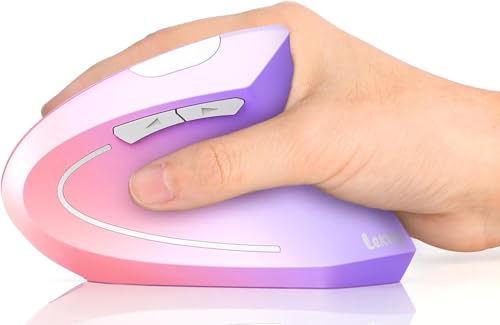
Lekvey is a vertical wireless mouse that comes in color options, with a 600mAh rechargeable battery, USB-C charging and page back/forward buttons. The listing gives the dimensions as 5.0 x 3.0 x 2.5 inches and a weight of 95 g.
It is the largest battery of the cheap vertical picks, but costs about $7 more than tlkawzy and has no Bluetooth detail in its highlights. Versus Perixx it charges over USB-C rather than using a battery.
Good for users who like color and USB-C. The caveat is limited detail about DPI and wireless modes.
Best for: Style-conscious USB-C desks
Check price on AmazonPros
- +Large 600mAh battery
- +USB-C charging
- +Color options
- +Page forward and back keys
Cons
- −Few connection details listed
- −Close to the price ceiling
TECKNET Compact Contoured Wireless Mouse, 2600 DPI
About this pick
TECKNET is a compact mouse about 4.09 x 2.68 x 1.49 inches with side grips and 5 DPI levels up to 2600. It uses a USB-A mini receiver stored in the back and the listing claims 24 months of battery on AAA cells.
At under $10 it is the cheapest, but it is not vertical: the ergonomic claim rests on a contoured shape and side grips. AAA batteries are not included and the side button is not supported on macOS.
Best for students who want comfort on a tiny budget. The caveat is that it is not a handshake design.
Best for: Tightest budgets
Check price on AmazonPros
- +Under $10
- +Side grips for hold
- +On/off switch
- +Stores receiver on the back
Cons
- −Not a vertical design
- −AAA batteries not included
How We Evaluated These Ergonomic Mice Under $25
Each pick was assessed across 5 criteria weighted for real-world use.
Hand fit
We compared stated hand sizes and shell dimensions.
Ergonomic design
We separated true vertical shells from contoured flat mice.
Connectivity
We compared Bluetooth, 2.4G and device counts.
Battery
We compared rechargeable and AAA approaches.
Price
We kept every pick at $25 or below.
How to Choose the Right Ergonomic Mice Under $25
By Hand Size
Match the shell to your hand length.
| Your situation | Recommended pick |
|---|---|
| Small to medium hand, 3 devices | Redragon Rechargeable Vertical Mouse, 3-Device |
| Small hand wanting a soft grip | Perixx PERIMICE-719 Mini Vertical Mouse |
| Small right hand wanting quiet | seenda 52-Degree Vertical Bluetooth Mouse |
| Any hand, tiny budget | TECKNET Compact Contoured Wireless Mouse, 2600 DPI |
By Budget
Real prices from this comparison.
| Price range | Recommended pick |
|---|---|
| Under $10 | TECKNET Compact Contoured Wireless Mouse, 2600 DPI |
| $15 to $18 | seenda 52-Degree Vertical Bluetooth Mouse |
| $18 to $22 | tlkawzy Vertical Wireless Rechargeable Mouse |
| $22 to $25 | Lekvey Vertical Wireless Mouse, USB-C Rechargeable |
Prices cluster tightly, so features should decide.
Vertical vs Contoured Flat
Vertical
Tilts the hand about 52 degrees and rotates the forearm toward a handshake position. Covers Redragon, seenda, Perixx, tlkawzy and Lekvey.
Contoured flat
Keeps your hand flat with side grips and no learning curve. TECKNET Compact is the only one.
Try vertical if you feel strain, flat if you want a gentle change.
By Power and Connection
Decide how you want to power and connect it.
| Your situation | Recommended pick |
|---|---|
| Rechargeable with 3 devices | Redragon Rechargeable Vertical Mouse, 3-Device |
| Rechargeable, 2.4G only | tlkawzy Vertical Wireless Rechargeable Mouse |
| USB-C charging with a big battery | Lekvey Vertical Wireless Mouse, USB-C Rechargeable |
| AAA with 24 month claim | TECKNET Compact Contoured Wireless Mouse, 2600 DPI |
For Dorm Desks Specifically
Look for
Quiet clicks, a small footprint, rechargeable power and Bluetooth for a laptop.
In this comparison
seenda 52-Degree Vertical Bluetooth Mouse offers quiet buttons and 3 devices. Redragon Rechargeable Vertical Mouse, 3-Device adds a wider DPI range.
When to Spend More
Spend more if
You switch between 3 computers and want wider DPI choices (Redragon Rechargeable Vertical Mouse, 3-Device).
Save if
You use a single desk and want the lowest price, where TECKNET Compact Contoured Wireless Mouse, 2600 DPI is enough.
Frequently Asked Questions
Will a cheap vertical mouse work for a large hand?
Most budget vertical mice are sized for small to medium hands. Large hands are better off checking dimensions.
Does a $20 mouse have good sensors?
Budget optical sensors handle everyday office work. Fine design work or gaming needs a better sensor.
Is a vertical mouse worth it over a $10 contoured mouse?
If you notice wrist strain, a vertical shape may feel more relaxed. See a doctor or ergonomist if pain persists.
How do I charge a rechargeable mouse?
Plug in the USB cable and charge until the light changes. Some can be used while charging.
Do the batteries come in the box?
Some listings warn AAA batteries are not included. Check the listing.
How do I pair with Bluetooth?
Hold the pairing button on the underside until the light flashes, then pick the mouse in your device's Bluetooth settings. Models with three channels let you repeat this for a second Bluetooth device and the 2.4G receiver. Press the channel button to switch between them.
Bottom Line
best overall: Redragon Rechargeable Vertical Mouse, 3-Device - best overall pick in this roundup.
See the full rankings above for all picks with pros, cons, and best-for summaries.
Browse on Amazon
All Prime-eligible options with current pricing.
Shop on Amazon →