
7 Best Ergonomic Keyboards Under $50 in 2026
Seven ergonomic keyboards under $50 with split, wave or curved layouts and wrist rests, compared for posture, noise and wired or wireless use.

New to Amazon Prime?
Get fast, free shipping on every pick in this guide, plus Prime Video and exclusive deals.
Try Prime Free




At a Glance
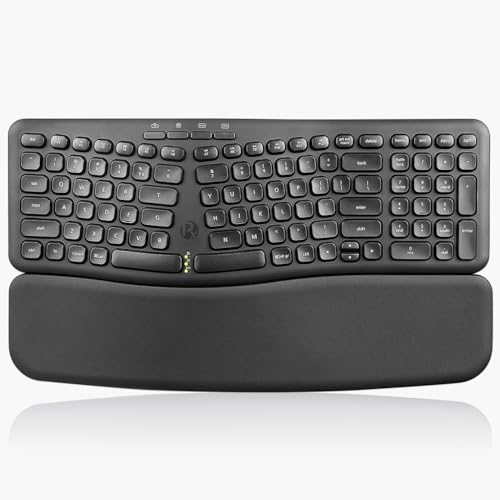
Under fifty dollars, ergonomic keyboards fall into two honest groups: split layouts that open the hands and wave or curved layouts that follow your fingers. A wrist rest alone is not ergonomic, so every board here has a real shape change, and the question is how much change you want to live with.
We evaluated seven keyboards that are split, curved or wave designed, leaving out flat boards with a pad glued on and bundles that include a mouse. Picks run from the cheapest wave board to the strongest split under the ceiling, judged on listing specifications and buyer feedback.
6 Criteria to Look For Before Buying a Ergonomic Keyboards Under $50
Key buying criteria so you get the right fit the first time.
Split, wave or curved shape
A fully split board separates the two halves to keep your wrists straight, a wave or curved board bends the key rows to follow your fingers and a flat board does neither. Strong splits give the biggest posture change but need an adjustment of one to three weeks, while wave layouts feel familiar from day one. Check whether the listing describes a split, a curve or only a wrist rest, because marketing uses ergonomic for all three.
Tenting and tilt
Tenting lifts the middle of the keyboard so the palms face inward rather than flat down, and negative tilt tips the front edge up so the wrists stay straight. Few low-cost boards offer real tenting, and some tilt legs raise the back instead, which bends the wrists up. Look for the words negative tilt, reverse tilt or adjustable tenting and an angle in degrees.
Number pad and desk width
A full-size ergonomic board is wide, and a number pad pushes your mouse farther from your body, which defeats part of the posture benefit. Compact or detached-pad designs keep the mouse closer. Measure the stated width and decide whether you use the pad often enough to pay for it.
Connection and battery
Wired models need no battery and never lag, while wireless models give a cleaner desk with Bluetooth or a dongle and need charging. Multi-device pairing helps if you switch between a work laptop and a home PC. Check the listing for the number of paired devices and the battery type.
Key feel and noise
Ergonomic boards are mostly membrane or scissor, which is quiet and soft, with a few mechanical options at higher cost. Low-force keys reduce finger fatigue, and mechanical wave boards give a firmer feel. Read the switch description and decide between soft and crisp before you pay.
What the $50 ceiling buys
The cheapest pick here, VEILZOR Wave Keyboard, is built around a wave key layout with a soft leather wrist rest and a dimmable seven-color backlight, while the priciest, Nulea Wired Split Keyboard, is built around a wired split layout with an oversized wrist rest, USB-C and three tilt angles. Moving up the ladder pays when your hours at the keys are long enough for a stronger shape or negative tilt to matter. Picture your typing hours: a stronger posture change only pays off if you will keep using the board past the adjustment weeks.
7 Best Ergonomic Keyboards Under $50 in 2026
Nulea Wired Split Keyboard
About this pick
The Nulea wired ergonomic split keyboard connects by USB-C and pairs a natural split design with an oversized leatherette wrist rest. Adjustable support legs give three different angles, and it works with Windows and Mac without a driver.
Nulea Wired Split Keyboard takes the top spot thanks to a wired split layout with an oversized wrist rest, USB-C and three tilt angles. Its closest challenger, OMOTON Curved Split Keyboard, leans on a curved split layout with a cushioned wrist rest and both USB-A and USB-C cables, so weigh your own priorities there.
Nulea Wired Split Keyboard is aimed at people who want a true split posture and are fine with a cable. The oversized wrist rest takes desk depth, which a shallow desk may not spare.
Best for: people who want a true split posture and are fine with a cable
Check price on AmazonPros
- +Strong split shape
- +Large wrist rest
- +Three tilt angles
- +No battery to manage
Cons
- −Wired only
- −Wrist rest needs desk depth
OMOTON Curved Split Keyboard
About this pick
The OMOTON WK0 is a wired curved split keyboard with a number pad, a sweat-proof leather wrist rest over a sponge core, and dual USB-A and USB-C interfaces so it moves from a desktop to a laptop with no adapter. Its layout opens the hands to a natural resting position, and adjustable tilts let you set the angle.
Compared with Nulea Wired Split Keyboard, which sits one place higher, the OMOTON Curved Split Keyboard is stronger on a curved split layout with a cushioned wrist rest and both USB-A and USB-C cables but it gives up wireless connectivity.
A split layout can slow typing for the first week or two while your hands adjust. Otherwise the OMOTON Curved Split Keyboard suits wired-desk typists who want a real split shape and cabled reliability.
Best for: wired-desk typists who want a real split shape and cabled reliability
Check price on AmazonPros
- +Real split layout
- +USB-A and USB-C cables
- +No pairing or battery
- +Wipe-clean wrist rest
Cons
- −Wired only
- −Split layout needs adjustment time
TECKNET Wireless Ergonomic Keyboard
About this pick
The TECKNET wireless ergonomic keyboard has a split, curved key arrangement and a dual-density memory-foam wrist rest built into the frame. It supports Bluetooth 5.0 with pairing memory for up to three devices and ships with a 2.4GHz USB dongle, and a stain-resistant fabric covers the palm area.
The TECKNET Wireless Ergonomic Keyboard sits between OMOTON Curved Split Keyboard and Perixx PERIBOARD-636B. It stands out for a split, curved layout with Bluetooth 5.0 for three devices plus a 2.4GHz dongle, whereas Perixx PERIBOARD-636B brings a wireless 2.4GHz compact ergonomic layout with a detachable magnetic wrist pad.
TECKNET Wireless Ergonomic Keyboard is aimed at people who want a wireless split board that pairs with several devices without spending much. Lesser-known brand, so read the warranty wording on the listing before buying.
Best for: people who want a wireless split board that pairs with several devices without spending much
Check price on AmazonPros
- +Wireless split shape
- +Three-device Bluetooth memory
- +Memory-foam wrist rest
- +USB dongle included
Cons
- −Lesser-known brand
- −Full-width body
Perixx PERIBOARD-636B
About this pick
The Perixx PERIBOARD-636B is a compact wireless ergonomic keyboard that uses 2.4GHz technology with a built-in number pad. A magnetic vegan-leather wrist pad detaches when you want more desk room, round key switches keep typing quiet, and it switches between Mac and Windows layouts.
Where TECKNET Wireless Ergonomic Keyboard leads with a split, curved layout with Bluetooth 5.0 for three devices plus a 2.4GHz dongle, the Perixx PERIBOARD-636B answers with a wireless 2.4GHz compact ergonomic layout with a detachable magnetic wrist pad, and it gives up Bluetooth and a split frame.
It uses a 2.4GHz receiver only, so tablets and phones cannot pair directly. Otherwise the Perixx PERIBOARD-636B suits people who want a smaller wireless ergonomic board with a number pad and a removable wrist pad.
Best for: people who want a smaller wireless ergonomic board with a number pad and a removable wrist pad
Check price on AmazonPros
- +Compact for an ergonomic board
- +Removable wrist pad
- +Whisper-quiet keys
- +Mac and Windows modes
Cons
- −Receiver only, no Bluetooth
- −Not a fully split design
Kensington Pro Fit Wired
About this pick
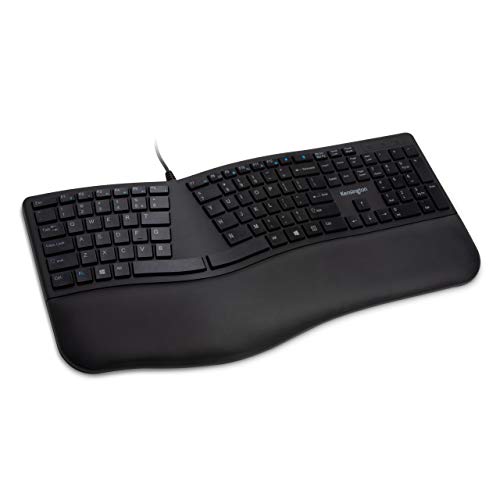
The Kensington Pro Fit Ergonomic Wired Keyboard has a built-in wrist cushion, adjustable reverse tilt and low-noise keys in a spill-proof, wipe-down build. It plugs in over USB with no setup, and the neutral grip supports are meant to position the wrist comfortably.
What separates the Kensington Pro Fit Wired from Perixx PERIBOARD-636B above it is focus: adjustable reverse tilt, a built-in wrist cushion and low-noise keys, and it gives up a split frame to get there.
Kensington Pro Fit Wired is aimed at people who want a conventional shape with reverse tilt and a cushioned wrist rest. It reshapes posture mainly through tilt and a wrist cushion, not a split layout.
Best for: people who want a conventional shape with reverse tilt and a cushioned wrist rest
Check price on AmazonPros
- +Reverse tilt for flatter wrists
- +Quiet keys
- +Spill-proof wipe-down build
- +Plug and play
Cons
- −Wired only
- −Not a split design
Adesso AKB-150UB
About this pick
The Adesso AKB-150UB is a 105-key wired USB keyboard with a split key design, a curved shape and an integrated palm rest. It adds 13 internet hotkeys and 7 media hotkeys, so common actions are one press away.
Compared with Kensington Pro Fit Wired, which sits one place higher, the Adesso AKB-150UB is stronger on a 105-key split layout with an integrated palm rest and 20 hotkeys but it gives up wireless and backlighting.
It is wired and unlit, so it suits a bright office more than a dim bedroom. Otherwise the Adesso AKB-150UB suits office users who want a plain, wired, split board with lots of hotkeys.
Best for: office users who want a plain, wired, split board with lots of hotkeys
Check price on AmazonPros
- +Split layout at a modest cost
- +Palm rest built in
- +20 hotkeys
- +Plain USB, no pairing
Cons
- −Wired only
- −No backlight
VEILZOR Wave Keyboard
About this pick
The VEILZOR is a wired ergonomic keyboard whose wave key layout follows a natural hand curve, paired with a soft leather wrist rest and a phone holder. A seven-color backlight has four brightness levels and three lighting modes, set with Fn shortcuts.
The VEILZOR Wave Keyboard closes the list. Next to Adesso AKB-150UB it gives up wireless and a split frame, in return for a wave key layout with a soft leather wrist rest and a dimmable seven-color backlight.
VEILZOR Wave Keyboard is aimed at first-time ergonomic buyers who want a gentle curve and a wrist rest at the lowest cost. The layout is a wave, not a true split, so it offers a mild posture change rather than a strong one.
Best for: first-time ergonomic buyers who want a gentle curve and a wrist rest at the lowest cost
Check price on AmazonPros
- +Gentle wave shape needs no relearning
- +Wrist rest included
- +Backlit keys
- +Lowest cost here
Cons
- −Wired only
- −Wave, not a true split
How We Evaluated These Ergonomic Keyboards Under $50
Each pick was assessed across 5 criteria weighted for real-world use.
Posture design
We compared split, wave and curved layouts, and whether tilt or tenting is adjustable, against what each listing states.
Wrist support
Palm rest material, whether it detaches and how much desk depth it takes were weighed for each pick.
Connection and battery
Wired, Bluetooth and dongle options and device slots were compared, along with rated battery life where given.
Typing feel and noise
Actuation force, key style and noise level were scored from the way each listing describes its keys.
Value inside the price ceiling
Cost was weighed against real posture design, so a board that only adds a wrist rest scores below one with a genuine split or wave shape. Every pick here lists below $50, and VEILZOR Wave Keyboard to Nulea Wired Split Keyboard marks the spread.
How to Choose the Right Ergonomic Keyboards Under $50
By Typing Habit
Start with how much posture change you will tolerate, as each board below reshapes the keys to a different degree.
| Typing Habit | Pick from this guide |
|---|---|
| Wants the strongest split posture at a fixed desk | Nulea Wired Split Keyboard: a wired split layout with an oversized wrist rest, USB-C and three tilt angles |
| Fixed desk where a cable is fine | OMOTON Curved Split Keyboard: a curved split layout with a cushioned wrist rest and both USB-A and USB-C cables |
| Wants a split shape and multiple devices at a low cost | TECKNET Wireless Ergonomic Keyboard: a split, curved layout with Bluetooth 5.0 for three devices plus a 2.4GHz dongle |
| Wants a smaller ergonomic board on a tight desk | Perixx PERIBOARD-636B: a wireless 2.4GHz compact ergonomic layout with a detachable magnetic wrist pad |
| Wants negative tilt to keep wrists flat | Kensington Pro Fit Wired: adjustable reverse tilt, a built-in wrist cushion and low-noise keys |
| Office desk where IT wants a plain USB board | Adesso AKB-150UB: a 105-key split layout with an integrated palm rest and 20 hotkeys |
| Wants the cheapest ergonomic shape with a wrist rest | VEILZOR Wave Keyboard: a wave key layout with a soft leather wrist rest and a dimmable seven-color backlight |
By Budget
| Budget | Pick from this guide |
|---|---|
| Under $30 | Perixx PERIBOARD-636B (Best Compact Wireless); VEILZOR Wave Keyboard (Lowest Cost Wave) |
| Up to $40 | Kensington Pro Fit Wired (Best Reverse Tilt); Adesso AKB-150UB (Best Simple Split); TECKNET Wireless Ergonomic Keyboard (Best Wireless Split Value); OMOTON Curved Split Keyboard (Best Wired Value) |
| Up to $50 | Nulea Wired Split Keyboard (Best Wired Split Pick) |
Split layouts vs Wave or curved layouts
Split against wave is the real fork for this group of boards, since it sets how long the adjustment takes.
Split layouts
A split separates the halves so wrists stay straighter, which gives the strongest posture change but a one to three week adjustment. In this guide: Nulea Wired Split Keyboard, OMOTON Curved Split Keyboard, TECKNET Wireless Ergonomic Keyboard, Adesso AKB-150UB.
Wave or curved layouts
A wave or curved layout bends rows to follow your fingers with almost no relearning, but changes posture less than a split. In this guide: Perixx PERIBOARD-636B, Kensington Pro Fit Wired, VEILZOR Wave Keyboard.
Most buyers should default to a wave layout unless they are ready for the adjustment a split needs.
By Second Priority
| Second priority | Pick from this guide |
|---|---|
| Moves between a desktop and a USB-C laptop | OMOTON Curved Split Keyboard (Best Wired Value): gives up wireless connectivity |
| Needs a memory-foam wrist rest | TECKNET Wireless Ergonomic Keyboard (Best Wireless Split Value): gives up a name-brand support record |
| Prefers a wireless board with a number pad | Perixx PERIBOARD-636B (Best Compact Wireless): gives up Bluetooth and a split frame |
| Needs a spill-proof wipe-down board for a shared desk | Kensington Pro Fit Wired (Best Reverse Tilt): gives up a split frame |
| Wants media and web hotkeys on a split layout | Adesso AKB-150UB (Best Simple Split): gives up wireless and backlighting |
For Wrist Strain Relief Specifically
Look for
A shape that keeps wrists straight, negative or adjustable tilt and a wrist rest that does not force the wrists upward.
In this comparison
Nulea Wired Split Keyboard fits best in this list, thanks to a wired split layout with an oversized wrist rest, USB-C and three tilt angles.
When to Spend More
Spend more if
You want wireless, mechanical feel or adjustable split width. Here, Nulea Wired Split Keyboard is the example, with a wired split layout with an oversized wrist rest, USB-C and three tilt angles.
Save if
You only need a gentle wave shape and a wrist rest. Here, VEILZOR Wave Keyboard is the example, with a wave key layout with a soft leather wrist rest and a dimmable seven-color backlight.
Frequently Asked Questions
Do ergonomic keyboards actually help with wrist pain?
They can reduce wrist bend and forearm strain for some people, but they are not a medical treatment. See a clinician for persistent pain, and combine any keyboard with good desk height and breaks.
How long does it take to adjust to a split keyboard?
Most people need one to three weeks before typing speed returns, and a few need longer. Wave and curved layouts need far less adjustment than fully split ones.
Is a wrist rest enough to count as ergonomic?
A wrist rest alone does not change your hand position much. Look for a split, wave or curved layout and adjustable tilt in addition to a rest.
Can I use an ergonomic keyboard with a Mac?
Many models work on both systems, but check for a Mac or Windows toggle and for Mac keycaps. Some business models list Windows only.
Are wireless ergonomic keyboards reliable?
Bluetooth and 2.4GHz dongles are steady for typing. Charge on a schedule and keep a USB cable handy.
What do I give up by staying under $50?
Going to the low end, VEILZOR Wave Keyboard keeps a wave key layout with a soft leather wrist rest and a dimmable seven-color backlight but gives up wireless and a split frame. Nulea Wired Split Keyboard adds a wired split layout with an oversized wrist rest, USB-C and three tilt angles, while giving up wireless options. If a gentler shape is enough for your wrists, the cheaper board is the safer start.
Bottom Line
best overall: Nulea Wired Split Keyboard - best overall pick in this roundup.
See the full rankings above for all picks with pros, cons, and best-for summaries.
Browse on Amazon
All Prime-eligible options with current pricing.
Shop on Amazon →