
5 Best Docking Stations for Dell Laptops Under $260 in 2026
We compared Dell docking stations under $260 by warranty length and first-party vs third-party sourcing, details that matter more than port count.

New to Amazon Prime?
Get fast, free shipping on every pick in this guide, plus Prime Video and exclusive deals.
Try Prime Free


At a Glance
Dell laptop owners have a real choice most other laptop brands don't offer as clearly: a genuine Dell-branded Thunderbolt dock backed by Dell's own warranty, or a third-party dock explicitly marketed for Dell compatibility at a lower price with a shorter or no stated warranty.
We compared warranty length specifically alongside Thunderbolt certification and charging wattage, since Dell's own WD22TB4 docks state warranty terms directly in the listing, a detail third-party alternatives often don't match even when their port specs look similar.
5 Criteria to Look For Before Buying a Docking Stations for Dell Laptops Under $260
Key buying criteria so you get the right fit the first time.
Decide if a first-party Dell dock or a third-party Dell-compatible dock fits your situation
A genuine Dell-branded dock, like the WD22TB4, comes with Dell's own hardware validation, warranty terms, and support path that ties directly into Dell's broader customer service and IT procurement systems, which matters most in a managed fleet environment where consistent vendor support simplifies asset tracking. A third-party dock explicitly marketed as Dell-compatible can offer more ports or features for a lower price, but any support or warranty claim comes from that third-party brand rather than Dell itself. For a personal home office setup, either path is reasonable; for an IT-managed environment, a first-party Dell dock is generally the simpler procurement choice.
Compare stated warranty length directly, since it can vary between nearly identical listings
We found two Dell-branded WD22TB4 listings with essentially identical hardware specs, same charging wattage and same Thunderbolt 4 certification, that differ mainly in their stated warranty term, one offering 1 year and the other 3 years for only a modest price difference. This is a genuine example of where reading the specific warranty language in a listing directly, rather than assuming a standard warranty term across similarly priced products, can meaningfully change the value calculation. Always check the exact stated warranty period in the listing's description, since it isn't always reflected proportionally in the price.
Confirm Thunderbolt certification if you need guaranteed high-bandwidth multi-display support
Genuine Thunderbolt 4 certification, found on the Dell-branded picks in this comparison, guarantees a specific minimum bandwidth ceiling (40Gbps) for connecting multiple displays and peripherals simultaneously, a guarantee a standard USB-C dock without that certification doesn't carry in the same documented way. For most standard office use, single or dual-display setups with typical peripherals, a well-specified USB-C dock performs comparably in practice. If you specifically need to run triple 4K displays with heavy simultaneous peripheral use, prioritizing Thunderbolt-certified hardware reduces the risk of hitting an undocumented bandwidth limitation.
Match charging wattage to your specific Dell laptop model's power needs
Dell's laptop lineup spans from lightweight ultrabooks that charge comfortably at 65-100W up to workstation-class models that draw significantly more power, and the docks in this comparison range from 100W up to 180W of charging capability accordingly. A dock rated below your laptop's actual power draw under load will still charge it, but potentially more slowly than its included charger, or in extreme cases not fast enough to keep up with battery drain during heavy use. Check your specific Dell laptop model's power adapter rating (typically printed on the charger brick) and match it against the dock's stated maximum charging wattage before assuming any dock in this price range covers your model.
Verify included accessories match what you'll actually need for setup
Some listings in this comparison explicitly state included HDMI and DisplayPort cables plus a cleaning cloth, while others describe the dock itself without detailing what cables ship in the box, which affects your real total setup cost if you need to separately purchase display cables. This is a small but real cost difference between otherwise similarly priced docks: a listing that bundles the cables you need saves you a separate purchase and shipping wait, while one that doesn't requires sourcing compatible cables yourself. Check the listing's "what's included" section specifically rather than assuming all docks in a similar price range include the same accessories.
5 Best Docking Stations for Dell Laptops Under $260 in 2026
Anker Nano 13-in-1 Laptop Docking Station
About this pick
Anker names Dell home office use specifically in this listing, offering triple display support (2 HDMI plus 1 DisplayPort), a detachable 6-in-1 hub for portability, and 10Gbps USB-C data transfer, all at the lowest price of any pick in this comparison.
Against the genuine Dell-branded docks below, this is a third-party USB-C dock rather than a Thunderbolt-certified one, meaning it doesn't unlock the same guaranteed bandwidth ceiling, but for standard office display and peripheral needs the practical difference is often minimal.
Best for buyers on a tighter budget who want triple-display support and portability without paying for Thunderbolt certification or a Dell-branded premium.
Best for: budget-conscious buyers who want triple-display support without paying for Thunderbolt certification
Check price on AmazonPros
- +Cheapest pick in this comparison
- +Triple display support at this price
- +Detachable hub design adds travel flexibility
Cons
- −Not Thunderbolt-certified like the Dell-branded picks
- −No stated multi-year warranty
Anker Prime Docking Station, 14-Port
About this pick
Anker's Prime steps up to 14 total ports and a 160W max output rating, higher than the Nano pick above, plus what the listing calls a real-time smart interface for monitoring connected device status at a glance.
Against the Dell-branded WD22TB4 docks further down this list, Anker Prime again skips Thunderbolt certification in favor of a broader third-party USB-C port selection at a lower price point.
Best for buyers who want the widest port selection and highest power output among the non-Thunderbolt picks in this comparison.
Best for: buyers who want the broadest port selection and highest power output without Thunderbolt certification
Check price on AmazonPros
- +Widest port selection among non-Thunderbolt picks
- +160W max output, highest of the Anker picks
- +Real-time smart interface for connection status
Cons
- −Not Thunderbolt-certified
- −No stated multi-year warranty
Dell Thunderbolt WD22TB4 Dock, 130W
About this pick
This is Dell's own first-party Thunderbolt 4 dock, the WD22TB4, at its base 130W charging configuration, giving you genuine Thunbolt certification and Dell's own hardware validation rather than a third-party brand's Dell-compatibility claim.
Against the third-party Anker picks above, this costs more for fewer total ports, but buyers specifically want a first-party Dell dock for guaranteed driver support and a purchasing path that ties directly to Dell's own enterprise procurement and support channels.
Best for Dell laptop owners who specifically want a first-party Dell dock at the lowest entry price into that product line, particularly in an IT-managed fleet environment.
Best for: Dell laptop owners who want a first-party Dell dock at the lowest entry price into that lineup
Check price on AmazonPros
- +First-party Dell brand, not third-party compatible
- +Genuine Thunderbolt 4 certification
- +Ties into Dell's own enterprise support channels
Cons
- −Fewer total ports than the Anker third-party picks
- −130W charging is the lowest wattage among the Dell picks here
Dell WD22TB4 Thunderbolt 4 Dock, 180W, 1-Year Warranty
About this pick
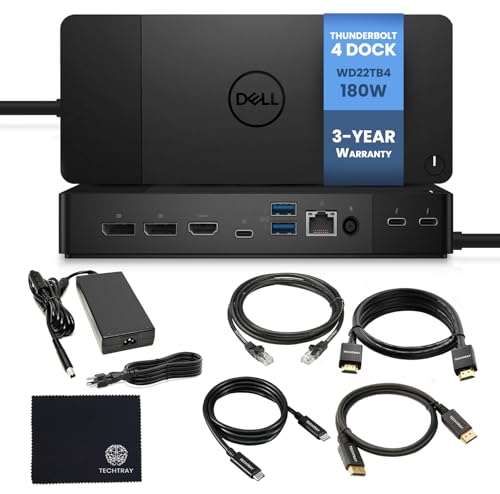
This listing steps the WD22TB4 up to 180W charging and explicitly states a 1-year warranty, plus support for dual or triple monitor 4K configurations and includes HDMI and DisplayPort cables along with a cleaning cloth in the box.
Against the 130W base WD22TB4 above, the extra $60 buys meaningfully higher charging wattage (covering higher-power Dell laptop models) and a documented triple-monitor capability the base model's listing doesn't specifically call out.
Best for Dell laptop owners running a higher-wattage model who need triple-monitor support and want the included cables to complete setup without a separate purchase.
Best for: Dell laptop owners with a higher-wattage model who want triple-monitor support and included cables
Check price on AmazonPros
- +180W charging covers higher-power Dell models
- +Triple-monitor support explicitly stated
- +Includes HDMI and DisplayPort cables in the box
Cons
- −Shorter warranty than the pricier 3-year pick below
- −Costs more than the base 130W WD22TB4
Dell WD22TB4 Thunderbolt 4 Dock, 180W, 3-Year Warranty
About this pick
For $10 more than the 1-year-warranty WD22TB4 above, this listing states a 3-year warranty instead, triple the coverage window at nearly the same price and identical 180W charging and dual/triple monitor 4K support.
Given the WD22TB4 hardware itself appears effectively identical to the 1-year-warranty listing at this price gap, the warranty term is genuinely the deciding factor between these two nearly-identical Dell docks.
Best for buyers who want the same 180W Dell dock as the pick above but with meaningfully longer warranty coverage for a marginal price difference.
Best for: buyers who want the longest warranty coverage on an identical 180W Dell Thunderbolt dock
Check price on AmazonPros
- +3-year warranty, triple the coverage of the other WD22TB4 listing
- +Same 180W charging and triple-monitor support
- +Includes cables and cleaning cloth
Cons
- −Priciest pick in this comparison
- −Same core hardware as the cheaper 1-year-warranty listing
How We Evaluated These Docking Stations for Dell Laptops Under $260
Each pick was assessed across 5 criteria weighted for real-world use.
First-party vs third-party sourcing
we distinguished genuine Dell-branded WD22TB4 docks from third-party docks explicitly marketed for Dell compatibility, since first-party sourcing affects warranty and support channels differently.
Warranty length comparison
for the Dell-branded picks specifically, we compared stated warranty terms directly, since we found two otherwise nearly identical listings differing mainly in warranty length at a small price gap.
Thunderbolt certification check
we noted which picks use genuine Thunderbolt 4 certification versus a standard USB-C connection, since Thunderbolt unlocks a higher guaranteed bandwidth ceiling for multi-display and peripheral use.
Charging wattage vs Dell laptop power needs
we compared each pick's charging wattage against typical Dell laptop charger ratings, since higher-power Dell models need more wattage to charge at full speed through a dock.
Live price gate
every pick had to be in stock and priced at or under $260 on the date this guide was checked; docks that only hit this tier during a temporary sale were excluded.
How to Choose the Right Docking Stations for Dell Laptops Under $260
By Priority
| If you mainly need | Recommended pick |
|---|---|
| The lowest price with triple display support | Anker Nano 13-in-1 Laptop Docking Station |
| The widest port selection | Anker Prime Docking Station, 14-Port |
| A first-party Dell dock at the lowest entry price | Dell Thunderbolt WD22TB4 Dock, 130W |
| The longest warranty on a Dell-branded dock | Dell WD22TB4 Thunderbolt 4 Dock, 180W, 3-Year Warranty |
By Budget
| Price range | Recommended pick |
|---|---|
| Under $170 | Anker Nano (under $120) or Anker Prime (under $170) |
| $185 to $260 | Dell WD22TB4 130W (under $190), 180W 1-year (under $250), or 180W 3-year (under $300) |
First-Party Dell Dock vs Third-Party Anker Dock
First-party Dell WD22TB4 (three picks here)
Genuine Thunderbolt 4 certification and ties directly into Dell's own support and IT procurement channels, at a higher price than third-party alternatives.
Third-party Anker docks
Lower price and often broader port selection, explicitly marketed for Dell compatibility, but without Thunderbolt certification or a Dell-branded support path.
In an IT-managed fleet environment, a first-party Dell dock simplifies procurement and support; for a personal home office setup, either option works, with Anker offering more ports per dollar.
By Charging Wattage Needs
| Your Dell laptop is | Recommended pick |
|---|---|
| A standard ultrabook-class Dell laptop | Dell WD22TB4, 130W (under $190) |
| A higher-power Dell model (workstation-class) | Dell WD22TB4, 180W (under $250 or under $300) |
For Dell-Managed IT Fleets Specifically
Look for
A first-party Dell dock with a clearly stated warranty term, since IT procurement and asset management is generally simpler when hardware and support come from the same vendor as the laptops themselves.
In this comparison
All three Dell WD22TB4 listings here are genuine first-party Dell hardware with a stated warranty, making them the more straightforward choice for fleet procurement.
When to Spend More
Spend more if
You specifically want a first-party Dell dock with Thunderbolt certification and a documented warranty: the WD22TB4 180W 3-year warranty pick (under $300) offers the strongest combination of charging power and coverage here.
Save if
You just need reliable multi-display and peripheral support without Thunderbolt certification: the Anker Nano (under $120) covers triple-display use for less than half the price of the Dell-branded picks.
Frequently Asked Questions
Should I buy a genuine Dell dock or a third-party dock that claims Dell compatibility?
For an IT-managed fleet, a first-party Dell dock simplifies warranty and procurement since it comes from the same vendor as the laptops. For a personal home office setup, a well-reviewed third-party dock like Anker's picks in this comparison can offer more ports or features for less money, without Dell's own support channel.
Why do two nearly identical Dell WD22TB4 listings have different warranty terms?
Different retailers or listing configurations sometimes bundle different warranty terms for otherwise similar hardware, which is why checking the exact stated warranty in each specific listing matters rather than assuming a standard term across similarly priced Dell docks.
Do I need Thunderbolt certification for a standard dual-monitor office setup?
Not necessarily. A well-specified USB-C dock without Thunderbolt certification can handle typical dual-display office setups comfortably. Thunderbolt certification matters most if you're running triple high-resolution displays with heavy simultaneous peripheral use where guaranteed bandwidth becomes more important.
Will a 130W dock charge my Dell laptop as fast as its original charger?
It depends on your specific Dell model's power needs. If your laptop's included charger is rated at or below 130W, a 130W dock should charge it comparably. If your laptop draws more power than that under load, a higher-wattage dock like the 180W options in this comparison is the safer match.
Do these docks come with the cables I need for my monitors?
It varies by listing. Some explicitly state included HDMI and DisplayPort cables, while others don't detail this in their description. Check the specific listing's included-items section before assuming cables are bundled, since you may need to purchase them separately otherwise.
Can I use a Dell-branded dock with a non-Dell laptop?
Genuine Dell Thunderbolt docks generally work with any laptop that has a compatible Thunderbolt or USB-C port, not exclusively Dell hardware, though Dell markets and validates them primarily for its own laptop lineup. Check the dock's stated port and protocol compatibility against your specific non-Dell laptop's ports before assuming full compatibility.
Bottom Line
best overall: Anker Nano 13-in-1 Laptop Docking Station - best budget pick pick in this roundup.
See the full rankings above for all picks with pros, cons, and best-for summaries.
Browse on Amazon
All Prime-eligible options with current pricing.
Shop on Amazon →