
4 Best Digital Notebooks for iPad Users in 2026
4 standalone digital notebook devices we evaluated as an iPad alternative or companion, plus what to buy instead if you want a paper-like iPad screen.

New to Amazon Prime?
Get fast, free shipping on every pick in this guide, plus Prime Video and exclusive deals.
Try Prime Free


At a Glance
reMarkable 2 with Marker Plus
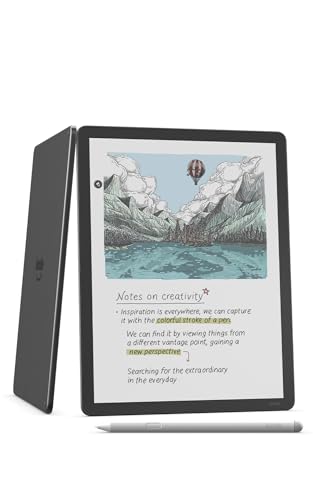
↓ See why we picked itAmazon Kindle Scribe Colorsoft 64GB, 11 inch paper-like color display with front light, Pen included, Graphite
↓ See why we picked itRocketbook Core Reusable Spiral Notebook, Letter Size 8.5x11, Black, Dotted Pages, App-Connected, Erasable, Durable Cover
↓ See why we picked itThis search term is genuinely ambiguous, and it's worth clarifying before you buy anything. Some buyers searching "digital notebook for iPad" actually want a paper-like textured screen protector that makes writing on an existing iPad feel more like paper, a cheaper accessory that is not covered in this guide. Others want a standalone digital notebook device as an alternative to, or companion for, their iPad.
None of the verified products in our research pool are iPad accessories. They're all standalone devices, so this guide covers that second group: buyers considering a dedicated digital notebook device alongside or instead of their iPad.
5 Criteria to Look For Before Buying a Digital Notebooks for iPad User
Key buying criteria so you get the right fit the first time.
Check whether AI or handwriting-conversion features are included or require a subscription
Digital notebook brands take genuinely different approaches to their software features: some bundle handwriting-to-text conversion, document summarization, and cloud sync into the purchase price, while others, most notably reMarkable's Connect plan, gate the more advanced versions of these same features behind an ongoing monthly subscription that continues costing money long after the initial purchase.
This is a real total-cost-of-ownership difference that a one-time hardware price comparison completely misses, since a cheaper device with a required subscription can cost more over two or three years than a pricier device with everything included upfront.
Check the specific listing and manufacturer's website for whether the features you actually want are included in the base purchase or require an ongoing plan, and factor that recurring cost into your real comparison.
Understand that "AI" and "handwriting conversion" mean different things across different devices
The marketing term "AI" gets applied to several genuinely different features across this product category: converting your handwriting into typed text, summarizing a long document or your own notes, organizing notes automatically by topic, or simply offering a chatbot-style writing assistant, and a device marketed heavily around "AI" doesn't necessarily include all, or even most, of these specific capabilities.
This matters because two devices can both claim AI features while actually doing completely different things, so a buyer specifically wanting handwriting-to-text conversion could end up with a device whose "AI" feature is actually a summarization tool that doesn't address their actual need at all.
Read the specific feature list rather than the marketing headline, and confirm the device does the exact task you need (handwriting conversion specifically, not just "AI" generally) before buying.
Confirm the stylus situation: included, sold separately, or requiring a specific model
Some digital notebooks include a compatible stylus in the box as part of the purchase price, while others sell the device and stylus as separate purchases, or require a specific proprietary stylus model that isn't interchangeable with a generic capacitive pen, and this distinction can add a meaningful hidden cost on top of the listed device price if you assumed a stylus was included.
Beyond just the cost, stylus quality itself varies in pressure sensitivity, tilt detection, and palm rejection quality, features that matter significantly more for sketching and detailed note-taking than for simple text entry.
Check the listing specifically for whether a stylus ships in the box, and if writing feel matters to you, look for mentions of pressure levels and palm rejection quality rather than assuming any included stylus performs the same as another.
Check the export and sync ecosystem, since notes trapped on one device have limited long-term value
A digital notebook's real usefulness depends heavily on getting your notes and documents off the device and into a format you can actually use elsewhere, whether that's cloud sync to a phone or computer, export to PDF or Word, or direct integration with a note-taking platform like OneNote or Google Drive, and devices differ meaningfully in which of these paths they actually support natively versus not at all.
This matters concretely for anyone using the device for professional or academic work where notes need to end up in a shared document, an email, or a specific software ecosystem, since a device with limited export options can leave your handwritten notes effectively stranded on the device itself.
Check the manufacturer's stated export formats and sync options against the specific software or workflow you actually need to feed notes into, rather than assuming any device syncs to everything.
Weigh review volume against star rating, especially for newer AI-branded entrants
Established digital notebook brands with years on the market carry review counts in the thousands, giving genuine statistical confidence in their ratings, while newer devices, especially ones marketing themselves heavily around AI features to ride current interest in the category, sometimes carry only a few dozen or a few hundred reviews, which is a meaningfully thinner sample to judge long-term reliability and whether the marketed features actually work as claimed.
This doesn't mean a newer, less-reviewed device is automatically worse, but it does mean the claims on its listing carry less independently verified weight than a device with years of real-world feedback behind it.
When comparing an established brand against a newer AI-branded entrant, check both the star rating and the review count together, and weigh a smaller but heavily AI-marketed device's claims more skeptically until more real-world feedback accumulates.
4 Best Digital Notebooks for iPad Users in 2026
reMarkable 2 with Marker Plus
About this pick
The reMarkable 2 is a standalone device, not an iPad accessory, appropriate for buyers who want to move note-taking off their iPad entirely to reduce distraction. This is a true e-ink digital notebook device (a standalone tablet with an e-paper screen you write on directly with a stylus, with files stored and synced digitally).
It earns the top spot in this comparison over reMarkable Paper Pro with Marker Plus for one main reason. Genuinely distraction-free compared to note-taking on a full iPad. On price, it comes in below reMarkable Paper Pro with Marker Plus, which is worth weighing if cost is your deciding factor between the two.
Worth knowing before you decide: Long battery life. On the other side, Black and white display only. That's the main tradeoff to weigh against everything above.
Best for: iPad owners who want to move distraction-prone note-taking to a separate dedicated device.
Check price on AmazonPros
- +Genuinely distraction-free compared to note-taking on a full iPad
- +Long battery life
- +Marker Plus included
- +Paper-like writing feel
Cons
- −Not an iPad accessory, a separate standalone device
- −Higher price on top of an existing iPad
- −Black and white display only
reMarkable Paper Pro with Marker Plus
About this pick
The reMarkable Paper Pro is a standalone premium device that some iPad owners choose as a dedicated writing companion, keeping note-taking separate from their iPad's general apps and browsing. This is a true e-ink digital notebook device (a standalone tablet with an e-paper screen you write on directly with a stylus, with files stored and synced digitally).
One spot below reMarkable 2 with Marker Plus in this ranking, it costs more than reMarkable 2 with Marker Plus. The compromise here is straightforward: Premium price on top of an existing iPad. What you gain in return: Color e-paper display. Whether that trade is worth it depends on which side matters more for how you'll actually use it.
Worth knowing before you decide: Larger writing surface than the standard model. On the other side, Verify current cloud subscription requirements. That's the main tradeoff to weigh against everything above.
Best for: iPad owners wanting a premium standalone note-taking companion device.
Check price on AmazonPros
- +Color e-paper display
- +Larger writing surface than the standard model
- +Standalone device, keeps notes separate from iPad distractions
- +Marker Plus included
Cons
- −Premium price on top of an existing iPad
- −Not an iPad accessory
- −Verify current cloud subscription requirements
Amazon Kindle Scribe Colorsoft 64GB, 11 inch paper-like color display with front light, Pen included, Graphite
About this pick
The Kindle Scribe Colorsoft is a standalone device some iPad owners add specifically for reading books alongside note-taking, functions they may prefer separate from their iPad. This is a true e-ink digital notebook device (a standalone tablet with an e-paper screen you write on directly with a stylus, with files stored and synced digitally).
Sitting just under reMarkable Paper Pro with Marker Plus, it costs more than reMarkable Paper Pro with Marker Plus. Here's the honest tradeoff: Not an iPad accessory. And here's what it gets you instead: Combines e-reader and notebook in one standalone device. That's the real difference between the two picks, not just a ranking number.
Worth knowing before you decide: Color display for annotation. On the other side, Best value if you're already in the Kindle ecosystem. That's the main tradeoff to weigh against everything above.
Best for: iPad owners wanting a standalone e-ink device specifically for reading and annotating books.
Check price on AmazonPros
- +Combines e-reader and notebook in one standalone device
- +Color display for annotation
- +Pen included
- +Genuine alternative screen technology to an iPad's LCD
Cons
- −Not an iPad accessory
- −Premium price on top of an existing iPad
- −Best value if you're already in the Kindle ecosystem
Rocketbook Core Reusable Spiral Notebook, Letter Size 8.5x11, Black, Dotted Pages, App-Connected, Erasable, Durable Cover
About this pick
The Rocketbook Core is the cheapest standalone alternative in this guide, a completely different approach from an iPad since it's genuine paper with no screen at all. This is a reusable paper notebook (write with a pen, then scan the pages with a phone app to digitize them before wiping the pages clean and reusing the notebook).
Ranked just behind Amazon Kindle Scribe Colorsoft 64GB, it's priced lower than Amazon Kindle Scribe Colorsoft 64GB. The real tradeoff against that pick: Sync happens after scanning, not live. In exchange, it offers this instead: Budget-friendly standalone alternative. That's the swap that decides whether this pick or the one above it is the better fit for your note-taking needs.
Worth knowing before you decide: Zero screen time for note-taking, a genuine change of pace from an iPad. On the other side, No on-device digital storage. That's the main tradeoff to weigh against everything above.
Best for: iPad owners wanting the cheapest possible screen-free note-taking alternative.
Check price on AmazonPros
- +Budget-friendly standalone alternative
- +Zero screen time for note-taking, a genuine change of pace from an iPad
- +App-connected scanning to cloud folders
- +Familiar paper-writing experience
Cons
- −Sync happens after scanning, not live
- −Requires a compatible erasable pen
- −No on-device digital storage
How We Evaluated These Digital Notebooks for iPad Users
Each pick was assessed across 4 criteria weighted for real-world use.
Search intent disambiguated before selecting any products
Identified that this search term covers two different buyer intents, a paper-like iPad screen protector accessory or a standalone alternative device, and confirmed the verified research pool only contains the latter.
Confirmed no iPad-specific accessories exist in the research pool
Verified every product here is standalone hardware, not an iPad case, screen protector, or stylus accessory, and reflected that honestly in the guide framing.
Companion vs replacement use case considered for each pick
Assessed whether each device is best positioned as a full note-taking replacement for iPad use or a complementary device for a specific function like reading.
Price weighed as an additional cost on top of an existing iPad
Since buyers here likely already own an iPad, treated the price of each pick as an additional investment rather than a standalone budget decision.
How to Choose the Right Digital Notebooks for iPad Users
By Use Case
| What you need it for | Recommended pick in this comparison |
|---|---|
| Everyday note-taking and reading | Rocketbook Core Reusable Spiral Notebook |
| AI-assisted or document-heavy work | Amazon Kindle Scribe Colorsoft 64GB |
By Budget
| Price range | Recommended pick |
|---|---|
| Under $27 | Rocketbook Core Reusable Spiral Notebook |
| Mid-range | reMarkable Paper Pro with Marker Plus |
| No firm budget ceiling, prioritizing storage or ecosystem | Amazon Kindle Scribe Colorsoft 64GB |
AI Features Included vs Subscription-Gated
Included, No Subscription
AI note tools come with the purchase price, no ongoing cost. In this comparison: check each listing's terms directly.
Subscription-Gated
Advanced AI features require an ongoing paid plan on top of the hardware price. In this comparison: reMarkable Paper Pro with Marker Plus.
Check each specific listing for current subscription terms, since these change over time.
By Rating Confidence: Highest Rated vs Most Reviewed
| What you're weighing | Recommended pick |
|---|---|
| Highest star rating | reMarkable 2 with Marker Plus |
| Largest review base (more statistical confidence) | reMarkable 2 with Marker Plus |
For Handwriting-to-Text Conversion Specifically
Look for
Explicit confirmation of handwriting-to-text conversion (not just "AI" generally), and whether that specific feature is included or requires a subscription.
In this comparison
reMarkable 2 with Marker Plus fits this specifically: Genuinely distraction-free compared to note-taking on a full iPad.
When to Spend More
Spend more if
You want what Amazon Kindle Scribe Colorsoft 64GB offers: Combines e-reader and notebook in one standalone device. That's a real functional upgrade over the budget picks here, not just a brand markup.
Save if
Rocketbook Core Reusable Spiral Notebook already covers the essentials: Budget-friendly standalone alternative. The main thing you'd be paying extra for elsewhere in this list is features or storage you may not need.
Frequently Asked Questions
Is there a digital notebook accessory that makes my iPad feel like paper?
That would be a paper-like textured screen protector, a separate and cheaper accessory category not covered in this guide, which focuses on standalone digital notebook devices.
Should I buy a standalone digital notebook if I already have an iPad?
Consider it if you want a distraction-free writing device separate from your iPad's apps and notifications, or a dedicated e-ink reading experience, otherwise your iPad may already cover your needs.
Do any of these digital notebooks connect directly to an iPad?
They're standalone devices with their own apps and cloud sync, not iPad accessories or peripherals that plug into or attach to an iPad.
What's the cheapest way to reduce iPad screen time for note-taking?
A reusable paper notebook like the Rocketbook Core is the most budget-friendly standalone alternative, since it uses no screen at all until you choose to scan a page.
Bottom Line
best overall: reMarkable 2 with Marker Plus - best standalone alternative to note-taking on an ipad pick in this roundup.
See the full rankings above for all picks with pros, cons, and best-for summaries.
Browse on Amazon
All Prime-eligible options with current pricing.
Shop on Amazon →