
4 Best Digital Calendars Under $50 in 2026
We compared digital calendars under $50 by calendar sync depth, chore tracking, and subscription terms, since no-subscription models genuinely vary here.

New to Amazon Prime?
Get fast, free shipping on every pick in this guide, plus Prime Video and exclusive deals.
Try Prime Free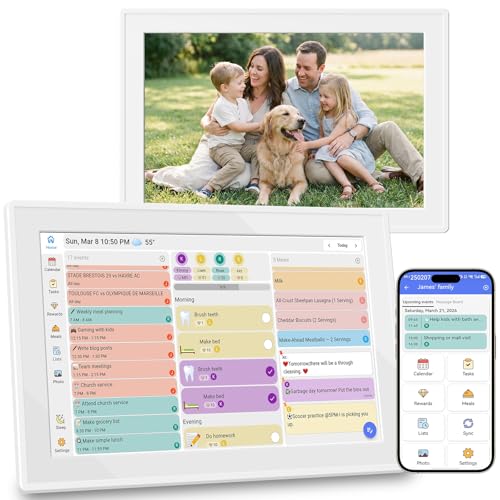


At a Glance
Digital Calendar 10.1in Touchscreen, Smart Electronic Wall Organizer
↓ See why we picked itSmart Digital Calendar 10.1 Inch, Electronic Family Calendar Planner
↓ See why we picked itUnder $50, digital calendars cluster around 10.1 inch touchscreens with chore charts and calendar sync, and the real differentiator is whether all features are genuinely unlocked without a subscription or only partially free.
We compared this lineup on calendar sync platforms, chore tracking design, and stated subscription terms, since a device marketed as 'no subscription' can still gate premium features behind a paywall later if you don't check the fine print.
5 Criteria to Look For Before Buying a Digital Calendars Under $50
Key buying criteria so you get the right fit the first time.
A 'No Subscription' Claim Should Be Checked for Which Specific Features It Actually Covers
The Smart Electronic Wall Organizer pick explicitly states every feature, schedule, chore list, meal plan, grocery list, and photo frame, is unlocked with zero hidden fees, a stronger and more specific claim than a general 'no subscription' statement that might only apply to basic calendar viewing while gating chore tracking or meal planning behind a paywall. This matters because the digital calendar category has a documented history of advertising 'free' hardware while requiring ongoing subscriptions for the features that actually make the device useful day to day. Read the listing's feature list carefully for language confirming each specific feature (not just 'the calendar') is included at no ongoing cost, rather than assuming a general no-subscription claim covers everything advertised.
Third-Party Calendar Platform Support Varies Meaningfully Beyond the Standard Google, iCloud, and Outlook Trio
The Electronic Family Calendar Planner pick specifically adds Cozi and Yahoo calendar sync beyond the standard three platforms most digital calendars support, a genuine differentiator if your household already manages schedules through one of those less common services. This matters because switching your household's established calendar platform just to match a cheaper digital calendar device creates real friction, while paying slightly more for a device that syncs with your existing platform avoids that disruption entirely. Check your household's actual calendar platform before assuming any 'syncs with major calendars' claim includes the specific service you already use.
A Stated Maximum Family Member Count Gives You a Concrete Capacity Figure to Plan Around
The Smart WiFi Electronic Calendar pick specifically states support for up to 20 family members with color-coded personal schedules, a concrete capacity figure that the other three picks in this comparison don't explicitly disclose, even though they likely support a reasonable number of users as well. This matters more for larger households, blended families, or households that also want to track extended family members like grandparents' schedules, where an unstated capacity limit creates uncertainty. Check for an explicit stated user or family member capacity if your household is larger than a typical 2-parent, 2-child structure, rather than assuming any digital calendar accommodates unlimited household members.
Chore Reward Systems Differ in Implementation Between Point-Based and Star-Based Motivation Structures
The Smart Electronic Wall Organizer pick's chore system uses stars for unlocking rewards, while the Wall Plan Touch Screen pick uses points redeemable for small rewards, subtly different gamification approaches that may resonate differently depending on your children's ages and preferences. This matters if you're specifically choosing a digital calendar to motivate reluctant chore participation in kids, where the specific reward mechanic's appeal can meaningfully affect whether children actually engage with it. Consider your own children's typical response to star-based versus point-based reward systems, if you have prior experience with either approach, before assuming any chore-tracking feature will work equally well for your family.
A Photo Slideshow Feature's App-Based Upload Process Should Be Checked for Ease Before Assuming Effortless Use
The Wall Plan Touch Screen pick specifically emphasizes uploading photos through a companion app to create a slideshow, a feature that depends on that app's actual usability and reliability, details that a product listing's marketing copy doesn't always accurately convey. This matters if the photo-frame functionality is a genuine priority for your purchase decision rather than just a secondary feature, since a clunky upload process undermines the appeal of this feature regardless of how it's marketed. Consider checking recent buyer feedback specifically about the companion app's photo upload experience before assuming this feature works as smoothly as the product description suggests.
4 Best Digital Calendars Under $50 in 2026
Digital Calendar 10.1in Touchscreen, Smart Electronic Wall Organizer
About this pick
This calendar syncs Google Calendar, iCloud, and Outlook in real time with every feature, schedule, chore list, meal plan, grocery list, and photo frame, fully unlocked with zero hidden fees, a specific claim the listing makes explicit. Its interactive chore list lets kids earn stars and unlock rewards, turning routines into a game rather than a nagging chore.
Compared to the WiFi Digital Calendar pick below, this one specifically emphasizes a complete feature unlock at this price point rather than a tiered feature structure. Smart sleep saves energy and auto-wakes the display, while local weather and timely reminders round out the daily-use features.
Best for buyers who want every feature genuinely unlocked without hidden subscription gates.
Best for: buyers who want every feature genuinely unlocked without subscription gates
Check price on AmazonPros
- +All features explicitly unlocked with zero hidden fees
- +Chore list with reward system genuinely motivates kids
- +Photo slideshow doubles as decor when idle
Cons
- −Cheapest pick but still near the top of this tier
- −No stated multi-user family count limit like some competitors
Digital Calendar 10.1in Smart WiFi Electronic Calendar
About this pick
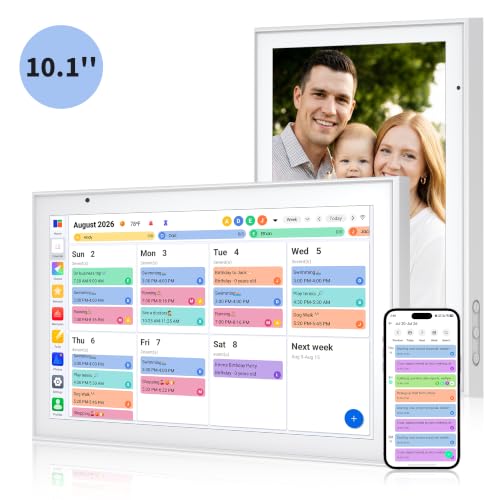
This calendar's 1-minute quick setup connects to power and WiFi with automatic calendar sync completing in under a minute, the fastest setup claim in this comparison. Its 178-degree wide viewing angle IPS screen with auto-brightness adjustment delivers clear visibility both indoors and near windows with outdoor light.
Compared to the pick above, this one specifically supports up to 20 family members with color-coded personal schedules, a stated capacity figure the other picks don't disclose as precisely. Smart vibration alerts provide silent reminders, and the adjustable stand supports both landscape and portrait orientation.
Best for buyers who want the fastest setup with a stated 20-person family capacity.
Best for: buyers who want the fastest setup with a stated 20-person capacity
Check price on AmazonPros
- +1-minute setup is the fastest claim in this comparison
- +Stated capacity for up to 20 family members
- +Adjustable stand supports both landscape and portrait modes
Cons
- −No stated meal planning feature like the pick above
- −Vibration alerts are silent, which some buyers may want paired with sound
Digital Calendar 10.1 Inch Wall Plan Touch Screen WiFi
About this pick
This calendar's photo upload feature turns the display into a slideshow of favorite memories through its companion app, specifically marketed as bringing warmth and joy alongside its scheduling function. Its built-in chore tracker lets kids earn points redeemable for small rewards, assigned and monitored via phone or the planner itself.
Compared to the pick above, this one emphasizes the photo-frame and memory-sharing angle more heavily in its marketing, positioning it for buyers who specifically want a device that doubles meaningfully as a family photo display. Wall mounting capability lets you position it in high-traffic areas for maximum household visibility.
Best for buyers who want strong photo-frame functionality alongside scheduling features.
Best for: buyers who want strong photo-frame functionality alongside scheduling
Check price on AmazonPros
- +Photo slideshow feature is specifically emphasized and well-developed
- +Chore point reward system motivates consistent task completion
- +Wall mounting supports high-visibility household placement
Cons
- −No stated maximum family member count like the WiFi pick
- −Similar core feature set to cheaper picks in this tier at a slightly higher price
Smart Digital Calendar 10.1 Inch, Electronic Family Calendar Planner
About this pick
This calendar syncs with Google, iCloud, Outlook, Cozi, and Yahoo, the broadest platform coverage in this comparison, merging everyone's appointments into one intuitive display over dual-band WiFi for instant updates. Custom colors assigned to each family member eliminate overlapping plans or missed events.
Compared to the other three picks in this tier, this one specifically supports Cozi and Yahoo calendar sync in addition to the standard Google, iCloud, and Outlook trio, useful if your household already uses one of those less common platforms. When not in active use, it automatically transitions into a digital photo frame cycling through cherished photos and videos.
Best for buyers who specifically use Cozi or Yahoo calendars alongside the standard platforms.
Best for: buyers who specifically use Cozi or Yahoo calendars alongside standard platforms
Check price on AmazonPros
- +Broadest calendar platform sync including Cozi and Yahoo
- +Dual-band WiFi ensures instant update reliability
- +Compact design fits kitchen counters or desks easily
Cons
- −Most expensive pick in this tier
- −Only benefits buyers who specifically use Cozi or Yahoo calendars
How We Evaluated These Digital Calendars Under $50
Each pick was assessed across 5 criteria weighted for real-world use.
Calendar Sync Platform Coverage
Compared which third-party calendar platforms each pick supports for syncing.
Chore Tracking Design
Compared reward systems and interactive chore chart features across the lineup.
Subscription Terms
Checked whether listings explicitly stated all features unlocked without hidden fees.
Setup Speed and Ease
Compared stated setup time and connectivity process across all four picks.
Photo Frame Functionality
Compared photo slideshow features and storage capabilities across the tier.
How to Choose the Right Digital Calendars Under $50
By Primary Need
| If you mainly need | Recommended pick |
|---|---|
| Every feature unlocked without subscription gates | Digital Calendar 10.1in Touchscreen, Smart Electronic Wall Organizer |
| The fastest setup with a stated 20-person capacity | Digital Calendar 10.1in Smart WiFi Electronic Calendar |
| Strong photo-frame functionality alongside scheduling | Digital Calendar 10.1 Inch Wall Plan Touch Screen WiFi |
| Cozi or Yahoo calendar sync alongside standard platforms | Smart Digital Calendar 10.1 Inch, Electronic Family Calendar Planner |
By Budget
| Price range | Recommended pick |
|---|---|
| Under $56 | Smart Electronic Wall Organizer (under $60) |
| Under $60 | Smart WiFi Electronic Calendar (under $60) or Wall Plan Touch Screen (under $60) |
| Under $68 | Electronic Family Calendar Planner (under $70) |
Fully Unlocked vs Platform-Specific Sync Depth
Fully unlocked (Smart Electronic Wall Organizer)
Explicitly states every feature works with zero hidden fees, prioritizing complete access over platform breadth.
Broad platform sync (Electronic Family Calendar Planner)
Prioritizes supporting more calendar platforms including Cozi and Yahoo, useful if your household already uses one of those.
If you just want everything unlocked at the lowest price with standard Google, iCloud, and Outlook sync, the Smart Electronic Wall Organizer delivers that. If your family specifically relies on Cozi or Yahoo calendars, the broader-sync pick is worth the extra cost.
By Household Size
| Your household size | Recommended pick |
|---|---|
| Standard family size | Any of the four picks |
| Larger household needing explicit capacity confirmation | Smart WiFi Electronic Calendar (stated 20-member support) |
For a Family That Uses Cozi for Meal and Chore Planning Specifically
Look for
Explicit Cozi calendar sync support in the listing, since not every digital calendar in this tier supports that specific platform alongside the more common Google, iCloud, and Outlook trio.
In this comparison
The Electronic Family Calendar Planner pick specifically syncs with Cozi and Yahoo in addition to the standard platforms, directly addressing households already using Cozi.
When to Spend More
Spend more if
You specifically use Cozi or Yahoo calendars and want the broadest platform sync, where the Electronic Family Calendar Planner delivers that at the top of this tier.
Save if
You just want every feature unlocked with standard calendar sync, where the Smart Electronic Wall Organizer covers that for about $13 less.
Frequently Asked Questions
Do these digital calendars require an ongoing subscription to keep working after the first year?
The picks in this tier specifically market their core features as free forever with no subscription required, though checking the listing for any mention of optional paid advanced features, like AI-based tools some competitors mention, is worth doing before assuming absolutely everything remains free indefinitely.
What's the most common mistake buyers make when choosing a digital calendar for calendar sync?
Not verifying their household's actual calendar platform (Google, iCloud, Outlook, Cozi, or Yahoo) against a specific pick's stated sync support before buying, since not every digital calendar in this tier supports every platform equally.
Is the Electronic Family Calendar Planner worth it over the cheaper Smart Electronic Wall Organizer?
If you specifically use Cozi or Yahoo calendars, yes, but if your household uses standard Google, iCloud, or Outlook calendars and you want every feature unlocked at the lowest price, the Smart Electronic Wall Organizer covers that for about $13 less.
How do I know if the chore reward system will actually motivate my kids to participate?
Consider your children's age and what type of reward system has worked for them in the past, star-based versus point-based, since the specific gamification mechanic can meaningfully affect engagement even though the core concept is similar across these four picks.
Can these digital calendars be used without connecting to WiFi at all?
No, all four picks in this comparison rely on WiFi connectivity for calendar syncing and photo uploads, so a stable WiFi connection is necessary to access the core scheduling and photo-frame features.
Do any of these calendars support voice input for adding events?
The listings for these four specific picks don't prominently feature voice input for event creation, so if that's a priority, checking higher-tier picks or specifically searching for that feature before purchase is worth doing.
Bottom Line
best overall: Digital Calendar 10.1in Touchscreen, Smart Electronic Wall Organizer - best overall pick in this roundup.
See the full rankings above for all picks with pros, cons, and best-for summaries.
Browse on Amazon
All Prime-eligible options with current pricing.
Shop on Amazon →