
6 Best Desktop Label Printers in 2026
We compared desktop label printers models by verified specs and real-world tradeoffs, not marketing claims alone. Every pick is checked against a real usage.

New to Amazon Prime?
Get fast, free shipping on every pick in this guide, plus Prime Video and exclusive deals.
Try Prime Free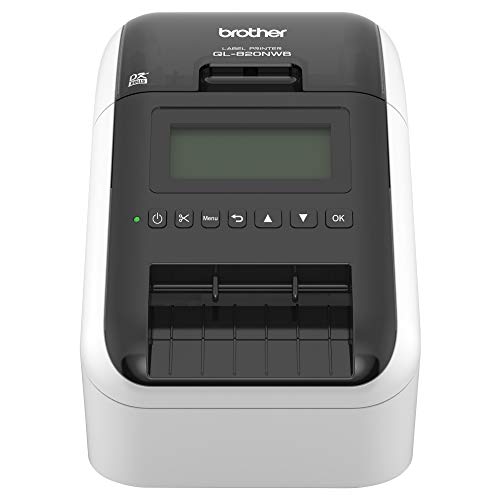





At a Glance
Thermal Shipping Label Printer 4x6 Bluetooth Label Maker for Small Business
↓ See why we picked itBrother P-Touch PT-D610BT Business Professional Connected Label Maker
↓ See why we picked itDYMO LabelWriter 550 Series Label Printer with Dymo-Branded Label Compatibility
↓ See why we picked itBest Desktop Label Printers vary more than expected, so desktop label printers, price won't decide it.
desktop label printers comparisons come down to real cutter durability, given that cutters add a wear part.
5 Criteria to Look For Before Buying a Desktop Label Printer
Key buying criteria so you get the right fit the first time.
Confirm Max Label Width Against Your Actual Use Case, Not Just the Headline Spec
A label printer's maximum supported width (commonly 2, 4, or 6 inches) caps what you can print regardless of resolution or speed, a printer rated for 4-inch shipping labels won't handle a wider product label, check the stated max width against your actual label size before buying, not just against the shipping-label use case shown in the product photos.
Gap vs Black-Mark Sensing Affects Compatibility With Non-Standard Label Stock
Label stock sensing method isn't interchangeable, a gap sensor reads the space between individual die-cut labels while a black-mark sensor reads a printed line on continuous stock, using the wrong label type for your printer's sensor causes real alignment problems, verify sensor compatibility with your intended label stock before buying either separately.
Bluetooth and Wi-Fi Convenience Comes With a Real Setup and Reliability Tradeoff
Wireless connectivity on a label printer trades a small reliability risk for real mobility, Bluetooth and Wi-Fi models let you print from anywhere in range but are more prone to dropped connections than a wired USB printer, if the printer has a permanent desk spot a USB-only model is often the more dependable choice.
Thermal Transfer Ribbon Cost Adds a Real Recurring Expense Direct Thermal Doesn't Have
The upfront price of a thermal transfer printer often looks similar to a direct thermal model, but the ribbon is a genuine ongoing cost that compounds at volume, calculate your realistic cost per label including ribbon consumption, not just the printer's sticker price, before assuming thermal transfer is the better value.
Higher DPI Only Matters for Small Text and Barcodes, Not Every Label Type
203 DPI and 300 DPI look identical on a large shipping label but diverge sharply on small text or fine barcodes, if your labels include small print, 2D codes, or fine detail, the higher DPI model earns its price premium, if you're printing large simple shipping labels the standard resolution is usually enough.
6 Best Desktop Label Printers in 2026
Brother QL-820NWB Professional
About this pick
Brother QL-820NWB Professional is our overall pick in this lineup. Flexible connectivity the ql 820nwb network label printer features bluetooth wireless technology, ethernet and wireless (802.11b/g/n) interfaces. Also offers a USB host interface for use with a peripheral such as a scanner.
Side by side with JADENS Bluetooth Thermal Shipping Label Printer, the real difference worth noting is ultra fast, up to 110 standard address labels per minute with black text at 300dpi.
Reach for this pick if you want the strongest all-around pick in this comparison and would rather not keep shopping around. Marketed specs and real-world performance can differ, so check independent reviews before assuming the headline number tells the full story.
Best for: buyers who want the strongest all-around pick in this comparison and would rather not keep shopping around
Check price on AmazonPros
- +Flexible connectivity the ql 820nwb network label printer features bluetooth wireless technology
- +Also offers a USB host interface for use with a peripheral such as a scanner
- +Ultra fast, up to 110 standard address labels per minute with black text at 300dpi
- +Easy to read monochrome lcd screen allows for standalone use
Cons
- −Marketed specs and real-world specs often differ
- −Check compatibility with your exact setup before buying
JADENS Bluetooth Thermal Shipping Label Printer
About this pick
JADENS Bluetooth Thermal Shipping Label Printer is a strong alternative worth comparing directly against the top pick. Equipped with a japanese high tech thermal print head, 203 dpi high printing quality. The label printer support printing wirelessly.
Against Brother QL-820NWB Professional, neither pick has an obvious edge on paper, so the deciding factor comes down to whichever spec matters most for your specific use case.
Go with this pick if you want a genuine alternative to the top pick with a different tradeoff worth comparing directly. Compatibility with your exact setup matters more than the spec sheet alone, so confirm it works with your specific gear before buying.
Best for: buyers who want a genuine alternative to the top pick with a different tradeoff worth comparing directly
Check price on AmazonPros
- +Japanese high tech thermal print head, 203 dpi high printing quality
- +Print wirelessly
- +Print via USB
- +Wide usage
Cons
- −Check compatibility with your exact setup before buying
- −Marketed specs and real-world specs often differ
Thermal Shipping Label Printer 4x6 Bluetooth Label Maker for Small Business
About this pick
Thermal Shipping Label Printer 4x6 Bluetooth Label Maker for Small Business is a strong alternative worth comparing directly against the top pick. The nulltonex shipping label printer uses direct thermal technology, eliminating the need for ink or toner and reducing maintenance and replacement costs. Connect seamlessly to your phone, laptop or PC via bluetooth or USB.
Brother QL-820NWB Professional is a reasonable point of comparison here, close enough that the actual listing details are worth checking before deciding between them.
This makes sense for anyone who want a genuine alternative to the top pick with a different tradeoff worth comparing directly. Marketed specs and real-world performance can differ, so check independent reviews before assuming the headline number tells the full story.
Best for: buyers who want a genuine alternative to the top pick with a different tradeoff worth comparing directly
Check price on AmazonPros
- +High‐quality, energy‐efficient thermal printing
- +Bluetooth & USB dual connectivity
- +User‐friendly operation
- +Wide compatibility with popular shipping platforms
Cons
- −Marketed specs and real-world specs often differ
- −Check compatibility with your exact setup before buying
Brother P-Touch PT-D610BT Business Professional Connected Label Maker
About this pick
Brother P-Touch PT-D610BT Business Professional Connected Label Maker is a strong alternative worth comparing directly against the top pick. Seamlessly create and print labels through bluetooth or USB connection, enabling multiple users to design custom labels from computers or mobile devices, perfect for dynamic business environments. Features 17 fonts, 17 styles, 160 frames, and 900 symbols for creating eye-catching labels up to 1 in wide, with high-resolution printing capability for crystal-clear barcodes and logos.
Brother QL-820NWB Professional is a reasonable point of comparison here, close enough that the actual listing details are worth checking before deciding between them.
This makes sense for anyone who want a genuine alternative to the top pick with a different tradeoff worth comparing directly. Compatibility with your exact setup matters more than the spec sheet alone, so confirm it works with your specific gear before buying.
Best for: buyers who want a genuine alternative to the top pick with a different tradeoff worth comparing directly
Check price on AmazonPros
- +Seamlessly create and print labels through bluetooth or USB connection
- +Brother p-touch design options
- +Efficient organization
- +Visual preview
Cons
- −Check compatibility with your exact setup before buying
- −Marketed specs and real-world specs often differ
DYMO LabelWriter 550 Series Label Printer with Dymo-Branded Label Compatibility
About this pick
DYMO LabelWriter 550 Series Label Printer with Dymo-Branded Label Compatibility is a strong alternative worth comparing directly against the top pick. Print precise quantities instead of wrestling with sheet labels. Uses only high-quality, bpa-free dymo authentic labelwriter labels; paper labels are made from fsc certified material.
Brother QL-820NWB Professional covers similar ground, though direct thermal label printer, no expensive ink or toner required is what tips the choice one way or the other.
Go with this pick if you want a genuine alternative to the top pick with a different tradeoff worth comparing directly. Marketed specs and real-world performance can differ, so check independent reviews before assuming the headline number tells the full story.
Best for: buyers who want a genuine alternative to the top pick with a different tradeoff worth comparing directly
Check price on AmazonPros
- +Print precise quantities instead of wrestling with sheet labels
- +Only works with authentic dymo labels
- +Never buy ink again
- +Eliminate waste and hassle of sheet labels
Cons
- −Marketed specs and real-world specs often differ
- −Check compatibility with your exact setup before buying
Nelko Bluetooth Thermal Shipping Label Printer
About this pick
Nelko Bluetooth Thermal Shipping Label Printer is a strong alternative worth comparing directly against the top pick. Download the "nelko"app to print via bluetooth on your nelko bluetooth thermal label printer for ios and android. For windows (7 and later), mac os, chrome os, you can connect the desktop label printer via USB cable.
Set next to Brother QL-820NWB Professional, the two land close enough on paper that it's worth comparing both listings directly on the spec that matters most for your setup.
This fits best if you want a genuine alternative to the top pick with a different tradeoff worth comparing directly. Compatibility with your exact setup matters more than the spec sheet alone, so confirm it works with your specific gear before buying.
Best for: buyers who want a genuine alternative to the top pick with a different tradeoff worth comparing directly
Check price on AmazonPros
- +Go wireless by bluetooth
- +Good helper for cost saving
- +Strong platform compatibility
- +Suitable for commercial and home use
Cons
- −Check compatibility with your exact setup before buying
- −Marketed specs and real-world specs often differ
How We Evaluated These Desktop Label Printers
Each pick was assessed across 5 criteria weighted for real-world use.
Confirm Max Label Width Against Your Actual Use Case, Not Just the Headline Spec
A label printer's maximum supported width (commonly 2, 4, or 6 inches) caps what you can print regardless of resolution or speed, a printer rated for 4-inch shipping labels won't handle a wider product label, check the stated max width against your actual label size before buying, not just against the shipping-label use case shown in the product photos..
Gap vs Black-Mark Sensing Affects Compatibility With Non-Standard Label Stock
Label stock sensing method isn't interchangeable, a gap sensor reads the space between individual die-cut labels while a black-mark sensor reads a printed line on continuous stock, using the wrong label type for your printer's sensor causes real alignment problems, verify sensor compatibility with your intended label stock before buying either separately..
Bluetooth and Wi-Fi Convenience Comes With a Real Setup and Reliability Tradeoff
Wireless connectivity on a label printer trades a small reliability risk for real mobility, Bluetooth and Wi-Fi models let you print from anywhere in range but are more prone to dropped connections than a wired USB printer, if the printer has a permanent desk spot a USB-only model is often the more dependable choice..
Thermal Transfer Ribbon Cost Adds a Real Recurring Expense Direct Thermal Doesn't Have
The upfront price of a thermal transfer printer often looks similar to a direct thermal model, but the ribbon is a genuine ongoing cost that compounds at volume, calculate your realistic cost per label including ribbon consumption, not just the printer's sticker price, before assuming thermal transfer is the better value..
Higher DPI Only Matters for Small Text and Barcodes, Not Every Label Type
203 DPI and 300 DPI look identical on a large shipping label but diverge sharply on small text or fine barcodes, if your labels include small print, 2D codes, or fine detail, the higher DPI model earns its price premium, if you're printing large simple shipping labels the standard resolution is usually enough..
How to Choose the Right Desktop Label Printers
By Print Volume
| Your volume | Recommended pick |
|---|---|
| Occasional light printing | JADENS Bluetooth Thermal Shipping Label Printer |
| Regular desk or shipping use | Brother QL-820NWB Professional |
| High-volume daily printing | Nelko Bluetooth Thermal Shipping Label Printer |
By Budget
| Budget | Recommended pick |
|---|---|
| Lowest price in this lineup | JADENS Bluetooth Thermal Shipping Label Printer |
| Mid-range pick | Thermal Shipping Label Printer 4x6 Bluetooth Label Maker for Small Business |
| Higher budget | Nelko Bluetooth Thermal Shipping Label Printer |
Direct Thermal vs Thermal Transfer
Direct thermal (e.g. JADENS Bluetooth Thermal Shipping Label Printer)
Lower running cost, labels fade within months.
Thermal transfer
Costs more per label with ribbon, labels last years.
Match this to your actual setup and priorities.
By Connectivity Need
| Your setup | Recommended pick |
|---|---|
| Fixed desk spot | Brother QL-820NWB Professional |
| Needs mobility or app printing | Thermal Shipping Label Printer 4x6 Bluetooth Label Maker for Small Business |
For High-Volume Shipping Specifically
Look for
A genuine automatic cutter and larger roll capacity rather than a compact desktop model stretched past its comfortable use case.
In this comparison
Brother QL-820NWB Professional is worth checking against its specific spec sheet before assuming any pick here covers your exact need.
When to Spend More
Spend more if
You need the strongest real-world performance and sturdiest build, where Nelko Bluetooth Thermal Shipping Label Printer justifies the extra cost.
Save if
You want straightforward everyday use without paying for headroom you won't need, where JADENS Bluetooth Thermal Shipping Label Printer already covers the job at the lowest price here.
Frequently Asked Questions
What's the difference between direct thermal and thermal transfer label printers?
Direct thermal burns the image into heat-sensitive paper with no ink, cheaper to run but labels fade within months, thermal transfer melts a ribbon onto standard stock for labels that last years but costs more per label due to the ribbon.
Is an automatic cutter worth paying extra for?
Only if you're printing at real volume, a cutter saves time on dozens of labels a day but adds a mechanical part that can jam or dull, a tear-bar design has nothing to fail but is slower at high volume.
Can I use any label stock with any label printer?
No, printers use either a gap sensor for die-cut labels or a black-mark sensor for continuous stock, using the wrong label type for your printer's sensor causes alignment problems, check compatibility before buying label stock separately.
Will a label printer handle labels wider than shipping labels?
Only up to its stated maximum width, a printer rated for 4-inch shipping labels physically cannot print wider, check the max width spec against your actual intended label size, not just the shipping use case shown in marketing.
Do I need 300 DPI or is 203 DPI enough?
203 DPI is fine for large simple shipping labels, but if your labels include small text, fine barcodes, or 2D codes, 300 DPI produces noticeably crisper results worth the price difference.
How do I know if a label printer works with my shipping platform?
Check the manufacturer's actual compatibility list for your specific platform (Shopify, eBay, Etsy, or a carrier's software), broad 'works with everything' marketing claims are often less precise than the real driver support.
Bottom Line
best overall: Brother QL-820NWB Professional - best overall pick in this roundup.
See the full rankings above for all picks with pros, cons, and best-for summaries.
Browse on Amazon
All Prime-eligible options with current pricing.
Shop on Amazon →