
8 Best Chromebook and Laptop Charging Carts in 2026
8 carts compared for mixed Chromebook and laptop fleets, distinguishing carts that explicitly confirm mixed-device compatibility from those that don't.

New to Amazon Prime?
Get fast, free shipping on every pick in this guide, plus Prime Video and exclusive deals.
Try Prime Free


At a Glance
POCHAR 30 Unit Device Charging Station for Chromebook, iPad, 14'' Laptop
↓ See why we picked itPOCHAR 20 Device Laptop Charging Cart for iPads Chromebooks, Tablet Charging Station
↓ See why we picked itPOCHAR 30 Devices 14'' Screen Laptop Charging Cart for K-12 Classrooms
↓ See why we picked itMeteteel Fully Assembled 20 Device Laptop Charging Cart for School (Black)
↓ See why we picked itMeteteel Fully Assembled 20 Device Laptop Charging Cart for School (Gray)
↓ See why we picked itPearington 20 Device Mobile Charging and Storage Cart for iPads, Chromebooks
↓ See why we picked itPearington 30 Device Mobile Charging/Storage Cart for iPads, Tablets, Laptop
↓ See why we picked itPlugsharge 32-Device Laptop Charging Cart for Chromebooks, iPad & Tablets
↓ See why we picked itA cart holding both Chromebooks and thicker laptops needs slot geometry that actually fits both device shapes, not just a listing that mentions both device names. We compared confirmed device counts and explicit mixed-fleet claims rather than assuming any classroom cart handles a genuinely mixed fleet the same way.
Only some of these listings explicitly confirm mixed Chromebook and laptop compatibility; we're noting which do and which are general-purpose carts that may still work but weren't specifically documented for a mixed fleet.
5 Criteria to Look For Before Buying a Chromebook and Laptop Charging Cart
Key buying criteria so you get the right fit the first time.
Verify actual bay geometry, not just the stated device count
A cart's marketed device count is measured with thin devices packed edge to edge with dividers removed or minimized, real laptops with thicker chassis, protective cases, or non-standard shapes often don't fit at the stated count once you actually load them, especially once charging cables and adjustable dividers are factored in.
This mismatch matters directly for a school or office buying to a specific fleet size, since discovering the real capacity is lower than advertised after purchase means either overcrowding bays or leaving devices unstored.
Check reviews specifically for mentions of the actual devices that fit, ideally from buyers using a similar laptop model or size to yours, rather than trusting the headline device count alone.
Understand the charging architecture and whether it can overload a circuit
A cart wired with simple AC pass-through outlets delivers full power to every outlet simultaneously, which can trip a circuit breaker if all bays are loaded and drawing power at once, while a cart with timed or zoned charging cycles devices through groups to stay within a safe total wattage draw.
This distinction matters a great deal at higher device counts, a 10-device cart drawing simultaneous full power is rarely an issue, but a 30 or 42-device cart without smart charging management is a real electrical risk on a standard household or classroom circuit.
Check the listing for total rated wattage and whether it explicitly mentions zoned or timed charging, not just the outlet count, especially for carts storing 20 or more devices.
Consider USB-C versus AC outlet charging for your specific device fleet
USB-C charging ports deliver power directly without needing each device's own separate power brick, simplifying cable management, but the actual charging wattage per port varies significantly between carts and isn't always disclosed, while AC outlet-based carts work with any device's own charger but require storing and managing that many separate power bricks inside the cart.
This matters directly for a mixed device fleet, a cart built around USB-C works cleanly for a uniform USB-C laptop or Chromebook fleet, but forces older or non-USB-C devices to use adapters or simply won't accommodate them.
Check whether the cart's charging ports match your actual device fleet's charging standard, and look for the specific per-port wattage rather than assuming USB-C alone means adequate charging speed.
Weigh loaded mobility and floor footprint against your actual space and routes
A cart that's easy to wheel around empty can behave very differently once loaded with 20-40 devices worth of weight, caster quality, wheel size, and overall build sturdiness matter more under real load, especially over thresholds, carpet transitions, or elevators.
This is worth checking before buying if the cart will regularly move between rooms or floors rather than stay parked in one spot, since a cart that's hard to maneuver loaded becomes a daily friction point.
Check reviews specifically for mentions of loaded mobility and caster durability over time, not just how it moves in an unboxing video with the cart empty.
Factor in locking security if the cart stores devices unattended
A cart's stated "lockable" feature can mean anything from a genuine keyed lock on a solid door to a simple latch that mostly deters casual access, and the actual security level matters a great deal if the cart will store expensive devices unattended overnight or in a semi-public space like a school hallway or shared office.
This is worth verifying directly rather than assuming any cart labeled "lockable" provides equivalent security, since a determined attempt at access can defeat a basic latch far more easily than a genuine keyed lock on a solid metal door.
Check the listing and reviews specifically for the lock mechanism type and door material, not just whether the word "lockable" appears in the title.
8 Best Chromebook and Laptop Charging Carts in 2026
POCHAR 30 Unit Device Charging Station for Chromebook, iPad, 14'' Laptop
About this pick
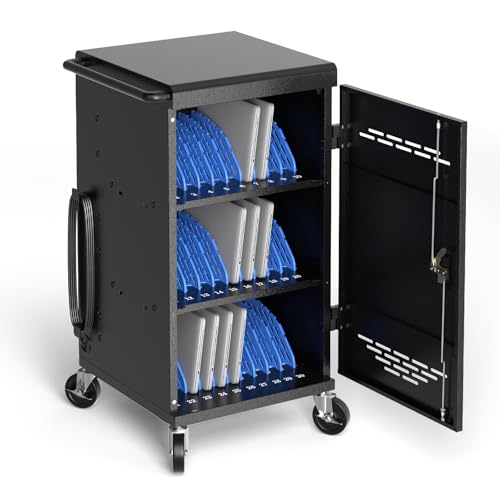
Explicitly names Chromebook, iPad, and 14-inch laptop compatibility directly in the listing, rated for devices up to 1.5 inches thick, the clearest mixed-fleet match in this comparison. Front and rear locks each ship with 2 keys, and both doors are fully removable for complete wire-management access, not just openable.
A detachable zig-zag cable frame handles the 30-cord tangle problem, and numbered bays speed up daily identification. A thin review base for the capacity commitment, worth confirming current slot geometry against your specific device thicknesses.
Numbered bays and dual-key locks for daily management. That's a real strength, but weigh it against the flip side: thin review base for a 30-device commitment.
Best for: Classrooms with a genuinely mixed Chromebook and laptop fleet wanting the clearest compatibility claim.
Check price on AmazonPros
- +Most explicit mixed-fleet claim in this comparison
- +Numbered bays and dual-key locks for daily management
Cons
- −Thin review base for a 30-device commitment
POCHAR 20 Device Laptop Charging Cart for iPads Chromebooks, Tablet Charging Station
About this pick
Heavy-duty steel construction with fully enclosed locking front and rear doors (keys included) protects electronics, and a chain hook at the bottom lets you anchor the entire cart in public spaces. A built-in 20-outlet power strip with surge protection pairs with removable dividers and zig-zag cable organizers.
Explicitly names iPad and Chromebook compatibility at this smaller 20-device scale, with flow-through ventilation on all sides. A reasonable middle-capacity choice for classrooms not needing the full 30-device scale.
Chain hook anchor point secures the cart itself, not just devices. On the other hand, higher price than the 30-device POCHAR mixed-fleet pick despite lower capacity. Both are worth keeping in mind before deciding.
Best for: Classrooms needing 20-device mixed Chromebook/iPad capacity rather than 30.
Check price on AmazonPros
- +Explicit mixed-fleet claim at a smaller capacity tier
- +Chain hook anchor point secures the cart itself, not just devices
Cons
- −Higher price than the 30-device POCHAR mixed-fleet pick despite lower capacity
POCHAR 30 Devices 14'' Screen Laptop Charging Cart for K-12 Classrooms
About this pick
The open-back design here allows superior airflow across 30 devices and prevents bulky cables from blocking the rear door, a detail that matters when a mixed Chromebook fleet is charging overnight. A built-in circuit breaker plus grounding protection covers unsupervised charging, and it ships flat-packed for compact delivery.
Doesn't name Chromebook specifically in the title, but the 14-inch screen limit and K-12 orientation strongly suggest Chromebook-scale compatibility. Two of four casters lock for stability once positioned.
A genuine advantage here is that open-back design specifically prevents overheating and cable blocking. The tradeoff is that doesn't explicitly name Chromebook compatibility in the listing.
Best for: K-12 schools standardizing on Chromebook-scale devices without a strictly mixed fleet.
Check price on AmazonPros
- +K-12 focus and 14-inch limit suggest strong Chromebook-scale fit
- +Open-back design specifically prevents overheating and cable blocking
Cons
- −Doesn't explicitly name Chromebook compatibility in the listing
Meteteel Fully Assembled 20 Device Laptop Charging Cart for School (Black)
About this pick
Ships 95% assembled with independently locking front and back doors and a ventilated American-style steel frame, though the listing doesn't explicitly name Chromebook and laptop compatibility together the way the POCHAR picks do. At 78 reviews, it has the deepest track record of any cart in this comparison.
A proven general-purpose cart worth considering if you don't specifically need explicit mixed-fleet documentation, just reliable 20-device charging.
95% pre-assembled, minimal setup delay. That said, no explicit mixed Chromebook/laptop claim in the listing. Neither should be a surprise once you know to look for it.
Best for: Buyers wanting the most proven general cart without requiring explicit mixed-fleet documentation.
Check price on AmazonPros
- +Largest confirmed review base in this comparison at 78 reviews
- +95% pre-assembled, minimal setup delay
Cons
- −No explicit mixed Chromebook/laptop claim in the listing
Meteteel Fully Assembled 20 Device Laptop Charging Cart for School (Gray)
About this pick
Same 95%-assembled build, same independently locking doors, same ventilated steel frame as the black Meteteel pick, in gray, and the same lack of explicit Chromebook/laptop naming in the listing. A color alternative at the same proven 78-review quality level.
Best for: Buyers preferring gray over black at the same proven general-cart quality.
Check price on AmazonPros
- +Identical proven review base to the black version
Cons
- −No explicit mixed Chromebook/laptop claim in the listing
Pearington 20 Device Mobile Charging and Storage Cart for iPads, Chromebooks
About this pick
18 padded bays plus an extra shelf reach 20-device capacity, explicitly naming Chromebook compatibility alongside iPads, with slots rated for screens up to 17 inches. Padded bays deter damage, ventilated panels prevent overheating, and a key locking system on both doors plus 2 locking casters add security.
A lower price than the Meteteel picks with a solid 60-review base, a strong value option for a mixed iPad/Chromebook fleet, though laptop compatibility specifically isn't named.
Worth calling out specifically: lower price than the Meteteel picks with a strong 60-review base. The catch is doesn't explicitly name broader laptop compatibility beyond Chromebook.
Best for: Budget-conscious buyers with an iPad/Chromebook fleet who don't need broader laptop support.
Check price on AmazonPros
- +Explicit Chromebook naming with widest screen support (up to 17") here
- +Lower price than the Meteteel picks with a strong 60-review base
Cons
- −Doesn't explicitly name broader laptop compatibility beyond Chromebook
Pearington 30 Device Mobile Charging/Storage Cart for iPads, Tablets, Laptop
About this pick
This actually charges 32 devices across 30 padded bays plus 2 bonus outlets, while securely locking 30 at a time, explicitly naming iPad, tablet, and laptop compatibility though not Chromebook specifically by name. Slots run 11.4H x 1.5W inches with cable management slots in the dividers.
Full assembly is required, but front and back doors both open completely for full access. The highest rating among the 30-device options here, at the highest price in this comparison.
32 simultaneous charging outlets while only 30 occupy locked storage. Set against that, doesn't specifically name Chromebook, though laptop compatibility is explicit. Both matter when comparing it to the other picks here.
Best for: Fleets with iPads, tablets, and laptops where Chromebook specifically isn't the primary device.
Check price on AmazonPros
- +Highest rating among 30-device picks in this comparison
- +32 simultaneous charging outlets while only 30 occupy locked storage
Cons
- −Doesn't specifically name Chromebook, though laptop compatibility is explicit
- −Highest price in this comparison
Plugsharge 32-Device Laptop Charging Cart for Chromebooks, iPad & Tablets
About this pick
Explicitly names Chromebook, iPad, and tablet compatibility at the highest confirmed capacity in this comparison, up to 15.6-inch screens, with integrated power strips carrying both surge and ground fault protection. Zig-zag cable routing plus 32 individual cable organizers keep cords manageable at this scale.
An open rack design allows quick visibility during device distribution, with numbered slots for daily organization. A very thin review base of just 3, so treat the perfect rating as an early signal rather than a settled track record.
The standout detail is that open rack design and numbered slots ease large-fleet distribution. Balancing that out, very thin review base of only 3 reviews.
Best for: Larger mixed Chromebook/iPad/tablet fleets wanting maximum confirmed capacity.
Check price on AmazonPros
- +Highest capacity with explicit Chromebook naming
- +Open rack design and numbered slots ease large-fleet distribution
Cons
- −Very thin review base of only 3 reviews
How We Evaluated These Chromebook and Laptop Charging Carts
Each pick was assessed across 4 criteria weighted for real-world use.
Explicit mixed-fleet naming distinguished from general-purpose carts
We separated listings that specifically name Chromebook and laptop (or Chromebook and iPad/tablet) compatibility from general-purpose carts that don't make that claim, rather than assuming every classroom cart handles a mixed fleet equally well.
14-inch screen limits treated as an implicit Chromebook-fit signal
K-12-oriented carts with a 14-inch screen cap strongly suggest Chromebook-scale compatibility even without explicit naming, which we noted as a secondary signal, not a confirmed claim.
Capacity and price compared within the mixed-fleet-confirmed group
Among carts that do explicitly confirm mixed-device compatibility, we compared 20- to 32-device capacity against price to find the best value at each scale.
Review base weighted against explicit-claim confidence
A cart with an explicit mixed-fleet claim but only 3-11 reviews still carries real evaluation risk, which we flagged directly rather than treating the claim itself as sufficient proof.
How to Choose the Right Chromebook and Laptop Charging Carts
By Device Capacity
| Your priority | Recommended pick |
|---|---|
| Around 32-device capacity | Plugsharge 32 |
| Around 30-device capacity | POCHAR 30 Unit Device Charging Station for Chromebook |
| Around 30-device capacity | POCHAR 30 Devices 14'' Screen Laptop Charging Cart for K |
By Budget
| Budget | Recommended pick |
|---|---|
| Under $300 | POCHAR 30 Unit Device Charging Station for Chromebook |
| Up to $460 | Pearington 30 Device Mobile Charging/Storage Cart for iPads |
Lockable Security vs Open Access
Genuine locking door
Real security for devices stored unattended in a semi-public space. In this comparison: POCHAR 30 Unit Device Charging Station for Chromebook, POCHAR 20 Device Laptop Charging Cart for iPads Chromebooks, POCHAR 30 Devices 14'' Screen Laptop Charging Cart for K, Meteteel Fully Assembled 20 Device Laptop Charging Cart for School, Meteteel Fully Assembled 20 Device Laptop Charging Cart for School, Pearington 20 Device Mobile Charging and Storage Cart for iPads, Pearington 30 Device Mobile Charging/Storage Cart for iPads.
Open access
Faster to grab devices from, fine for a supervised or private space. In this comparison: Plugsharge 32.
Default to a locking cart unless the space is always supervised or private.
By Locking Security
| Your priority | Recommended pick |
|---|---|
| Genuine locking door for unattended storage | POCHAR 30 Unit Device Charging Station for Chromebook |
For a School or Classroom Fleet Specifically
Look for
Confirmed bay geometry for your actual laptop model, zoned or timed charging for larger fleets, and a genuine locking door for unattended storage.
In this comparison
Meteteel Fully Assembled 20 Device Laptop Charging Cart for School is worth checking against its listed capacity and charging architecture before buying, given its strong review base.
When to Spend More
Spend more if
You're managing a larger fleet needing safe zoned charging and genuine security, where Pearington 30 Device Mobile Charging/Storage Cart for iPads's higher price buys real capacity and reliability headroom over the cheaper picks.
Save if
You're storing a small number of devices with simple charging needs, where POCHAR 30 Unit Device Charging Station for Chromebook covers the same job at a lower price.
Frequently Asked Questions
Which cart most explicitly confirms Chromebook and laptop compatibility?
The POCHAR 30 Unit Device Charging Station, which names Chromebook, iPad, and 14-inch laptop compatibility directly.
Is there a smaller option for a 20-device Chromebook/iPad classroom?
Yes, the POCHAR 20 Device Laptop Charging Cart explicitly names iPad and Chromebook compatibility.
What's the highest-capacity mixed-fleet option?
The Plugsharge 32-Device Laptop Charging Cart, explicitly naming Chromebook, iPad, and tablet compatibility.
Do the Meteteel carts specifically confirm Chromebook compatibility?
No, the listings don't explicitly name Chromebook and laptop together, though they're the most reviewed general-purpose carts in this comparison.
What's the best value option for an iPad/Chromebook fleet?
The Pearington 20 Device Mobile Charging and Storage Cart, which explicitly names Chromebook compatibility at a lower price than the Meteteel picks.
Bottom Line
best overall: POCHAR 30 Unit Device Charging Station for Chromebook, iPad, 14'' Laptop - best explicit mixed-fleet match pick in this roundup.
See the full rankings above for all picks with pros, cons, and best-for summaries.
Browse on Amazon
All Prime-eligible options with current pricing.
Shop on Amazon →