
7 Best 75-Inch Interactive Whiteboards
75 inches is one of the deepest current size tiers across nearly every major interactive-display vendor. We required exact current SKUs.

New to Amazon Prime?
Get fast, free shipping on every pick in this guide, plus Prime Video and exclusive deals.
Try Prime Free



At a Glance
75 inches is genuinely one of the deepest current product tiers in this entire category, represented across nearly every major brand from NEWORK to Vibe to JAV, giving buyers real choice at this size.
We required an exact current 75-inch SKU for every pick, published room-depth guidance suited to this mid-large size, and compared weight and VESA requirements since 75-inch panels sit at a meaningful jump in installation demand versus 55/65-inch models.
6 Criteria to Look For Before Buying a 75-Inch Interactive Whiteboard
Key buying criteria so you get the right fit the first time.
Separate flat panels, projectors, and portable systems
An interactive whiteboard can mean an all-in-one 4K flat panel, a projector paired with a sensor, or a portable conversion bar that turns any surface interactive. These solve different problems at very different price points, know which category you actually need before comparing specs.
Touch-point count is not simultaneous writing capacity
A board advertising 20-point touch does not mean 20 people can write clean, independent lines at once, some of those points cover palm rejection and gesture recognition. Check the manufacturer's stated simultaneous-writer number specifically, not just the raw touch-point spec.
EDLA certification means something specific
Google EDLA (Enterprise Device Licensing Agreement) certification guarantees stable Google Play Store, Workspace, and Google Education Suite access with regular OTA security updates. A board merely running Android without EDLA certification may lose app-store access or updates over time.
OPS slots need a separately purchased module
Many boards advertise an OPS (Open Pluggable Specification) expansion slot for adding Windows compatibility, but the actual Windows OPS computer module is almost always sold separately and can cost as much as a mid-range laptop. Budget for it if Windows software is a real requirement.
Wireless casting and wireless touch-back are different features
Casting lets a phone or laptop screen display on the board. Touch-back control lets you operate that connected device's cursor directly from the board's touchscreen. Confirm which one a specific product actually supports before assuming both are included.
Mounting weight and wall structure matter as much as specs
A 75-inch or larger panel commonly weighs 80-150+ pounds. Confirm VESA mount compatibility and that your wall studs or mounting surface can support that load safely, professional installation is often worth the cost at this size.
7 Best 75-Inch Interactive Whiteboards
COOLHOOD 75in 4K Smart Board
About this pick
The 75-inch COOLHOOD board shares its 65-inch sibling's octa-core processor, Android 13, 128GB storage, and 20-point multi-touch at 6ms response and plus-or-minus 1mm precision, scaled up for larger rooms.
The same open app ecosystem, QR-code file sharing, and video conferencing integration with Zoom, Meet, Teams, and Webex carry over unchanged, and the stand again ships separately from the included wall mount.
Best for: buyers prioritizing 75in 4k, android 13, 20-point touch
Check price on AmazonPros
- +Same proven feature set as the 65-inch model at larger scale
- +Open app ecosystem with enterprise security
- +QR-code file sharing
Cons
- −Stand sold and shipped separately
- −Android 13 rather than 14
NEWORK NewBoard 75E Google EDLA Board
About this pick
The 75-inch sibling to NEWORK's 65E carries identical Google EDLA certification, Android 14 with 8GB RAM and 64GB storage, and the same 50-point multi-touch supporting 10 simultaneous writers, just scaled to a larger classroom or conference room.
The 178-degree viewing angle and 85% NTSC color gamut keep the larger screen legible from wider seating angles, and wireless casting for up to 16 devices carries over unchanged from the smaller model.
Best for: buyers prioritizing 75in 4k, edla-certified android 14
Check price on AmazonPros
- +Same EDLA certification and touch performance as the 65-inch model
- +178-degree viewing angle suits wider rooms
- +16-device wireless casting
Cons
- −64GB storage modest for the larger deployment context
- −85% NTSC color gamut, not full-gamut
JAV 75in Smart Board Pro
About this pick
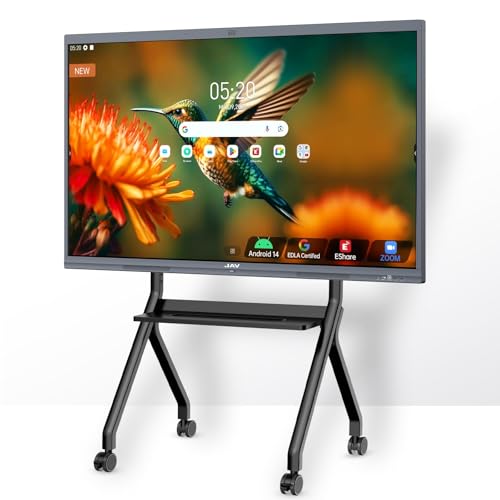
The 75-inch JAV Pro shares its 55/65/86-inch siblings' 48MP AI camera and 100W soundbar, adding NeoVision AI optics at 30FPS gesture tracking and an Arm DynamIQ compute architecture for smoother sustained multi-layer whiteboarding sessions.
Google Drive integration pairs with OCR text extraction and digital ink annotation, and AI-driven auto-framing, speaker tracking, and sound localization enhance remote meetings, with etched AG anti-glare nanocoat cutting screen reflectivity by 52%.
Best for: buyers prioritizing 75in 4k, 48mp ai camera, 100w soundbar
Check price on AmazonPros
- +52% documented reflectivity reduction is a genuine measured spec
- +30FPS gesture tracking for AI-driven interaction
- +AI auto-framing and speaker tracking for remote meetings
Cons
- −Feature-dense marketing language makes some claims hard to independently verify
- −Premium AI hardware reflected in higher price
Shiarffe X5 75in Smart Board
About this pick
The 75-inch Shiarffe X5 shares its 86-inch sibling's industrial-grade reinforced chassis built for daily K-12 use, Google EDLA certification with zero subscription fees, and consistent sizing across the 55/65/75/86-inch range.
4K anti-glare IPS screen with 20-point multi-touch and automatic brightness adjustment carries over, and select models include an integrated camera for hybrid learning, with wall-mount hardware included and mobile carts available separately.
Best for: buyers prioritizing 75in 4k, industrial-grade construction
Check price on AmazonPros
- +Same K-12-durable construction as Shiarffe's other sizes
- +Zero-subscription EDLA licensing
- +Automatic brightness adjustment for varying lighting
Cons
- −Integrated camera only on select models
- −Mobile carts sold separately
75in 4K Dual OS Interactive Smart Whiteboard
About this pick
This 75-inch board runs both Android and Windows in a genuine dual-system design, letting buyers switch between platforms to suit education, business, or entertainment needs without separate hardware, backed by 8GB RAM and 128GB storage.
Multi-screen split display supports up to 4 devices simultaneously for comparing lesson materials or team brainstorming, and smart touch recognition supports over 20 languages with scan-to-save and one-click sharing for a genuinely streamlined workflow.
Best for: buyers prioritizing 75in 4k, dual android + windows os
Check price on AmazonPros
- +Genuine dual Android/Windows OS switching without separate hardware
- +4-device simultaneous split-screen display
- +Wide 20+ language smart touch recognition support
Cons
- −Dual-OS complexity adds a learning curve for new users
- −Windows performance depends on the embedded OPS module specs
Vibe S1 75in All-in-One Smart Board
About this pick
The Vibe S1 75-inch runs VibeOS on Chromium OS with an Arm RK3588 chip, 8GB RAM, and 128GB storage, delivering 20-point infrared touch at under 10ms response time, genuinely fast for a board this size.
250+ apps are accessible through the Vibe App Store spanning Google Workspace to Microsoft 365, and enterprise-level Chromium OS security pairs with fleet management letting IT admins securely manage users and devices across a deployment.
Best for: buyers prioritizing 75in 4k, vibeos on chromium os
Check price on AmazonPros
- +Under-10ms touch response is genuinely fast for this size
- +250+ apps spanning Google Workspace and Microsoft 365
- +Chromium OS enterprise security with fleet management
Cons
- −Chromium OS ecosystem narrower than full Android/Windows app pools
- −128GB storage modest for heavy multimedia use
Samsung 75in WAF Interactive Display
About this pick
Samsung's WAF series runs Android 14 with an easily customizable home screen and genuine EDLA certification, giving stable access to Google Play, YouTube, and other Google services rather than a sideloaded app approach.
An OPS slot transforms the display into a full Windows device when needed, letting IT departments switch between Android's simplicity and Windows software compatibility without buying separate hardware, a real flexibility advantage for mixed-use deployments.
Best for: buyers prioritizing 75in, edla-certified android 14
Check price on AmazonPros
- +OPS slot converts to Windows without separate hardware
- +Genuine EDLA certification for stable Google service access
- +Samsung's broader enterprise support ecosystem
Cons
- −OPS Windows module sold separately
- −Thinner published spec sheet than Samsung's WAD series
How We Evaluated These 75-Inch Interactive Whiteboards
Each pick was assessed across 5 criteria weighted for real-world use.
Product Architecture
Classified each product as a flat-panel display, projector-based interactive system, or portable conversion hardware, since these serve fundamentally different room setups and budgets.
Touch & Writing Behavior
Checked documented touch-point count, simultaneous-writer capacity, response latency, and touch technology (infrared, PCAP, or sensor-bar) rather than assuming higher touch-point numbers always mean a better writing experience.
OS, EDLA & Software Lifecycle
Verified whether each board has genuine Google EDLA certification, which Android or Windows generation it runs, and whether an OPS slot requires a separately purchased module for full functionality.
Connectivity & Collaboration
Tested claims around wireless casting device limits, touch-back control, video conferencing platform compatibility (Zoom, Teams, Meet, Webex), and camera/microphone hardware quality where documented.
Build, Mounting & Support
Weighed panel weight, included wall mount versus separately sold stands, warranty length, and after-sales support commitments against the realistic deployment cost.
How to Choose the Right 75-Inch Interactive Whiteboards
Room Fit at 75 Inches
75-inch boards suit rooms with roughly 15-30 feet of viewing distance, a genuine step up from 55/65-inch models for standard classrooms and larger conference rooms without requiring the professional-installation planning of 86+ inch panels.
Frequently Asked Questions
How much heavier is a 75-inch board than a 65-inch model?
Expect roughly 15-30 pounds heavier depending on the specific model, most 75-inch panels in this comparison weigh in the 80-110 pound range versus 60-90 pounds for comparable 65-inch models. Confirm VESA and wall-load ratings before installation.
Is 75 inches the most popular size for classroom and business interactive whiteboards?
It's among the deepest current product tiers alongside 65 and 86 inches, reflecting genuinely strong demand at this size for standard classrooms and mid-size conference rooms across nearly every major brand in this category.
What does Google EDLA certification actually guarantee?
EDLA (Enterprise Device Licensing Agreement) certification means Google has verified the device for stable, ongoing access to the Google Play Store, Google Workspace, and Google Education Suite, plus regular over-the-air security updates. A board that just runs Android without EDLA certification can lose app-store access or stop receiving updates over time.
Does a higher touch-point count always mean a better writing experience?
Not necessarily. Touch-point count measures how many contact points the sensor can track, but the number of people who can write clean, independent lines simultaneously is usually lower and separately documented by the manufacturer. Check the stated simultaneous-writer number, not just the raw touch-point spec, before assuming a 60-point board beats a 20-point one for group use.
Do I need to buy anything extra to run Windows on a board with an OPS slot?
Yes, in almost every case. An OPS (Open Pluggable Specification) slot is just an expansion bay, the actual Windows computer module that plugs into it is sold separately and can cost as much as a mid-range laptop. Confirm the OPS module price before assuming Windows compatibility is included in the board's sticker price.
Bottom Line
best overall: COOLHOOD 75in 4K Smart Board - best overall 75-inch pick in this roundup.
See the full rankings above for all picks with pros, cons, and best-for summaries.
Browse on Amazon
All Prime-eligible options with current pricing.
Shop on Amazon →